



Streaming platforms make it easy to watch almost anything, but sometimes you just want a movie downloaded on your phone, tablet, or laptop. When you learn how to download movies legally, you avoid shady sites, protect your devices, and support the people who actually make the films you love.
Legal movie downloads come from licensed services that pay studios and rights holders. These platforms let you download movies legally for offline viewing, usually inside their app. You skip risky pop-ups, malware, and copyright notices, and you still get high-quality video and audio.
This guide walks you through the legal ways to download movies, how to choose safe movie download sites, and what to avoid if you want a clean, stress-free experience. The steps work on most modern phones, tablets, and computers, as long as the service supports downloads in your region.
How Legal Movie Downloads Actually Work
Licensed services sign deals with studios and distributors, then offer legal movie downloads through their apps and websites. You either subscribe, rent, or buy a title, then tap a download button to save an encrypted copy for offline playback.
Most legal ways to download movies keep the file locked inside the app, so you cannot freely copy it or share it. That restriction helps services respect copyright while still giving you a flexible offline option when you travel, commute, or lose your connection.
How To Download Movies Legally On Any Device
Every platform looks a little different, but most legal movie streaming and downloads follow the same basic pattern. Start with a trusted service, then work your way down this checklist on your phone, tablet, smart TV, or computer.
Choose A Trusted Legal Movie Service
You need a platform that holds real licenses, not a random website that promises free Hollywood blockbusters in perfect quality. Well-known subscription apps (like Netflix), digital stores, and cable or wireless provider apps usually fall into the safe category.
- Open your app store and search for a major movie or TV app you recognize.
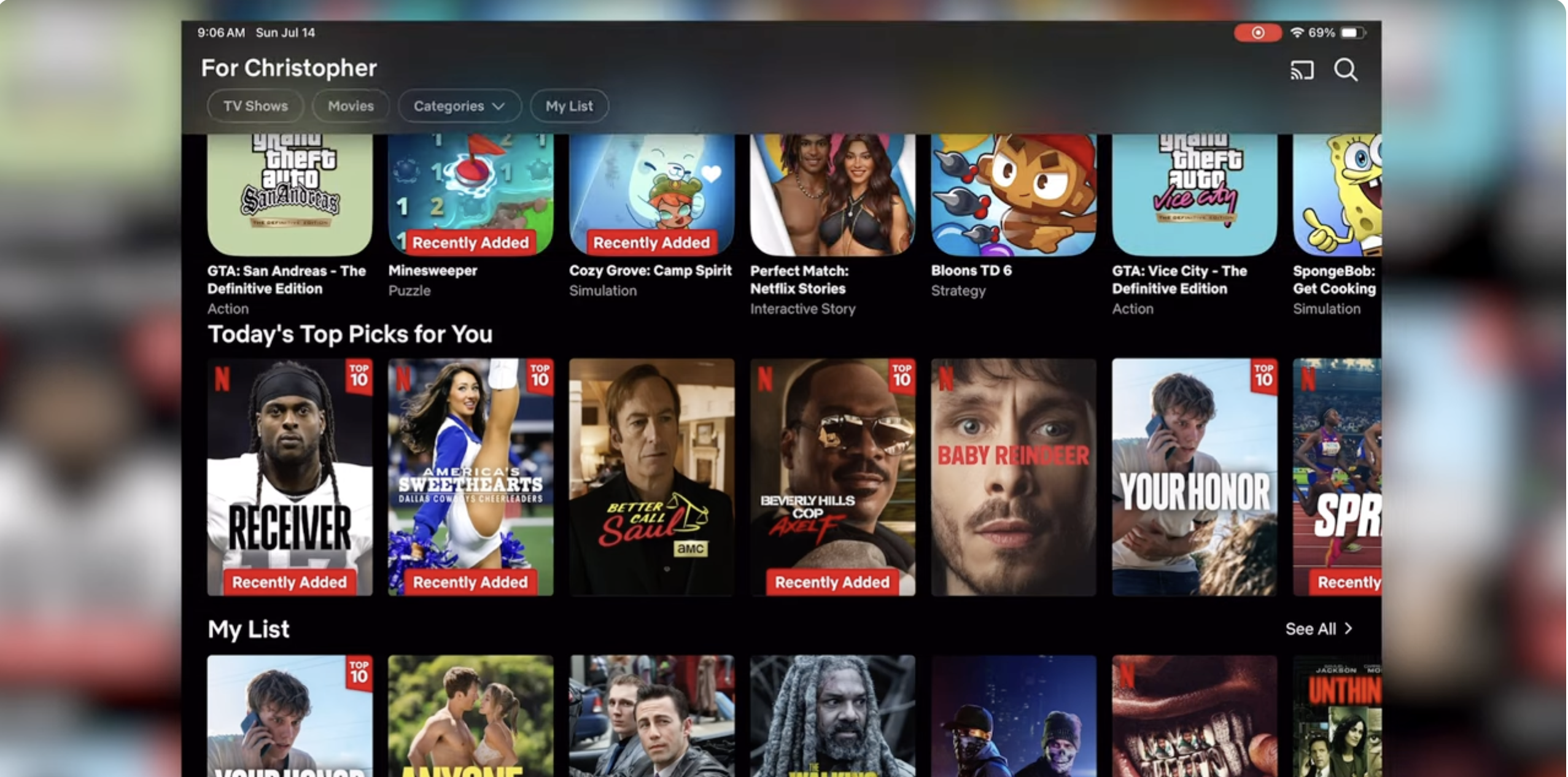
- Check the developer name, star rating, and recent reviews to confirm it looks legitimate.
- Install the app and create an account or sign in with an existing one.
- Review the subscription, rental, or purchase options before you pay for anything.
When you stick with big, mainstream platforms, you give yourself the best chance of truly legal movie downloads and reliable playback, instead of surprise charges or fake files.
Confirm Download Support And Device Limits
Not every service lets you download every title, and some only support certain devices. Before you build a big offline library, double-check that downloads actually work on your phone, tablet, or laptop.
- Open the app menu and look for a section labeled Downloads, Offline, or Library.
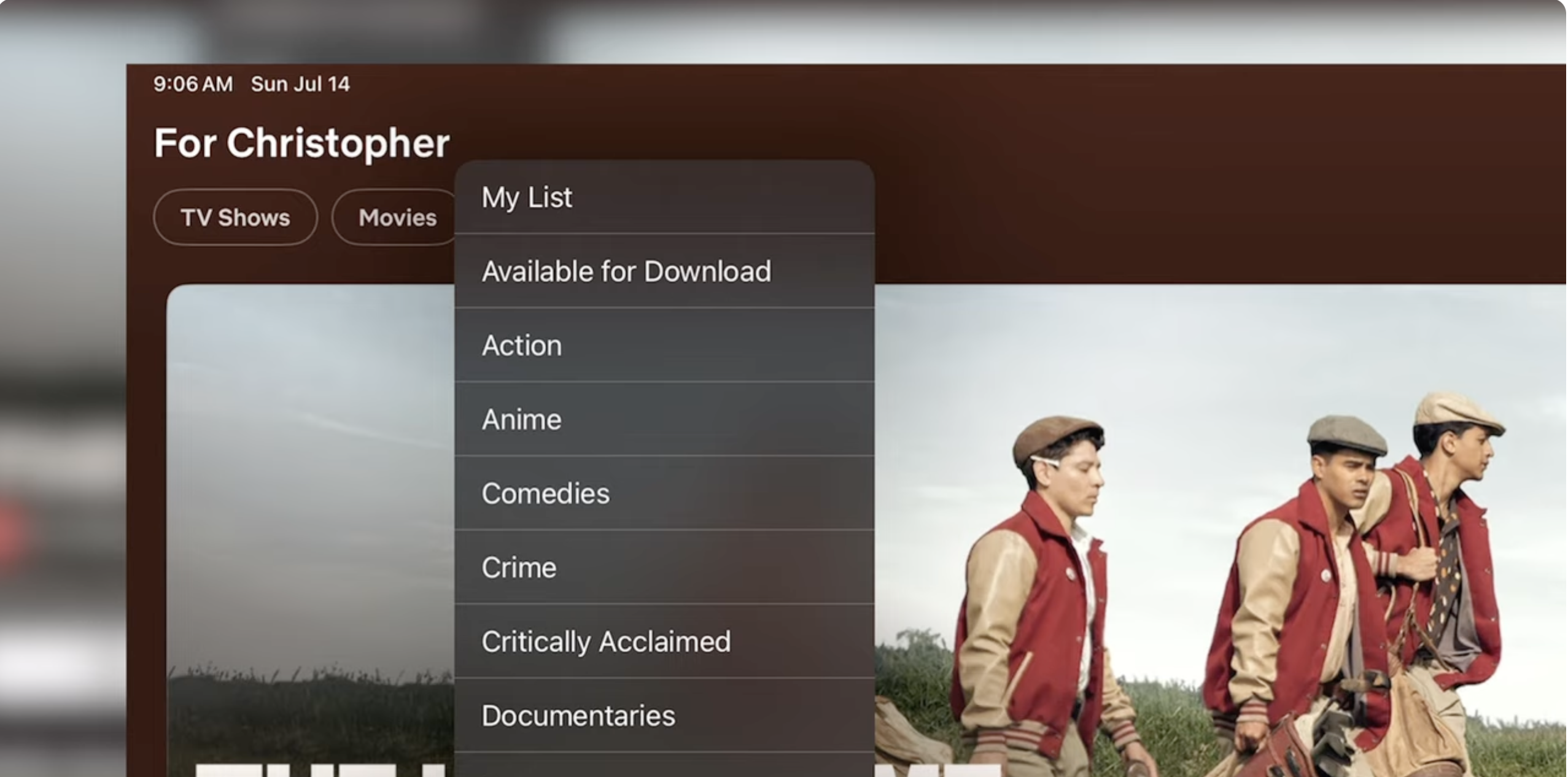
- Check the help or settings area for information about offline viewing, device limits, and expiration rules.
- Make sure your device runs a supported version of Android, iOS, Windows, or another operating system.
- Verify whether downloads work only on mobile or also on your computer’s desktop app.
Once you confirm support, you can confidently download movies legally without guessing whether they will actually play on your current device.
Pick Your Movie And Check The Download Icon
Legal services clearly show which titles support offline viewing. When a movie qualifies, you usually see a download icon near the play button or in the details page.
- Browse the app’s home screen, categories, or search bar to find a movie you want.
- Tap the title to open its details page with the description, cast, and rating.
- Look for a Download button or a down arrow icon under the poster or next to the play option.
- If no download option appears, assume the movie only supports streaming in your region.
Many services rotate their catalogs, so a movie might become available for offline viewing later, even if you only see a stream option today.
Choose Quality And Start A Legal Movie Download
When you tap download, some apps ask you to pick a quality level before they start. Higher quality looks better on larger screens but uses more storage and bandwidth.
- Connect to a reliable Wi-Fi network so you do not burn through mobile data.
- Open Settings or Downloads in the app and choose Standard or High quality.
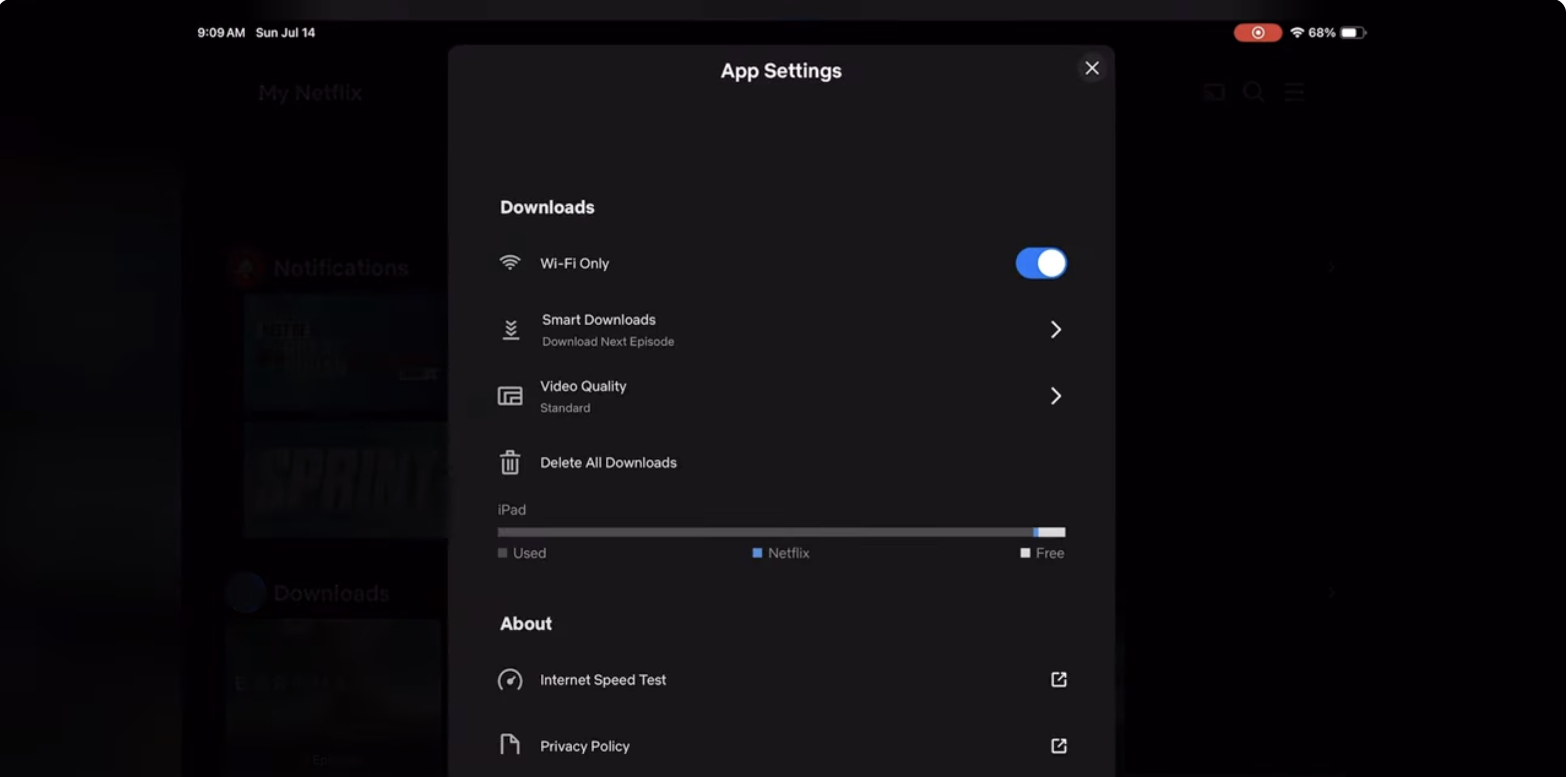
- Return to the movie page and tap the Download icon to begin.
- Keep the app open or running in the background until the progress indicator reaches 100%.
This approach lets you download movies legally while still controlling how much space and data each file consumes on your device.
Find And Play Your Offline Movies
Once a download finishes, the movie sits in a special offline section inside the app. You do not need a separate video player, because the same service handles playback.
- Open the app and tap the Downloads, My Stuff, or Library tab.
- Look for a filter such as Downloaded or Available Offline.
- Select the movie and tap Play to watch without an internet connection.
- When you finish, tap Delete Download if you want to free storage space.
Most platforms allow offline viewing for a limited time and may require a quick reconnect later to renew rights. That renewal keeps the title within legal movie downloads and avoids licensing violations.
Troubleshooting Common Problems
Legal downloads usually work smoothly, but small issues can still interrupt movie night. These quick checks resolve many common problems before you contact support.
- The download button does not appear
Check whether the title only supports streaming in your region or on your current plan. Try a different movie to confirm that downloads work at all. - The movie will not start downloading
Confirm that you have a stable Wi-Fi connection and enough free storage. Close and reopen the app, then tap the download icon again. - The download gets stuck halfway
Pause the download, wait a few seconds, and resume it. If it still hangs, cancel the download, restart your device, and try again on a stronger network. - The movie says it expired
Many services set expiration dates for offline titles. Reconnect to the internet, open the app, and tap Renew or re-download the movie if the service offers that option. - The app says the device limit is reached
Some platforms limit offline downloads to a certain number of phones or tablets. Remove downloads from an older device, then sign out there to free up a slot.
Tips
- Use only official apps and stores when you download movies legally to avoid malware and fake copies.
- Schedule large downloads overnight while your device stays on Wi-Fi and plugged into power.
- Pick standard definition when you watch on a small phone screen to save space and finish downloads faster.
- Download movies before flights, long drives, or vacations so you do not depend on hotel or airplane Wi-Fi.
- Regularly clear old downloads you already watched to keep room for new titles and TV seasons.
- Avoid movie piracy online by ignoring pop-ups and shady links that promise “totally free” new releases.
- Create separate profiles for kids and download age-appropriate movies inside those profiles only.
FAQ
Can I Download Movies Legally For Free?
Some ad-supported apps and promotional offers let you download certain movies at no extra cost. Even in those cases, the app still runs under proper licenses and remains legal, as long as you follow the service’s terms.
Why Can I Stream A Movie But Not Download It?
Licensing deals often separate streaming rights from offline rights. A platform may stream a movie to your home but lack permission to store it on your device, so you only see a play button instead of a download icon.
Are All Torrent Downloads Automatically Illegal?
Some torrents carry open-source or public domain content, but most commercial movies on public torrent sites do not come with proper rights. When you want truly legal movie downloads, you should avoid torrents for mainstream films.
Can I Move Downloaded Movies To A USB Drive?
Most services lock downloaded files inside the app with encryption, so you cannot copy them to a USB drive or external hard disk. You usually need to play the movie directly from the app that provided the download.
Do Legal Download Services Track What I Watch?
Most platforms log viewing data to recommend new titles and manage licenses. You can review privacy settings in the app to limit data sharing, but they still need some information to keep your downloads authorized.
Summary
- Use licensed platforms when you learn how to download movies legally and avoid piracy.
- Confirm that your device and plan support offline viewing before you rely on downloaded titles.
- Look for a clear download icon on each movie page and choose a quality level that fits your storage.
- Manage your offline library inside the app by renewing, deleting, or re-downloading titles as needed.
- Stay away from unverified sites and torrents if you want safe, legal movie downloads with no copyright headaches.
Conclusion
When you understand how to download movies legally, you get the best of both worlds: a reliable offline library and peace of mind. You enjoy your favorite films on planes, subways, and long road trips while still supporting the creators and studios behind them.
Stick with trusted services, avoid suspicious “free” download sites, and use the built-in tools each app offers for quality, storage, and renewals. With a few good habits, you can build a secure offline collection and never scramble for something to watch when your internet connection drops.


Discussion (0)
Be the first to comment.