




Cash App makes sending, receiving, and managing money effortless, but you need to set it up properly to avoid verification issues or account holds. Here’s a clear, updated guide on how to create a new Cash App account - plus how to handle errors and keep your account secure.
Before getting started, prepare the following:
- A valid U.S. phone number or email address
- Debit card or linked bank account
- Your full legal name.
- You’ll also need to be 18 or older to verify your identity.
Once these are ready, proceed to the step-by-step guide below.
Step 1: Download and install the Cash App
Open Google Play or the App Store and search for Cash App. Tap Install or Get, depending on your device to download the latest version. Launch the app once installed to start the setup process.
Step 2: Enter and verify your phone number or email
When prompted, choose whether to register with your phone number or email. Type either in the box, and click Sign up. Cash App will send a six-digit code to confirm your contact method. Make sure it’s active and accessible.
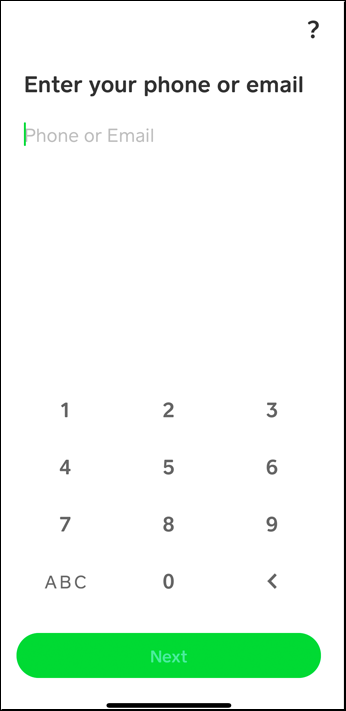
Next, Check your messages or inbox for the verification code. Enter it in the app to continue.

This step is required to activate your account and access Cash App’s full functionality.
Step 3: Add your bank or debit card
Tap Add Bank and enter your debit card details or link a bank account directly. This connection lets you send or withdraw money. Using accurate card information prevents verification delays.
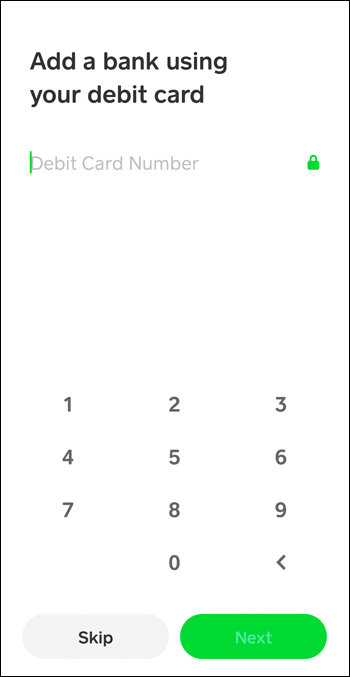
This also helps with ID verification later.
Step 4: Choose your $cashtag
Create your unique $cashtag - a username that makes sending and receiving payments simple. Pick a recognizable name that friends or clients can easily identify. To do this, tap your profile icon and select Edit profile.
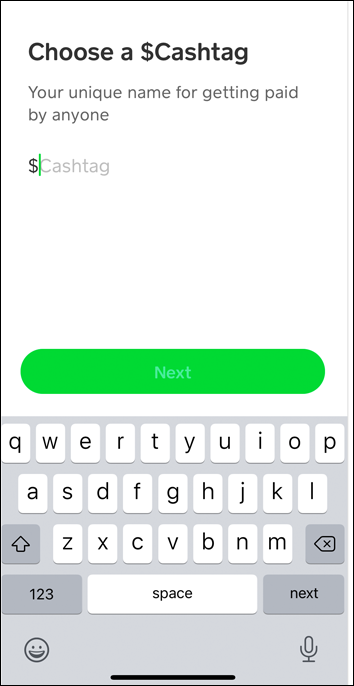
Tap the $cashtag field and enter your unique username. Finally, click the Set button, which only becomes active if the username is available.
Tip: Your $cashtag must inlclude atleast 1 letter and should not be more than twenty characters.
Step 5: Confirm Your Identity (Optional but Recommended)
If you plan to send or receive more than $1,000 in 30 days, verify your identity. You’ll need your full name, date of birth, a photo of yourself and a government-issued ID, and the last four digits of your SSN. You can do this during the set up process or later.
To set this up at a later time, tap the Profile icon > Personal Information or Security & Privacy > Identity verification. From here, follow the onscreen prompts to complete the process.
Step 6: Create a second Cash App account
It’s possible to create a second Cash App account if you have another email or phone number. Each account must link to a separate bank account and unique $cashtag. Avoid reusing personal details to prevent system conflicts or bans.
Also, note that this against the Cash App policy of one person, one account. So, there is always a risk of account restriction.
Troubleshooting verification or setup issues
- Account setup stall: Ensure you’re connected to the internet and that your debit card details are accurate
- Verification code fails to arrive: Reinstall the app and restart your device.
- Login errors: If you can't login to your Cash App account, clear app cache or update to the newest version
Tips for a smooth setup and safety
- Always use accurate personal information during registration.
- Link only one bank account per profile.
- Keep your recovery email active to reset your account easily.
- Download Cash App only from official app stores to avoid fake versions.
- Enable fingerprint or Face ID login
- Keep your device updated
- Never share your verification code or $Cashtag with unknown users
- Report suspicious activity through the in-app support channel
FAQs
Can I create a Cash App account outside the U.S.? No. Cash App is officially available only in the United States and the United Kingdom. Attempts to register from unsupported regions may fail or result in restricted access.
What if I forget my login details? You can recover your account using the phone number or email linked during signup. Select “Forgot Login” on the app’s login screen to receive a reset code.
Can I use Cash App without linking a bank? Yes, but your activity is limited. You can receive funds but cannot transfer them to your bank or make purchases until you link a debit card or account.
Can I create a Cash App account without a phone number? You can sign up with an email address if you prefer not to use a phone. However, some features like instant transfers or verification might remain unavailable until you add a valid phone number later.
Can I create a second Cash App account? Yes, you can. Just make sure you use a different email address and phone number. Also link different accounts and know that you won't be able to verify your identity.
Summary
- Download and install Cash App from an official store.
- Register with your phone number or email and verify the code.
- Add your debit card or link a bank account.
- Choose a unique $Cashtag and confirm your identity.
- Enable biometric login for better security.
Conclusion
Setting up a new Cash App account only takes a few minutes when you follow the right steps. Once verified, you can instantly send or receive payments and enjoy a secure, reliable way to manage money digitally. Keep your details accurate and your app updated to avoid issues later.



Discussion (0)
Be the first to comment.