




Cash App is an excellent app that helps you completely manage your finances, and as such, utmost caution must be exercised when logging into it on your browser. In this guide, we will show you how to securely access this app from a computer or tablet in a few easy steps.
Before you start
- Ensure you have a cash app account
- Verify your email or phone number
- Get a secured and reliable browser
- Ensure you internet connection is stable
Step 1: Open the Cash App website

Navigate to the official Cash App website. It’s crucial to visit the legitimate Cash App site to avoid phishing scams. Ensure the web address starts with https:// for added security.
Step 2: Enter your phone number or email

Once you’re on the website, you’ll be prompted to enter the phone number or email linked to your Cash App account. Double-check your entry for accuracy before proceeding.
Step 3: Enter the verification code
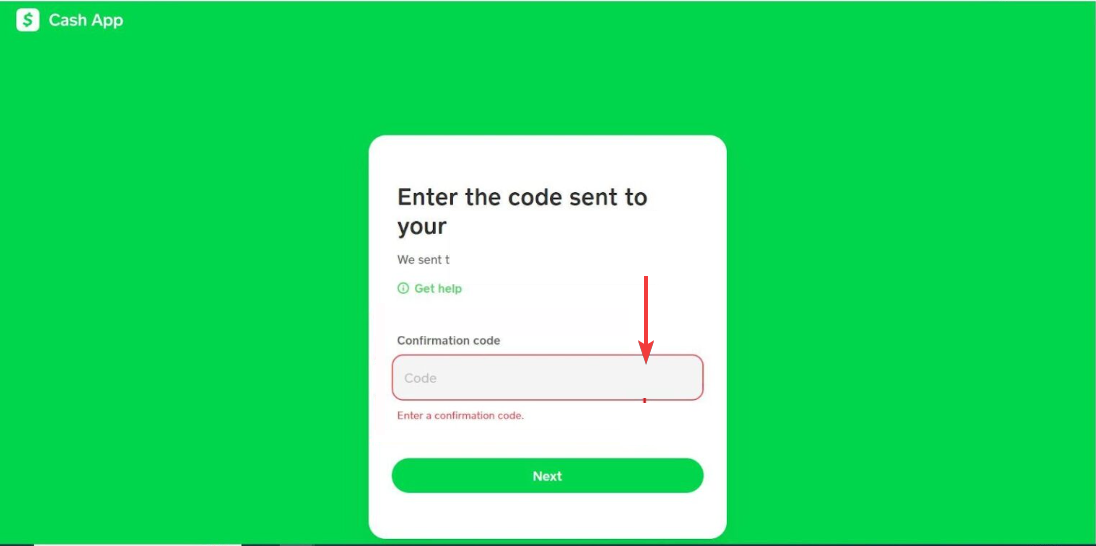
After submitting your email or phone number, you’ll receive a verification code. Enter this code to authenticate your login. This step is essential for account security.
Step 4: Access Your Account
Once the verification code is entered, you’ll be logged into your Cash App account. From here, you can manage your balance, transfer money, and access other features.
Troubleshooting Cash App Login Issues
- Incorrect Login Credentials: Double-check the email or phone number you entered. Ensure there are no typos. If you’ve forgotten your password, click on the "Forgot Password" link to reset it.
- Verification Code Not Received: Ensure your phone or email is receiving messages. Check your spam folder and confirm that you entered the correct contact details. If the code still doesn’t come through, request a new one.
- Browser Compatibility Issues: Cash App supports most major browsers, including Chrome, Firefox, and Safari. If you’re facing issues, try updating your browser to the latest version or switching to a different one.
- Cache and Cookies Problems: Clear your browser’s cache and cookies to fix any stored data that might be causing issues. Once cleared, restart the browser and try logging in again.
- Two-Factor Authentication Problems: If you’ve enabled two-factor authentication, ensure you enter the correct code sent to your device. If you’re having trouble with 2FA, verify your device’s time settings, as a mismatch can cause issues.
- Account Locked or Suspended: If Cash App detects suspicious activity or violations of their terms, your account may be temporarily locked. In this case, contact Cash App support for assistance in resolving the issue.
By following these troubleshooting steps, you can resolve most login issues and get back to using Cash App quickly. If the issue persists, don’t hesitate to reach out to Cash App’s customer support.
Tips to Keep Your Cash App Account Safe
Keeping your Cash App account secure is just as important as knowing how to log in. Follow these simple tips to protect your personal and financial information.
- Turn on 2FA for your Cash App account to add an extra layer of security every time you log in.
- Create a unique password with a mix of letters, numbers, and symbols. Avoid using the same password across multiple accounts.
- Never access Cash App from public Wi-Fi networks, as they are more vulnerable to hacking and data theft.
- Always make sure the URL starts with “https://cash.app” before entering your credentials to prevent phishing attacks.
- If you log in from a shared computer, always sign out when done to prevent unauthorized access.
- Keep your web browser up to date to ensure you have the latest security protections and patches.
- Cash App will never ask for your password or verification code through email or text. Report any suspicious messages immediately.
Following these safety practices helps ensure your Cash App account stays protected from unauthorized access and online scams.
FAQs
Can I log into Cash App on any browser? Yes, Cash App works with most major browsers like Chrome, Firefox, Safari, and Edge. Just make sure the browser is known to be secure.
What should I do if I don’t receive the verification code? Check your network and contact information. If it still doesn’t come through, try requesting the code again or contact support.
Can I use multiple devices to log into Cash App? Yes, but always log out from devices you no longer use for security.
Summary
- Open the official Cash App website.
- Enter your email or phone number.
- Enter the verification code sent to you.
- Access your account.
Conclusion
Logging into Cash App on a browser is a straightforward process that can be completed in just a few steps. By following the instructions outlined here, you can manage your account securely and efficiently. Remember to take precautions to protect your account, like enabling two-factor authentication and avoiding public Wi-Fi networks.


Discussion (0)
Be the first to comment.