




Wondering how to change video quality on HBO Max because your shows look blurry or keep buffering? You are not alone. Max (still called HBO Max in many guides and app stores) uses adaptive streaming, which means the app automatically adjusts video quality based on your connection, device, and plan.
Unlike Netflix or YouTube, HBO Max does not give you a simple “360p / 720p / 1080p / 4K” slider for streaming. At the time of writing, you can only influence HBO Max video quality indirectly through your network, device settings, subscription tier, and a few browser tools on desktop.
This guide explains what you can and cannot change, then walks you through practical ways to sharpen the picture and reduce buffering on phones, browsers, smart TVs, and streaming devices.
Can You Manually Change Video Quality On HBO Max?
Short answer: you cannot manually set a resolution for streaming inside the official HBO Max or Max apps. There is no built-in control that lets you pick 720p, 1080p, or 4K for live playback.
Instead, HBO Max adjusts quality automatically based on:
- Your current internet speed and stability
- Your device type and screen resolution
- The title’s maximum quality (not every movie supports HBO Max 4K)
- Your subscription tier in regions where Max offers different plans
You can still control download quality for offline viewing, improve your network and device setup, and, on desktop browsers, use an extension to force a higher HBO Max resolution. The sections below cover each option step by step.
How To Improve HBO Max Video Quality On Mobile
On iOS and Android, the app controls streaming quality automatically, but you can tweak a few settings to get a better picture and fewer drops in quality.
Check Network And App Settings
- Connect to a strong Wi-Fi network instead of mobile data whenever possible, especially for HD or 4K titles.
- Move closer to your router, or switch to the 5 GHz band if your router supports both 2.4 GHz and 5 GHz.
- Close other apps that download, stream, or update in the background to free up bandwidth.
- Open the HBO Max or Max app, go to your profile or settings section, and look for options related to “Video,” “Streaming,” or “Data Saver.”
- Turn off any “Data Saver” or “Stream Over Wi-Fi Only” mode that forces lower quality.
- Restart the app after you change settings to refresh your session.
Set Download Quality For Offline Viewing
This does not change live streaming quality, but it does control how sharp your offline downloads look.
- Open the HBO Max or Max app and sign in.
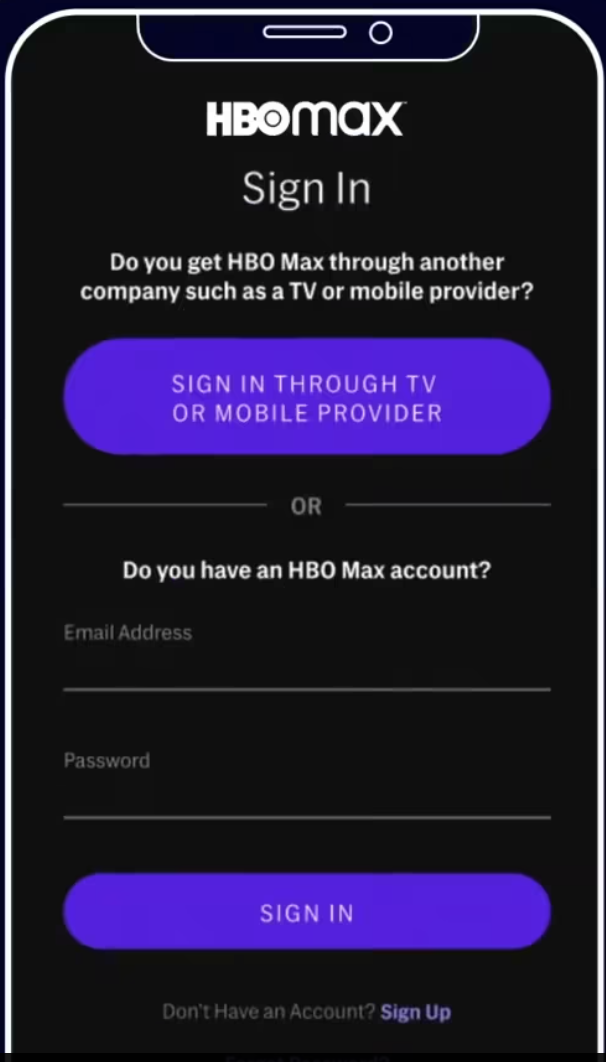
- Tap your profile icon and open the app’s settings menu.
- Look for a “Downloads” or “Download Quality” option.
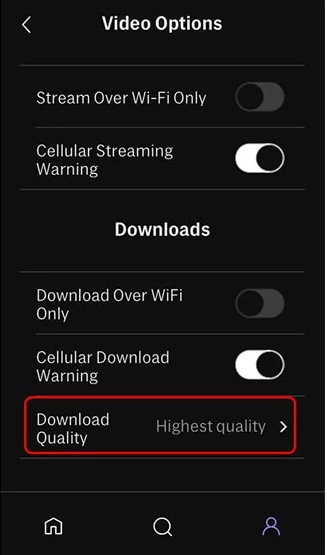
- Select a higher setting such as “Highest Quality” if you have enough storage and data.
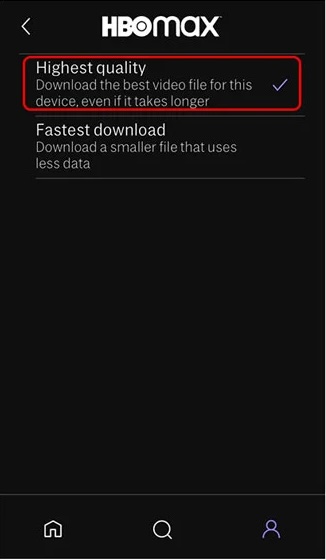
- Download your movie or show again so the app applies the new quality setting.
If your goal is the best possible picture on the go, download in the highest quality over Wi-Fi and watch offline instead of streaming.
How To Change Video Quality On HBO Max In A Browser
On desktop, you can influence streaming quality in two ways: improve your connection so the adaptive stream picks a higher bitrate, or use a browser extension that lets you override the default HBO Max streaming quality.
Improve Connection And Browser Performance
- Connect your computer to the router with an Ethernet cable if possible.
- Close other streaming sites, large downloads, cloud backups, and game launchers that use bandwidth.
- Update your browser to the latest version and restart it before streaming.
- Try a different browser if videos look consistently blurry in one (for example, switch from an old version of Edge to Chrome or Firefox).
- Disable unnecessary browser extensions that interfere with video playback or inject overlays.
Force Higher HBO Max Resolution With An Extension
Some Chrome-based extensions let you pick a target resolution for HBO Max video quality on desktop. They do not work on every title or in every region, but they can help when the stream refuses to leave “potato” mode even on a fast connection.
- Open a Chromium browser such as Google Chrome, Microsoft Edge, or Brave.
- Go to the Chrome Web Store and search for an HBO Max quality extension (for example, one that mentions “HQ” or “video quality” for Max in the description).
- Install the extension and grant only the permissions it needs for the HBO Max site.
- Open the HBO Max or Max website, sign in, and start playing a movie or show.
- Click the extension icon near your address bar and choose a preferred resolution such as 1080p or 4K, if available.
- Reload the stream if the extension instructs you to do so and check whether the image looks sharper.
Keep in mind that HBO Max still relies on adaptive streaming. If your connection cannot sustain the chosen resolution, the app may drop quality or buffer more often.
How To Improve Video Quality On HBO Max On Smart TVs
On Roku, Fire TV, Apple TV, and smart TVs from brands like Samsung or LG, you cannot pick a resolution manually, but you can tune your setup so HBO Max chooses a better stream.
- Connect your TV or streaming stick via Ethernet instead of Wi-Fi when possible.
- Move your router closer to the TV or add a mesh node nearby if you must use Wi-Fi.
- Open the HBO Max or Max app and sign out and back in to refresh your session.
- Check your TV’s network settings and make sure it connects to the faster 5 GHz Wi-Fi band.
- Update your TV firmware and update the HBO Max app to the latest version from your device’s app store.
- Close or force-quit other streaming apps that run in the background on your TV.
- Restart the TV or streaming device and your router if the picture still looks soft or keeps downgrading.
If your plan and device support HBO Max 4K UHD and HDR, you also need a 4K TV and a fast, stable connection. Many providers recommend at least 25 Mbps per stream for consistent 4K playback.
Why HBO Max Keeps Lowering Video Quality
HBO Max uses adaptive streaming, so the app constantly monitors your connection and adjusts bitrate up or down. You may see quality drops when:
- Other people in your home start streaming, gaming, or downloading large files.
- Your Wi-Fi signal weakens because you move farther from the router or hit interference.
- Your internet plan throttles streaming traffic during peak hours.
- You watch on older hardware that struggles with higher resolutions.
- The title itself only streams in HD and does not offer a 4K version.
Because you cannot directly change quality on HBO Max, your best strategy is to stabilize your connection, free up bandwidth, and use compatible devices and plans so the service can automatically select a higher stream.
Troubleshooting HBO Max Video Quality Issues
If the show still looks soft, pixelated, or keeps buffering, run through these quick checks before you give up on the app.
- Test your internet speed using a trusted speed test while nothing else streams in your home.
- Reboot your modem and router to clear temporary glitches and refresh your connection.
- Update the HBO Max or Max app on every device and install pending system updates.
- Clear the app cache on mobile and streaming devices if your system offers that option.
- Try a different device on the same network to see if the issue stays with HBO Max or a specific device.
- Log out of HBO Max on all devices, then sign in again on the one you want to use.
- Contact your internet provider if speed tests show much lower bandwidth than your plan promises.
- Reach out to HBO Max support if only this app delivers poor quality while other services look fine.
FAQ About Changing Video Quality On HBO Max
Can I Choose 720p Or 1080p Manually On HBO Max?
No. The official apps do not include a manual resolution picker. You can only influence quality through your connection, device, and subscription, or by using a browser extension on desktop that forces higher HBO Max video quality.
Why Does HBO Max Look Blurry On My TV?
Most of the time, a weak or unstable connection causes HBO Max to drop to a lower bitrate. Check your network, switch to wired Ethernet if you can, close other heavy apps, and update your TV and app before you watch again.
How Do I Get 4K HDR On HBO Max?
You need a title that supports 4K, a compatible device and TV, a strong internet connection, and a plan that unlocks 4K where Max offers multiple tiers. If one piece of that chain fails, HBO Max falls back to HD.
Does Changing Download Quality Affect Streaming?
No. Download quality only changes how your offline downloads look. Live streams still use adaptive quality, so you must improve your connection or device setup to change quality on HBO Max while you watch online.
Final Thoughts
Even though you cannot directly pick a resolution, you still have a lot of control over video quality on HBO Max. When you stabilize your network, keep your apps and devices current, and, on desktop, use the right tools, HBO Max usually rewards you with a sharper, more stable stream.
Treat Max like any other demanding streaming service: give it bandwidth, compatible hardware, and a clean connection, and you will spend more time watching and less time squinting at a blurry screen.


Discussion (1)
This article is not accurate. HBO Max delivers poor picture quality, so there’s nothing you can do to make the picture sharper. I’ve read threads on various forums that are more than three years old, and even back then, people were already complaining about the poor picture quality on HBO Max. Therefore, it’s clear that HBO Max has no intention of bringing the quality up to an acceptable standard. The only thing you can do is cancel your HBO Max subscription to show that you won’t accept their subpar quality and their unwillingness to improve it.