




Trying to sign in to Cash App without your phone number or email can feel impossible, but the app offers several fallback identity checks that still let you regain access. This includes your device’s app history, linked debit card, and SSN details.
In this guide, we will show the verified paths you can take when you lose both login credentials.
1) Check if your old device still has access
If your previous phone still has Cash App installed and unlocked, you may be able to access the account instantly. This avoids verification steps and works even when old login credentials are no longer valid.
Open Cash App and check if your home screen loads without requiring a login. If it does, update your phone number and email in Settings so you do not lose access again.
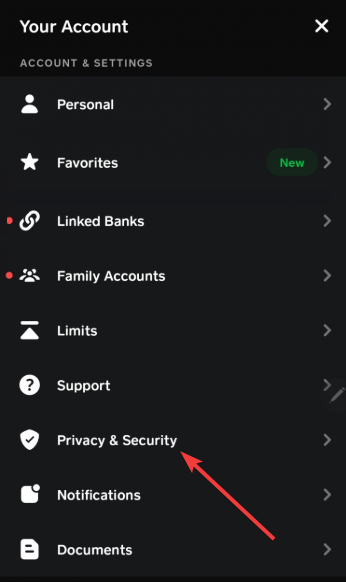
2) Try signing in with your $Cashtag
Click the Profile icon on the Cash app page and select Sign out. Next, click the question mark (?) in the top right corner and select I need help signing in. Now, choose the $Cashtag option, and you will be asked if you have access to your phone number, showing the last four digits of the number in case you have forgotten it.
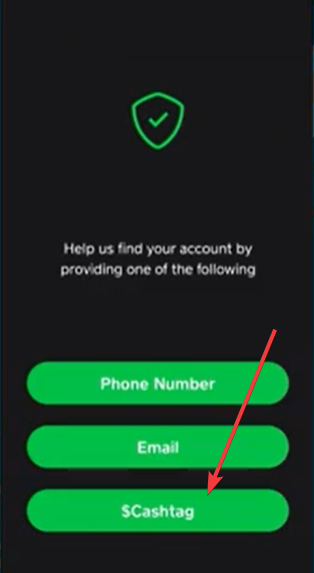
If you don't have access to the number, you will get a pop-up saying your details cannot be verified. Your only option here is to click the Create new account button to create a new Cash App account and use it to contact support.

3) Contact Cash App Support when no verification method works
Support can unlock accounts that automated tools cannot verify. A detailed request gives you the best chance of approval.
You need to go to the support page on the app or the official website and select Login & Security. Next, choose Access old account or can't access email/phone and submit a recovery request.
The team should get back to you and might ask you to provide your full name, SSN last four digits, your Cash Card last four digits, your linked bank’s last four digits, and any known emails or phone numbers. These and other details help support verifying your identity manually.
4) How long does Cash App account recovery take
Most automated checks are complete within 24 to 48 hours. Manual verification and support-assisted recovery may take three to seven days, depending on review volume.
5) Troubleshooting common errors during Cash App recovery
- Account not found: This usually happens when bank or card digits do not match old records. Try other cards or accounts you used with Cash App in the past.
- We couldn’t verify your identity: Retake photos of your ID or ensure your details match your original Cash App profile. Small mismatches can trigger verification failures.
- This SSN is already in use: This error appears when your identity matches an existing Cash App account, but login details differ. Support can merge accounts after confirming ownership.
Tips to avoid losing access to Cash App in the future
- Add multiple emails
- Add a backup phone number
- Enable your Cash App ID verification
FAQs
Can I recover Cash App without access to my old number? Yes. Cash App can match your account using your debit card, bank information, your SSN's last four digits, or government ID.
Can Cash App find my account with only my name? No. You must provide additional information, such as your SSN's last four digits or your Cash Card number, to confirm identity.
Does Cash App allow account recovery if my ID and card details no longer match? Support may still help if you provide enough information to prove ownership, but mismatched data increases verification time.
Summary
- Check whether your old device still has Cash App access.
- Try debit card or bank details to match your account.
- Complete identity verification if automated matching fails.
- Create a new login to trigger account merging.
- Contact Support with strong identity information.
Recovering your Cash App account without your phone number or email takes patience, but you can still regain access through bank details, card digits, identity checks, or manual support. Following each method in order gives you the best chance of restoring your account fully.


Discussion (0)
Be the first to comment.