




Walmart does not accept Apple Pay, even though many shoppers expect tap-to-pay support. The retailer blocks Apple Pay in stores, online, and in its mobile app, instead promoting its own Walmart Pay system. If you want to avoid checkout surprises, it helps to know exactly what works at Walmart and what does not.
Table of contents
Does Walmart accept Apple Pay?
Walmart blocks Apple Pay across all checkout channels. You cannot tap your iPhone at registers, nor can you use Apple Pay on Walmart.com or inside the Walmart app.
Why Walmart doesn’t support Apple Pay
Walmart invests in its own payments ecosystem. That strategy keeps checkout data, rewards, and promotions inside Walmart’s platform rather than a third-party wallet.
Can you use Apple Pay at Walmart in any situation?
In-store payments
Apple Pay does not work at Walmart terminals. The NFC readers stay disabled for Apple Pay taps.
Online purchases
Apple Pay also fails on Walmart.com and in the Walmart app. Checkout prompts never surface Apple Pay as an option.
What payment methods Walmart accepts instead
Walmart supports cards, cash, gift cards, and its own mobile wallet. For contactless-style payments, Walmart steers shoppers to Walmart Pay.

How Walmart Pay works
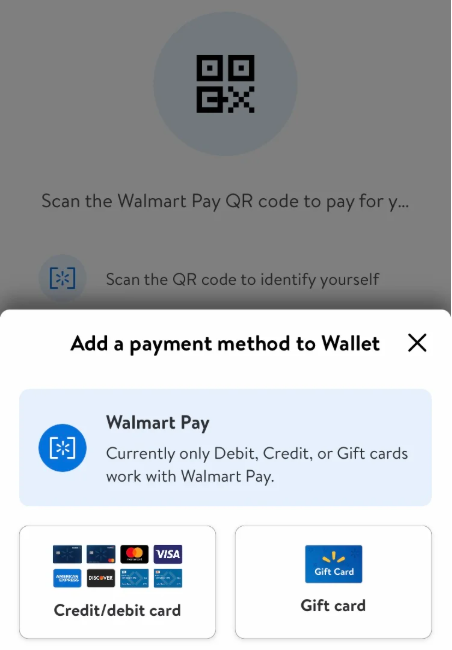
Walmart Pay links your debit or credit card to the Walmart app. You scan a QR code at checkout and complete payment inside the app, which replaces tap-to-pay.
How to set up Walmart Pay on your phone
Download the Walmart app on your iPhone or Android, open it, and sign in. Select the Walmart Pay option on the home screen and tap Add a Payment method. Finally, add a debit or credit card depending on your preference and complete any required verification.

Apple Pay vs Walmart Pay
Apple Pay excels at universal tap-to-pay across many retailers. Walmart Pay trades tap convenience for tighter integration with Walmart rewards, receipts, and offers.
Will Walmart ever support Apple Pay?
Walmart shows no signs of changing course. The company continues to expand Walmart Pay features, which makes Apple Pay support unlikely.
Tips
- Set up Walmart Pay before you reach the checkout line to avoid delays.
- Add a backup debit or credit card in the Walmart app in case one fails.
- Turn on biometric authentication to speed up Walmart Pay approval.
- Save digital receipts in the app for easier returns and expense tracking.
- Use physical cards or cash if the Walmart app has connectivity issues.
Summary
- Walmart does not accept Apple Pay anywhere.
- In-store and online checkouts block Apple Pay completely.
- Walmart Pay serves as the official mobile payment alternative.
- Cards, cash, and gift cards remain fully supported.
Walmart skips Apple Pay and promotes Walmart Pay instead. If you shop there often, set up Walmart Pay once and avoid checkout friction on every visit.


Discussion (0)
Be the first to comment.