




For beginners, a logo maker proves its value when the logo works across everyday situations.
That means a logo that reads clearly in a website header, stays recognizable as a square social profile image, and holds its shape when resized for a business card or flyer.
Design.com’s logo maker focuses on these real outcomes, which makes it easier for non-designers to judge and trust the results.
Let’s take a look at the workflow and what you can actually achieve with this online logo design tool.
Starting the logo creation process

The workflow starts by entering a brand name. This single step replaces lengthy questionnaires and removes the need to describe design preferences in abstract terms.
Within seconds, the logo maker generates a full set of logo concepts. Each option appears as a complete layout, with text hierarchy, icon placement, and spacing already resolved. Instead of arranging elements manually, users review logos as finished designs from the start.
Reviewing the first set of logo results

The initial logo grid shows clear structural variety. Some logos rely purely on typography, which works well for clean website headers or email signatures.
Others combine text with an icon sized appropriately for social profile images or app-style use.
Emblem-style layouts appear more compact, making them suitable for stamps, labels, or printed materials.
Because these layouts differ in composition rather than surface decoration, beginners can quickly identify which directions fit their intended use.
Narrowing options with style and color filters
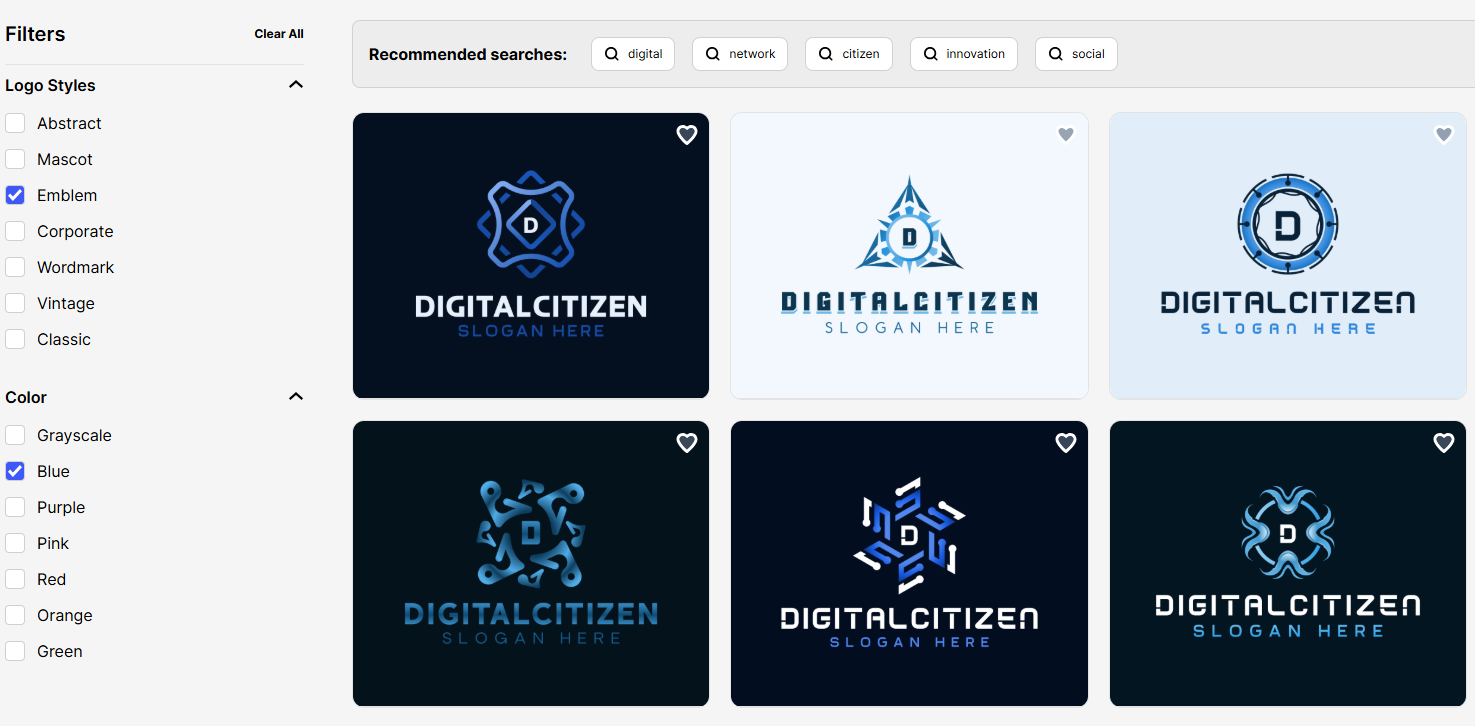
Style filters change the structure of logos, not just their colors. Switching between categories such as wordmark, emblem, abstract, mascot, corporate, vintage, or classic visibly alters layout geometry and typography hierarchy.
Color filters help align logos with common backgrounds.
For example, filtering toward darker palettes makes it easier to preview logos that will sit on light websites, while higher-contrast options stand out better on social banners.
This reduces the need to manually test each design.
Editing the logo without breaking the layout

Once a logo is selected, editing focuses on changes beginners actually make. Fonts can be swapped from a library of 750+ fonts, including 525+ exclusive fonts designed specifically for the platform. These cover a wide range of styles, from clean sans-serif and modern display fonts to more decorative and traditional options.
When changing the brand name length or adding a slogan, spacing adjusts automatically so text remains centered and readable. Color changes apply globally across the logo, which keeps icons and text visually aligned without manual correction.
Even after several edits, the logo maintains its proportions, which helps beginners avoid common layout mistakes.
Refining details with advanced controls

The advanced editor allows small refinements that affect real use. Adjusting spacing improves readability when the logo appears at small sizes, such as in a website footer. Resizing an icon slightly can improve balance when the logo is used on a business card or profile image.
These adjustments happen incrementally, so the logo stays recognizable throughout the refinement process.
Template variety and differentiation
Generating multiple logo sets for the same brand name highlights the depth of the template system. Design.com draws from 360,000+ logo templates, supported by 62,000+ custom vector shapes. In practice, this means layouts differ in typography emphasis, icon treatment, and composition rather than repeating the same structure.
Because templates start from professional designs and use exclusive fonts and shapes, swapping elements changes how the logo behaves in use. A design that works well as a horizontal header can easily shift into one that also functions as a square icon without losing clarity.
Exporting logos for everyday scenarios
Once finalized, logos can be exported in formats suited to different tasks. SVG, EPS, and PDF files scale cleanly for print and signage. PNG and JPG work for websites, social media, and email signatures. GIF and MP4 versions support simple animations for presentations or online content.
Transparent background and icon-only versions make it easier to reuse the same logo across different layouts without redesigning.
Who the logo maker suits best
Design.com’s logo maker fits beginners who want to move from idea to usable logo without learning design software. It works especially well for users who think in terms of where the logo will appear, such as on a website, social profile, or printed material, rather than how to build it manually.
Users seeking full manual control over every design element may prefer traditional design tools, but non-designers benefit from a system that keeps layouts stable as they scale and adapt.
Pricing: what beginners actually pay for logo creation
Design.com allows beginners to explore logo creation without paying upfront. You can generate logos, compare styles, and test edits before deciding whether to upgrade.
The free plan covers:
- Downloadable high-resolution logo files and vector formats, matching premium plan exports
- Access to a free website builder for creating a branded site using your logo colors
- Free link-in-bio creator for sharing multiple links on social platforms
- Free digital business card maker for sharing contact details online
- Access to over 50 additional design tools for print and social designs
- A premium plan is required to download designs created with those additional tools
This makes it possible to evaluate logo quality and usability before spending anything.
Paid plans unlock full logo ownership and usable downloads:
- Starter – Logo Pack at $5 per month billed annually
Unlocks high-resolution and vector logo files (SVG, EPS, PDF), raster and animated formats, unlimited logo edits, transparent background versions, and icon-only exports. - Value – Logo Pack + Website at $6 per month billed annually
Includes everything in the Starter plan, with added website creation for users who want their logo deployed immediately online. - Premium – Logo Pack + Website + More at $7 per month billed annually
Builds on the Value plan by adding a link in bio page and a digital business card for broader online visibility.
For beginners focused primarily on logo quality, the Starter plan covers all practical needs. Higher tiers become relevant once the logo moves into active use across websites and online profiles.
Final verdict
Design.com’s logo maker works well for beginners because it starts with professionally structured layouts, offers meaningful variation through hundreds of thousands of templates, and supports customization without destabilizing the design. With access to over 750 fonts, tens of thousands of vector shapes, and export formats that cover both digital and print use, it provides a practical path from concept to finished logo.
For non-designers who want a logo that holds up across real-world uses, Design.com delivers consistent, usable results without requiring design experience.


Discussion (0)
Be the first to comment.