



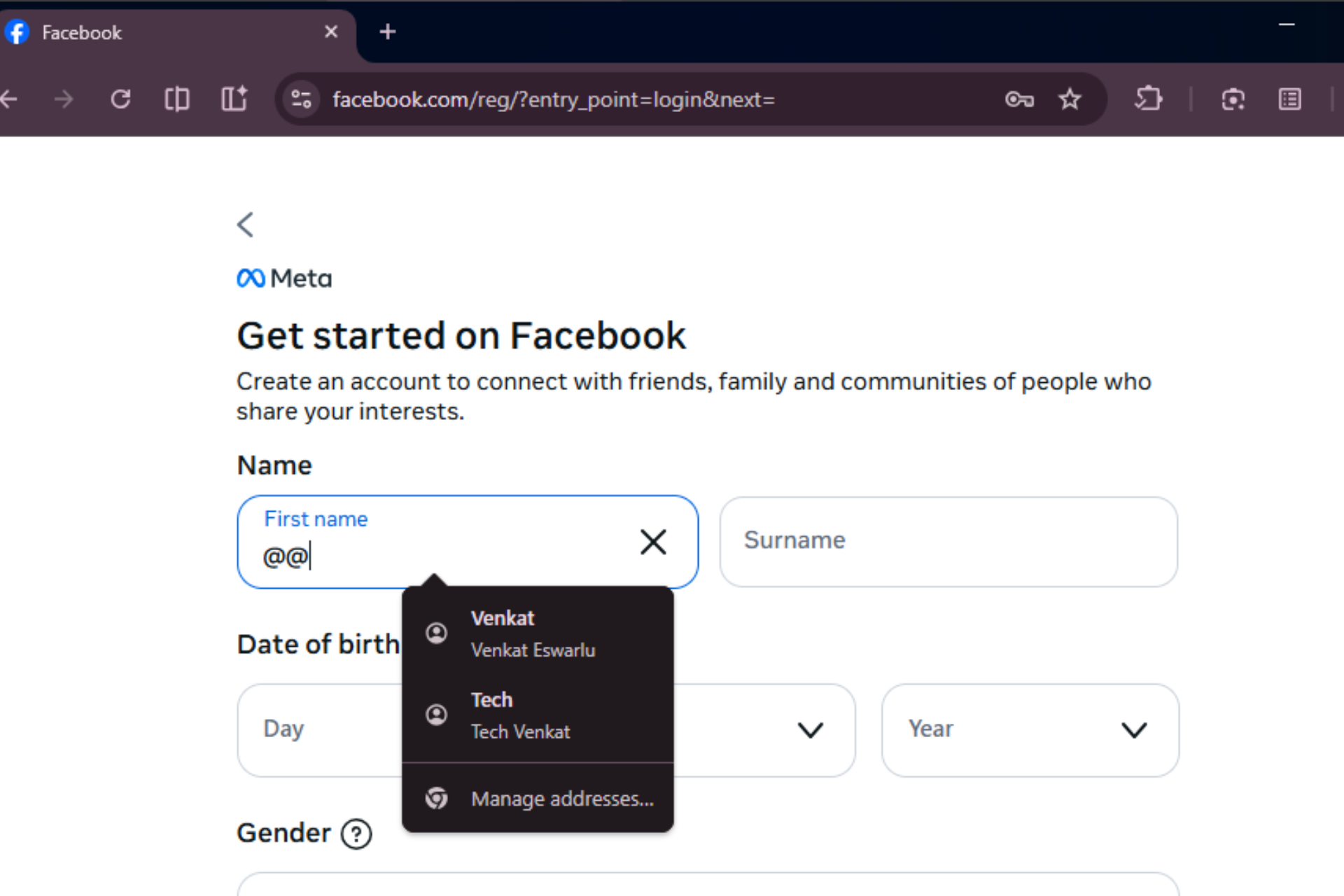
Chrome is testing a new “Autofill @memory” feature that lets users type "@@" inside any text field to open a searchable popup of their saved personal information.
Chrome already fills forms with saved emails, addresses, and payment details. With @memory, instead of waiting for Autofill to trigger automatically, users can type "@@" directly in a field to bring up a popup and search their saved data from the keyboard. That makes it easier to insert a secondary email, use a work address, or recall rarely used details without opening settings or a password manager.
In the background, Chrome treats the @@ input as a search query and looks for matching entries within the Autofill data saved on your device. The results come directly from your locally saved emails, addresses, and other personal details. It does not rely on a separate cloud service or new database.
Chrome hides the feature hidden behind the Autofill @memory flag (chrome://flags/#autofill-at-memory) on Mac, Windows, Linux, and ChromeOS. It builds on Chrome’s existing Autofill data rather than introducing a new storage system. It adds a manual trigger layer on top of normal Autofill.

For advanced users, this adds a predictable "@@" shortcut to recall saved information when Autofill does not kick in automatically or when typing in long text areas that are not treated as forms.


Discussion (0)
Be the first to comment.