




Google is testing a new feature in Chrome that stops websites from interrupting users with permission pop-ups the moment a page loads. The feature is called "Permissions Gesture Gated Prompts".
Chrome describes the experiment as a way to “mute non-user-initiated permission requests.” In practice, sites can request notifications or location access only after the user interacts with the page.
Today, many websites trigger permission prompts as soon as a page opens. This test changes that behavior.
Chrome now requires a user gesture before it allows a full permission prompt. A gesture includes simple actions such as clicking a button, tapping a link, or typing in a text field. Without any interaction, Chrome silences the request.
This connects to behavior Chrome already uses today. Chrome already hides notification requests on sites it classifies as spammy or abusive, based on patterns and user responses collected over time.
This test applies a stricter rule from the start. No interaction means no loud permission prompt.
How to enable gesture-based permission prompts in Chrome on Android
- Launch Chrome Canary
- Visit chrome://flags
- Search for "Permissions Gesture Gated Prompts"
- Set the flag to "Enabled" and restart Chrome
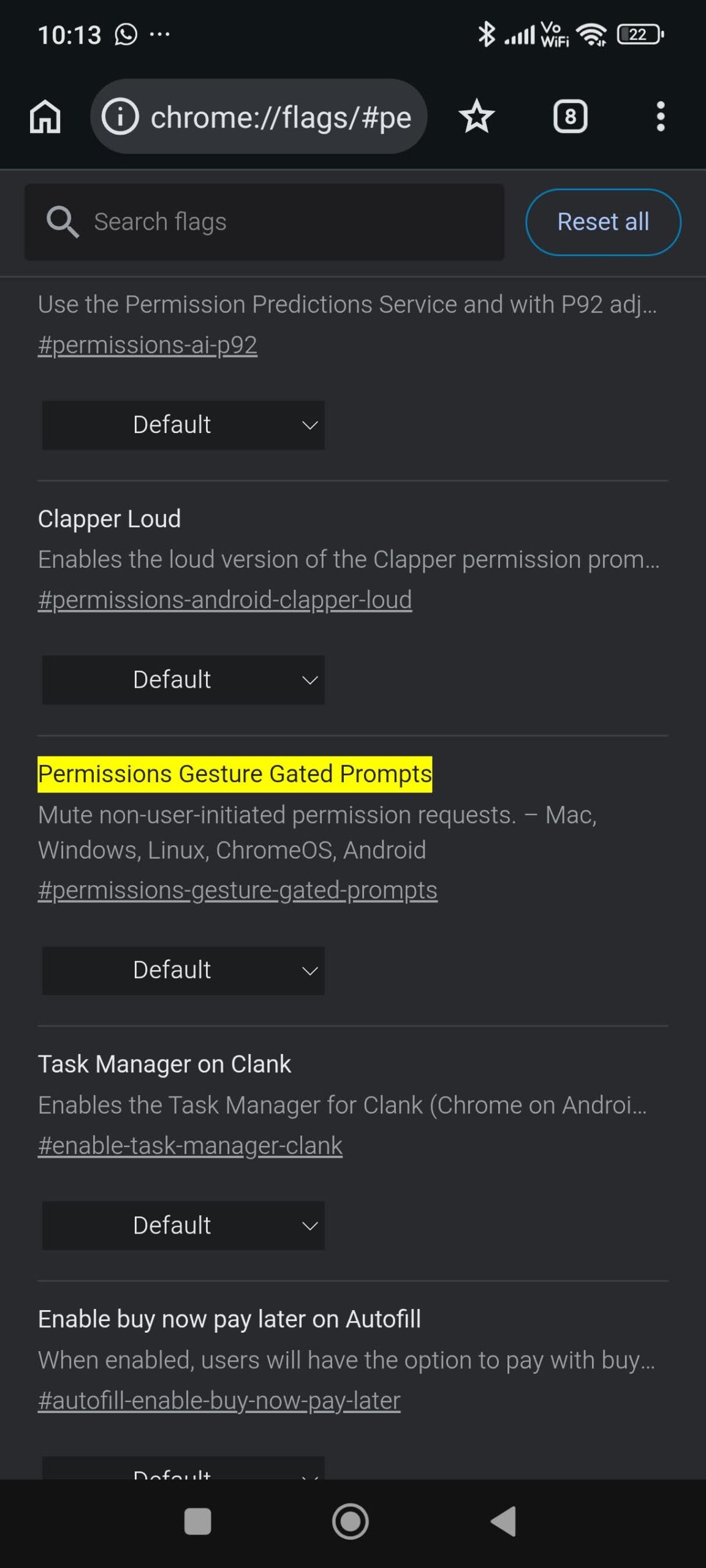
The flag is currently visible in Chrome Canary on Android. Although the description lists Windows, macOS, Linux, and ChromeOS, Google usually starts tests on Android Canary before expanding to other platforms.
Chrome is also testing a new tab bottom sheet on Android.



Discussion (0)
Be the first to comment.