



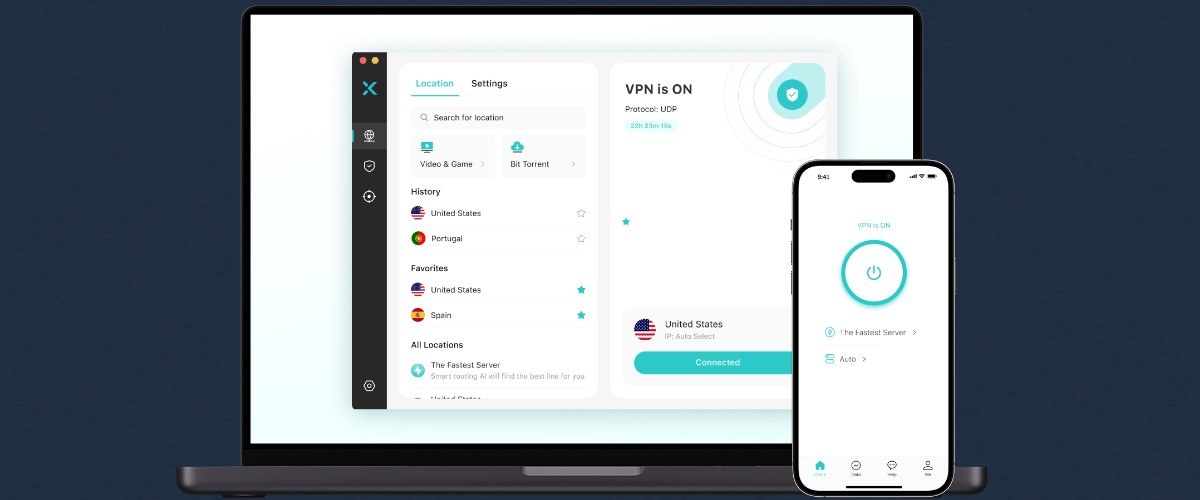
We’ve all heard about the importance of using a VPN, but how do you cut through the jargon to find a provider that lives up to the hype? In this X-VPN review, I take a straightforward approach, exploring all its features so you know exactly what to expect.
What does a VPN do?
The core function of a VPN is to encrypt your internet activity, so it’s hidden from your ISP, government censors, and cybercriminals.
Because the data cannot be read, you can bypass content filters that block certain websites, apps, and online services.
Furthermore, requests must first pass through a separate server located in another part of the world with a different IP address.
Any site tracking your location can only see this server’s IP as the originating source. Therefore, VPNs can also help you unblock content restricted by geographic location, such as a streaming service in another country.
X-VPN at a Glance
X-VPN is a VPN service owned by LIGHTNINGLINK NETWORKS, based out of Singapore. It lets you protect up to 5 devices at once using VPN apps for all common devices.
You can choose from locations in more than 80 countries to bypass geo-restrictions, and it provides optimized servers for different tasks, such as streaming, gaming, and torrenting.
Standard VPN encryption via 1,000+ servers is free, while its premium plans offer lots of additional security and performance features.
X-VPN has a strict no-logs policy that doesn’t store or share any information about your VPN usage. This was independently audited on February 28, 2026.
Pros & Cons
| Pros | Cons |
| Generous free-forever tier. | Ads appear in the free versions for iOS and Android. |
| 10,000+ server network in 250+ locations. | Additional security tools are currently only available for PC. |
| High-value premium plans with rich security features. | |
| Fast and stable speed for streaming and gaming. | |
| Outstanding unblocking ability. |
Getting Started
The X-VPN apps are easy-to-use and will get you connected in just a few steps.
Windows
The VPN for PC connects to the fastest server with one click or you can browse through the other locations and optimized servers by scrolling or searching.

The program is lightweight and minimizes to the tray, and the most important settings are all found via the settings button on the VPN tab.
Desktop exclusives include safe browsing and an ad-blocker. You can also clean up disk space and manage startup programs from within the app.
Android
The Android app can be downloaded directly from the site as an APK or from the Google Play Store.

It has all the core features and takes a single tap to connect or a couple of taps to find your desired location. Connection status is then displayed in the Android notification area and via a key icon.
Settings are found by tapping the Me icon at the bottom. Here you will also find icons for a built-in secure browser and a Data log, showing how much data has been used while the VPN is active.
The mobile version also has some quick links to some security tools for checking your IP address and any leaks. This way you know the VPN is working.
macOS

The Mac client mirrors Windows, including the Kill Switch, split tunneling, and all additional security tools. You can easily select the location and configure its other settings, as well as benefit from browser protection and ad blocking.
X-VPN offers a free version for Windows and macOS that requires no login, with no ads and no data limits. Each time you hit the button, X-VPN automatically connects you to the nearest server based on your location, ensuring the fastest speeds while enjoying VPN encryption.
iOS

The iOS app is available from the Apple App Store. It looks and works the same as Android, minus the built-in browser. Unlike other VPNs that only allow URL-based split tunneling, X-VPN also supports app-based settings.
iOS and Android users can also use X-VPN for free without logging in. Like PC users, they enjoy unlimited data. However, mobile users can manually select free servers from 26 regions—though this comes with a few ads.
Other Devices
X-VPN also has dedicated apps for Linux, Chromebook, Android TV, Apple TV, and Amazon Fire TV. The Chrome extension lets you configure the VPN from your browser.
You can also use it on the Switch, PS4, and PS5 consoles by first launching it on mobile and following the steps under the Use on Other Devices setting.
Pricing
X-VPN is competitively priced, with great savings if you commit to a longer period upfront. The free VPN lacks some premium features but is a great way to try the service and there’s more here than other free VPNs.
X-VPN FREE
Core features, including Kill Switch and Protocol selection (no Split Tunneling or extra tools). You get 26 free regions (backed by 1,000+ servers), and mobile users can manually select the region. All users can access the free version of X-VPN without needing to log in and enjoy unlimited usage/data.
X-VPN Premium
The premium version unlocks all features and can be trialed for 7 days for free if you download the apps from the official app stores.
X-VPN supports payment in crypto to help anonymize your account.
- Two-Year: $69.99 (same as $2.99/mo)
- Yearly: $47.99 (same as $3.99/mo)
- Monthly: $11.99
All plans come with a 30-day money back guarantee.
Key Features
Now we’ve covered the basics, let’s take a closer look at X-VPN’s features and how they work:
Protocol Selection
By default, whenever you connect to a server, X-VPN uses its proprietary Everest protocol.
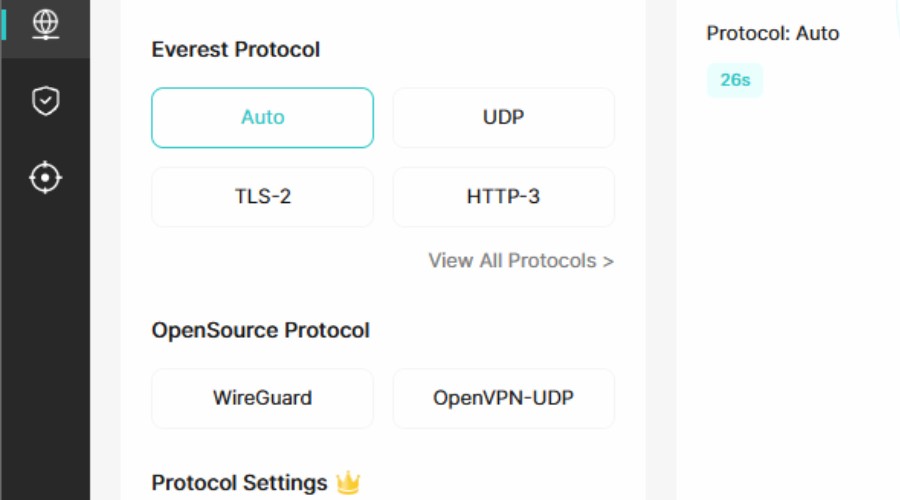
Everest is a fast option and offers the best chance of getting around blocks and geo-restrictions. This is because it is a closed-source protocol that employs obfuscation techniques.
Unlike NordVPN's proprietary protocol, which prioritizes speed and remains open-source, Everest focuses on unlocking capabilities. Maintaining closed-source status prevents platforms with VPN detection, such as Netflix, from shutting down VPN traffic, thereby significantly increasing the success rate of unblocking.
Some people may worry about Everest's security. However, when testing Everest, we didn’t experience any IP or DNS leaks, which to some extent demonstrates that the Everest protocol is trustworthy.
Of course, if you still prefer to use an open-source protocol and aren't particularly concerned about unlocking capabilities, you have freedom to change the protocol to WireGuard or OpenVPN in X-VPN's settings.
Double VPN
Like all good VPNs, X-VPN uses AES-256-bit military-grade encryption. While the chances of this being cracked are extremely unlikely, the Double VPN feature offers a second layer of encryption.
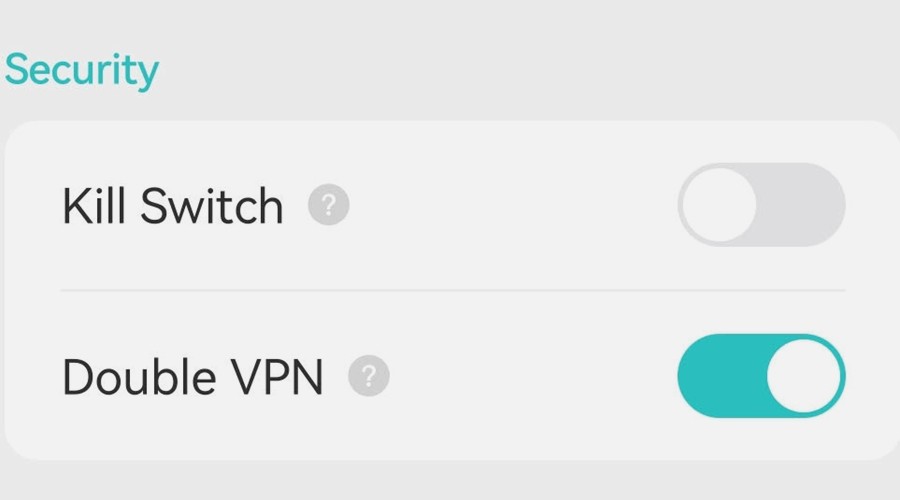
In effect, this routes your internet traffic not through one but two different VPN servers.
Kill Switch
Toggling on the automatic Kill Switch ensures all internet activity is instantly paused if your connection to the VPN server drops. This means your unencrypted connection or IP address is never leaked, even for a second.
In most cases, you won’t notice this as the VPN will attempt to reconnect right away. However, if there is a longer drop, the app will pop up a notification, and you can choose a different server.
The Kill Switch is one of the features also available to free users.
Split Tunneling
Not everyone wants to use a VPN all the time, especially for certain ping-reliant tasks like gaming or work activities that might require your real IP address. Likewise, perhaps privacy or censorship isn’t a concern, and you just want to unblock Netflix in a different country.
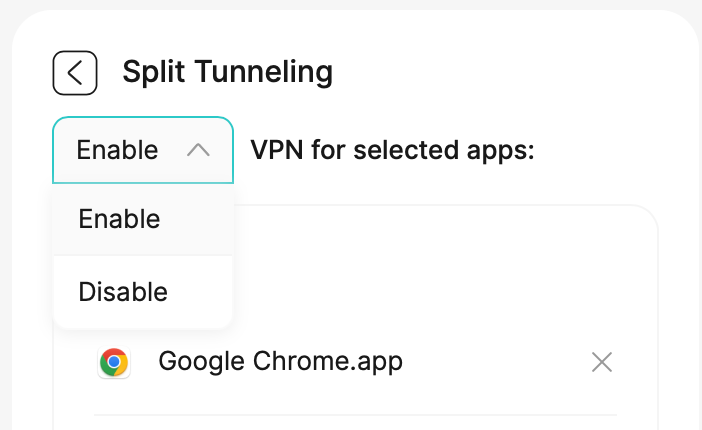
Whatever the reason, split tunneling lets you choose the apps that should be protected by X-VPN or the apps that shouldn’t go through the encrypted tunnel.
Ad and Tracker Blocker
An unencrypted connection is only one security risk when using the internet. The websites you access can also place tracking cookies on your browser, bombard you with ads, and even expose you to malware and viruses.
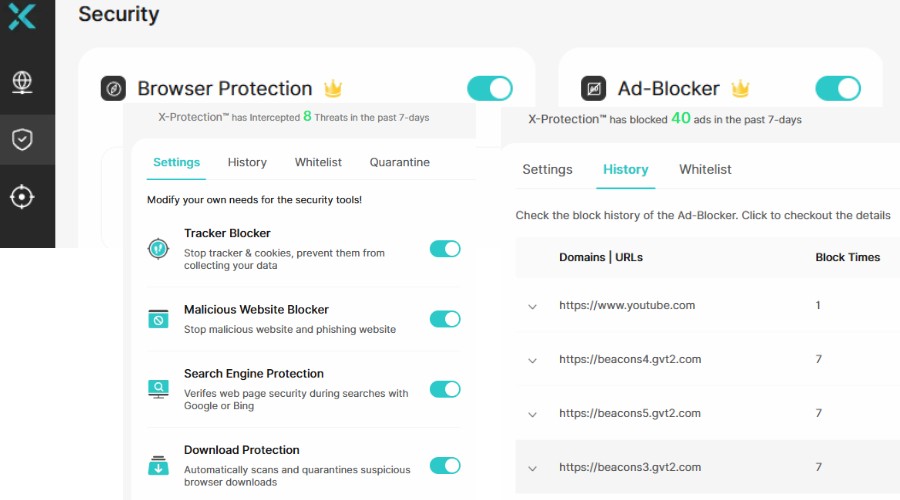
X-VPN tackles this on Windows and macOS with Browser Protection and an Ad Blocker. Toggle these on under the Security tab, and the app will block dangerous sites, search results, downloads, and files.
I found the ad blocker to be surprisingly effective, removing popups and banners from even some of the worst websites, so they no longer slow down or interrupt the page. It even blocks ads on YouTube, which hasn’t always been an easy process.
Dark Web Monitor
Another useful extra found on Mac and Windows is the dark web monitor. This takes your registered email address and scans the dark web to find if it’s been compromised and leaked by cybercriminals.
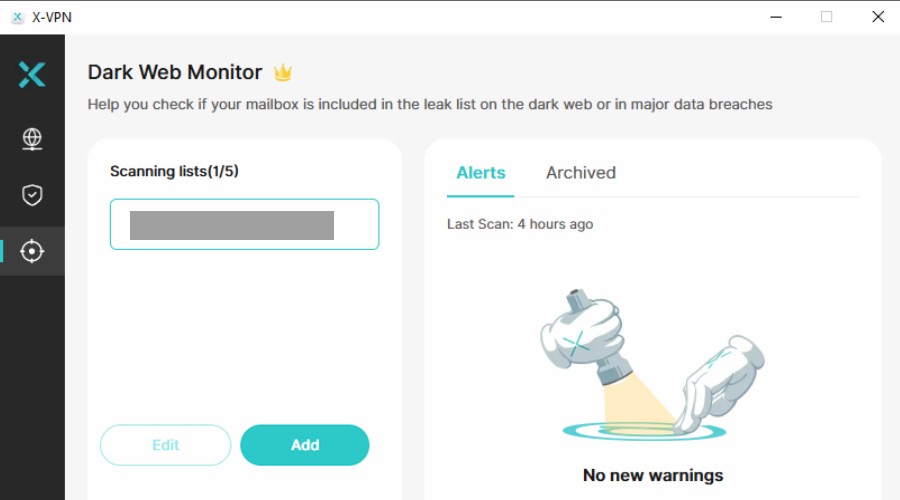
If found, this alerts you to change the password and secure the account before crooks use it to steal your information and compromise other accounts.
You can add other email addresses to the monitoring list, though you’ll need to verify ownership.
Free Checking Tools
The X-VPN website and the mobile app highlight several free tools for checking that the VPN is working correctly. Though many sites have similar tools, it’s useful to have them all together.

IP Checker – Displays your current IP address information, so you can check that you’re properly connected to a VPN server and not showing your real IP address.
DNS Leak Test – Checks if you’re using the VPN’s Domain Name System (DNS) or the one assigned by your ISP. If the regular DNS is leaking, the VPN will be less effective.
WebRTC Leak Test – Checks if your browser is leaking your real IP address through WebRTC applications, like in-browser or mobile audio and video chatting apps. Weaker VPNs fail to plug this vulnerability.
Password Generator – Helps quickly create strong passwords.
Locations and Speed
For a VPN to perform well it needs to have a lot of servers to prevent user congestion and slow speeds. X-VPN is up there with the best, offering more than 10,000 individual servers with the premium version.
This powerful network is spread across locations in 80 countries, allowing you to choose precisely where you want to spoof your location.
In other words, if you are based in the United States, for example, but want to access content that is region-restricted to the UK. All you have to do is click or tap on one of the UK options to unblock it.
With any VPN, the closer the server is to your real location, the faster it is. This is the server you will connect to by default.
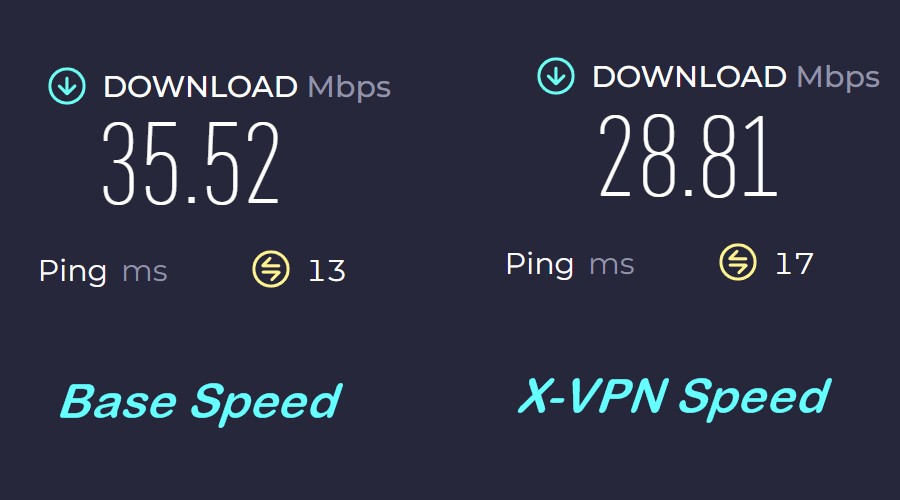
In our tests, X-VPN performs well, resulting in just a 19% drop in speed compared to baseline when connected to the fastest server via WireGuard protocol. This was approximately 22% when connected to a server on the other side of the world.
This is in the range of other reputable VPNs, and we were more than capable of HD streaming on multiple devices without buffering.
Optimized Servers
One way X-VPN maintains high performance is by offering servers that are optimized for different internet activities. While it’s not a requirement to use these, it’s worth trying them first to get the best experience.
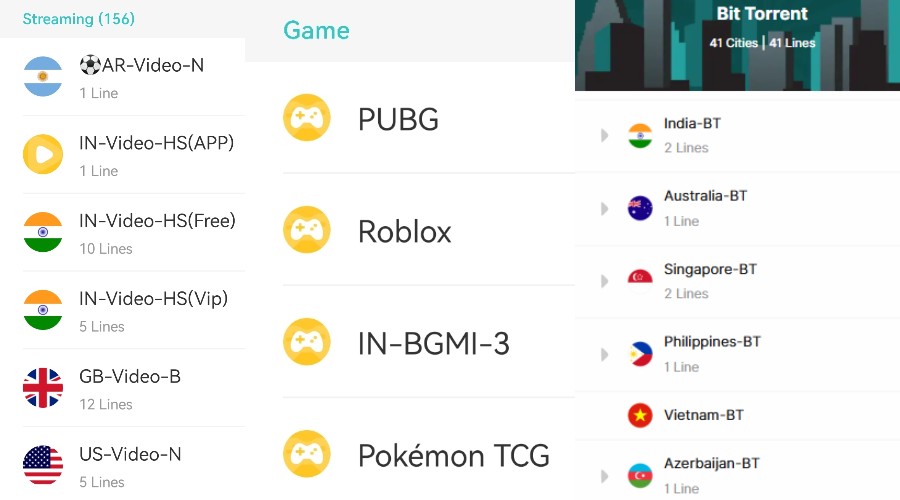
Streaming
There are around 150 dedicated streaming servers, which are found under the Video & Game section.
This includes a single server for Argentina and multiple options for India, Great Britain, the United States, Brazil, Japan, Mexico, and Australia.
If you need to access streaming services in these countries, these servers offer better speeds and reliability over the regular list.
Gaming
Gaming servers are also available, which are optimized for the Pokémon TCG mobile game, PUBG, Roblox, and Battlegrounds Mobile India (BGMI).
Again, although you can use the other servers and still play these online games, the optimized servers deliver less lag.
Torrenting
If you use the BitTorrent file sharing protocol to download files, you should choose one of the dedicated BitTorrent servers, which span 41 countries.
Because Torrenting is a P2P process and involves complex connections with other users, VPNs can struggle to maintain a solid download and upload speed within the client or even to connect at all.
When testing X-VPN’s Torrent servers, we were able to maintain a stable connection with good speeds.
No-Logs Policy
Before committing to a VPN provider, it’s always a good idea to check how it handles data itself, especially if you live under a restrictive government that might seek to obtain information about VPN users. You also don’t want a situation where hackers compromise a VPN’s servers where your info is stored.
Fortunately, X-VPN follows the industry standard of having a no-logs policy. This means its infrastructure is not set up to store your real IP address or browsing habits, and any technical logs are not linked to users themselves.
As outlined in X-VPN’s 2025 transparency report, it uses RAM-only servers that are incapable of storing your personally identifiable information.
Furthermore, of all the DMCA takedown and law enforcement requests made since 2017, no user data has ever been passed on.
One of the Big Four auditing firms verified that no user data is tracked, collected, or stored, in a February 2026 report, which users can access from within their accounts.
You can also purchase an X-VPN subscription using Bitcoin, Bitcoin Cash, or Ethereum, so billing information is not tied to you either.
X-VPN is now going through an independent audit by a third-party, to further verify its no-logs policy. We will keep an eye on the results.
Conclusion
Overall, X-VPN has everything you could need from a modern VPN provider. It successfully protects your internet connection, has a fast network of servers (some optimized for different tasks), and enough locations across the world for bypassing geo-restricted content.
Its user-friendly apps don’t overwhelm the user with settings, instead focusing on core features like a kill switch, double VPN, split tunneling, and the ability to select your desired protocol.
Furthermore, it shows strong dedication to privacy and security, adhering to a strict no-logs policy and offering additional tools like safe browsing and ad blocking.
At as little as $2.99/mo and a free version, there’s no reason not to try X-VPN today!



Discussion (0)
Be the first to comment.