




Choosing the right SATA port for your SSD directly affects performance, boot times, and overall system responsiveness. Modern motherboards include multiple SATA ports, and not all of them deliver the same speeds. Understanding how SATA II and SATA III ports differ helps you avoid a slowdown and ensures your solid-state drive operates at its full potential.
Most SSDs today are designed for SATA III (6Gbps) speeds, but your motherboard may also include SATA II (3Gbps) ports. The best SATA port for SSD use is always the fastest available option. Below, we explain how to identify the right port and set up your drive correctly for maximum performance.
How To Choose The Right SATA Port For Your SSD
Motherboards usually label SATA ports numerically, but the key difference comes from the speed rating. Here’s how to make sure your SSD connects to the fastest port available.
- Locate the SATA ports on your motherboard and check which ones support SATA III (6Gbps). These are the ideal ports for SSD performance.

- Consult your motherboard manual to confirm which SATA ports share bandwidth or get disabled when NVMe drives are installed.
- Connect your SSD to the first available SATA III port to ensure maximum read and write speeds.
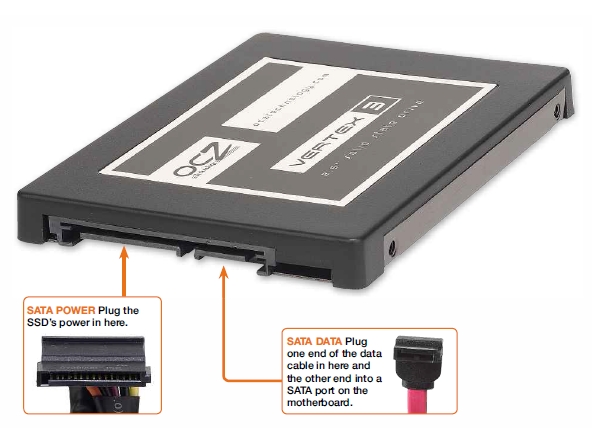
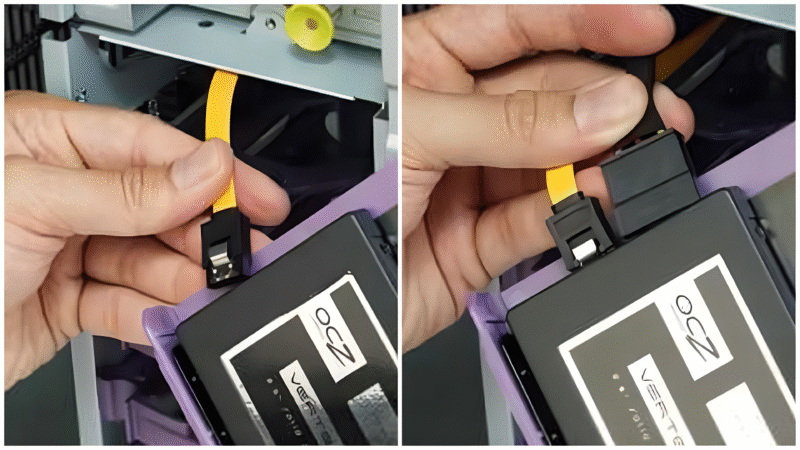
- Use a high-quality SATA cable and ensure it is firmly connected at both ends to avoid connection drops.
- Enter your system BIOS and confirm the SSD is detected and running in AHCI mode for optimal performance.
Troubleshooting Common Problems
- If your SSD runs slower than expected, verify it is connected to a SATA III port rather than SATA II.
- If the SSD does not appear in Windows, check BIOS settings to confirm AHCI mode is enabled.
- If certain SATA ports do not work, confirm they are not disabled by an M.2 slot sharing bandwidth.
- If your SSD disappears intermittently, try replacing the SATA cable or using a different port.
Tips
- Always use SATA III for any modern SSD to avoid bottlenecking performance.
- Avoid connecting SSDs to SATA expansion cards unless absolutely necessary, as onboard ports offer better stability.
- Label your cables during installation to track which devices use which ports.
- Update your SSD firmware periodically to maintain peak performance.
FAQ
Does It Matter Which SATA Port I Use?
Yes. SATA III ports offer faster speeds than SATA II, and SSDs perform best on SATA III.
Can I Use A SATA II Port For My SSD?
Yes, but performance will be limited compared to a SATA III connection.
How Do I Know Which Port Is SATA III?
Most motherboards label SATA III ports as 6Gbps. Check the printed labels or your motherboard manual.
Does AHCI Mode Affect SSD Speed?
Yes. AHCI enables features like NCQ, improving performance and responsiveness.
Summary
- SATA III (6Gbps) is the best SATA port for SSDs.
- SATA II ports work but reduce SSD performance.
- Check your motherboard manual to identify the correct ports.
- Use AHCI mode for optimal drive speeds.
Conclusion
Choosing the correct SATA port ensures your SSD delivers the fast boot times and responsiveness it was designed for. A simple port selection can make a significant difference in real-world performance.

Discussion (0)
Be the first to comment.