




Every few years a new Wi-Fi standard arrives with impressive-sounding numbers, and every few years the honest question is the same: does any of this actually matter for real people in real homes, or is it just a reason for router manufacturers to sell new hardware?
With Wi-Fi 7, the answer is more interesting than usual. The improvements are genuinely significant, the prices have finally come down to sensible levels in 2026, and the decision about whether to upgrade depends almost entirely on your specific situation. Here is what you actually need to know.
What Is Wi-Fi 7?
Wi-Fi 7 is the latest generation of wireless networking, officially known as IEEE 802.11be. Where previous generations focused mostly on pushing raw speeds higher, Wi-Fi 7 focuses on doing more things at once, more reliably, for more devices simultaneously.
The headline speed figure is 46 Gbps theoretical maximum, which sounds extraordinary but is not a number you will ever see in a home. Real-world speeds with a good setup are more like 3 to 5 Gbps, which is still several times faster than most home internet connections. The speed is not really the point though. The more meaningful improvements are under the surface.
What Actually Makes It Different
Three things set Wi-Fi 7 apart from Wi-Fi 6 and Wi-Fi 6E in ways that translate into noticeable real-world improvements.
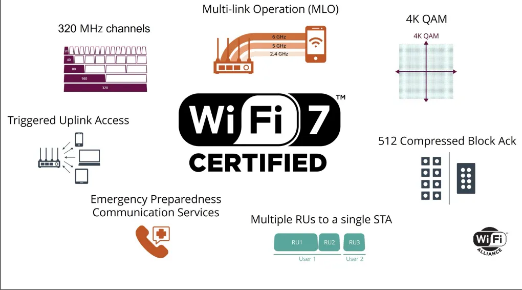
Multi-Link Operation is the biggest one. Every previous Wi-Fi standard forced your device to pick one band and stick to it. The 2.4 GHz band reaches further but is slower and congested. The 5 GHz band is faster but shorter range. The 6 GHz band introduced with Wi-Fi 6E is the fastest and least congested. With Wi-Fi 7, your device can use multiple bands at the same time simultaneously, combining their capacity into a single seamless connection. Your phone streaming a film could pull data from the 5 GHz and 6 GHz bands simultaneously, getting faster speeds and automatic fallback if one band gets congested or the signal weakens. For most people this translates into a connection that simply feels more consistent and less likely to suddenly dip when the neighbours all get home and start streaming.
320 MHz channels effectively doubles the width of the data lane compared to Wi-Fi 6E. Wider lanes mean more data can travel at once. Combined with Multi-Link Operation, this is what produces the genuinely impressive throughput numbers in real-world testing.
Better handling of many devices is increasingly relevant. The average home in 2026 has smartphones, laptops, tablets, smart TVs, games consoles, streaming sticks, smart speakers, thermostats, doorbells, cameras, and countless other connected things. Wi-Fi 7 handles dense device environments significantly better than older standards, with up to five times the network capacity of Wi-Fi 6. If you have ever had your connection noticeably degrade when everyone in the house is online at once, this is the improvement you will actually feel.
Who Should Upgrade Now
If you are still on Wi-Fi 5 or an older router, upgrading to Wi-Fi 7 makes a lot of sense in 2026. You are several generations behind and the difference will be immediately noticeable in speed, range, and how well the connection holds up with multiple devices. Wi-Fi 7 routers have come down significantly in price and you can get a solid tri-band model for well under £200 now.
If you have a fast internet plan above 1 Gbps, a Wi-Fi 7 router is worth considering because your current router may actually be the bottleneck preventing you from getting the speeds you are paying for wirelessly. A Wi-Fi 6 or older router cannot deliver multi-gigabit speeds wirelessly regardless of how fast your broadband is.
If you game online seriously or work from home with frequent video calls, the lower and more consistent latency from Multi-Link Operation is a real practical benefit. Online gaming and video conferencing are both sensitive to latency spikes, and Wi-Fi 7 handles them more gracefully than older standards in a busy home environment.
If your home has many connected smart devices, the improved capacity handling means your network is less likely to feel sluggish or drop connections when many devices are active simultaneously.
Who Can Wait
If you already have Wi-Fi 6 and your current setup works well, there is no urgency. Wi-Fi 7 is a meaningful upgrade but not a necessary one if your internet connection feels reliable and fast enough for your daily use. The gap between Wi-Fi 6 and Wi-Fi 7 is noticeable but smaller than the gap between Wi-Fi 5 and Wi-Fi 6.
If most of your devices are still Wi-Fi 6 or older, you will not get the full benefit of Wi-Fi 7 until those devices are replaced. Wi-Fi 7 is fully backward compatible so nothing will stop working, but older devices connect at their native Wi-Fi generation's speeds. The router can only do so much if the device connecting to it does not support the new standard.
If your internet plan is 500 Mbps or below, your broadband connection is likely the limiting factor rather than your router. Upgrading to Wi-Fi 7 will not make your internet feel faster in that situation.
Wi-Fi 7 vs Wi-Fi 6 vs Wi-Fi 5 at a Glance
| Wi-Fi 5 | Wi-Fi 6 | Wi-Fi 7 | |
|---|---|---|---|
| Max theoretical speed | 3.5 Gbps | 9.6 Gbps | 46 Gbps |
| Real-world home speed | Up to 1 Gbps | Up to 2 Gbps | Up to 5 Gbps |
| Frequency bands | 2.4, 5 GHz | 2.4, 5 GHz | 2.4, 5, 6 GHz |
| Multi-Link Operation | No | No | Yes |
| Best for many devices | Decent | Good | Excellent |
| Typical router price | Under £50 | £80 to £150 | £150 to £300+ |
What to Look for When Buying a Wi-Fi 7 Router
Not all Wi-Fi 7 routers are equal. Some budget models cut corners that defeat the purpose of upgrading. The most important thing to check is that the router is tri-band, meaning it includes the 2.4 GHz, 5 GHz, and 6 GHz bands. Some cheaper Wi-Fi 7 routers quietly drop the 6 GHz band to reduce cost, which removes much of what makes Wi-Fi 7 worth having.
Look for at least one 2.5 Gbps Ethernet port, ideally more, so wired connections can keep up with the wireless speeds. If you have a larger home, a Wi-Fi 7 mesh system using multiple nodes is worth considering over a single router, and Wi-Fi 7 mesh systems use Multi-Link Operation between the nodes themselves for faster communication throughout the home.
Well-regarded options in 2026 include the TP-Link Archer BE800 at the more affordable end, the ASUS RT-BE96U for those wanting a strong single router with excellent port selection, and the Netgear Nighthawk RS600 for good performance at medium range.
Final Thoughts
Wi-Fi 7 is not marketing hype. The improvements are real and Multi-Link Operation in particular is a genuinely clever solution to a problem that has plagued busy home networks for years. Whether you need it today depends almost entirely on what router you are coming from and how your current setup performs.
If your router is more than four or five years old and your home has a growing number of connected devices, 2026 is a sensible time to upgrade. If you already have Wi-Fi 6 and everything feels fine, you can wait another year or two and let prices fall further while more of your devices gain native Wi-Fi 7 support. Either way, when you do eventually upgrade, you will notice the difference.
Frequented Questions
Will my older devices still work with a Wi-Fi 7 router?
Yes. Wi-Fi 7 is fully backward compatible with Wi-Fi 6, Wi-Fi 6E, Wi-Fi 5, and older standards. All your existing phones, laptops, tablets, and smart home devices will connect and work normally. They simply connect at their native Wi-Fi generation's speeds rather than getting the full Wi-Fi 7 benefit.
Do I need a Wi-Fi 7 device to benefit from a Wi-Fi 7 router?
Not entirely. Even older devices benefit from the improved network management and reduced congestion a Wi-Fi 7 router provides. However, the full advantages of Multi-Link Operation and the highest speeds only apply when both the router and the connecting device support Wi-Fi 7. Most flagship smartphones and laptops released in 2025 and 2026 include Wi-Fi 7 support.
Is Wi-Fi 7 faster than a wired Ethernet connection?
On paper, Wi-Fi 7 theoretical speeds exceed standard gigabit Ethernet. In practice, a wired Ethernet connection still provides more consistent speeds and lower latency for demanding tasks like competitive gaming or large file transfers. Wi-Fi 7 closes the gap considerably but has not replaced the case for wired connections entirely.



Discussion (0)
Be the first to comment.