



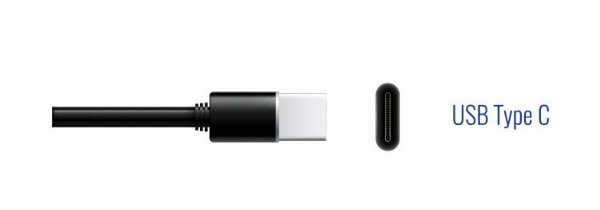
Most people have a drawer somewhere. You know the one. A tangle of cables, half of which you cannot identify, none of which seem to be the one you actually need right now. One for your old Android, a different one for your camera, a proprietary brick for your laptop, a Lightning cable for your iPhone, a flat rectangular one for everything else.
USB-C is the industry's long-overdue answer to that drawer. Here is what it actually is, why everything is switching to it, and what you need to know before buying cables and chargers.
What Is USB-C?
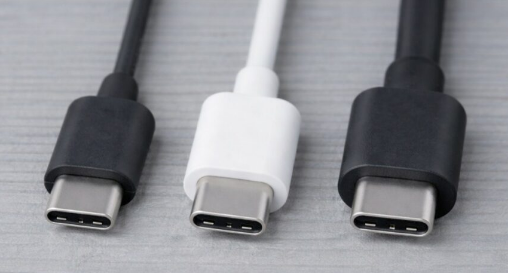
USB-C is a connector standard. It is the small, oval-shaped port you now see on phones, laptops, tablets, headphones, cameras, and an increasing number of other devices. Unlike the older rectangular USB-A port that most people grew up with, USB-C is symmetrical. You can plug it in either way. There is no wrong side up.
It was developed in 2014 by a consortium of major tech companies including Apple, Google, Intel, and Microsoft, with the explicit goal of creating one connector that could eventually replace everything that came before it. Not just old USB ports, but HDMI, proprietary laptop charging connectors, SD card readers, and more.
The physical connector is just the start. What makes USB-C genuinely different from every cable that preceded it is what it can carry through that one small port: power, data, and video, all at the same time through a single cable.
Why Everything Is Switching to It
The old world of cables was a mess that had built up gradually over decades. You had USB-A for data and charging, Micro-USB for smaller devices, Lightning for Apple products, separate HDMI cables for video, and different proprietary chargers for almost every laptop brand. None of these talked to each other. Every new device came with a new cable you would eventually lose.
USB-C is a genuine upgrade over all of them in every meaningful way. It is smaller and more durable than the old rectangular connectors. the connector is also reversible, which sounds trivial until you stop fumbling with cables in the dark. It supports far more power, enough to charge a gaming laptop, not just a phone. Further It moves data significantly faster than older USB standards. And it can carry a 4K video signal to a monitor, eliminating the need for a separate HDMI cable on a desk setup.
For manufacturers, USB-C makes devices thinner and simpler to design. For consumers, it means fewer cables, fewer chargers, and fewer moments of realising the cable in your bag does not fit the device in your hand.
The European Union helped push things along significantly. Legislation passed in the EU requires smartphones, tablets, laptops, cameras, and portable gaming devices sold there to include a USB-C port. Apple, which had famously resisted switching from Lightning for years, moved the iPhone to USB-C with the iPhone 15 in 2023 as a direct result. By 2026 the transition is effectively complete across most mainstream consumer electronics.
What USB-C Can Actually Do
This is where it gets slightly more complicated, because not all USB-C ports and cables are created equal. The connector looks identical everywhere, but what it can do varies considerably depending on the device and the cable.
Charging is the most universal feature. Every USB-C port charges devices, but at different speeds depending on the power delivery standard supported. A basic USB-C port might charge your phone at the same speed as a cheap old charger. A port supporting USB Power Delivery can push up to 100 watts, enough to charge most laptops comfortably, and newer standards push that to 240 watts for the most demanding machines.
Data transfer speed also varies by the USB standard behind the port. USB 2.0 speeds are fine for charging and light use. USB 3.2 moves files considerably faster. USB4 approaches the speeds of Thunderbolt, which is fast enough to transfer a full HD film in seconds. The cable matters here too. A cheap USB-C cable might only support USB 2.0 speeds even if your device supports something faster.
Video output is possible through a feature called Alternate Mode. Many USB-C ports can output video directly to a monitor using a USB-C to HDMI or USB-C to DisplayPort cable or adapter. This is how modern laptops with only USB-C ports connect to external monitors without a separate video port. Not every USB-C port supports this, so it is worth checking your device's specifications before buying a monitor cable or adapter.
Thunderbolt ports use the USB-C connector but are a more capable standard developed by Intel. A Thunderbolt 4 port looks identical to any other USB-C port but supports higher speeds, more connected devices, and higher-resolution external displays. Thunderbolt ports are typically marked with a small lightning bolt icon.
The One Thing to Watch Out For
The biggest practical frustration with USB-C is that identical-looking cables can have completely different capabilities. A cable that comes bundled with a cheap accessory might only charge at slow speeds and cannot transfer data at all. A cable that looks the same from the outside might support the fastest USB standards and 240 watts of power delivery.
When buying USB-C cables, check what the cable is rated for rather than just grabbing the cheapest option. Cables from reputable brands like Anker, Belkin, or the official cable from your device's manufacturer are worth the small extra cost. For laptop charging in particular, using a cable and charger rated for the correct wattage matters.
The good news is that USB-C is fully backward compatible. Plugging a slower device into a faster charger or cable does not cause any damage. It simply uses the speed and power both sides support.
Final Thoughts
The drawer of tangled cables is not gone yet, but it is getting smaller every year. USB-C is the first connector standard in consumer electronics history that genuinely does everything. Charge your phone, power your laptop, connect your monitor, transfer your files. One cable, one port, one less thing to think about. The transition has taken longer than it should have, but in 2026 it is effectively here.
Frequently Asked Questions
Can I charge my laptop with a phone USB-C charger?
It depends on the wattage. A phone charger typically delivers 20 to 45 watts. Most laptops need at least 45 watts to charge at a normal rate and 65 to 100 watts for faster charging. Plugging a laptop into an underpowered charger will charge it very slowly or may only maintain the battery level rather than charge it while the laptop is in use. It will not damage anything, it will just be slow.
Why do some USB-C cables charge slowly even though my charger is fast?
The cable itself has to support the power delivery standard your charger uses. A cheap cable rated only for basic USB 2.0 speeds will limit charging regardless of how capable the charger is. Always check that the cable is rated for the wattage you need.
Is USB-C the same as Thunderbolt?
No, but they use the same physical connector. Thunderbolt is a more capable standard developed by Intel that happens to use the USB-C port shape. A Thunderbolt port can do everything USB-C does plus more. A USB-C cable works in a Thunderbolt port, but a standard USB-C port cannot use all Thunderbolt features. Thunderbolt ports are usually marked with a small lightning bolt icon next to the port.
Do all USB-C ports support video output?
No. Video output through USB-C requires a feature called Alternate Mode, which not every USB-C port supports. Check your device's specifications or user manual to confirm whether the USB-C port on your laptop or phone supports video output before buying a cable or adapter for a monitor.
Will USB-C eventually replace HDMI on monitors and TVs?
USB-C is already standard on most new monitors as an input that accepts both data and video over a single cable. However HDMI and DisplayPort remain common on TVs and desktop monitors and are unlikely to disappear completely. For laptops and portable setups, USB-C has already become the practical replacement for dedicated video ports on the computer side.



Discussion (0)
Be the first to comment.