



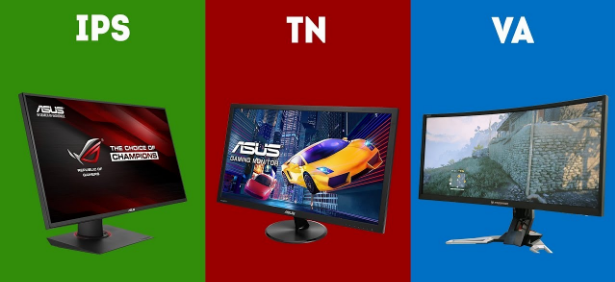
When you are shopping for a monitor and trying to make sense of the specification sheet, three letters keep appearing: IPS, VA, TN. Sometimes they come with confident claims about being the best for gaming, or the best for colour, or the fastest available. Often those claims contradict each other depending on which marketing department wrote them.
The panel type is one of the most important decisions you make when choosing a monitor, arguably more important than refresh rate or resolution once you are past the obvious thresholds. It determines contrast, colour accuracy, viewing angles, and motion handling in ways that are genuinely consequential for how the monitor looks and feels to use every day.
Here is what each type actually does and why the differences between them are real.
How All Three Work
All three panel types are LCD technology. They all use liquid crystals to control how much of a backlight passes through to your eyes. The difference is in how those liquid crystals are physically arranged and how they move.
TN panels use twisted nematic liquid crystals that rotate when voltage is applied. They have been around since the early days of LCD displays. The twisting motion is fast and mechanically simple, which is why TN panels historically dominated gaming. The drawback is that this physical orientation means the image changes dramatically depending on the angle you view it from.
IPS panels align their crystals parallel to the glass surface and rotate them in-plane rather than twisting. This rotation produces much more consistent colour and brightness from different viewing angles because the optical properties of the crystal change less dramatically as your viewing angle shifts.
VA panels arrange crystals vertically, perpendicular to the glass. When voltage is applied they tilt rather than twist or rotate. This vertical orientation is what gives VA its defining characteristic: an exceptional ability to block the backlight when displaying dark content, which produces far deeper blacks than either IPS or TN.
None of these is technically superior in every dimension. Each makes trade-offs that favour different use cases.
Contrast: Where VA Wins by a Margin
Contrast ratio is the difference between the brightest white a panel can display and the darkest black. The higher the number, the more visual depth the image has, particularly in dark scenes.
VA panels achieve contrast ratios between 2500:1 and 4000:1, sometimes higher. IPS panels typically land between 800:1 and 1500:1. TN panels are similarly modest to IPS in this regard.
In practice, VA's contrast advantage is visible and significant. Dark scenes in games and films have genuine depth and shadow detail. Black letterbox bars during a movie look black rather than dark grey. HDR content benefits particularly because the panel can separate bright highlights from dark shadows in the same image with far more range.
The IPS limitation in this area is sometimes called the IPS black problem: on darker content, the backlight bleeds through the panel more than a VA panel would allow. This produces a washed-out appearance in dark scenes and greyish blacks rather than true dark. It is less noticeable in a bright room and more obvious in a dim or dark environment.
TN panels sit in a similar contrast range to IPS, without the same colour quality advantages, which is why VA's contrast lead matters most when comparing with TN specifically.
Colour Accuracy: Where IPS Leads
IPS panels produce the most accurate and consistent colours of the three types. They cover wider colour gamuts, regularly achieving 95 to 100 percent of the DCI-P3 colour space used in cinema and digital media production. TN panels typically only cover the narrower sRGB gamut, and budget TN panels may not even do that well. VA panels fall between the two, often producing vibrant colours but with less consistency, particularly when viewed slightly off-axis.
The consistency point matters as much as coverage. On an IPS panel, colours look the same whether you are sitting directly in front of the monitor or glancing at it from a slight angle. On VA panels, colours can shift subtly when the viewing angle changes even slightly. TN panels shift dramatically: sit too far to the side or look from below and colours invert noticeably.
For anyone doing colour-critical work, photography editing, graphic design, or video production, IPS is the clear choice. The accuracy and consistency are not merely nice to have; they directly affect whether the work you see on screen represents what other people will see on their own displays.
Viewing Angles: IPS and the 178-Degree Claim
Most monitor specifications list viewing angles as 178 degrees horizontal and 178 degrees vertical for both IPS and VA panels. This sounds identical, but the experience is not.
IPS genuinely delivers on that claim. The image remains visually consistent from nearly any angle. Sitting at the side of an IPS monitor, or viewing it from above or below, produces minimal colour shift or brightness change. This matters more than it might seem, even for single-person use, because you are rarely sitting in a perfectly perpendicular position relative to your monitor for an entire session.
VA panels specify similar viewing angles but show more colour shift than IPS in practice, particularly when viewed from above or below. The specification is technically accurate but the experience does not quite match the numbers. The shift is more subtle than TN, but it is there.
TN is the clear worst performer here. Despite claiming 170 degrees horizontal and 160 degrees vertical in specifications, the actual experience of viewing a TN panel from anything other than directly in front of it is markedly different. Colours wash out, darken, or invert depending on the angle. For a monitor you sit directly in front of, this may not be a daily problem. The moment someone sits next to you, the image looks genuinely bad.
Response Time and Motion Handling
This is where the historical narrative around panel types has changed most significantly in recent years and where outdated advice continues to persist.
TN was for a long time the only panel technology capable of the fastest pixel response times. One millisecond grey-to-grey transitions were essentially exclusive to TN, which is why competitive gaming monitors used TN almost universally for years. IPS and VA were considered too slow for serious gaming.
That is no longer accurate in 2026. Fast IPS panels match or closely approach TN response times. Many gaming monitors now achieve one to two millisecond response times on IPS panels, and a significant proportion of professional esports players have moved to fast IPS monitors precisely because they offer competitive speed with far better image quality. At the highest refresh rates available today, some TN panels retain a marginal speed advantage, but the gap has narrowed to the point where most players cannot detect it.
VA remains the slowest of the three in motion handling. The specific problem is what is called black smearing: VA panels struggle with dark-to-dark transitions, where a dark element moves against a dark background. The crystals are slow to transition between similar dark values, leaving a visible trail or smear behind fast-moving elements in dark scenes. This is most obvious in dark games or when a mouse cursor moves across a dark background. It is a characteristic limitation of VA that has not been fully resolved even in newer panels, though some premium VA monitors have improved significantly.
IPS Glow: The Known Trade-Off
IPS panels have their own characteristic flaw worth knowing about: IPS glow. In dark or dim viewing conditions, the corners and edges of an IPS panel can appear to glow with a hazy light bleed. It is not pixel-by-pixel backlight bleed from manufacturing defects, though that exists too. It is an inherent optical property of the IPS design.
IPS glow is most visible when displaying solid dark content in a dark room with the screen brightness set high. It appears as a subtle brightening around the corners that is not present in the centre of the image. For most gaming and everyday use it is not disruptive. In a well-lit room it is essentially invisible. For someone watching films in a dark room or working with dark-themed content in dim lighting, it can become noticeable enough to be mildly irritating.
High-quality IPS panels from reputable manufacturers have generally reduced this effect compared to older implementations, but it cannot be entirely eliminated. Some units are better than others. If you receive an IPS panel with severe glow in areas beyond the expected corners, that is a quality control issue worth pursuing a replacement for.
Panel Types at a Glance
| TN | IPS | VA | |
|---|---|---|---|
| Contrast ratio | 800:1 to 1200:1 | 800:1 to 1500:1 | 2500:1 to 4000:1+ |
| Colour accuracy | Basic sRGB | Excellent, wide gamut | Good, less consistent |
| Viewing angles | Poor in practice | Excellent | Moderate |
| Response time | Very fast | Fast (modern) | Slower, dark smearing |
| Black levels | Moderate | Moderate, IPS glow | Deep and accurate |
| Best use case | Budget competitive gaming | Creative work, general gaming | Dark room gaming, film |
| Typical price | Lowest | Mid to high | Mid |
| HDR performance | Poor | Good | Good, superior blacks |
What This Means for Choosing a Monitor
For competitive gaming in fast-paced shooters where every millisecond of input response matters: a fast IPS monitor is now the mainstream recommendation. TN retains a very marginal speed advantage at the extreme end, and budget TN monitors remain a reasonable choice if money is tight, but IPS delivers similar performance with substantially better image quality. The days of having to sacrifice colour for speed are largely over for mainstream resolutions and refresh rates.
For immersive single-player games, RPGs, and open-world titles: VA's contrast advantage is genuinely meaningful. Deep blacks and high contrast make dark environments look dramatically better than on IPS. If the games you love have moody lighting, night environments, or cinematic presentation, VA's contrast ratio produces a noticeably more atmospheric image. Be aware of the motion smearing limitation in fast-moving dark scenes.
For creative and colour-critical work: IPS is the clear answer. The colour accuracy, consistency across viewing angles, and wide gamut coverage make it the professional standard for good reason. Monitors intended for photography, video editing, or graphic design are almost universally IPS.
For general everyday use with a mixed workload: IPS is the safe, well-rounded default. It handles gaming capably, produces accurate colours for everyday content, and does not have the motion smearing limitation of VA or the colour shift limitation of TN.
A Note on OLED in 2026
It is worth acknowledging that OLED monitors have become increasingly relevant and are now at prices where they represent genuine competition for premium IPS and VA choices. OLED eliminates the backlight entirely, with each pixel producing its own light. This produces contrast ratios that make VA look modest by comparison, with pixel-level blacks and essentially instantaneous response times.
OLED comes with its own considerations around burn-in risk from static content and higher prices. But for someone investing at the top end of the monitor market, OLED is the third option that deserves consideration alongside fast IPS, not just a theoretical future product.
Final Thoughts
Panel technology matters more than many buyers realise when they are focused entirely on refresh rate and resolution. Two monitors with identical specifications on those dimensions can look dramatically different depending on whether one has a VA panel with deep blacks and the other has an IPS panel with accurate colours and cleaner motion.
The honest answer to which panel is best is that it depends on what you are using the monitor for. IPS is the safest all-round choice for most people in 2026. VA earns its place for anyone who prioritises a cinematic, high-contrast image and primarily plays slower or darker games. TN still exists for budget-focused buyers who want maximum refresh rate at minimum cost and can live with the image quality trade-offs.
None of the three is obsolete. All three remain valid depending on what you are asking a monitor to do.
Frequently Asked Questions
Can you tell the difference between panel types in everyday use?
Yes, in specific conditions. Contrast differences between VA and IPS are visible in dark scenes, particularly in a dim room. IPS glow is noticeable in dark content at high brightness. TN's viewing angle limitations become obvious the moment you are not sitting directly in front of the screen. For everyday bright-room use doing normal tasks, the differences are less immediately apparent but still present in colour quality and shadow detail.
Is VA better than IPS for watching films?
For films with dark scenes watched in a dim or dark room, VA's contrast advantage is substantial and visible. Blacks look genuinely dark rather than grey, and shadow detail is richer. IPS is preferable if colour accuracy is the priority and the room is well-lit. OLED outperforms both for film watching if the budget allows.
Why do so many monitors still use IPS if VA has better contrast?
Because contrast is one metric among several, and IPS wins on most of the others. Better colour accuracy, superior viewing angles, cleaner motion handling, no dark smearing, and wide professional adoption make IPS the practical default for a monitor that needs to do multiple things well. VA's contrast advantage is compelling for specific use cases but not enough to make it the universal recommendation.
Is TN really dead as a panel type?
Not entirely, but it is declining. TN still appears in budget gaming monitors and in some extreme high-refresh-rate displays where speed is the absolute priority. But fast IPS has removed the primary performance reason to choose TN for most buyers, and TN's image quality limitations mean it has no real argument in most other purchase decisions. It occupies a shrinking niche.



Discussion (0)
Be the first to comment.