



Claude has skills. Not in the vague sense of being generally capable, but in a very specific technical sense. Skills are reusable bundles of instructions that Claude loads automatically when it encounters a task they are designed for. There is a skill for creating Word documents, a skill for editing PDFs, a skill for generating Excel files. You can install the ones Anthropic provides, and if you want something more tailored, you can build your own.
The Skill Creator is the tool that helps you do the building. It is itself a skill, which is a satisfying kind of recursion, and it is one of the more quietly useful things in Anthropic's growing ecosystem of Claude Code capabilities.
What a Skill Actually Is
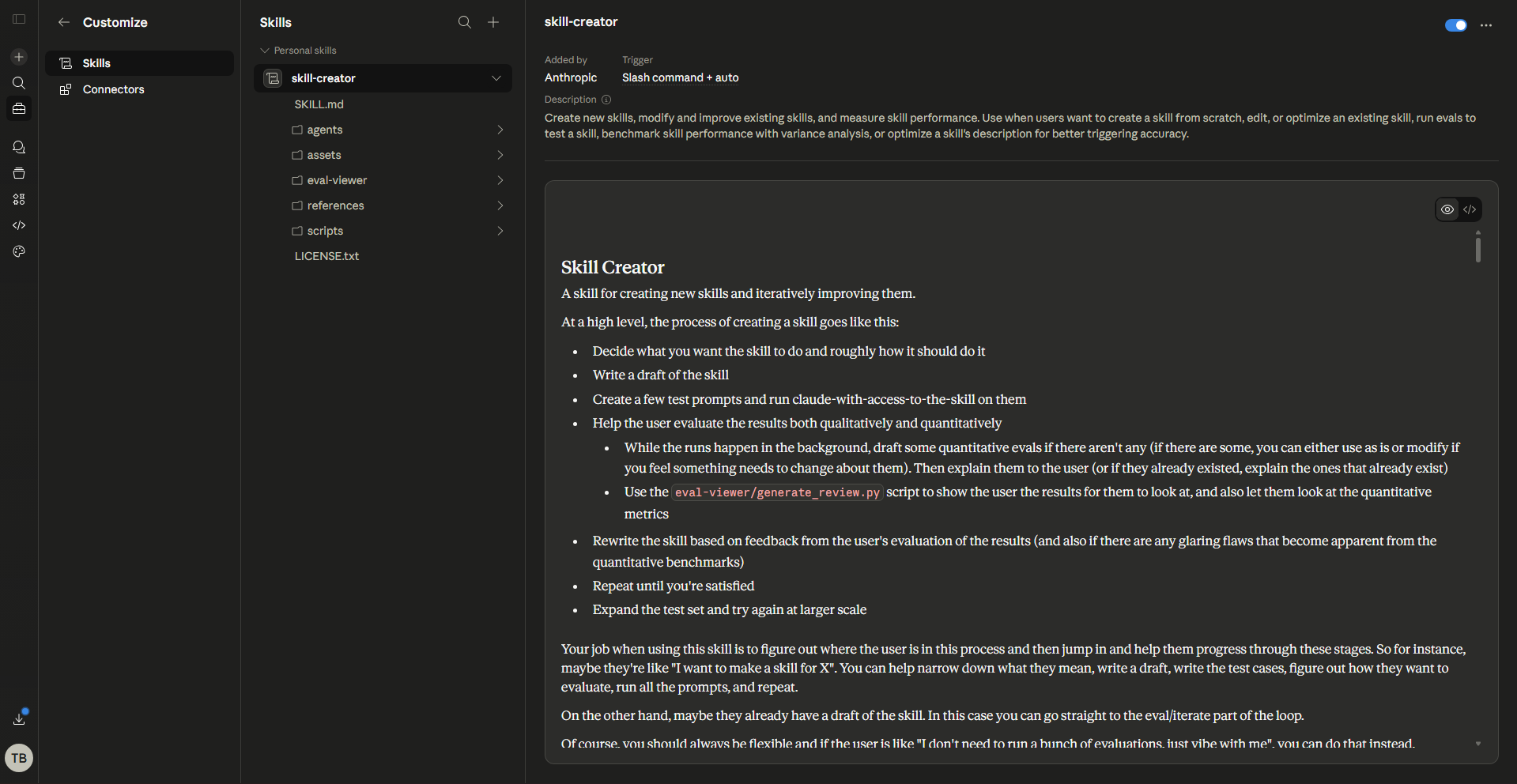
The concept is simpler than it sounds. A skill is a folder containing a single file called SKILL.md. That file has two parts. The first is a short header that tells Claude when to load the skill and what it does. The second is the actual instructions, written in plain Markdown, that Claude follows when the skill is active.
When you install a skill, Claude reads the description and adds it to its available capabilities. When you ask Claude to do something that matches, it pulls up the skill and uses it as a specialised playbook for that task. Skills can be triggered explicitly with a slash command, or they fire automatically when Claude recognises the task is relevant.
Anthropic publishes pre-built skills for PowerPoint, Excel, Word, and PDF creation, which are what power Claude's document abilities on claude.ai. But the system is open. You can write your own or use the Skill Creator to have Claude write them for you.
What the Skill Creator Does
The Skill Creator is a skill that builds other skills. You describe what you want Claude to be able to do, and it generates a properly structured SKILL.md file ready to install.
This matters more than it might seem. Writing an effective skill from scratch is harder than it looks, and the triggering mechanism is the trickiest part. Claude only loads a skill when it decides the task is relevant, and it makes that decision by reading the description in the skill header. Write the description too vaguely and the skill never triggers. Write it too narrowly and it only fires in a handful of cases. The Skill Creator knows how to strike that balance, producing descriptions that are specific enough to be useful but broad enough to load when they should.
It also handles the structure of the instructions. A good skill uses the imperative form, defines clear output formats, includes examples where helpful, and puts the right information in the right place. The header carries the triggering logic. The body carries the actual instructions. Reference material lives in a separate folder. These conventions exist for good reasons, and the Skill Creator applies them by default so you do not have to learn them before you start.
The Evaluation Loop
This is where the Skill Creator gets genuinely interesting. Building a skill and being confident it actually works are two different things. A skill that seemed fine in testing can start behaving unexpectedly after a model update, or in contexts the original author never considered.
The Skill Creator includes an automated evaluation system to address this directly. When you build a skill, it runs test queries against the triggering description to measure how reliably the skill fires. It splits the tests into a training set and a held-out test set, evaluates the current description multiple times to get a reliable measurement, then calls Claude to propose improvements based on what failed. This iterates up to five times. The best description is selected based on the test score, not the training score, which is a deliberate choice to avoid the common trap of optimising for cases you have already seen.
When the evaluation finishes, it generates an HTML report showing results across each iteration. Having systematic testing built directly into the creation process rather than leaving it as an afterthought is one of the more thoughtful design decisions in the Skill Creator's construction.
What You Can Build With It
The range is wide. Anthropic's own open-source skills repository includes skills for creative work, technical development, enterprise communication, and document creation. The community has built thousands more using the same SKILL.md format.
Common things people build include workflow-specific instructions for how Claude should handle a particular type of task, writing style guides that Claude applies consistently across all documents, code review patterns tied to a specific codebase's conventions, and onboarding workflows for processes that need to be followed the same way every time.
The pattern that points toward a good skill candidate is repetition. If you find yourself giving Claude the same context or the same set of instructions at the start of a particular type of task, that task is probably a good candidate for a skill. Define it once, package it up, and stop recreating it every time.
How to Get Started
The Skill Creator is available in Claude Code. If you have Anthropic's skills repository installed, the skill-creator skill is already included. Once it is available, using it is a conversation.
You describe what you want the skill to do, what contexts should trigger it, and what kind of output or behaviour you expect. The Skill Creator asks clarifying questions where needed, then produces the SKILL.md file. From there, the evaluation runs to confirm the triggering description is well-calibrated, you make any adjustments the results suggest, and you install the finished skill.
To upload a custom skill to claude.ai, go to Settings, then Capabilities, then Skills. In Claude Code, skills go in the skills directory. Once installed, Claude applies the skill automatically when it encounters relevant tasks.
One thing worth knowing about how the Skill Creator communicates: it pays attention to context cues in how you describe things. If you are comfortable with technical terms like JSON and evaluation benchmarks, it will use them. If you seem less familiar with that vocabulary, it will explain what it is doing in plainer language. That calibration is deliberate. Skills are increasingly being built by people who are not professional developers, and the Skill Creator is designed to be genuinely useful across that whole range.
Why This Actually Matters
The Agent Skills system represents a meaningful shift in how Claude can be customised. Previously, getting Claude to behave consistently in a specific way required careful prompting every single time, or complex system prompt engineering at the API level. Skills sit in the middle. You define the behaviour once, package it, and Claude applies it consistently without you recreating the context on every conversation.
The Skill Creator makes that process accessible to anyone who understands what they want Claude to do, regardless of whether they know how to write YAML frontmatter. You bring the domain knowledge. The Skill Creator handles the architecture.
For teams, the implications are practical. Skills can be deployed organisation-wide by administrators, which means a well-built skill for a company's document format or review workflow becomes available to everyone automatically. No individual setup required. Everyone gets the same capability without anyone managing their own installation.
Final Thoughts
The Skill Creator sits quietly in the background of a larger system and makes the whole thing significantly more accessible. Without it, building custom skills requires learning the structure, understanding the triggering conventions, and managing the evaluation process yourself. With it, you describe what you want and Claude figures out the implementation.
The evaluation loop is worth singling out. The difference between a skill that triggers reliably and one that only fires intermittently is not always visible from reading the description. Having a system that automatically tests, iterates, and reports on that is the kind of thing that turns a good idea into something you can actually depend on.
Frequently Asked Questions
What is a Claude skill in plain terms?
A skill is a set of instructions packaged in a file called SKILL.md that Claude loads automatically when it encounters a relevant task. Think of it as a specialised playbook for a specific kind of work. Anthropic provides pre-built skills for document creation, and you can build custom ones for your own workflows using the Skill Creator.
Who is the Skill Creator designed for?
Anyone who wants to build custom skills without starting from scratch. It is particularly useful for people who know what they want Claude to do consistently but are not familiar with the technical conventions for structuring skills. It reads how you describe things and adjusts its explanations to match your apparent comfort level with technical language.
Do custom skills work across all Claude surfaces?
Skills built in the SKILL.md format work across Claude.ai, Claude Code, and the API, but they need to be installed separately on each surface. Uploading a skill to claude.ai does not automatically make it available in Claude Code, and vice versa.
What does the evaluation feature actually check?
It tests how reliably your skill's triggering description fires when it should. The system runs test queries, proposes improved descriptions based on failures, and iterates up to five times before showing a results report. This prevents the common problem of a skill that works in testing but behaves inconsistently in practice.
Can organisations deploy skills to all their users at once?
Yes. Administrators on Team and Enterprise plans can deploy skills workspace-wide so that all users automatically have access without managing their own installations.



Discussion (0)
Be the first to comment.