



You run a speed test. Download speed looks fine. Ping is acceptable. Everything on paper is normal. And yet your character is teleporting, your shots are not registering, and you just got killed by someone who was standing behind a wall three seconds ago.
The problem is not your internet speed. It is packet loss. And it is one of the most misdiagnosed, most frustrating network problems a gamer can face, precisely because it does not show up where people think to look.
What a Packet Actually Is
When your computer sends or receives anything over the internet, it does not send it as one continuous stream. It breaks the data into small, discrete chunks called packets. Each packet contains a piece of the information, the address of where it is going, and enough metadata for the receiving end to reassemble everything in the right order.
Think of it like sending a book through the post by tearing out individual pages, putting each one in a separate envelope, and mailing them. Each envelope is numbered so the recipient can put them back in order. In ideal conditions, all the envelopes arrive and the book is complete.
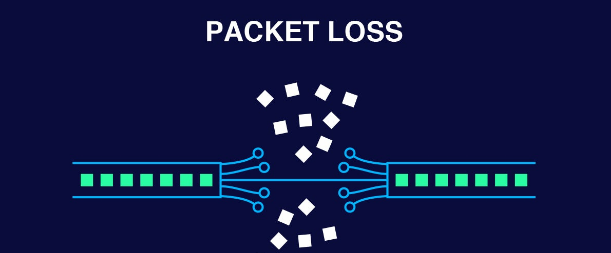
Packet loss is what happens when some of those envelopes go missing.
Why Packet Loss Is Different From High Ping
Most people have heard of ping and have a rough understanding of what it means. High ping means your data is arriving late. You fire a shot and the server registers it a fraction of a second after you pressed the button. Everything is delayed, but it is all there. The world keeps moving, just slower than it should.
Packet loss is different in a way that matters enormously for real-time applications like games. The data does not arrive late. It does not arrive at all.
When a packet is lost, one of two things happens depending on how the application handles it. For applications using TCP, the reliable but slower protocol used for things like file downloads and web pages, the missing packet triggers a request to send it again. The entire stream pauses and waits for the retransmit. For applications using UDP, the faster but less reliable protocol that most games use, there is no retransmission. The game makes its best guess at what happened and moves on.
This is why packet loss feels so different from lag. With high ping everything is slow but coherent. With packet loss the game world breaks. Your character teleports because position updates are arriving with gaps. Your shots do not register because the packet containing the input never reached the server. An enemy appears to move erratically because updates describing their position are missing and the game is interpolating blindly between the data it does have.
Why Such Small Amounts Cause Such Big Problems
Here is the part that surprises most people. Packet loss does not need to be severe to cause serious disruption in a game. Network engineers consider 1% packet loss the threshold where users begin noticing problems. At 2%, real-time applications become genuinely frustrating. At 5%, most online gaming is effectively broken.
Those are tiny numbers. One in every hundred packets disappearing is enough to produce visible rubber-banding and missed hit registration in a competitive shooter. The reason the impact is so disproportionate is that games send many small updates constantly, often 60 or more times per second in modern titles. At 60 updates per second with 1% packet loss, you are losing roughly one update every two seconds. In a fast-paced game where your position and the positions of every other player change dramatically in that time, a gap of even a fraction of a second produces visible distortion.
With slow internet the problem is you have to wait a bit longer for things. With packet loss the problem is the game is working with incomplete information and guessing the rest.
What Actually Causes It
Network congestion is the most common cause. When more data is being pushed through a network than it can handle, routers start dropping packets rather than queuing them indefinitely. This happens on your home network when multiple devices are competing for bandwidth, on your ISP's network during peak evening hours when the whole neighbourhood is online, and at various points along the internet backbone between you and the game server.
Wi-Fi interference is the second most common cause for home users. Wireless signals degrade with distance, walls, interference from microwaves and other devices, and competition from neighbouring networks on the same channels. Every time the wireless signal quality drops, packets start getting lost. A connection that shows full bars and acceptable speed can still have significant packet loss due to radio frequency issues.
Faulty hardware causes packet loss that appears completely random and is therefore particularly confusing to diagnose. A damaged ethernet cable, a failing network adapter, or a router with degraded hardware can drop packets intermittently. The connection appears to work normally most of the time and then inexplicably loses packets for no obvious reason.
ISP infrastructure problems sit outside your home entirely. Issues with the line running to your house, problems with equipment at your local exchange, or congestion on your provider's backbone network can all cause packet loss that you cannot fix regardless of what you do to your own setup.
Game server issues are worth checking before assuming the problem is on your end. A server under heavy load or with infrastructure problems will drop packets from its side. Check the game's official status page or DownDetector before spending an hour troubleshooting your home network.
How to Test Whether You Have It
The Windows ping command gives a quick first look. Open Command Prompt and type:
ping -n 50 8.8.8.8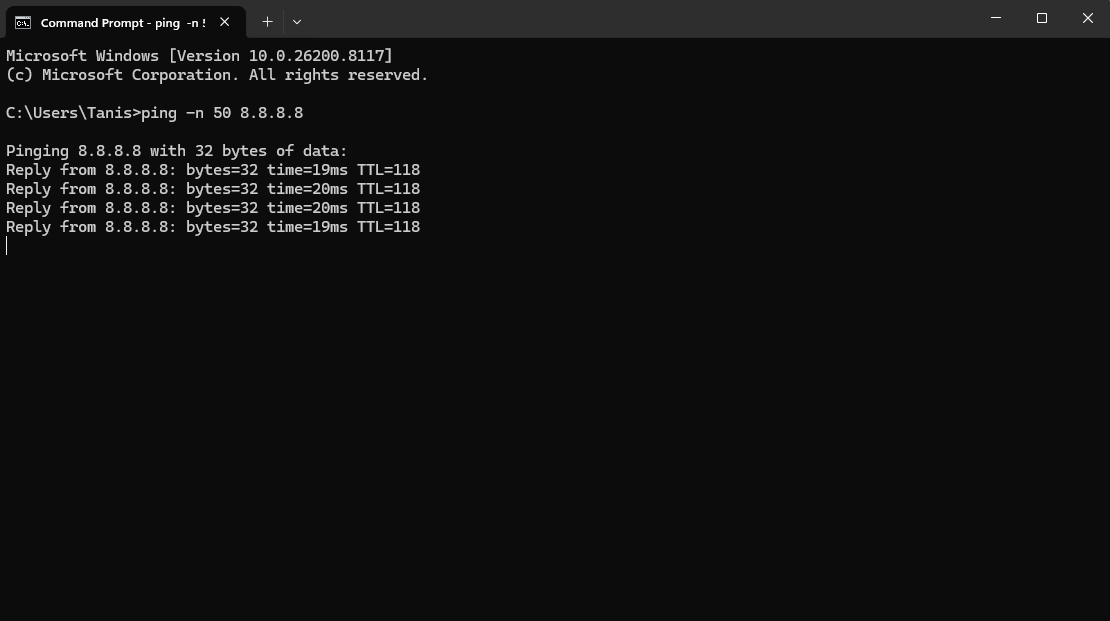
This sends 50 packets to Google's DNS server and reports how many come back. Any packet loss in this test indicates a problem somewhere between you and that server, though it does not tell you where along the path.
For a more detailed picture, use WinMTR, a free Windows tool that runs a continuous traceroute and shows packet loss at each hop between your machine and a destination. This tells you whether the loss is happening inside your home network, at your router, somewhere on your ISP's network, or further out toward the game server. Identifying where the loss starts is the most important step in knowing what you can actually fix.
Many games also display packet loss in their network statistics overlay. In most titles you can enable this in the settings. Seeing packet loss reported directly in the game confirms the problem is affecting your gaming connection specifically.
What to Do About It
Switch from Wi-Fi to ethernet if you have not already. This is the single most impactful change for the majority of gamers dealing with packet loss. A wired connection eliminates all wireless interference and dramatically improves reliability. If you cannot run a cable, a powerline adapter that carries the network connection through your home's electrical wiring is significantly more reliable than Wi-Fi for gaming.
Restart your router and modem before anything more involved. A significant proportion of packet loss issues at home are resolved by a power cycle that clears congested buffers and re-establishes the connection to your ISP.
Check your ethernet cables if you are already wired. Damaged cables, loose connections, or cables that are physically bent or kinked can cause intermittent packet loss that is indistinguishable from other causes. Swap the cable for a known-good one and test again.
Enable QoS on your router if you live in a household with multiple internet users. Quality of Service allows your router to prioritise gaming traffic over less time-sensitive activities like streaming and downloads. When someone starts a large download while you are gaming, the download gets throttled rather than the game packets getting dropped.
Contact your ISP if WinMTR shows the packet loss starting at their infrastructure rather than inside your home. Report it as packet loss specifically, not as slow internet, and share your traceroute results. A persistent packet loss issue on the ISP's side requires a technician visit or a hardware replacement in their network.
Update your network adapter drivers if nothing else resolves the issue. Outdated or corrupted drivers cause packet loss that can appear completely random. Open Device Manager, expand Network Adapters, right-click your ethernet or Wi-Fi adapter, and update the driver. For ethernet adapters, the most reliable drivers usually come directly from your motherboard manufacturer's support page rather than through Windows Update.
The Difference in Practice
Consider two scenarios. In the first, you have a 50 Mbps connection with 80ms ping and zero packet loss. Games load quickly, and everything in-game is delayed by 80ms but completely coherent. You adapt your timing and play effectively.
In the second scenario, you have a 200 Mbps connection with 20ms ping and 3% packet loss. Games download faster, your ping looks better on paper, but in a competitive shooter you are rubber-banding, your shots are not registering, and enemies are appearing in positions they were in half a second ago. The experience is genuinely worse despite objectively better headline numbers.
Speed test results do not measure packet loss. Ping alone does not explain it. The combination of fast internet and good ping can coexist with packet loss, which is exactly why so many people spend months assuming their internet is fine when the real problem is sitting right there in their network statistics.
Final Thoughts
Packet loss is the network problem that most gamers blame on everything except the actual cause. Bad servers. Bad game code Sometimes those things are real. But if your game feels inconsistent, if your inputs seem not to register, if enemies seem to teleport, check your packet loss before concluding anything else. It is measurable, it is diagnosable, and for most people at home it is fixable with a combination of switching to ethernet, restarting networking hardware, and a phone call to an ISP if the problem sits upstream of your front door.
Frequently Asked Questions
What is an acceptable level of packet loss for gaming?
Ideally zero, or as close to it as possible. In practice, anything below 0.5% is generally imperceptible. Between 0.5% and 1% you may occasionally notice issues. Above 1% you will notice problems in fast-paced games. Above 2% most competitive gaming becomes genuinely frustrating.
Can I have packet loss even with a fast internet connection?
Yes. Speed and packet loss are separate measurements. A 1Gbps connection can have packet loss if there is a faulty cable, network congestion, or a hardware problem. Speed tests do not measure packet loss, which is why a speed test result can look completely normal while your game experience is breaking down.
Does a VPN help with packet loss?
Sometimes, in a specific situation. If your ISP is throttling or routing your gaming traffic poorly, a VPN can route it differently and reduce loss. More commonly, a VPN adds a processing overhead that does nothing to improve and can worsen packet loss. It is worth trying if you suspect ISP routing is the problem, but it is not a general solution.
Is packet loss the same as jitter?
No, though they are related. Jitter is inconsistency in the timing of packet arrival. Packets arrive but not at regular intervals, causing stuttering even when none are lost. Packet loss means packets do not arrive at all. Both affect online gaming but in slightly different ways. High jitter produces inconsistent frame timing. Packet loss produces the teleporting and missing inputs described above.
How do I check for packet loss on Windows?
Open Command Prompt and run ping -n 50 8.8.8.8. Any packets lost in the results indicate a problem. For a more detailed diagnosis of where along the route the loss is occurring, download WinMTR and run it pointed at your game server's IP address or a known endpoint. The hop-by-hop results show you exactly where packets start getting dropped.



Discussion (0)
Be the first to comment.