



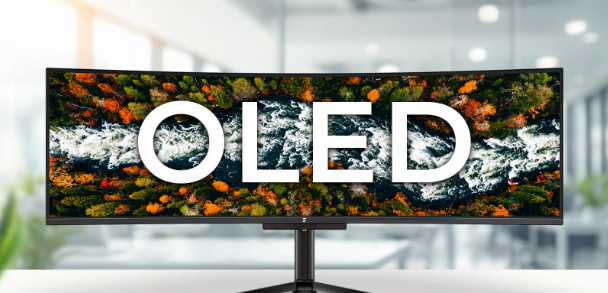
If you have ever stood in a shop comparing two laptops or televisions side by side and noticed that one of them looks dramatically better, the one with the richer blacks and more vivid colours was almost certainly OLED. The difference is immediately obvious even to people who have never heard the term before.
What is less obvious is whether that difference justifies paying meaningfully more for it, and the honest answer is that it depends entirely on what you are buying and what you use it for.
What Is OLED?
OLED stands for Organic Light-Emitting Diode. The name sounds technical but the underlying idea is straightforward. In a traditional LCD screen, a single backlight shines from behind the entire panel. The liquid crystals in the screen shift to block or allow that light through, creating the image you see. The backlight is always on, even when the screen is showing something completely black.
OLED works completely differently. There is no backlight at all. Every individual pixel produces its own light. When a pixel needs to display black, it simply turns itself off entirely. No light, no glow, no compromise. True black.
This single difference is responsible for almost everything that makes OLED screens look the way they do.
What OLED Actually Looks Better At
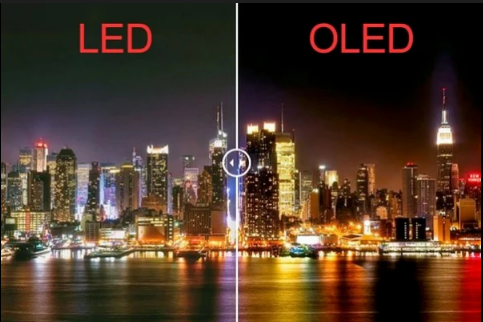
Contrast is where OLED has no competition. Because black pixels are completely off, the difference between the darkest and brightest parts of an image is essentially infinite. On a conventional LCD screen, what looks like black is actually a very dark grey because the backlight is always shining behind it. Put the two screens side by side in a dark room showing the same film and the OLED looks like it belongs to a different generation of technology.
Colours benefit directly from that contrast. When blacks are genuinely black, the colours next to them look more vivid and accurate. Skin tones, night skies, fire, neon lights in a cityscape, any scene with a mix of dark and bright elements looks noticeably more real on an OLED screen.
Viewing angles are excellent. Walk to the side of an OLED screen and the image remains accurate and bright. Many LCD screens shift in colour and brightness when viewed off-axis.
Response time is essentially instantaneous. Each pixel switches on and off independently with no lag. This makes OLED screens exceptionally smooth for gaming and video, with no motion blur or ghosting in fast scenes.
Thickness is a practical benefit that is easy to overlook. With no backlight required, OLED panels can be made significantly thinner. This is part of why premium phones and laptops have become so remarkably slim in recent years.
Where OLED Falls Short
Brightness has historically been OLED's main weakness. Because pixels are self-lit and driving every pixel at full brightness simultaneously generates significant heat, OLED screens tend to be dimmer than the best LCD screens under bright lighting conditions. In a dark room this is irrelevant. In a bright office or a room with large windows, a high-end LCD with a strong backlight can look sharper and more readable. Newer OLED panels in 2025 and 2026 have improved significantly here, particularly QD-OLED panels that combine OLED technology with quantum dot filters, but the gap with the very brightest LCD panels remains.
Burn-in is a real concern that is often overstated but should not be ignored. If the same static image sits on an OLED screen at high brightness for extended periods, the organic compounds in those pixels can degrade faster than the ones around them, leaving a faint permanent ghost of that image. For phones and televisions used normally this is rarely an issue in practice. For a PC monitor used daily for work with a static taskbar, browser toolbar, and desktop icons sitting in the same position for hours every day, the risk is more relevant. Most modern OLED monitors have pixel-shifting and auto-dimming features specifically to manage this, but it is worth knowing about before buying.
Price is the most immediate and obvious limitation. OLED manufacturing is more complex and expensive than LCD. The premium over an equivalent LCD screen ranges from modest to substantial depending on the category. On laptops and monitors in particular, choosing OLED often means paying considerably more for the display while accepting a smaller screen, less storage, or a weaker processor for the same budget.
OLED vs LCD at a Glance
| OLED | LCD (IPS) | |
|---|---|---|
| Black levels | Perfect, true black | Dark grey, backlight always on |
| Contrast | Effectively infinite | Good but limited |
| Brightness | Good, improving | Generally higher |
| Colours | Vivid, punchy | Accurate, more neutral |
| Viewing angles | Excellent | Good on IPS, poor on TN |
| Response time | Sub-millisecond | 1 to 5ms on fast panels |
| Burn-in risk | Yes, manageable | None |
| Thickness | Very thin | Thicker due to backlight |
| Price | Premium | More affordable |
Is It Worth Paying More?
For a phone, you almost certainly already have one. The majority of mid-range and flagship smartphones have used OLED panels for years because they are power efficient when displaying dark content, which is most of the time on a phone screen with a dark interface. If you are choosing between two phones, OLED is worth having at the same price. It is rarely the deciding factor on its own.
For a television, OLED is genuinely worth it if you watch films and TV in a room where you can control the lighting. The picture quality difference on a dark cinematic scene is something you will notice every single time you watch something. If the TV is in a bright living room that you rarely darken and you mostly watch daytime sports, a high-quality LCD with a strong backlight competes well and costs less.
For a laptop, the case for OLED depends on what you do. If you edit photos or video professionally, colour accuracy and contrast matter and OLED is a meaningful tool. If you use your laptop outdoors, in bright offices, or primarily for writing and browsing, the extra brightness of a good LCD panel is often more practical. OLED laptop screens look stunning, but the price premium on a laptop can be significant.
For a monitor, OLED is increasingly compelling for gaming and media consumption, but for all-day office work with static interfaces, burn-in caution and the brightness limitations in a well-lit room mean a high quality IPS or Mini-LED monitor remains a perfectly sensible choice.
Final Thoughts
OLED is genuinely better in the ways that matter most for watching and enjoying visual content. The blacks, the contrast, and the colours are in a different league from a conventional LCD when viewed in the right conditions. Whether that is worth the premium depends on your budget, your environment, and what you actually do with the screen. For most people buying a television to watch films in a dim room, the answer is yes. For a work laptop used in a bright office, the answer is less clear. Know what you are paying for and you will make the right call.
Frequently Asked Questions
Does OLED burn-in actually happen in normal use?
For phones and televisions used normally, burn-in is rare in practice and usually only becomes a problem after years of use with static content at high brightness. For PC monitors used daily with a persistent taskbar and static UI elements, the risk is higher. Modern OLED screens include features like pixel shifting, screen savers, and automatic dimming to mitigate this. It is a real limitation worth knowing about rather than an immediate dealbreaker.
Is OLED better for your eyes than LCD?
It depends on the context. OLED produces less blue light than many LCD screens and the perfect contrast reduces eye strain when viewing dark content. However, some OLED screens use pulse-width modulation dimming at low brightness levels, which can cause eye strain for sensitive users. Newer OLED panels increasingly offer DC dimming as an option to address this. For long work sessions in a bright room, a good IPS LCD with flicker-free certification is often more comfortable.
What is QD-OLED?
QD-OLED is a newer variant that combines traditional OLED technology with quantum dot colour filters, used mainly in high-end Samsung TVs and some monitors. It achieves higher peak brightness and a wider colour range than standard OLED while retaining the perfect blacks. It is the best display technology currently available for picture quality, and also the most expensive.
Is OLED worth it on a laptop?
It depends on what you use the laptop for. If you edit photos or video, work with colour-sensitive content, or simply value a stunning screen for media, OLED is a meaningful upgrade. If you work primarily in bright environments or outdoors where high brightness matters more than perfect blacks, a good IPS panel is often the more practical choice. The price premium on OLED laptops is real and sometimes means accepting weaker specifications elsewhere for the same budget.
Will OLED eventually replace LCD entirely?
OLED has already replaced LCD as the dominant technology on smartphones above the mid-range. In televisions and monitors the transition is happening more gradually due to cost and manufacturing scale. Mini-LED LCD has emerged as a strong competitor that closes some of the gap at a lower price. OLED will likely become the standard for premium screens across most categories over the coming years as production costs fall.



Discussion (0)
Be the first to comment.