



If you have ever had a clear idea in your head but no way to make it look like something, Claude Design is built for exactly that gap.
Anthropic launched Claude Design on April 17, 2026, as a research preview for Pro, Max, Team, and Enterprise subscribers. It sits in the left sidebar of Claude.ai alongside Chats, Projects, Artifacts, and Code, and it does something none of those do: it turns a plain text description into a finished-looking visual, whether that is a product prototype, a pitch deck, a one-pager, or a marketing asset.
It is powered by Claude Opus 4.7, Anthropic's latest and most visually capable model, and it is already one of the most talked-about product launches Anthropic has made.
Who It Is Actually For
The honest answer is two different groups of people, for slightly different reasons.
The first group is founders, product managers, and marketers who have never used a design tool professionally. These are people who have always needed to hand something rough to a designer, wait for a draft, give feedback, wait again. Claude Design shortens that entire loop. You describe what you need, Claude builds a first version, and you refine it through conversation rather than through back-and-forth emails with another person.
The second group is actual designers. Not to replace their work but to accelerate the parts of it that are tedious. Early exploration, quick prototyping, getting something on screen fast enough to make a decision. Anthropic put it plainly in their own words: Claude Design gives designers room to explore widely and everyone else a way to produce visual work.
Both uses are legitimate. The tool is just genuinely useful in different ways depending on who is holding it.
What You Can Make With It
The range is broader than you might expect from something this new.
App and product prototypes are the headline use case. You describe a mobile interface, Claude builds one that looks like something you could actually put in front of a user. Interactive elements, layout, typography, colour, all handled without you touching a design tool.
Pitch decks and presentations are another strong use case. Give Claude context about your company or idea and ask for a deck and you get structured slides rather than a blank template.
Marketing one-pagers, landing page mockups, wireframes, social media assets, and internal documents all fall within what the tool can produce. The Datadog product team reportedly compressed a week-long brief-to-mockup-to-review cycle into a single conversation. The education company Brilliant said their most complex pages that took 20 or more prompts in competing tools needed only two in Claude Design.
How the Workflow Actually Works
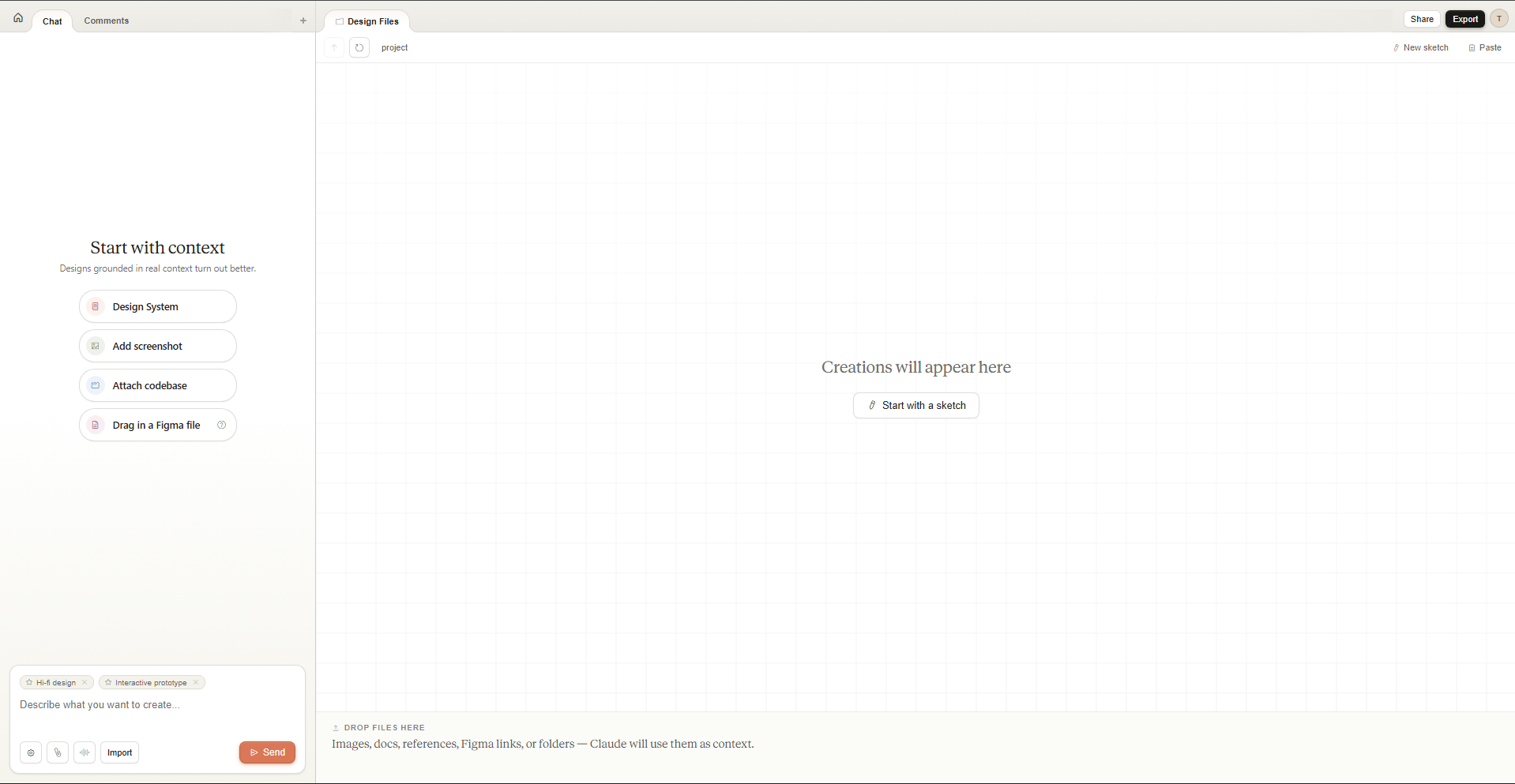
You start either from a text prompt or from something you already have. Upload a sketch, a document, a PPTX, an XLSX, or point Claude at your codebase. There is also a web capture tool that lets you grab elements directly from a live website so prototypes look like the actual product rather than a rough approximation of it.
Claude generates an initial version. From there you refine it through conversation, inline comments, direct edits, or custom sliders that Claude itself builds so you can adjust specific things like font size or colour intensity without writing another prompt.
One of the more practically useful features is the design system. During onboarding, Claude reads your codebase and existing design files to extract your team's colours, typography, and components. Every project you create after that automatically applies those rules. You are not starting from scratch each time, and the output does not look generic.
When the design is ready, you can export it as a PDF, PPTX, standalone HTML, or a URL to share internally. You can also send it directly to Canva, where it becomes fully editable and collaborative. Or you can hand it off to Claude Code as a bundle, which is where things get genuinely interesting. The loop from idea to visual to working code all stays within Anthropic's ecosystem if you want it to.
The Canva Connection
Claude Design and Canva are partners rather than competitors, at least officially. Canva's Design Engine powers part of what makes Claude Design output polished rather than rough. Anything created in Claude Design can be exported into Canva in one click and becomes a fully editable Canva document from that point.
Canva launched its own Canva AI 2.0 on the same day, describing it as the biggest product launch in the company's history. The timing was coordinated. Anthropic gets a visual output layer for Claude that non-technical users consider finished work. Canva gets Claude Design funnelling users into its ecosystem for editing, collaboration, and publishing. Both companies benefit.
What It Is Not
Claude Design is not a replacement for Figma, Canva, or PowerPoint in the sense that it is not where you go to do precision design work, manage design systems manually, or collaborate on complex multi-page documents with a large team.
It is a starting point. A fast, low-friction way to get from nothing to something that looks real enough to share, discuss, or test. From there, the expectation is that you move into whatever tool your team actually uses for the polished final version.
Anthropic is also being careful to position this as a research preview rather than a finished product. Usage is metered separately from regular Claude usage with its own weekly limits, and Enterprise access is off by default and needs to be enabled by administrators.
The Market Reaction
Figma's stock dropped roughly 7% the day Claude Design launched. That is the market's clearest signal that this is being taken seriously, not as a curiosity but as a genuine competitive move in a space that established tools have owned for years.
Anthropic's Chief Product Officer Mike Krieger resigned from Figma's board three days before the announcement. Whether or not that was connected, the timing landed with a certain clarity.
Final Thoughts
Claude Design is genuinely new territory for Anthropic. For most of its history the company has been a model company, building better and safer AI. Claude Code was the first sign that they were willing to build specific products on top of that foundation. Claude Design is the second, and it moves into a domain where the incumbents are well-established and heavily used.
Whether it succeeds depends on how well the output quality holds up across diverse use cases, how the pricing settles once it leaves research preview, and whether the integrations with Canva and Claude Code are smooth enough to make the workflow feel natural rather than forced.
What is already clear is that it does the thing it says it does. You describe something. Claude makes it look like something. That alone puts it ahead of where most people start when they have an idea and no design background.
Frequently Asked Questions
Who can use Claude Design?
Claude Design is currently available as a research preview for Claude Pro, Max, Team, and Enterprise subscribers. It is rolling out gradually. Enterprise access is off by default and must be enabled by an administrator.
What model powers Claude Design?
It runs on Claude Opus 4.7, Anthropic's most capable vision model released on the same day as Claude Design. Opus 4.7 has been specifically optimised for design tasks including higher-resolution image analysis and more tasteful visual output.
Does Claude Design count against my normal Claude usage?
No. Claude Design has its own separate usage tracking and its own weekly limits that sit alongside your existing chat or Claude Code limits, not inside them.
Can I export what Claude Design creates?
Yes. Exports include PDF, PPTX, standalone HTML, a shareable internal URL, and direct export to Canva where the design becomes fully editable. Designs can also be handed off to Claude Code as a bundle for implementation.
Is Claude Design a replacement for Figma or Canva?
Anthropic says no, and the Canva integration suggests genuine intention to complement rather than replace. Claude Design is positioned as a fast starting point for getting from idea to visual, not a tool for precision design work or large-scale collaborative projects. Canva and Figma remain the destinations for that kind of work.



Discussion (0)
Be the first to comment.