




Apple ProMotion refers to Apple’s adaptive display technology that can refresh up to 120Hz. Instead of running at a fixed refresh rate, the screen dynamically adjusts based on what you’re doing, which improves smoothness without draining battery unnecessarily.
This guide explains how ProMotion works, where it matters, when it doesn’t, and how to control it on your devices.
Table of contents
- What is Apple ProMotion display
- How the 120Hz refresh rate actually works
- Which Apple devices support ProMotion
- When ProMotion makes a visible difference
- When ProMotion does not matter much
- How ProMotion affects battery life
- How to enable, disable, or limit ProMotion
- Why ProMotion may feel stuck at 60Hz
- How to check if ProMotion is working
- ProMotion vs standard 60Hz displays
- Is ProMotion worth it for you
- Tips
- FAQs
- Summary
What is Apple ProMotion display
Apple ProMotion is a variable refresh rate display technology that scales from very low refresh rates up to 120Hz. Apple uses it to deliver smoother motion while keeping power usage under control.
Unlike standard 60Hz displays, ProMotion reacts in real time to scrolling, animations, and touch input.
How the 120Hz refresh rate actually works
ProMotion constantly adjusts how many times the screen refreshes per second. Fast motion triggers higher refresh rates, while static content allows the display to slow down.
This adaptive behavior makes the interface feel fluid without running at 120Hz all the time.
Refresh rate vs frame rate
Refresh rate describes how often the display updates each second. Frame rate describes how many frames an app or video sends to the screen.
A 120Hz display does not force apps or videos to run at 120fps.
Variable refresh rate and LTPO panels
Apple relies on LTPO display technology to vary refresh rates efficiently. This hardware allows the screen to drop to very low refresh rates when nothing moves.
Lower refresh rates reduce power consumption during reading or idle moments.
Which Apple devices support ProMotion
Apple includes ProMotion on select iPhone, iPad, and Mac models. Support depends on hardware generation and display technology.
Checking your exact model matters because not all Apple displays offer adaptive refresh rates.
Differences between iPhone, iPad, and Mac implementations
iPhones emphasize touch responsiveness and system animations. iPads benefit more during Pencil input and multitasking.
On Macs, ProMotion mainly improves scrolling and window animations rather than gaming performance.
When ProMotion makes a visible difference
ProMotion shines when content moves quickly or responds directly to your touch. These moments create the biggest contrast versus 60Hz screens.
Scrolling and system animations
Fast scrolling feels smoother and more natural on ProMotion displays. System animations also appear more fluid and responsive.
This effect becomes obvious after extended daily use.
Gaming and high-frame-rate apps
Games that support higher frame rates feel smoother on ProMotion displays. Competitive and action-heavy titles benefit the most.
Not all games unlock 120fps, even on supported hardware.
Apple Pencil and stylus input
ProMotion reduces input latency during drawing and note-taking. Pencil strokes track more closely with your hand movement.
Artists and students notice this improvement immediately.
When ProMotion does not matter much
Some tasks see little or no benefit from higher refresh rates. Knowing this helps set realistic expectations.
Video playback and streaming apps
Most videos play at 24, 30, or 60 frames per second. ProMotion does not magically increase video frame rates.
Streaming content usually looks identical on 60Hz and 120Hz displays.
Reading and static content
When text or images remain still, ProMotion lowers the refresh rate automatically. This behavior saves power without affecting readability.
You won’t notice smoother motion while reading articles or ebooks.
How ProMotion affects battery life
ProMotion improves efficiency compared to a constant 120Hz display. The screen only uses high refresh rates when needed.
In many cases, ProMotion devices last longer than older non-adaptive displays.
Low Power Mode and system limits
Low Power Mode restricts refresh rates to preserve battery. Thermal conditions can also reduce refresh rates temporarily.
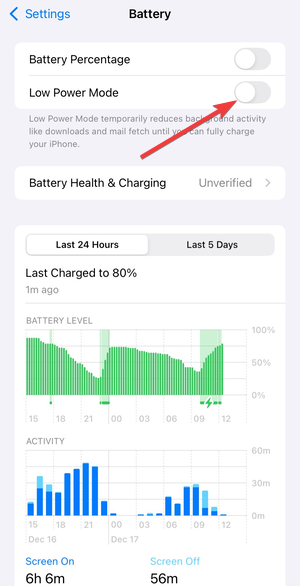
These limits operate automatically and vary by device.
How to enable, disable, or limit ProMotion
Apple allows limited user control over refresh behavior. These options help users prioritize battery life or visual smoothness.
Limit frame rate on iPhone and iPad
iOS and iPadOS include an accessibility option called Limit Frame Rate. Just go to Settings > Accessibility > Motion and enable the Limit Frame Rate. Turning it on caps the display at 60Hz.
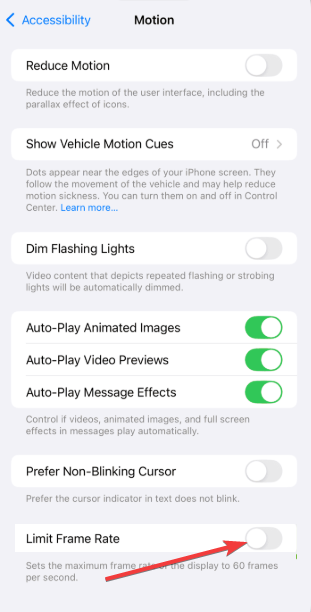
This setting affects system animations and supported apps.
Refresh rate settings on Mac
macOS lets users manually select refresh rates on supported displays. You can switch between standard and higher refresh rates.

External monitors may expose additional refresh options.
Why ProMotion may feel stuck at 60Hz
Many users think ProMotion isn’t working when they don’t see constant smoothness. In reality, the system adapts aggressively.
App-level refresh rate caps
Some apps limit frame rates for stability or battery reasons. Browsers and video apps often enforce these caps.
ProMotion cannot override app-level restrictions.
Common testing misconceptions
Online refresh-rate tests often misreport results. These tools rarely reflect real-world system behavior.
Judging ProMotion through daily interaction works better.
How to check if ProMotion is working
Scroll quickly through long menus or web pages and watch for fluid motion. Compare behavior with Low Power Mode enabled and disabled.
On Mac, manually switching refresh rates provides a clear comparison.
ProMotion vs standard 60Hz displays
ProMotion offers smoother motion, lower input latency, and better power efficiency. Standard 60Hz displays remain perfectly usable for casual tasks.
The difference becomes more noticeable over time rather than instantly.
Is ProMotion worth it for you
ProMotion benefits users who scroll frequently, draw with Apple Pencil, or play supported games. Casual media consumption sees fewer gains.
Your usage pattern matters more than raw specifications.
Tips
- Turn off Low Power Mode to experience full ProMotion behavior.
- Don’t rely on refresh-rate test websites for accuracy.
- Check app settings for frame-rate limits.
- Compare scrolling speed rather than video playback.
- Keep your device updated for optimal display behavior.
FAQs
What does 120Hz mean on an Apple display?
It means the screen can refresh up to 120 times per second when content requires it.
Does ProMotion always run at 120Hz?
No, the system dynamically adjusts the refresh rate to save power.
Does ProMotion improve video quality?
No, videos remain limited by their original frame rate.
Can I turn ProMotion off completely?
You can limit refresh rates to 60Hz through accessibility or display settings.
Summary
- ProMotion dynamically adjusts refresh rates up to 120Hz.
- It improves smoothness while protecting battery life.
- Benefits appear most during scrolling, drawing, and gaming.
- Some content shows no visible difference.
ProMotion works best when you let the system manage it automatically. If smooth interaction matters to you, ProMotion delivers clear everyday benefits without constant power tradeoffs.


Discussion (0)
Be the first to comment.