




Background noise can ruin calls, recordings, and even in-game communication. Whether it’s keyboard clicks, fan noise, or traffic, it becomes distracting quickly.
AMD Noise Suppression is AMD’s built-in solution for this problem. It uses AI to filter out unwanted sounds from your microphone and even incoming audio.
Available inside AMD Software: Adrenalin Edition, it’s designed to work system-wide without needing third-party apps.
What AMD Noise Suppression Actually Does
AMD Noise Suppression removes background noise in real time.
It can filter:
- Keyboard typing
- Mouse clicks
- Fan or AC noise
- Ambient room sounds
It works on:
- Microphone input (what others hear from you)
- Speaker output (what you hear from others)
The goal is simple: make voice communication clearer without manual tuning.
How It Works
The feature uses AI-based audio processing running on your system.
Instead of just lowering volume, it:
- Identifies voice patterns
- Separates them from noise
- Suppresses unwanted sounds dynamically
This is more effective than traditional noise filters, especially in noisy environments.
How to Enable AMD Noise Suppression
Step-by-Step Setup
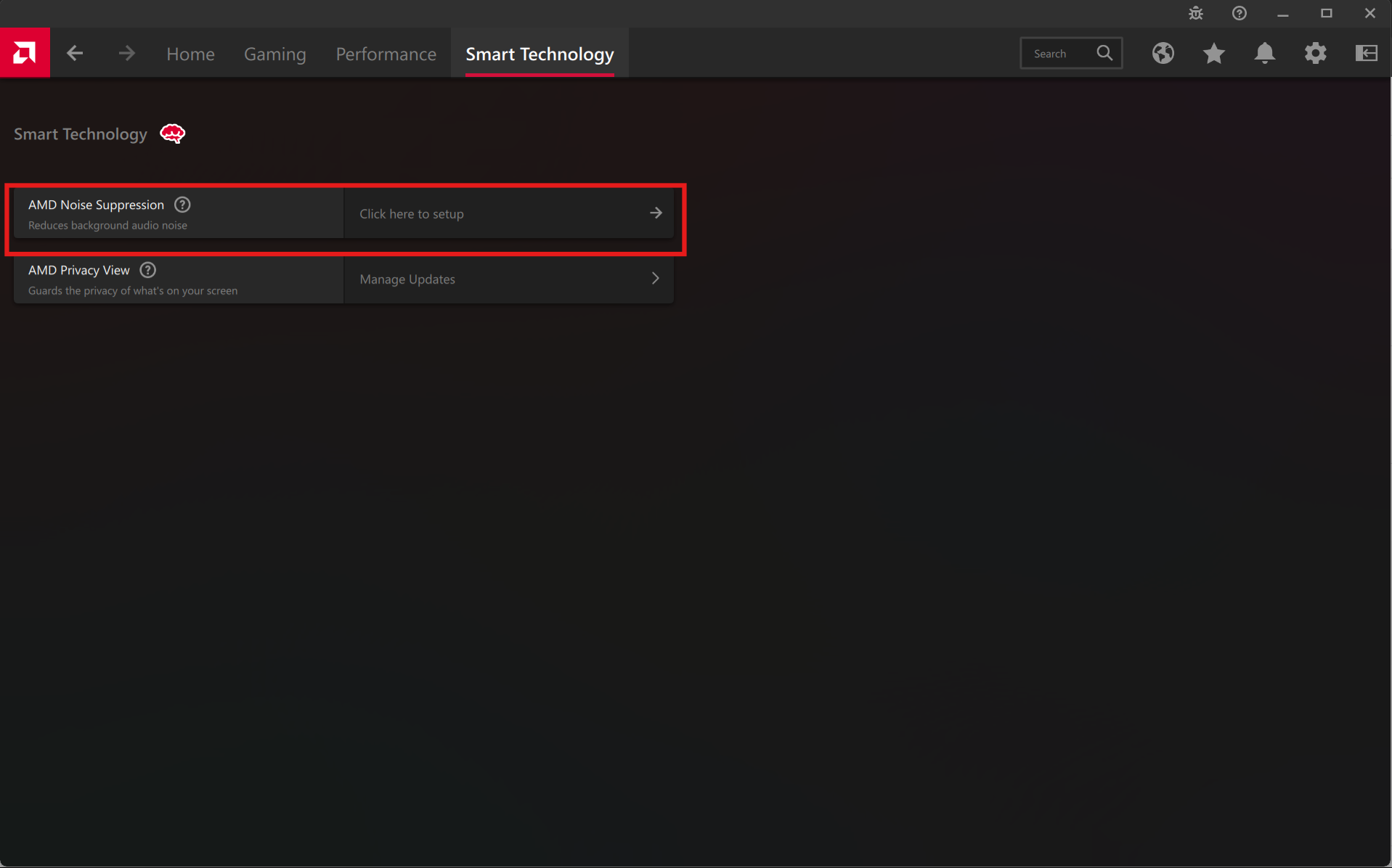
- Open AMD Software: Adrenalin Edition
- Go to Settings (gear icon)
- Navigate to Smart Technology
- Find AMD Noise Suppression
- Toggle it ON
Once enabled, it creates virtual audio devices.
Configure It in Apps
After enabling, you need to select it in your apps.
For Microphone:
- Choose AMD Noise Suppression Input as your mic
For Speakers/Headphones:
- Choose AMD Noise Suppression Output
Do this in apps like:
- Discord
- Zoom
- Microsoft Teams
Without this step, the feature won’t be applied.
Real-World Usage: Where It Helps Most
AMD Noise Suppression is most useful in:
Online Meetings
Removes background distractions and improves clarity.
Gaming Voice Chat
Filters keyboard and fan noise while talking.
Streaming or Recording
Provides cleaner audio without external software.
Shared or Noisy Environments
Helps when you don’t have a quiet room.
Performance and System Impact
The feature is lightweight and optimized for AMD hardware.
In most cases:
- Minimal performance impact
- No noticeable lag in audio
However, on lower-end systems, there may be slight processing overhead.
Limitations You Should Know
While effective, it is not perfect.
- May slightly affect voice quality
- Can struggle with very loud or overlapping noise
- Requires compatible AMD hardware
- Needs manual selection in apps
It works best for moderate noise, not extreme conditions.
AMD Noise Suppression vs Other Tools
Compared to alternatives:
- NVIDIA Broadcast → More advanced, but requires NVIDIA GPU
- Discord Noise Suppression → App-specific
- Third-party tools → Often require setup
AMD’s solution stands out because it is:
- System-wide
- Easy to enable
- Built into drivers
Should You Use It?
You should enable it if:
- You frequently use voice chat or meetings
- You have background noise issues
- You want a simple, built-in solution
You may skip it if:
- You already use dedicated audio hardware
- You need studio-level audio quality
Final Thoughts
AMD Noise Suppression is a practical feature that solves a very common problem without requiring extra software.
It is not perfect, but for everyday use, it significantly improves audio clarity with minimal effort.
Once set up correctly in AMD Software: Adrenalin Edition and your apps, it becomes one of those features you just leave on and forget.
FAQs
What is AMD Noise Suppression?
It is an AI-based feature that removes background noise from audio.
Does it work for both mic and speakers?
Yes, it supports both input and output.
Is it free?
Yes, it is included with AMD drivers.
Does it affect performance?
Minimal impact in most cases.
Do I need to enable it in apps?
Yes, you must select the AMD audio devices manually.



Discussion (0)
Be the first to comment.