




Instagram uses icons instead of text to keep the interface clean and fast. These symbols change meaning depending on where they appear, which often confuses users. This guide explains every major Instagram icon so you know exactly what each one does.
Table of contents
- Understanding Instagram symbols and icons
- Instagram home feed icons and symbols
- Instagram Stories icons and symbols
- Instagram Reels icons and symbols
- Instagram Direct Messages icons and symbols
- Instagram profile and account icons
- Instagram creator and monetization icons
- New and confusing Instagram icons users ask about
- Android vs iPhone Instagram icon differences
- Tips for remembering Instagram icon meanings
- Summary
Understanding Instagram symbols and icons
Instagram icons represent actions, statuses, or features. The same symbol can behave differently in the Feed, Stories, Reels, or Direct Messages. Knowing the context helps you avoid tapping the wrong option.
Instagram home feed icons and symbols
These icons appear while you scroll posts from accounts you follow or suggested content.
Like, comment, share, and save icons
- The heart icon likes a post and signals engagement.
- The speech bubble opens the comments section.
- The paper airplane shares the post via DM or external apps.
- The bookmark saves posts to private collections.
More options and suggested content icons
- The three-dot icon opens post options like hide, report, or copy link.


- Suggested post labels indicate algorithm-based recommendations, not ads.
Instagram Stories icons and symbols
Stories use a separate set of icons focused on quick interaction.
Story interaction icons
- The message field lets you reply privately to a Story.
- Emoji reactions send instant responses without opening a chat.
- The share icon reposts public Stories where sharing is allowed.


Story creation and editing icons
- Sticker, text, and drawing icons customize Stories.
- The music icon adds licensed tracks or original audio.
- The link icon inserts tappable URLs when available.
Instagram Reels icons and symbols
Reels include unique icons tied to discovery and engagement.
Reel interaction icons
- The heart, comment, and share icons work like feed posts.
- The remix icon lets you create content alongside another Reel.
- The save icon stores Reels for later viewing.
Reel discovery and audio icons
- The audio icon shows the sound used in the Reel.
- Trending audio labels signal popular sounds you can reuse.
Instagram Direct Messages icons and symbols
DM icons show message status and available chat features.
Message status icons
- A hollow circle means the message sent.
- A filled circle means delivery completed.
- A profile photo or checkmark confirms the message was seen.
Chat feature icons
- The camera icon opens instant photo or video capture.
- The microphone records voice messages.
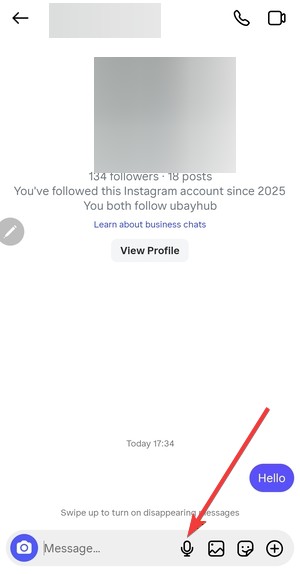
- The phone and video icons start calls inside Instagram.

Instagram profile and account icons
These icons relate to account management and identity.
Profile action icons
- The menu icon opens settings and account tools.


- The plus icon adds posts, Stories, or Reels.
- Highlight icons save Stories permanently on profiles.
Verification and account type icons
- The blue checkmark confirms verified identity.
- Business and creator labels show account category and purpose.
Instagram creator and monetization icons
These symbols matter most to creators and businesses.
Subscription, gifts, and monetization symbols
- Subscription icons mark paid-only content.
- Gift icons show viewer support during eligible content.
- Earnings indicators appear inside creator dashboards.
Branded content and collaboration icons
- Partnership labels disclose sponsored posts.
- Collaboration icons show shared posts between accounts.
New and confusing Instagram icons users ask about
Instagram regularly tests new icons. AI content labels, experimental badges, and temporary symbols often appear without explanation. Checking context and tapping info panels helps clarify their meaning.
Android vs iPhone Instagram icon differences
Instagram keeps icons consistent across platforms. Minor layout or placement changes can appear between Android and iOS versions. Icon meaning stays the same even when placement changes.
Tips for remembering Instagram icon meanings
- Pay attention to icon location before tapping.
- Long-press icons to reveal tooltips where available.
- Save this guide for quick reference.
Summary
- Instagram icons change meaning based on location.
- Reels and DMs include the most unique symbols.
- Creator and monetization icons target business users.
- New icons appear often due to feature testing.
Instagram icons help keep the app fast and visual, but they require context to understand. Once you learn where each symbol appears and what action it triggers, navigating Instagram becomes simple and predictable.


Discussion (0)
Be the first to comment.