



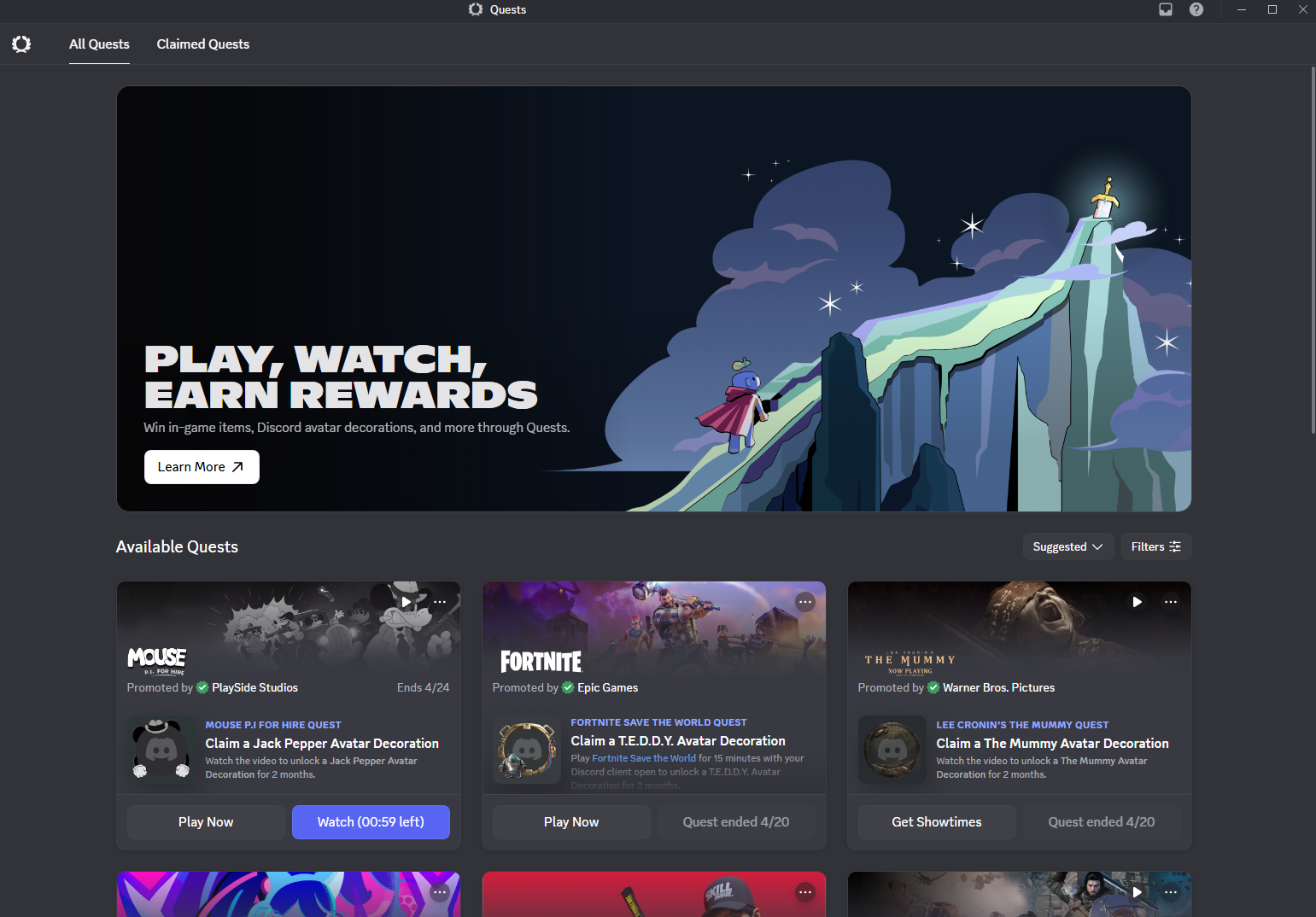
Most people use Discord every day without realising there is a system sitting inside it that hands out free cosmetics, in-game items, and even Nitro credits in exchange for tasks that take anywhere from thirty seconds to fifteen minutes. Discord Quests have been quietly running since 2024 and have expanded significantly since then, and for anyone who cares about their Discord profile or the games they play on the platform, they are worth paying attention to.
This article covers what Quests are, the different types available, how the Orbs currency ties into everything, and how to actually find and complete them.
What Discord Quests Actually Are
Discord describes Quests as a rewarded ad format, which is accurate but undersells them from the user's perspective. In practice, a Quest is a short challenge tied to a game or service that rewards you for engaging with it. Play a game for fifteen minutes. Stream gameplay to a friend. Watch a short video clip. Complete the task within the time window and claim a reward directly in Discord.
The rewards are the part that makes Quests genuinely worthwhile. Depending on the Quest, you might receive an exclusive avatar decoration, a profile effect, Discord Orbs you can spend in the Shop, in-game items for a specific title, or Nitro credits. Some of these items are only available through Quests and cannot be bought in the Shop at any price, which makes completing them the only way to own certain cosmetics.
Every Quest is time-limited. They appear for a set window, typically one to two weeks, and once that window closes the Quest disappears whether you completed it or not. If you want the reward, you need to notice and act within the active period.
The Types of Quests You Will Encounter
Discord runs three distinct Quest formats and understanding which type you are looking at tells you immediately what completing it involves.
Game Quests require you to play a specific game for a set amount of time while Discord is running and connected to your activity. The most common requirement is fifteen minutes of playtime, though some require longer sessions. Discord tracks your playtime automatically through its game activity detection, so there is nothing to configure. Launch the game, play for the required duration, return to Discord, and claim the reward.
Streaming Quests require you to share your screen or go live to at least one other person through Discord while playing a specific game, again for a set duration. This is slightly more involved since you need someone watching your stream, but it does not need to be a large audience. One friend in the voice channel watching your stream is enough to satisfy the requirement.
Video Quests are the simplest type. They require you to watch a short promotional video or trailer inside Discord, usually lasting a few minutes or less. These tend to offer smaller rewards than game or streaming Quests but require almost no effort to complete.
Discord Orbs: The Currency Quests Earn You
Alongside specific item rewards, many Quests now award Discord Orbs rather than a single fixed item. Orbs are Discord's quest-exclusive virtual currency and they cannot be purchased with real money. The only way to earn them is by completing Quests, which gives them genuine scarcity and makes them worth collecting.
Orbs accumulate in your account and do not expire. When you have enough, you spend them in the Orbs Exclusives section of the Discord Shop. The catalogue there includes avatar decorations and profile effects that are not available anywhere else in the Shop, as well as Nitro credits that apply directly to your account. Nitro credits are the most significant redemption option for many users since they effectively let you earn Nitro time without paying for it, provided you are willing to complete enough Quests over time.
Nitro subscribers earn an Orbs multiplier of 1.2x on Quests that reward Orbs, meaning they accumulate slightly faster if you already have an active subscription. Orbs are tied to your account and cannot be transferred or traded. If you see anyone offering to sell or buy Orbs, this violates Discord's terms and can result in account penalties.
How to Find Available Quests
On desktop, Quests appear in two places. The most visible is the Quest bar that occasionally appears in the bottom left of the app when you are eligible for an active Quest. Hovering over it shows the details and lets you accept it directly. You can also find all available Quests by navigating to your Direct Messages list, clicking the Discord app icon in the top left, and selecting the Quests tab from the sidebar. This is Quest Home, the central hub showing every currently active Quest you are eligible for.
On mobile, tap your avatar icon in the bottom right corner, then look for your Orbs balance or an Earn Orbs button which takes you to the mobile Quest log. Quest availability on mobile has been expanding and most Quest types now work across both platforms, though some specific Quests remain desktop-only.
The Quest bar in the bottom left is easy to miss if you have never noticed it before. It appears contextually rather than being permanently visible, so checking Quest Home directly is the more reliable habit to build.
How to Complete and Claim a Quest
Step 1: Accept the Quest
Go to Quest Home through the Quests tab and find an active Quest you want to complete. Read the requirements carefully before accepting. The Quest card shows what you need to do, how long you have to complete it, and what the reward is. Click Accept Quest to start tracking your progress.
Step 2: Complete the Requirement
For game Quests, launch the relevant game and play for the required time while Discord is running. Discord tracks this automatically using the same game activity detection that shows what you are playing to your friends. You do not need to be in a voice channel or server. Simply playing the game with Discord open is enough.
For streaming Quests, join a voice channel with at least one other person, start a screen share or Go Live session, and play the required game for the specified duration while someone is watching.
For video Quests, find the Quest in Quest Home and play the video directly within the Quest card.
Step 3: Claim Your Reward
Once the requirement is met, Discord will notify you that the Quest is complete. Return to Quest Home or look for the notification and click Claim Reward. The item is added to your account immediately. For avatar decorations and profile effects, you can apply them straight away from User Settings under Profiles. For in-game items tied to specific games, you receive a one-time redemption code to use in that game's store or redemption system.
What to Know Before You Start
Each Quest can only be completed once per account. You cannot repeat a Quest you have already claimed a reward for, so there is no way to farm the same Quest for multiple rewards.
Users aged 13 to 17 have a daily cap of three Quests. Once that daily limit is reached, a countdown timer shows when new Quests can be accepted.
Quest availability varies by region. Some Quests tied to specific games or services are only available in certain countries. If a Quest does not appear in your Quest Home despite being listed elsewhere, regional restrictions are the most likely cause.
Linux users currently cannot earn Quest rewards through gameplay tracking. Discord's activity detection does not function on Linux for Quest tracking purposes and the team is working on a resolution. Completing the gameplay requirement on Windows or macOS is the only current workaround.



Discussion (0)
Be the first to comment.