



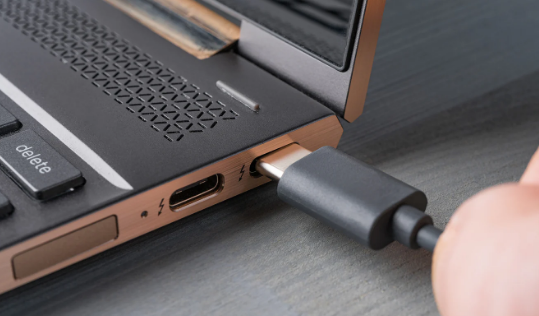
You plug your phone into a 100W charger expecting it to charge at full speed. It charges at 18W. You try a different cable and suddenly it jumps to 45W. You use that same charger on your laptop and it draws 65W. Same charger, different results every time, and no obvious explanation why.
The reason is USB Power Delivery. It is the protocol that determines how much power actually flows between a charger and a device, and it works through a negotiation process that happens automatically every time you plug something in. Understanding how it works explains a lot about why charging behaves the way it does and how to get the most out of your setup.
What USB Power Delivery Actually Is
USB Power Delivery, commonly shortened to USB PD, is a universal charging standard developed by the USB Implementers Forum. Its core purpose is simple: allow devices to communicate with chargers and agree on the right amount of power to transfer, rather than assuming a fixed output for everything.
Before USB PD, USB charging was rigid. Standard USB delivered a fixed 5 volts at 500 milliamps, giving you 2.5 watts. That was enough for a mouse or a keyboard. It was not enough for a tablet or a laptop. Manufacturers responded with proprietary fast charging solutions that only worked with their own chargers and cables, creating the nightmare of incompatible bricks and charging standards that most people remember.
USB PD changed this by creating an open standard that any manufacturer could adopt. A USB PD charger and a USB PD device can communicate with each other, agree on the best power level the charger can supply and the device can safely accept, and then begin delivering power at that level. The result is a single charger capable of fast charging a phone, a tablet, and a laptop, adjusting its output to match each device's needs automatically.
How the Negotiation Actually Works
Every USB PD negotiation follows a specific sequence. It happens in milliseconds, before any significant power flows, and you never see it happening. But understanding the steps explains why the same charger behaves differently with different devices.
When you plug a device into a USB PD charger, the charger speaks first. It sends a message called a Source Capabilities message that lists every power level it can offer. These options are called Power Data Objects, and a capable charger might offer several: 5V at 3A, 9V at 3A, 15V at 3A, and 20V at 5A, for example. Each combination represents a different wattage the charger is capable of delivering.
The device reads this list and decides which option best matches what it needs and what it can safely handle. A phone that accepts up to 45W might request 9V at 3A, giving it 27W, or 15V at 3A, giving it 45W, depending on what the charger supports. A laptop that needs 65W might request 20V at 3.25A. The device sends back a Request Data Object specifying exactly what it wants.
The charger evaluates the request. If it can deliver the requested power level, it sends an Accept message, adjusts its output voltage and current to the agreed levels, and then sends a Power Ready signal. The device receives this signal and begins drawing power at the negotiated level. The whole exchange takes milliseconds.
If something goes wrong or neither side can agree, both devices fall back to a guaranteed safe default of 5V at 0.9A. This is why any USB PD device will still charge from any USB PD charger, even if neither supports the other's preferred power level. It is slower, but it is safe.
Why the Cable Matters More Than Most People Realise
Most people treat the cable as a passive connector. For USB PD, it is an active participant in the negotiation.
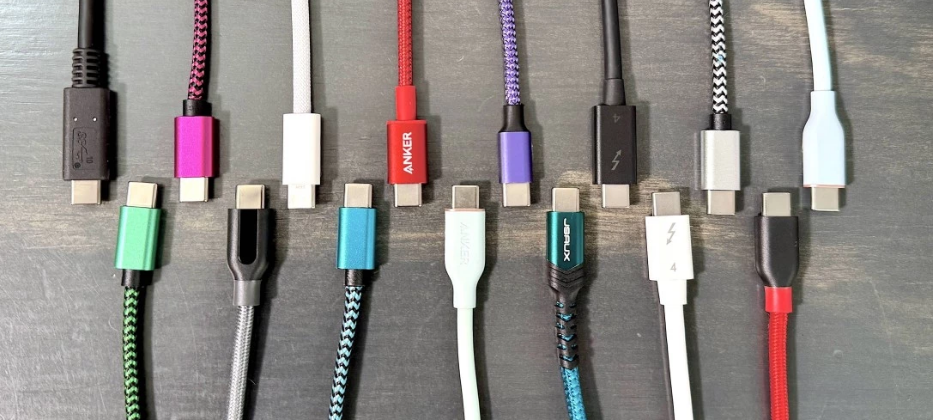
Standard passive USB-C cables can carry a maximum of 3 amps. At 20 volts, that limits them to 60 watts. This is why plugging a 100W charger into a laptop with a basic USB-C cable often results in charging at 60W rather than the full 100W. The cable itself is the bottleneck.
To carry more than 60W, the cable needs to contain a small chip called an E-Marker. This chip identifies the cable's current rating to both devices during negotiation. When the charger and device detect an E-Marked cable that supports 5A, they can negotiate up to 100W. Without it, both sides cap the power to stay within safe limits for the cable.
This is why the USB PD specification requires cables rated above 60W to be electronically marked. If you are trying to charge a laptop at full speed and the charger supports it but the power is lower than expected, the cable is almost always the reason.
The Versions of USB PD and What Each One Added
USB PD has gone through several revisions, each expanding what is possible.
USB PD 2.0 was the first version to be built around USB-C connectors and introduced the Power Data Object system. It supported up to 100W at 20V and 5A, which was enough to charge most laptops. This version remains the most widely deployed and is what most USB-C chargers and devices support today.
USB PD 3.0 added Programmable Power Supply, known as PPS. Rather than negotiating fixed voltage and current steps, PPS allows the device to request precise voltage levels within a continuous range. Instead of jumping from 9V to 15V, a device could request exactly 11.4V. This finer control allows more efficient charging with less heat generated, which is why flagship smartphones started charging faster and running cooler. Most modern Android flagships use PPS when paired with a compatible charger.
USB PD 3.1, released in 2021, extended the maximum power to 240W by adding three new fixed voltage options: 28V, 36V, and 48V. This made USB-C viable for powering demanding laptops, external GPUs, and even some monitors without a separate power brick. It requires a dedicated EPR cable to operate above 60W safely, but the same USB PD negotiation framework handles everything automatically.
PPS and Why It Matters for Your Phone
If you own a recent flagship Android phone and a compatible charger, your device is almost certainly using PPS without you knowing it.
PPS charging works by allowing the device's own charging controller to regulate voltage and current precisely in real time. Traditional fast charging pushes high voltage into the device and then steps it down inside, generating heat in the process. PPS pushes a voltage that is closer to the battery's actual voltage at any moment, reducing the conversion loss and the heat it creates.
The practical result is that PPS-compatible devices charge faster, run cooler during charging, and experience less battery degradation over hundreds of charge cycles compared to older fixed-voltage fast charging methods. This is why Samsung's Super Fast Charging and similar technologies from other manufacturers are built on PPS rather than on proprietary protocols.
Why Wattage Alone Does Not Tell the Full Story
The wattage printed on a charger is its maximum output under ideal conditions. What your device actually receives depends on three things: what the charger can offer, what the device can accept, and what the cable between them can safely carry.
A 140W charger connected to a phone that accepts a maximum of 45W will charge that phone at 45W. The extra capacity sits unused. The same charger connected to a 100W laptop via a standard cable will charge at 60W, not 100W, because the cable cannot carry more. Connect the same charger to the same laptop with an E-Marked 5A cable and it charges at the full 100W.
This also explains why multi-port chargers behave the way they do. A 65W charger with two USB-C ports does not deliver 65W per port. The total available power is shared across however many ports are active. Connect a laptop drawing 45W to one port and a phone drawing 20W to the other, and both charge at their requested rates because the combined draw fits within the charger's total capacity. Add a third device and the charger redistributes what it has, which may slow down the laptop.
USB PD vs Proprietary Fast Charging
Qualcomm Quick Charge, Xiaomi HyperCharge, OPPO SUPERVOOC, and similar technologies are proprietary fast charging protocols that predate or work alongside USB PD. Some of them achieve higher peak wattages than standard USB PD by using lower voltages with extremely high current, a method that requires tight control over the entire charging chain from the charger to the battery.
The practical difference for most users is compatibility. A USB PD charger will fast charge any USB PD device regardless of brand. A Xiaomi HyperCharge charger at its maximum speed only works with compatible Xiaomi devices. Using it with a different phone results in standard USB PD speeds at best.
Most flagship devices now support both USB PD and their manufacturer's proprietary protocol, so you get fast charging from any compatible USB PD charger and even faster charging from the brand's own charger when they have pushed beyond what USB PD currently supports.
Frequently Asked Questions
Does my USB-C cable affect how fast my device charges?
Yes, significantly. Standard passive USB-C cables are limited to 3A, which caps charging at 60W regardless of what the charger and device support. Charging above 60W requires a cable with an E-Marker chip that identifies itself as a 5A cable. If your charger and device support 100W but charging is limited to 60W, the cable is almost certainly the reason.
Can I use a 100W USB PD charger with a device that only accepts 18W?
Yes, safely. USB PD negotiation ensures the charger only delivers what the device requests. A phone that requests 18W receives 18W. The extra capacity of the charger is simply unused. There is no risk of damage from using a higher-wattage charger with a lower-wattage device.
What is the difference between USB PD and Quick Charge?
USB PD is an open industry standard supported by Apple, Google, Samsung, and most laptop manufacturers. Quick Charge is a proprietary protocol from Qualcomm that works specifically on devices using Qualcomm chipsets. Recent versions of Quick Charge are built on top of USB PD, but peak Quick Charge speeds on compatible devices still require a Quick Charge certified charger rather than a generic USB PD charger.



Discussion (0)
Be the first to comment.