With Deco E4 or E4R, TP-Link is lowering the price of entry in the mesh WiFi ecosystem for consumers. This new model is available at an affordable price, it can work with other models in the Deco lineup, and it has some exciting features. If you want to know more about TP-Link Deco E4, and whether it is a good fit for you and your needs, read this detailed review:
TP-Link Deco E4: Who is it good for?
This whole-home mesh WiFi system is a suitable choice for:
Homes with an internet connection that is not faster than 100 Mbps
Parents who desire excellent parental controls to protect their children online
People who want to remote control their mesh WiFi system from a mobile app
Owners of Alexa powered devices who want to voice control their home network
Users who want to extend their existing Deco mesh WiFi system with an affordable Deco station that costs less than previous models
Pros and cons
Here are the things we like about TP-Link Deco E4:
The most accessible price for a mesh WiFi system
Well thought out design that combines simplicity and elegance
The WiFi throughput is incredibly stable, especially on the 5 GHz band
Easy to set up through the TP-Link Deco mobile app
It can be used in tandem with other Deco devices, even if they are from a different model
It is integrated with Amazon Alexa and IFTTT (If This Then That)
There are also some weak spots to consider:
The maximum speed you get is 100 Mbps, even on the 5 GHz band
It does not offer a web-based interface for administration
It has fewer features than other Deco systems, to make up for the price difference
Product rating4/5
Verdict
TP-Link Deco E4 is an important product because it opens the world of mesh WiFi systems to everyone. While it does have its limitations, the pricing of this model is so affordable that anyone can now build their mesh WiFi systems without paying a lot. One important strength is the fact that you can mix Deco E4 with other Deco models, and use it as an affordable way of extending the coverage of your existing mesh WiFi network. Deco E4 has solid hardware, the features that it offers are useful, even though they are not many, and the mobile app for it is easy to use. The only significant limitation is that it cannot work at speeds higher than 100 Mbps. Overall, TP-Link Deco E4 offers great value for the money. If you are looking for an affordable mesh WiFi system, and your internet connection is not faster than 100 Mbps, TP-Link Deco E4 is one of the best choices that you can make.
Unboxing the TP-Link Deco E4 whole-home mesh WiFi system
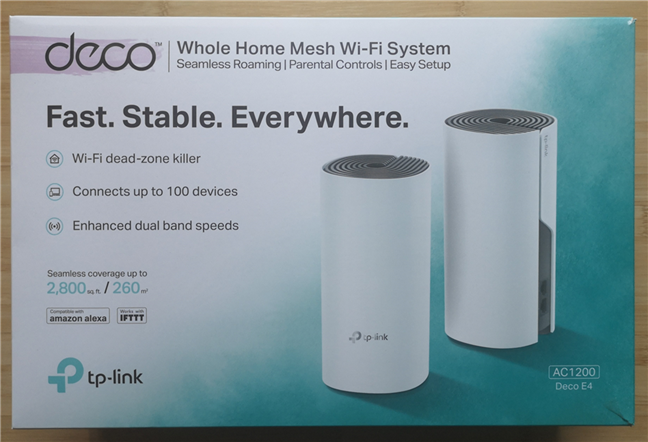
TP-Link Deco E4 or E4R is sold in packs of one, two or three stations. We received for testing the two-pack version that you see below. The packaging is the same for the entire Deco lineup. The box looks great, and it shows details about the main features of this kit, alongside a picture of the stations that are found inside the box.
The packaging of the TP-Link Deco E4
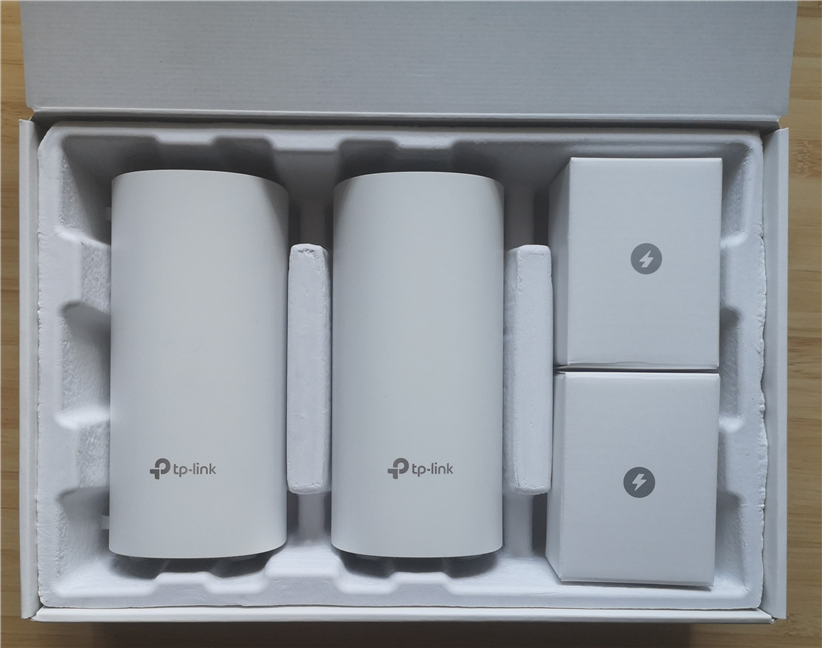
When you take the cover off, you see another box. Inside you have the devices that make up the TP-Link Deco E4 mesh WiFi system. Alongside them, there are several small boxes with accessories. Everything looks beautiful, and you feel that you are dealing with a premium device.
Unboxing the TP-Link Deco E4
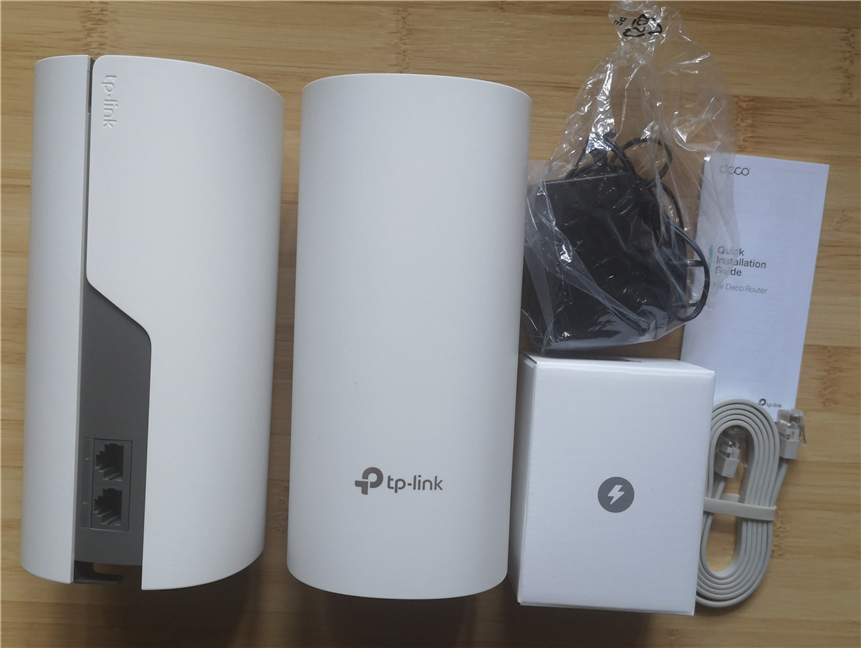
When you unbox everything, you get the following items: the Deco E4 stations, their power adapters, one Cat 5e Ethernet cable, the warranty, the license for the firmware, and the quick setup guide.
TP-Link Deco E4 - what you find inside the box
The unboxing experience offered by TP-Link Deco E4 is lovely. Everything looks great, and nicely packaged, making you feel that you get more than you paid for. Also, you get all the accessories you need to get your WiFi network up and running.
Hardware specifications and design
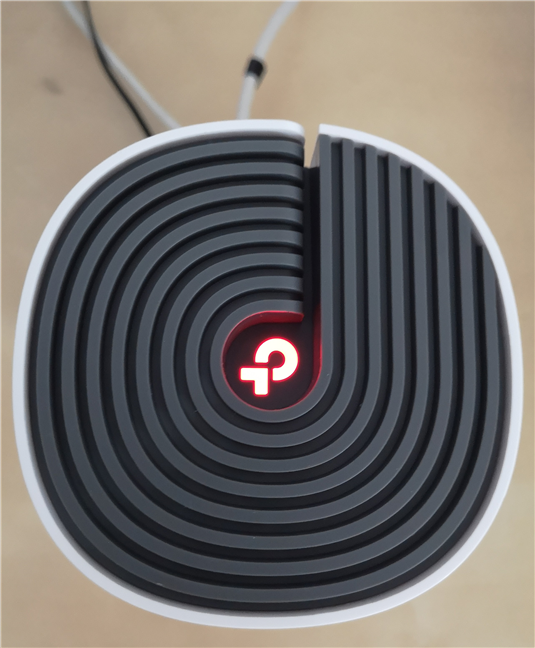
TP-Link Deco E4 or E4R look identical to TP-Link Deco M4. The stations that make up the kit are tall and thin, similar in size and looks to traditional PC speakers. The stations have a size of 3.6 x 7.5 inches or 90.7 x 190 mm in width and height. They also weigh around 33.5 ounces or 950 grams, which makes them light. On the top, you see the TP-Link logo and the ventilation grids. The logo lights up in different colors, to show you what the Deco E4 is doing. For example, red means that it is disconnected from the internet. When it is white, it means that everything is working well.
The top side of the TP-Link Deco E4
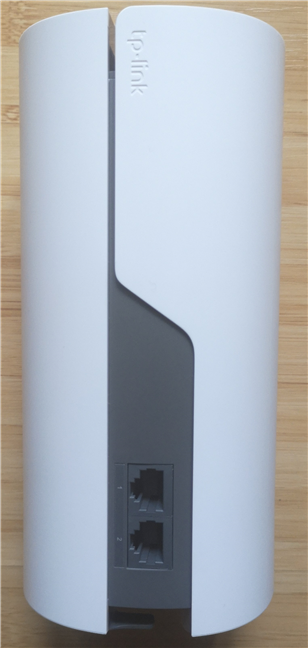
On the back of each Deco E4, there are two Ethernet ports with a speed of 100 Mbps. Yes, that's correct, it is not 1 Gbps like on the Deco M4, but only 100 Mbps. From the start, this specification limits the usefulness of this mesh WiFi system to users who have internet connections with speeds of up to 100 Mbps.
The ports on the back of the TP-Link Deco E4
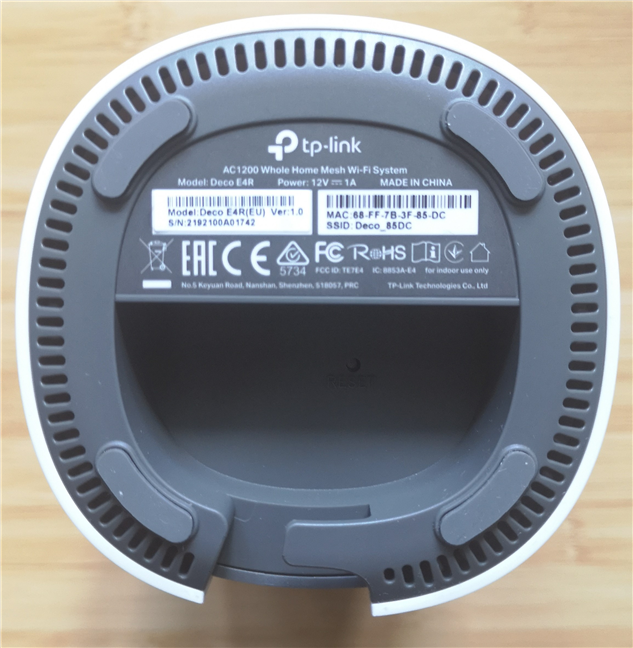
On the bottom of each TP-Link Deco E4, you find the power jack and the Reset button. There are also four small rubber feet so that the devices are stable when you place them on flat surfaces. Unfortunately, the Deco E4 stations cannot be mounted on walls.
The bottom of the TP-Link Deco E4
Each TP-Link Deco E4 Qualcomm Atheros QCA9561 System-on-a-Chip, running at 750 MHz, 128 MB of RAM and 16 MB of storage space for the firmware. The stations have a total theoretical bandwidth of 1200 Mbps, split as follows: 300 Mbps for the 2.4 GHz band, and 867 Mbps for the 5 GHz band. It also works with all wireless networking standards up to Wi-Fi 5 (802.11ac), and it offers 2x2 MU-MIMO wireless transfers.
If you would like to learn more about the official specifications of this wireless router, go to this page: TP-Link Deco E4 Specifications.
Setting up and using the TP-Link Deco E4 whole-home mesh WiFi system
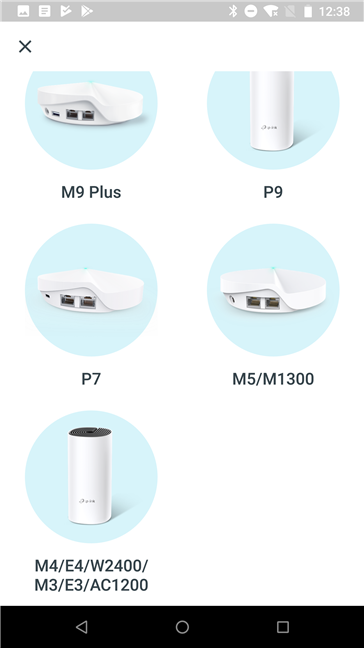
The setup of the TP-Link Deco E4 mesh system is done using the TP-Link Deco mobile app for Android and iOS. You also need a TP-Link Cloud account. One downside is the lack of two-factor authentication, to increase the security of your account. We hope that TP-Link is going to add this security feature in the future. After you register or log in with your TP-Link Cloud account, you can start the setup process. The wizard is easy to use, and it starts with choosing the Deco model that you want to set up.
Setting up the TP-Link Deco E4
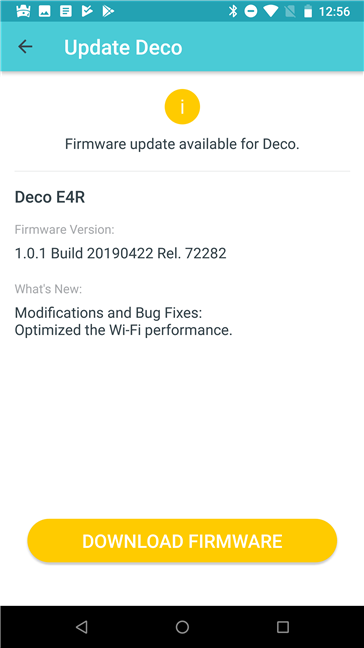
You then get all the necessary setup instructions, and you are asked to set the following elements: the location of the Deco E4 that you are setting up, the details of your internet connection, and the name and the password for the wireless network that it is going to be broadcast. This mesh WiFi system works with the following types of internet connections: Dynamic IP, Static IP, and PPPoE. Once the first Deco E4 station is set up, you can add the remaining devices. All you have to do is choose where they are placed. The app helps them copy the settings you have made for the first device. When you are done setting up the mesh system, the TP-Link Deco app automatically checks for firmware updates and, if any are found, it asks you to download and install the latest version. You should update the firmware, as newer versions improve performance, fix stability problems and security vulnerabilities. The firmware updates take some time and involve a restart of all the Deco stations.
Updating the firmware for TP-Link Deco E4
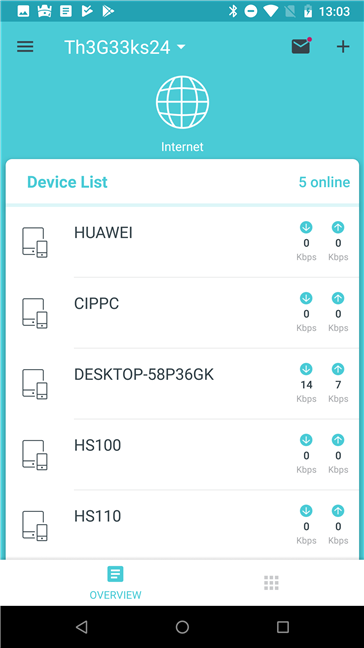
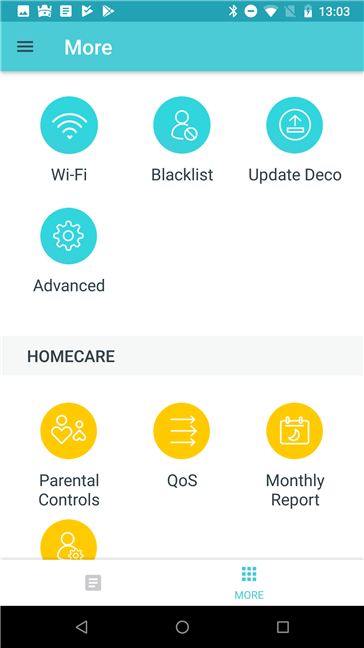
The TP-Link Deco mobile app is straightforward and easy to use. On the home screen of the app you see the devices that are connected to the network, and how much data they are transferring over the network. There are also some buttons and menus. For accessing all the configuration options, in the bottom-right corner of the screen, tap the button with squares.
The TP-Link Deco mobile app
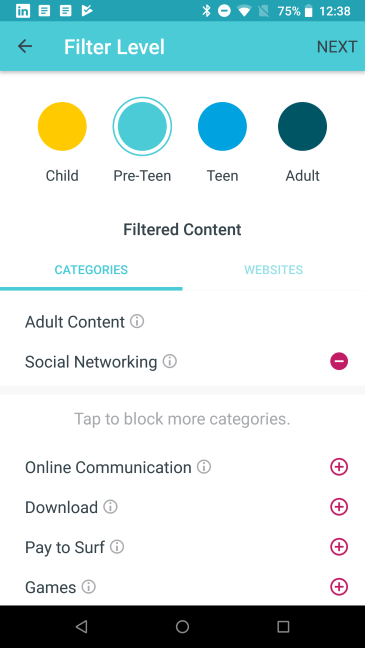
There are not many advanced settings available, and everything can be set up with ease. You can set features like port forwarding, DDNS, LED control, notifications, the Parental Controls, the Managers of the system, and the operating mode. The features list of the Deco E4 is slimmer than that of more expensive Deco systems, but that is not surprising considering how much cheaper this mesh WiFi system is. All the settings in the mobile app are well explained so you should have no issues in setting up and configuring the mesh WiFi system.
The TP-Link Deco mobile app
We connected more than a dozen devices to the network, and we enjoyed a stable signal and good speeds in all the rooms of our test apartment. We connected two desktop PCs, two laptops, one tablet, several smartphones, an Xbox One console, several smart plugs, one smart bulb, an intelligent robot vacuum cleaner, and a wireless printer. All of them connected to the network without problems. We were also able to share content through the network without issues.
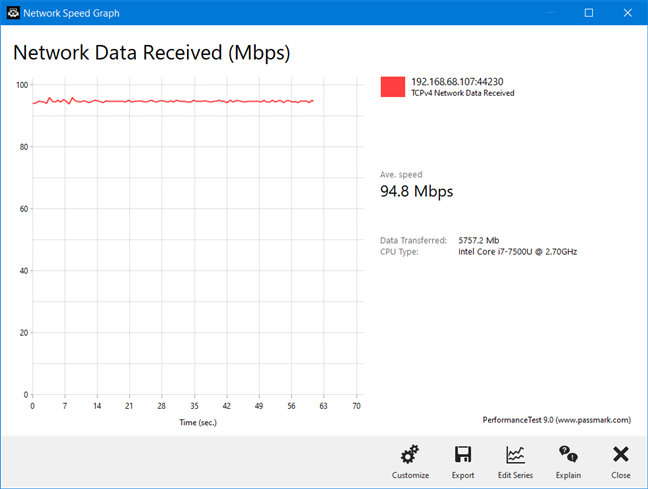
TP-Link Deco E4 is an AC1200 mesh wireless system but do not expect speeds that match other AC1200 systems, because there is one important technical limitation: the Ethernet ports on the devices that are part of this mesh WiFi system, are limited to 100 Mbps, unlike other systems that work at 1 Gbps. This means that, even if you have a fast internet connection of 500 Mbps or more, your internet connection and WiFi are going to work at maximum 100 Mbps on the Deco E4. However, there is also an upside to this. The speed you get may be lower than on other AC1200 mesh WiFi systems, but it is flawlessly stable, especially on the 5 GHz band. Just look at the transfer below, made on a laptop, connected to the 5 GHz WiFi frequency, in a room separated by one wall from the main station. We have not seen such a stable wireless throughput in years. It is almost a perfectly straight line.
TP-Link Deco E4 - A file transfer through WiFi
We are pleased with TP-Link Deco E4 and what it has to offer. We like how easy it was to set up, how it looks, and the features it offers through its mobile app. The maximum speed you get is 100 Mbps, but the WiFi throughput is incredibly stable, especially on the 5 GHz band. Also, the list of features is slimmer, when compared to the more expensive Deco systems, to make up for the price difference.
If you want to know more about the speed of TP-Link Deco E4, how it fared in benchmarks and what extra features it bundles, go to the second page of this review.
Wireless network performance
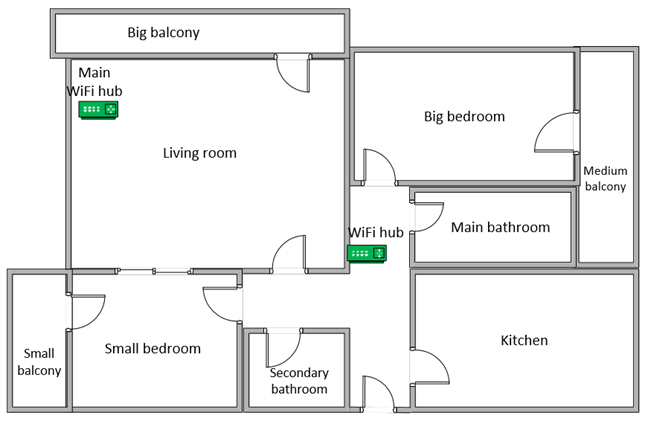
Let's take a look at the apartment that was used in our testing and how it is set up. You can see that the central TP-Link Deco E4 hub is placed in the living room. When using wireless routers, the signal strength is not that high in rooms like the Kitchen and the Medium balcony. To improve the coverage of the network, we placed the second Deco E4 hub in the hallway, close to the entrance to the Kitchen.
The apartment where we tested TP-Link Deco E4
Our testing was done using a fast 1 Gigabit Internet connection that is capable of uploads on the internet of up to 500 Mbps. We used an HP Spectre 13 laptop for our measurements.
To get a better perspective of the performance offered by TP-Link Deco E4, we compared it to two similar mesh WiFi systems: Tenda nova MW6 AC1200 and Linksys Velop AC1300 (WHW01).
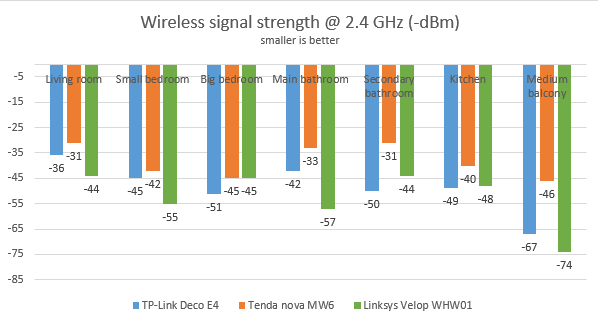
We started by evaluating the 2.4 GHz wireless network and measured the signal strength offered in each room, using a tool named NetSpot Pro. The signal strength offered by TP-Link Deco E4 was OK, without standing out from the crowd.
TP-Link Deco E4 - Wireless signal strength on the 2.4 GHz band
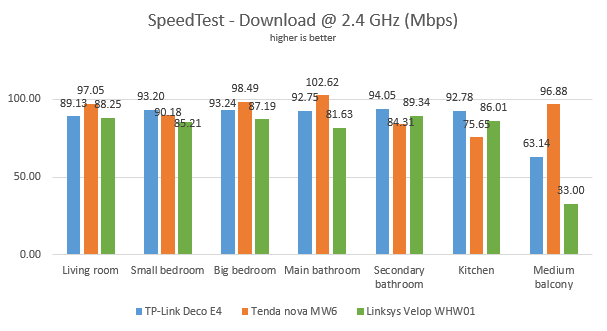
Then, we used SpeedTest to see how fast the internet connection is when we used the 2.4 GHz wireless frequency. TP-Link Deco E4 delivered downloads that are as fast as its competitors, in most rooms.
TP-Link Deco E4 - SpeedTest download speed on the 2.4 GHz band
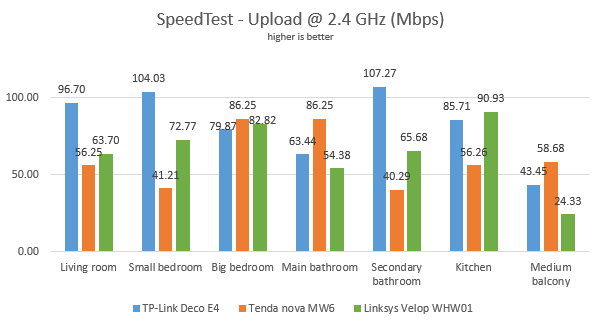
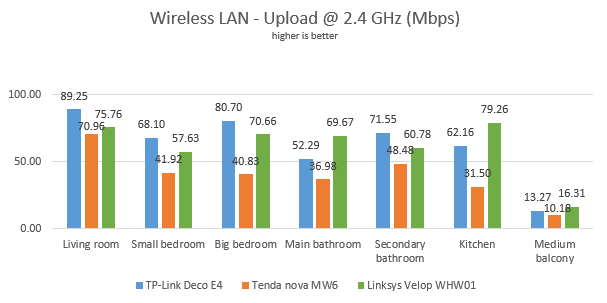
When we measured the upload speed, TP-Link Deco E4 was the speed leader in several rooms.
TP-Link Deco E4 - SpeedTest upload speed on the 2.4 GHz band
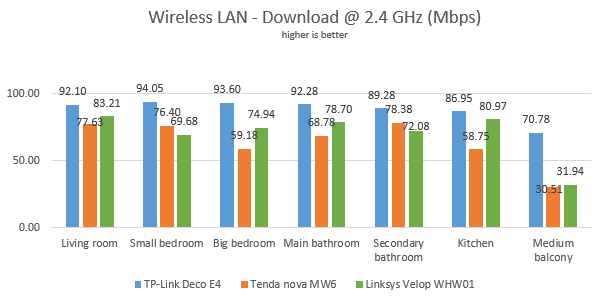
Continuing our measurements on the 2.4 GHz wireless network, we used the PassMark Performance test to transfer data between two computers connected to the network. When we measured the download speed, TP-Link Deco E4 outperformed the mesh WiFi systems we compared it to.
TP-Link Deco E4 - WiFi download speed on the 2.4 GHz band
A similar situation was noticed when we measured the upload speed.
TP-Link Deco E4 - WiFi upload speed on the 2.4 GHz band
TP-Link Deco E4 offers good WiFi coverage and transfer speeds on the 2.4 GHz band, similar and sometimes better than other AC1200 mesh WiFi systems.
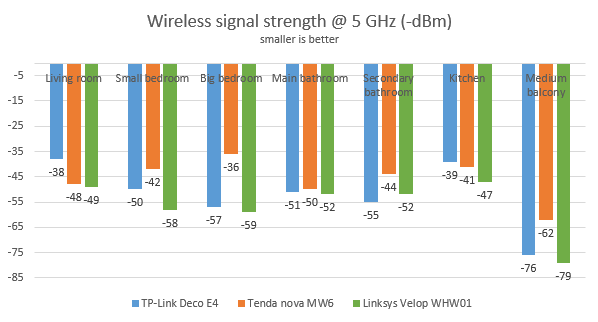
Next, we analyzed the performance offered by the 5GHz wireless network. First, we looked at the evolution of the signal strength, from room to room. The signal strength delivered by TP-Link Deco E4 was similar to that of other mesh WiFi systems.
TP-Link Deco E4 - Wireless signal strength on the 5 GHz band
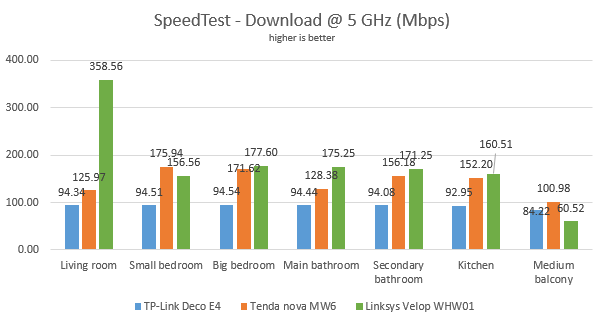
Next, we ran SpeedTest to see how fast the internet connection is on the 5GHz band. The maximum speed offered by TP-Link Deco E4 was smaller than that of other mesh WiFi systems because it is capped at 100 Mbps.
TP-Link Deco E4 - SpeedTest download speed on the 5 GHz band
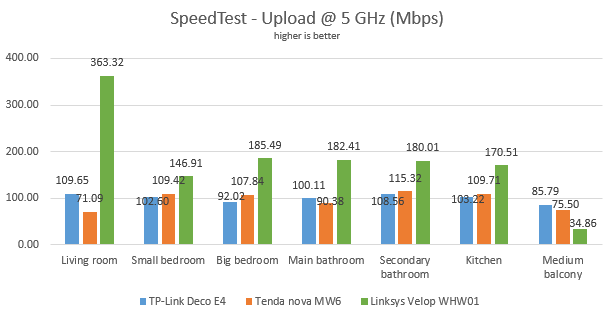
When measuring the upload speed, we noticed a similar story.
TP-Link Deco E4 - SpeedTest upload speed on the 5 GHz band
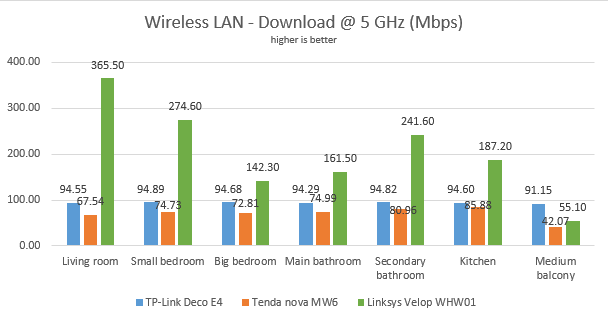
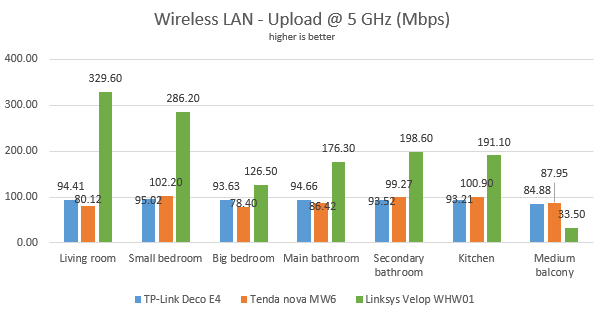
For the last measurements on the 5GHz wireless network, we used the PassMark Performance test to transfer data between two computers connected to the network. TP-Link Deco E4 worked flawlessly at 100 Mbps, in every room. When looking at the variability of the network transfers, TP-Link Deco E4 was by far the most stable mesh WiFi system that we tested.
TP-Link Deco E4 - WiFi download speed on the 5 GHz band
The same trend applied to the upload speed too.
TP-Link Deco E4 - WiFi upload speed on the 5 GHz band
Other AC1200 mesh WiFi systems may deliver higher speeds on the 5 GHz band than TP-Link Deco E4, but none is as stable as Deco E4 is. We were impressed by how little variability we measured on the 5 GHz band.
Wired network performance
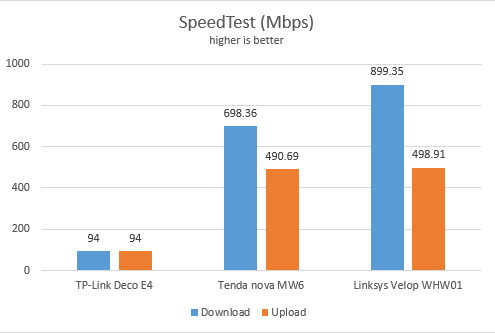
To test the quality of the wired Ethernet connection, we used a desktop PC and a laptop, connected to the network through Ethernet cables, both using fast SSD drives. We measured the speed of the internet connection when using a 1 Gbps Ethernet cable, using SpeedTest. Because its Ethernet ports are capped at 100 Mbps, TP-Link Deco E4 was easily outmatched in this test.
TP-Link Deco E4 - SpeedTest through Ethernet connections
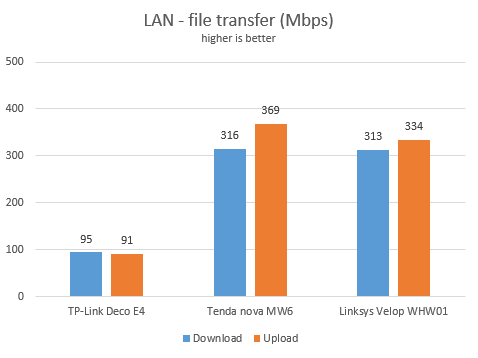
Then, we ran a network transfer between the two computers, each connected with an Ethernet cable to a different TP-Link Deco E4. Since the stations were connected wirelessly, the transfer was mediated through WiFi. We used PassMark Performance test for these measurements. Again, Deco E4 was hampered by its Ethernet ports that work only at 100 Mbps.
TP-Link Deco E4 - File transfers through Ethernet connections
The Ethernet connections on the TP-Link Deco E4 work only at 100 Mbps, and it is easily outmatched by other mesh WiFi systems.
Extra features
TP-Link bundles some advanced features that are not found on mesh systems from other brands like Linksys or Tenda:
The TP-Link Deco mobile app
Cloud-based parental controls that are effective and easy to configure. They are useful for setting time limits, schedules, and protecting your children from inappropriate content online.
You can set managers for your Deco E4, through the TP-Link Cloud accounts. For example, in a family, both the husband and the wife can manage the system from their smartphones and tablets.
TP-Link DDNS - allows you to assign a fixed host and domain name to a dynamic IP address.
QoS - a basic Quality of Service feature that helps you control how the total bandwidth is split between devices.
Can be used together with other TP-Link Deco models, to build your custom mesh WiFi system, and optimize the price you pay to build it.
Integration with Alexa andIFTTT(If This Then That) - you can remote control the Deco E4 using Alexa and voice commands, and set your automation system.
What is your opinion about TP-Link Deco E4?
Now you know our opinion about the TP-Link Deco E4 whole home mesh WiFi system, and how it performed in our testing. Before closing this review, share your opinion. Is it something that you would like to purchase? Do you like what it has to offer for such an affordable price? Comment below and let's discuss.
Do we have any data to see what’s the wireless transfer speed? I mean, let’s say I have another Gigabit Deco device (e.g. Deco X60, 1 piece), which I configure as the master node. As per the TP-link manual, I can connect E4 to the same network as X60 to extend the range. I understand that if I connect them via Ethernet cable, the speed of E4 will be capped at 100Mbps. But what happens when we wirelessly connect them? How does the speed of E4 nodes look like?
Georgios ·
In such a product with the 100mb limitation, the speed within the LAN but wireless to same node wireless connection should also be metered to measure the top possible speed.




























Discussion (2)
Do we have any data to see what’s the wireless transfer speed? I mean, let’s say I have another Gigabit Deco device (e.g. Deco X60, 1 piece), which I configure as the master node. As per the TP-link manual, I can connect E4 to the same network as X60 to extend the range. I understand that if I connect them via Ethernet cable, the speed of E4 will be capped at 100Mbps. But what happens when we wirelessly connect them? How does the speed of E4 nodes look like?
In such a product with the 100mb limitation, the speed within the LAN but wireless to same node wireless connection should also be metered to measure the top possible speed.