



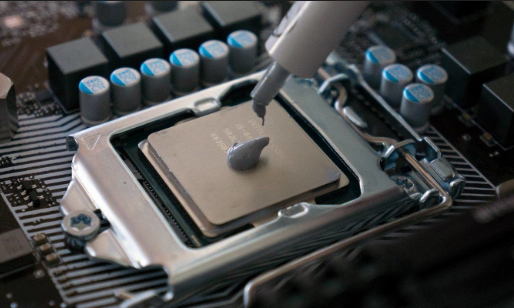
Every CPU and GPU generates heat. The thermal interface material sitting between the processor and its cooler determines how efficiently that heat escapes. Get it right and temperatures stay low, boost clocks hold, and the system runs quietly. Get it wrong and the chip throttles, the fans spin up, and performance takes a hit.
For most of PC building history, thermal paste was the only real option. Then liquid metal arrived and offered dramatically better heat transfer numbers. Better conductivity, lower temperatures, real performance gains. The catch is that liquid metal is also electrically conductive, chemically reactive with certain metals, and genuinely capable of destroying hardware if applied carelessly.
This article covers what each material actually is, how the heat transfer numbers translate into real temperature differences, and which one makes sense for your situation.
What Thermal Paste Is
Thermal paste, also called thermal compound or thermal grease, is a viscous material designed to fill the microscopic air gaps between a CPU's heat spreader and a cooler's base plate. Neither surface is perfectly flat. Under a microscope, both look like mountain ranges. Air trapped in those gaps is a terrible heat conductor. Thermal paste displaces the air and fills the valleys with a material that conducts heat orders of magnitude better.
Most thermal pastes use a silicone or polymer base mixed with thermally conductive particles. The filler determines the performance. Common fillers include zinc oxide, aluminium oxide, and silver particles. Higher quality pastes use finer particles in higher concentrations, which is why there is a meaningful performance gap between a cheap stock paste and something like Thermal Grizzly Kryonaut.
The best premium thermal pastes achieve thermal conductivity around 12 to 16 W/mK. That number, watts per meter Kelvin, measures how much heat the material can transfer per unit of thickness and temperature difference. Higher is better.
Importantly, most quality thermal pastes are electrically non-conductive. You can apply them without covering surrounding components and the worst outcome is a messy cleanup rather than a dead motherboard.
What Liquid Metal Is
Liquid metal thermal interface materials are exactly what they sound like. They are metal alloys, typically combinations of gallium, indium, and tin, that remain liquid at room temperature. Gallium melts at around 29 degrees Celsius, so at CPU operating temperatures these alloys are genuinely fluid.
Because they are actual metals, their thermal conductivity is dramatically higher than any paste. Thermal Grizzly Conductonaut, the most widely used liquid metal compound, achieves 73 W/mK. That is nearly six times the conductivity of Kryonaut, which is itself a premium paste. Alphacool and other brands offer similar products in the same thermal conductivity range of 70 to 82 W/mK.
The physics here is real and the temperature difference is measurable. In practice, switching from a quality thermal paste to liquid metal between the CPU's integrated heat spreader and cooler typically yields temperature reductions of 5 to 15 degrees Celsius depending on the chip, cooler, and workload. On high-TDP processors under sustained load that can be the difference between sustained boost clocks and thermal throttling.
The problem is everything that comes with it.
The Risks of Liquid Metal
It Conducts Electricity
This is the most immediate and serious risk. Liquid metal conducts electricity. A small amount spreading onto the motherboard, capacitors, or VRM components can short circuit the entire board. The margin for error during application is narrow, and the consequences of exceeding it are expensive.
Under normal circumstances liquid metal stays between the heat spreader and the cooler base. The concern is during application, during cooler removal, and if the system is transported or handled in a way that causes the fluid to migrate. Experienced builders mask the area around the CPU socket with tape before applying liquid metal for exactly this reason.
It Reacts With Aluminium
Gallium is highly reactive with aluminium. When liquid metal contacts an aluminium cooler base, it begins a process called galvanic corrosion that progressively degrades the aluminium surface. The cooler base softens, pits, and eventually fails structurally. This can happen within weeks of first contact.
Liquid metal is only safe to use with copper or nickel-plated cooler bases. Many mid-range coolers use aluminium bases even when the fins are copper. Using liquid metal on these without knowing is a reliable way to destroy a cooler.
It Can Pump Out Over Time
In systems with vibration, frequent temperature cycling, or significant pressure variation at the mounting interface, liquid metal can gradually migrate outward from the contact area. This is called pump-out. Once the liquid metal shifts, the contact area loses coverage and temperatures rise, often significantly, before the user notices something is wrong.
This risk is more relevant in laptops, where manufacturers sometimes apply liquid metal from the factory, than in desktop systems with stable cooler mounting. Some laptop manufacturers have engineered specific containment systems to prevent pump-out, but in custom builds it is worth monitoring temperatures periodically if liquid metal is used.
It Is Difficult to Remove
Thermal paste wipes off with isopropyl alcohol and a lint-free cloth. Liquid metal bonds to metal surfaces and removing it requires more effort, more isopropyl alcohol, and care not to spread residual fluid onto surrounding components. Cooler removal is particularly risky because the fluid can drip if the cooler is tilted during disassembly.
The Performance Difference in Real Numbers
The thermal conductivity gap between liquid metal and premium paste is dramatic on paper. Whether it translates into meaningful real-world gains depends on the specific build.
For a desktop CPU running stock settings with a quality tower cooler, switching from a premium paste to liquid metal typically yields 5 to 10 degree reductions at full load. Whether that matters depends on where the chip was operating before. If temperatures were already comfortably below throttling thresholds, the reduction changes nothing functional. If the chip was hovering near its thermal limit, the reduction could allow it to sustain higher boost clocks for longer.
For overclocked systems, the calculation shifts. Every degree of thermal headroom is a resource that translates directly into additional MHz or reduced voltage. Enthusiast overclockers and competitive benchmarkers use liquid metal specifically for this reason.
For laptops, liquid metal makes more sense than in desktops. Thermal constraints in thin chassis are extreme and the gap between sustained performance and throttled performance is narrower. This is why some manufacturers, including Asus on certain ROG laptops and Sony on the PlayStation 5, have shipped products with liquid metal applied from the factory.
Comparison at a Glance
| Thermal Paste | Liquid Metal | |
|---|---|---|
| Thermal conductivity | 4 to 16 W/mK | 70 to 82 W/mK |
| Real-world temp reduction vs stock | 5 to 15°C | 10 to 25°C |
| Electrically conductive | No (most types) | Yes |
| Compatible cooler materials | Aluminium, copper, nickel | Copper and nickel only |
| Application difficulty | Easy | Difficult |
| Risk level | Low | High |
| Longevity | 3 to 5 years | 1 to 3 years |
| Pump-out risk | Minimal | Moderate |
| Cleanup difficulty | Easy | Difficult |
| Best suited for | Most users and builds | Experienced builders, overclockers, SFF builds |
| Price | Low to moderate | Moderate to high |
Types of Thermal Paste Worth Knowing
Not all thermal paste performs equally. Understanding the main categories helps set expectations before choosing.
Silicone-based pastes with metallic oxide fillers are the most common. They cover the range from cheap stock pastes included with coolers to premium options. Arctic MX-6 and Thermal Grizzly Kryonaut sit near the top of this category and perform within a few degrees of each other under identical conditions.
Silver-based pastes use silver particles as the primary filler. They generally perform better than standard oxide pastes. Some silver pastes have mild electrical conductivity, which is worth checking before applying in tight spaces.
Carbon-based pastes use carbon nanoparticles or graphite. They are non-conductive and perform comparably to premium silver pastes. Some recent formulations from Thermal Grizzly and others have pushed thermal conductivity above 14 W/mK using carbon compounds.
Electrically conductive pastes use metallic silver or other conducting compounds at high concentrations. They perform well but require the same caution as liquid metal regarding spillage. These are generally avoided by builders who want performance without the extreme risk of full liquid metal.
Which One Should You Actually Use
For the vast majority of builders, premium thermal paste is the correct answer. Products like Arctic MX-6, Thermal Grizzly Kryonaut, or Noctua NT-H2 close most of the temperature gap between entry-level paste and exotic options at minimal cost and zero risk. A five degree improvement from upgrading paste to a quality product is achievable without touching liquid metal at all.
Liquid metal makes sense in three specific situations. The first is competitive overclocking where every degree of headroom directly translates into benchmark performance and the builder is experienced enough to manage the application risks. The second is small form factor builds where the chassis leaves no thermal margin and liquid metal's additional headroom prevents throttling that would otherwise be unavoidable. The third is delidded CPUs, where liquid metal is applied between the bare silicon die and the heat spreader in place of the often mediocre compound Intel or AMD applies at the factory. Delidding is irreversible and carries significant risk of damaging the chip, but the thermal gains are substantial.
For everyone else, the risk profile of liquid metal is simply not justified by the real-world performance gains. Spending that same money on a better air cooler or a 240mm AIO will deliver more tangible improvements with less risk of destroying a motherboard.



Discussion (0)
Be the first to comment.