




When Spotify keeps pausing randomly, the problem almost never comes from the app alone. Device conflicts, background restrictions, Bluetooth switching, or account activity usually interrupt playback. This guide shows how to fix the root cause of this issue which stops the pauses across all devices.
Table of contents
Why Spotify keeps pausing randomly
Spotify pauses when another system, device, or setting interrupts audio playback. Understanding the trigger helps you apply the correct fix instead of guessing.
Another device takes over playback
Spotify Connect allows any signed-in device to control playback. A smart TV, speaker, browser, or car system can silently take over and pause your session.
Bluetooth or audio output switching
Headphones, car stereos, or speakers often auto-connect in the background. When the audio output changes, Spotify pauses to switch sources.
Battery optimization and background limits
Android and iOS limit background apps to save power. These limits cut off Spotify when the screen turns off or the app runs idle.
Network changes and data restrictions
Switching between Wi-Fi and mobile data or using a VPN disrupts the stream. Spotify pauses when it loses a stable connection.
Quick checks before trying advanced fixes
Run these checks first. They resolve many cases in under a minute.
Check if Spotify plays on another device
Open Spotify and tap the device icon. Stop playback on any other listed device before continuing.
Restart Spotify and your device
Close Spotify fully and reboot your phone or computer. This clears stuck audio sessions and temporary conflicts.
Fix Spotify pausing on Android
Android aggressively manages background apps. These fixes target the most common Android causes.
Disable battery optimization for Spotify
- Open Settings.
- Tap Apps.
- Tap Spotify.
- Tap Battery.
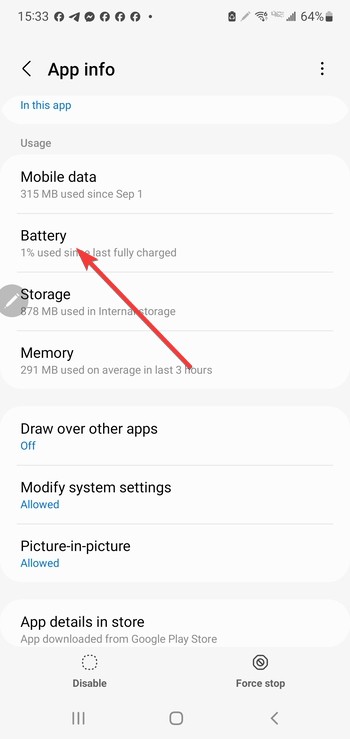

- Select Unrestricted.


Allow background data and unrestricted usage
- Open Settings and tap Apps.


- Next, tap Spotify.
- Tap Mobile data & Wi-Fi.
- Turn on Background data usage.
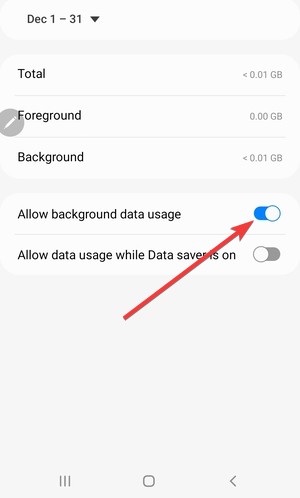

- Disable any Data saver or usage limit for Spotify.
Reset Bluetooth and audio permissions
- Turn Bluetooth off.
- Restart your phone.
- Turn Bluetooth back on.
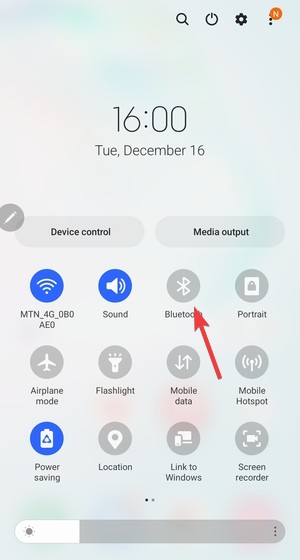

- Reconnect your headphones or speaker.
Fix Spotify pausing on iPhone
iOS background limits and wireless features often cause pauses.
Enable Background App Refresh for Spotify
- Open Settings.
- Tap General.


- Tap Background App Refresh.
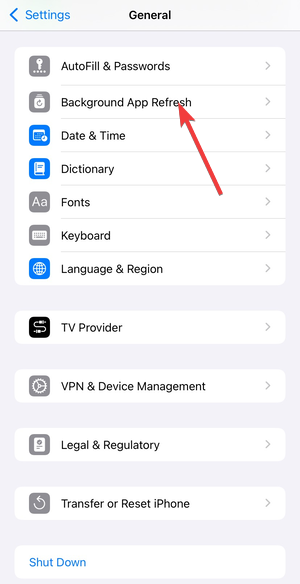

- Turn it on and allow Spotify to refresh in the background.
Turn off Low Power Mode
- Open Settings.
- Tap Battery.
- Turn off Low Power Mode.


Check AirPlay and Bluetooth auto-connect
- Open Settings.
- Tap Bluetooth.
- Disconnect unused devices you do not actively use.
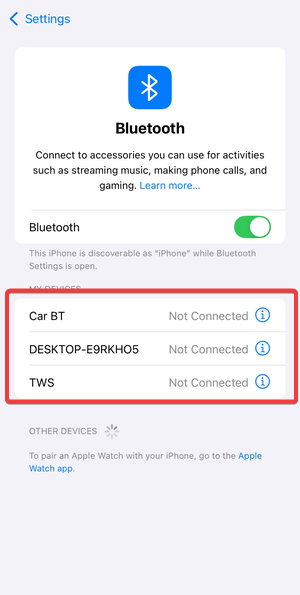
- Keep only the current headphones, speaker, or car system connected.
Fix Spotify pausing on Windows and Mac
Desktop systems introduce audio and network conflicts that can interrupt playback.
Disable audio enhancements and exclusive mode
Open your system sound settings and disable audio enhancements or exclusive audio control. These options can interrupt continuous playback when apps compete for the audio device.
Check firewall, VPN, or network adapters
Pause any VPN and review firewall rules for Spotify. Network tools and aggressive filtering can break streaming sessions and cause random pauses.
Reinstall Spotify and clear local cache
Remove Spotify completely, then reinstall it. This fixes corrupted local data that can cause repeated pausing on the desktop.
Account-level fixes that stop random pauses everywhere
If the problem follows you across devices, you should try the following account-level Spotify settings tricks:
Sign out of Spotify on all devices
Open your Spotify account settings and sign out everywhere. This removes hidden playback sessions that can take over your stream.
Change your Spotify password
Unauthorized access can pause your music unexpectedly. Changing your password forces all other devices to sign in again.
Tips to prevent Spotify from pausing again
- Use one primary playback device at a time.
- Avoid aggressive battery saver modes.
- Keep Spotify updated.
- Limit Bluetooth auto-connect devices.
FAQs
Why does Spotify keep pausing when my screen turns off? Battery or background restrictions usually stop playback when the display sleeps.
Can Spotify pause because someone else uses my account? Yes. Another device can take control through Spotify Connect.
Does Bluetooth cause Spotify to pause randomly? Unstable or auto-connecting Bluetooth devices often interrupt playback.
Why does Spotify pause only on mobile data? Data limits, signal drops, or VPNs usually cause mobile-only pauses.
Summary
- Check Spotify Connect for other active devices.
- Disable battery and background restrictions.
- Fix Bluetooth and audio output switching.
- Sign out of all devices if pauses continue.
Spotify pauses rarely come from a single bug - device conflicts, background limits, and account activity cause most interruptions. Apply the fix that matches your setup, and playback should remain stable across your devices.


Discussion (0)
Be the first to comment.