




Sharing your Straight Talk data connection helps your laptop or tablet get online fast. Straight Talk phones support hotspot, but only when your plan and APN settings allow it. This guide shows you how to enable hotspot, check plan eligibility, and fix issues when the hotspot toggle does not appear.
Table of contents
Check if your Straight Talk plan supports hotspot
Straight Talk only enables hotspot on specific plans. Your network assignment (Verizon, AT&T, or T-Mobile) also affects hotspot support and speed. Confirm this before you change any settings on your phone.
Confirm hotspot eligibility in your account
Open the Straight Talk app or sign in on the website. Check your plan details and look for hotspot data in the benefits list. If you do not see hotspot included, your phone will block the hotspot toggle.
Check your underlying network
Straight Talk activates your SIM on Verizon, AT&T, or T-Mobile. Your SIM card prefix or original coverage map usually reveals the network. Hotspot rules vary by carrier, so correct identification avoids confusion later.
Set up hotspot on Android
To set up hotspot on your Android, open Settings > Network & internet > Hotspot & tethering. Turn on Wi-Fi hotspot. Your phone now broadcasts a wireless network you can join from other devices.
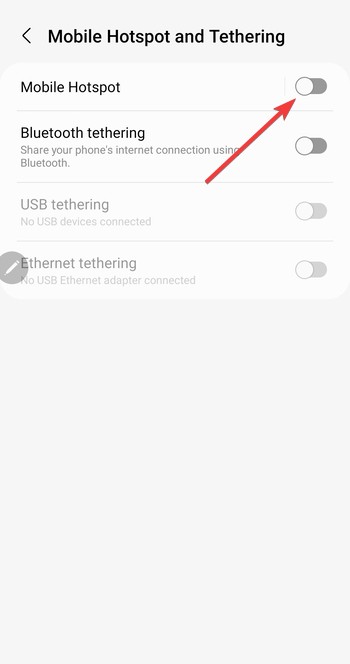
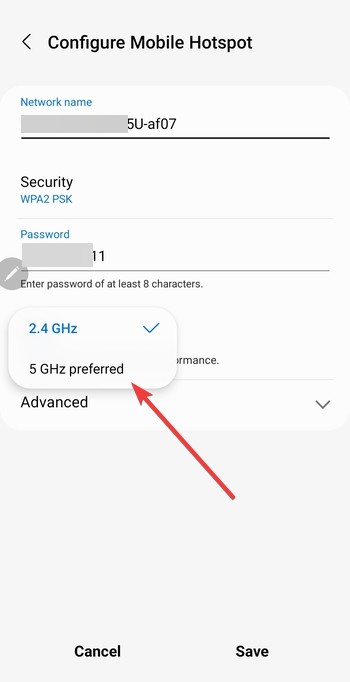
You can also customize the SSID, password, and band. Just open the hotspot configuration screen. Set a clear network name and a strong password. Switch to the 5 GHz band when you want faster speeds, or switch to 2.4 GHz when you need a longer range.
Set up hotspot on iPhone
iPhones use the Personal Hotspot feature. Straight Talk enables it only when APN settings match the carrier profile for your SIM.
Open Settings > Personal Hotspot. Turn on Allow Others to Join. Set a secure Wi-Fi password to protect your data.
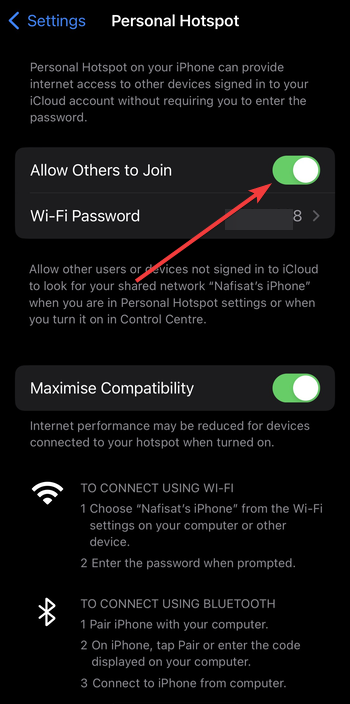
You can also allow family or multiple devices by allowing Family Sharing under the hotspot menu. This helps you avoid entering passwords repeatedly on each device.
Update or correct APN settings
Straight Talk hotspot often fails because the APN does not include the correct tethering fields.
Correct APN for Android
Open Settings > Network & internet > Mobile network > Access Point Names. Create or edit an APN with these key fields:
- APN:
TRACFONE.VZWENTPor the value Straight Talk provided - APN type:
default,mms,dun
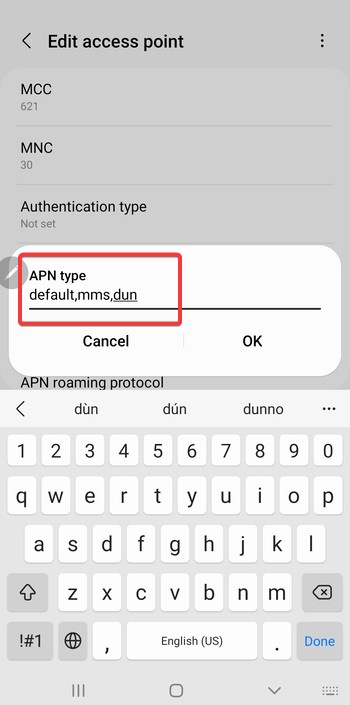
The dun entry enables tethering. Save the APN and restart the phone.
Correct APN for iPhone
Open Settings > Cellular > Cellular Data Network. Enter Straight Talk’s APN under Cellular Data, LTE Setup, and Personal Hotspot. Restart the phone to activate the new profile.
Understand Straight Talk hotspot limits
Straight Talk enforces hotspot caps even on plans that include tethering. You avoid surprises when you understand these limits upfront.
Monthly hotspot data limits
Most Straight Talk plans include fixed hotspot amounts, such as 5 GB or 10 GB. Once you use that allowance, hotspot stops working until your next cycle.
Throttling and speed reductions
Straight Talk often reduces speed after you hit your data threshold. Throttled speeds cannot support video streaming or large file downloads.
Fix hotspot not working on Straight Talk
- Confirm the hotspot toggle appears: Open your network settings and look for the hotspot switch. Straight Talk hides this toggle on unsupported plans. If it still appears grayed out, your APN needs corrections.
- Reset network settings: On Android, open Settings > System > Reset options. On iPhone, open Settings > General > Transfer or Reset iPhone. Reset network settings to clear corrupt APNs or cached provisioning files. You may need to rejoin Wi-Fi networks afterward.
- Reinsert SIM and reboot: Remove the Straight Talk SIM, wait a few seconds, and insert it again. Restart the phone to refresh registration with the network.
Tips to improve hotspot performance
- Change hotspot band to 5 GHz when you need faster speeds at short range
- Use 2.4 GHz when you need farther coverage or older device compatibility.
- Move the phone to a stronger signal area
- Limit connected devices
Frequently asked questions
Can I use hotspot on an unlimited Straight Talk plan? Some unlimited plans support hotspot, but many restrict it or lock the toggle. Check your plan details in your account.
Why is my hotspot slow, even with 5G? Network congestion, weak indoor signal, or too many connected devices can cut speeds.
Does hotspot work on BYOP Straight Talk phones? Yes, but BYOP devices need correct APN settings. You may need to enter them manually.
Can Straight Talk disable my hotspot? Yes. Straight Talk disables the hotspot when your plan does not include tethering or after you reach your data limit.
Summary
- Confirm that your Straight Talk plan supports hotspot.
- Enable hotspot in your Android or iPhone settings.
- Update APN fields when the hotspot toggle does not appear.
- Improve performance with band selection, better signal, and fewer connected devices.
- Watch your hotspot data cap to avoid speed reductions.
You can enable hotspot on Straight Talk quickly when you use the correct plan and APN settings. Most issues disappear once you confirm your plan benefits, correct the APN type, and refresh your network settings.


Discussion (0)
Be the first to comment.