The release of a new Samsung Galaxy smartphone generates such hype that it can only be compared to an iPhone release: everyone's excited about the new features and many want to get the latest installment in the long-running Galaxy series. After owning a Samsung Galaxy S2 for many years, I have been disappointed by the S3-S4-S5 line, so I have completely abandoned Samsung smartphones and was genuinely interested in what the Galaxy S7 could bring to the table. In s hort, I have been surprised. Read our review to learn everything you need to know about the Samsung Galaxy S7:
Hardware specifications and packaging
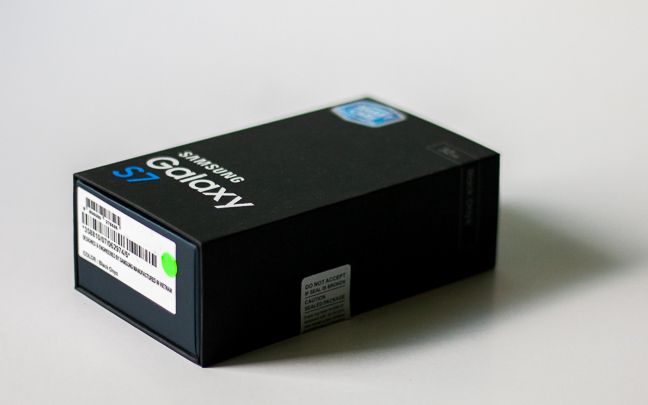
Samsung doesn't seem to waste too much time on the packaging of its flagship smartphone: the Samsung Galaxy S7 comes in a simple, black cardboard box that is not very elegant nor minimalistic, but at least it looks OK. It has the model name and storage space printed on its front, with the model's color on the right side, plus you also get a shiny blue warranty sticker too.
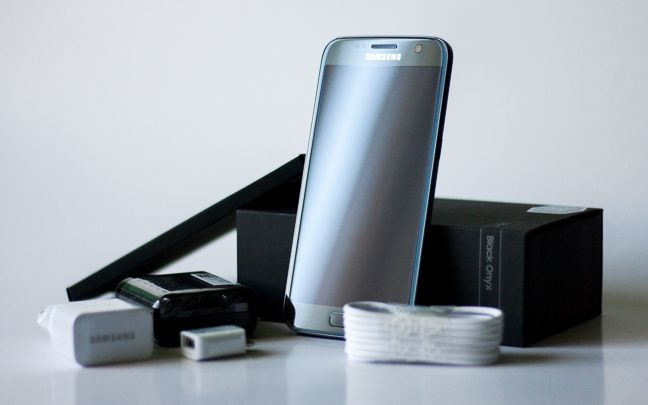
The cardboard box is magnetically sealed and opens up to reveal the smartphone itself, placed on top of the package. Under the device there is a piece of cardboard - when taken out you can see all the other accessories bundled with the smartphone: a charger head, a microUSB cable, a USB OTG adapter and a headset in a small plastic case.
Although there is no smartphone case bundled with the Galaxy S7, the number of accessories is still quite generous: the headset has its own nice little case that can be very handy, as the headset's cable won't get tangled up. The OTG adapter is another nice bonus: it can be used to connect the Samsung Galaxy S7 to your previous smartphone and instantly transfer all your personal data, or you can even connect a mouse or a keyboard to your device if you need to.
Of course, the most interesting thing inside the package is the smartphone itself: when you take it into your hand you just feel quality. The cold, brushed metal back fits perfectly in an average-sized palm and it simply gives the feeling of a perfect size. Besides that, it's also obvious that the smartphone is made of very high quality materials and it is very solid. It won't fall apart for sure. 🙂
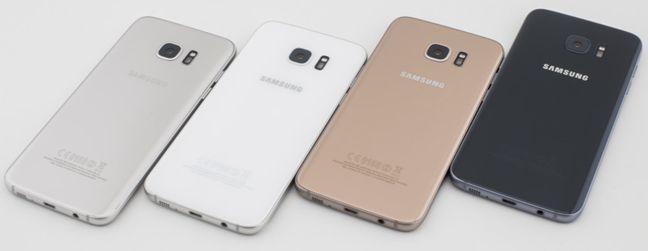
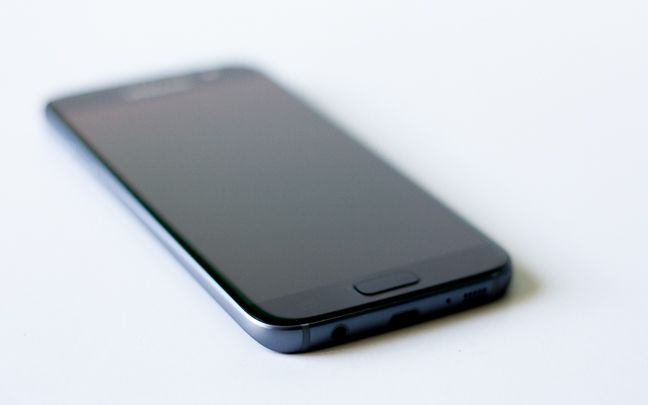
Its design is quite elegant, especially the Black Onyx edition which we had for testing. This is the first current-gen smartphone that is really black, not some dark silver color and it looks incredibly good. Of course, if you prefer something more extravagant, you might want to get a Pink Gold edition, or something from in between, like White Pearl, Gold Platinum or Silver Titanium.
Let's see what the Samsung Galaxy S7 has to offer on the technical side of things:
Its display is a 5.1" Super AMOLED touchscreen with a resolution of 1440 x 2560 pixels - that means a rocking 577 ppi pixel density. The screen is protected with a layer of Corning Gorilla Glass 4 coating, so you don't have to worry about getting it scratched. The S7 is not a very large smartphone: it's 5.61 inches or 142.4 mm tall, 2.74 inches or 69.6 mm wide and it has a thickness of only 0.31 inches or 7.9 mm. At this size it weighs 5.36 oz or 152 grams, which is mostly due to the high quality metals used in the device. It's not very much, we are sure that it won't be annoying.
As for the heart of this flagship smartphone, we have to say that it has more than one. This means that the Samsung Galaxy S7 comes in two flavors: the US edition is equipped with a Qualcomm MSM8996 Snapdragon 820 chipset that has two 2.15 GHz and two 1.6 GHz Kryo cores, while if you live outside the US, you will get the other edition that comes with the Samsung Exynos 8890 Octa-core chip, using a quad-core, 2.3 GHz Mongoose processor and a quad-core 1.6 GHz Cortex-A53 CPU. Both versions use 4 GB Dual-channel LPDDR4 RAM, although the US version is slightly faster, ticking at 1866 MHz, compared to the non-US speed of 1974 MHz.
The graphical processor is also different in the two chipsets: the US edition the 624 MHz Adreno 530 GPU, while the non-US variant is equipped with a Mali-T880 MP12 graphical processing unit, both having DirectX 11.1, OpenCL 1.2 and OpenGL ES 3.1 support. And just to let you sleep tight tonight: no matter which variant you get, the system performance is almost exactly the same on the two models, so don't worry about the technicalities.
Although you won't really get to see which model are you buying of the previous two, you can still choose based on storage space, as the Galaxy S7 comes with 32 or 64 GB of space. If that seems small, you can extend it , as you can install a microSD card of up to 200 GB in size. You won't really be able to install most apps on a microSD card, but we're sure that it will be great for large files, like your music or videos.
Another variation for the Samsung flagship device is that it comes in both Single SIM and Dual SIM editions. The first one has a nano-SIM slot and another dedicated for the microSD card, while the latter can use two nano-SIM cards, or a single nano-SIM and a microSD card, taking up the second SIM slot. The Dual SIM edition uses dual standby technology, meaning that while you're talking on one SIM card, the other one is in standby, not able to receive calls. Both SIM slots have 4G support, although only one can connect to these high-speed networks at a time.
The device's battery has a non-removable, Li-Ion battery with an impressive capacity of 3000 mAh. Based on our tests it won't really be a problem that you can't get the battery out, as it has a really good standby time - but more on that later.
Samsung Galaxy S7 has two cameras. The primary, rear-facing camera has a resolution of 12 MP, an aperture size of f/1.7, phase detection autofocus, optical image stabilization and a LED flash. It can record 2160p videos at 30fps, 1080p videos at 60fps and 720p videos at a super-slow speed of 240fps. The front camera is a 5 MP module with the same f/1.7 aperture size and has auto HDR to enhance image quality.
As for connectivity, there is nothing the Samsung Galaxy S7 cannot handle: it supports all networks from 2G to LTE, although the specific frequencies are not mentioned in its online specifications, as neither are the theoretical maximum speeds on 4G networks. The device can connect to all kinds of WiFi networks (802.11 a/b/g/n/ac), has dual-band WiFi (supporting both 2.4 GHz and 5 GHz networks), supports WiFi Direct and can be used as a WiFi hotspot. It is also equipped with a Bluetooth 4.2 chip with A2DP, LE and aptX support, it has GPS module with A-GPS, GLONASS and BDS support, a microUSB 2.0 port (with OTG support), a 3.5 mm audio jack and an NFC chip. Although there is no FM radio in this smartphone, it has some other nice additions, like the heart rate monitor on the back panel, or the fingerprint reader on the Home key.
The full set of hardware specifications can be found here: Samsung Galaxy S7 specifications.
If you just take a look at its specs, it becomes quite clear that the Samsung Galaxy S7 is no small-time player: it's loaded with the latest and greatest hardware, has some really good extras and comes in a size that will probably be a perfect match for the hands of many.
Design and build quality
As I have previously noted, I haven't really been a fan of Samsung's smartphone designs during the Galaxy S3-S5 period. Somehow I always felt that I was holding something very fragile in my hands, that could break at any given moment. This is absolutely not true for the Galaxy S7: it has very sleek curves, a simplistic design, that is somewhere on the border between elegant and a bit sporty.
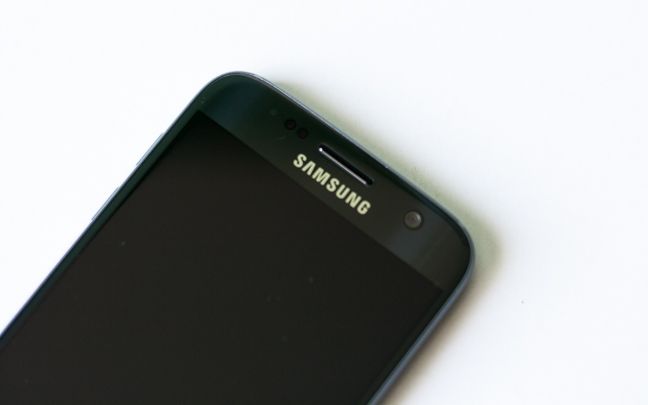
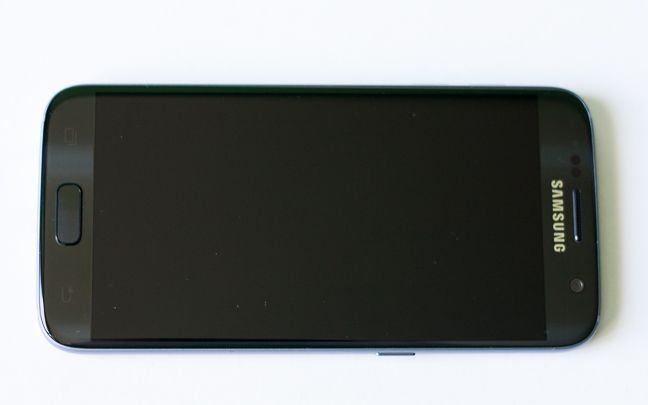
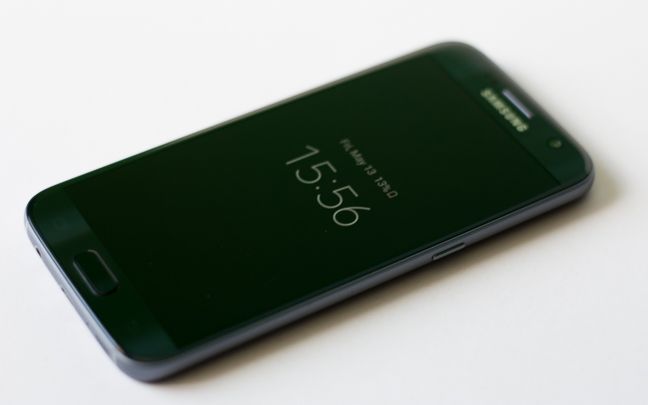
Most of its front panel is taken up by the 5.1" screen, that nearly goes edge to edge: of course the only things missing are the curved sides from Galaxy S7 Edge, but if you are not used to having those, you will be absolutely fine without them, it's not such a big deal to spend the price of an entry-level smartphone on that. Right above the screen we can see the light and proximity sensors, as well as the frontal, 5 MP camera, the phone speaker and the manufacturer's logo, while below the display there is a physical Home key, which also houses a fingerprint reader. There are two softkeys on the sides of the Home key, but these are invisible until needed.
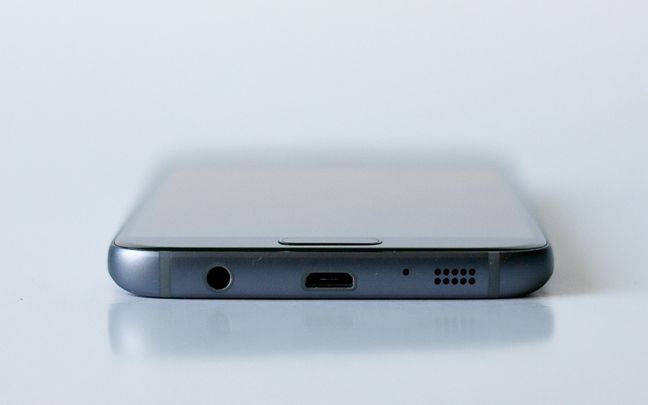
The bottom edge is quite crowded: from left to right there is the 3.5 mm jack, a microUSB 2.0 port (with OTG support), the primary microphone and the loudspeaker. Also, these connectors are placed between two pieces of plastic that are supposed to be a small addition to the all-steel case. These look quite similar to the ones on the sides of the iPhone 6 and we honestly don't understand why they were necessary. They might give the impression of the front of a sports car, but also feel like some cheaper materials. It's also interesting to note, that although the microUSB and the jack ports are not sealed, the Samsung Galaxy S7 is IP68 certified, which means that it's completely protected against dust and can be continuously immersed in up to 3 meters of water. If water penetrates these connectors, the device warns the user not to connect anything to it until it's dried.
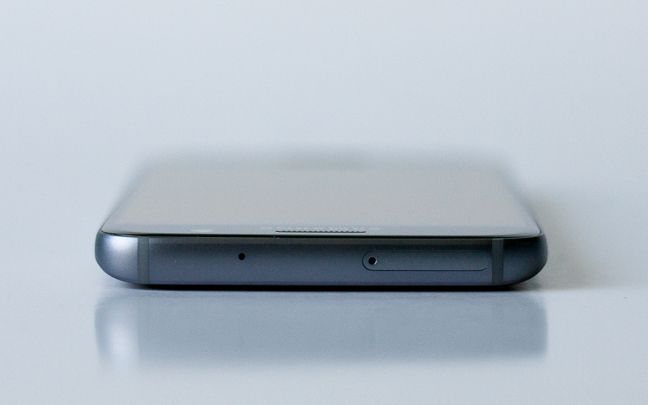
There is much less to see on the top edge, we only have the secondary microphone and the SIM slot: in case of a Single SIM model, there is a tray for a nano SIM card inside, or if you have a Dual SIM model, the tray has place for two nano SIM cards, or a nano SIM and a microSD card. The two pieces of plastic are present on this edge as well.
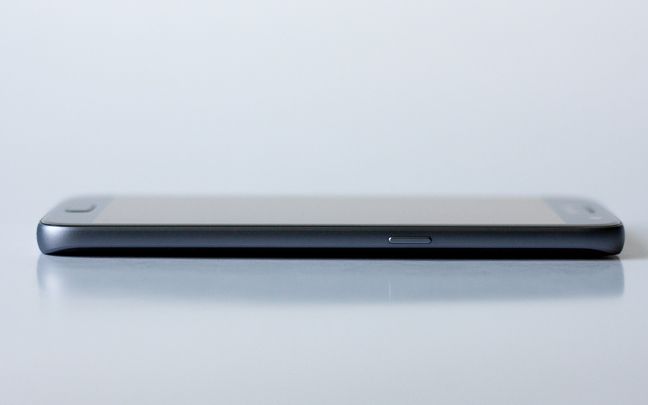
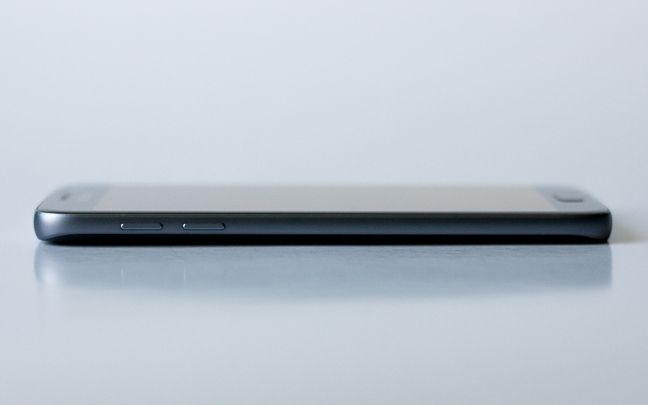
The two sides are not empty either: there is a single button on the right edge, which is used to turn the smartphone or the display On and Off, while on the right side there are two keys to control the volume.
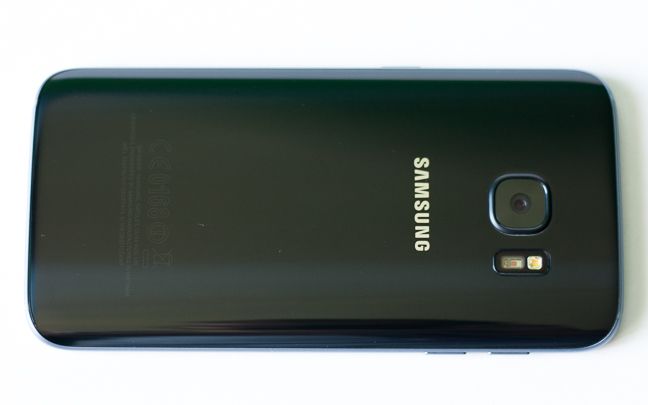
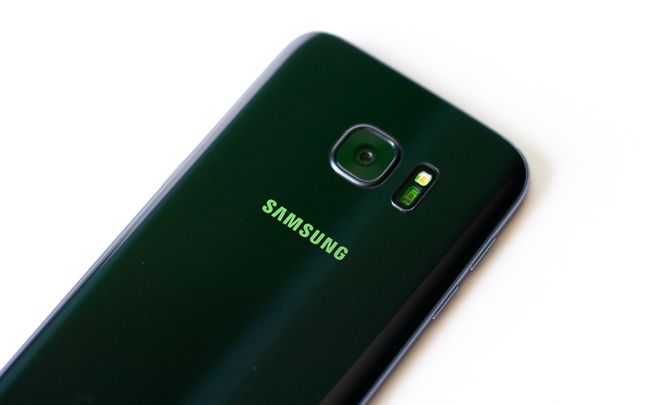
The back panel is clearly dominated by the presence of the large, 12 MP main camera, which can be seen in the center of the topmost part. Near the camera there is a LED flash and another sensor, which turns out to be an optical heart-rate monitor.
Remember when using this, that optical heart rate sensors are still considered new technology and are not 100% accurate, and neither are medical devices, so don't rely on data from them for medical purposes. Below the camera there is another Samsung logo, while on the bottom of the back panel there is some obligatory manufacturing information that is barely visible.
As for the smartphone's build quality we have to say that we are very impressed. Holding the Samsung Galaxy S7 in your hand feels like holding something that has been crafted to perfection. We really don't like to use superlatives, but it just feels like a very solid, long-lasting construction. Although the material it's made from can be a bit slippery, the device is not too large, so we don't think it will fall out of your palm.
The screen is very bright and - as usual for Samsung smartphones - with a high contrast. This might even seem a bit too much for some, but it can be fine-tuned from the settings. It is a 2.5K (QHD) screen with a resolution of 2560 x 1440 pixels and a 577 ppi pixel density. It is great to look at, has superb brightness, no matter what lighting conditions you use it in. It is an "Always on" display, meaning that the current date and time are always displayed onscreen, even if you turn the display off. This barely uses any power and it's a great idea, but it can be a bit annoying, as the time display is moved on the screen periodically to avoid burn-in.
Samsung's design team did a great job with the Galaxy S7: it feels very compact, it has no annoying design features, it's made of very high quality materials and it's practically blessed with a screen that is a marvel of current technology.
The smartphone experience on the Samsung Galaxy S7
The Galaxy S7 is not the most expensive smartphone from Samsung, but its price is still rather high. Considering that and the hardware it's packed with, we are clearly looking at a high-end flagship smartphone. If the specifications and the build quality didn't convince you, it's time to turn on the device.
The first thing you'll notice is the crystal clear screen which we already praised, but we must say again that it looks darn good to look at so many pixels crammed in such a tight space. The second thing you will surely take note of is the speed of the smartphone: the hardware is very powerful, there is really no chance to see any lags, screen tears or slowdowns. The Samsung Galaxy S7 has one of the best available mobile processors and it's packed with lots of RAM and accompanied by a good graphics chip. All in all, speed won't be an issue at all. Say goodbye to loading times or long waits.
Although making phone calls seems to be one of the least popular activities on today's smartphones, we are still talking about a phone, so sound and call quality should be top-notch. All calls were very clear, we had no problems hearing others and others heard us perfectly as well.
Network connectivity shouldn't be an issue on any modern device, and it isn't on the Galaxy S7 either: the smartphone had no issues connecting to the 4G network and the connection was always stable, we didn't experience any problems with it. It's good to know that if you opt for the Dual SIM model, you can have 4G access on any of the two SIM cards, but only one of them will be able to use a high-speed network, the other being limited to calls and text messages.
WiFi, Bluetooth connectivity and navigation all worked like a breeze. The 5.1 inch screen is considered to be average nowadays, but it's big enough to watch a movie and it can also be a superb companion during your travels, if you use it for GPS navigation.
The Samsung Galaxy S7's official specifications doesn't list the expected standby or call times, although, according to GSMArena , you should be able to talk for 22 hours on a 3G networks or play music for 62 hours. We're not really fans of day-long chit-chats or never ending house parties, but we must say that the 3000 mAh battery was fairly impressive: it kept the Galaxy S7 ticking for over two days. Nowadays we're content with a smartphone that doesn't need to be charged every day, so this is a really good result. As usual, we were using the smartphone with its default settings: automatic brightness, always-on WiFi, disabled Bluetooth and the location set to battery saving mode. Add to this an average number of phone calls, messages, email and quite a lot of web browsing and those two days on battery are even better.
Charging is another thing: be sure to keep the original charger intact as the Samsung Galaxy S7 supports quick charging, which means that your device will be charged from 0 to 100 in an hour and a half or so. Yep, that's really fast, but be wary that the smartphone can get a bit hot during fast charging. The Samsung Galaxy S7 also supports wireless charging, but you need to get a wireless charger separately for that.
When you buy a flagship smartphone from a major manufacturer, you expect it to work flawlessly and the Samsung Galaxy S7 does exactly that. It has a great screen, it's faster than most current smartphones on the market, has no connectivity problems, has an uptime of over two days, can be charged quickly and it lacks important software bugs.
Read the next page of this review to learn more about the camera experience on this smartphone as well as the performance it offered in benchmarks.
The camera experience on the Samsung Galaxy S7
Although the Samsung Galaxy S7 is not specifically a camera smartphone, in the case of a flagship device one could expect to have a very good camera that can take great-looking pictures. Its main camera is not its main feature, but it is a rather good 12 MP module, while the secondary camera on the front has a resolution of 5 MP.
The main camera can take pictures at a maximum resolution of 4032 x 3024 pixels and has a single LED flash. It has an aperture size of f/1.7 and a focal length of 26 mm, features phase detection autofocus and optical image stabilization. It uses a 1/2.6" sensor with a pixel size of 1.4 µm. As for the pictures it takes, we really have nothing to complain about: the colors feel really alive, the images have great contrast and the dynamic range is also quite good. Both close-up images and wider shots have lots of detail, camera noise is barely noticeable and details aren't washed out by software noise removal. It is also good to know that due to the phase detection autofocus technology, focusing is really fast.
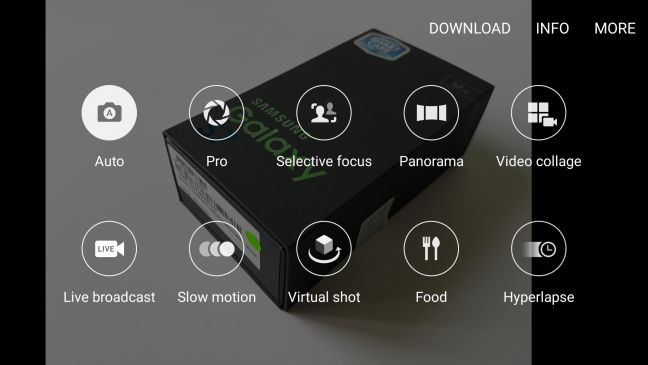
The camera's software is packed with lots of features. There are a number of effects, a HDR mode, timed shots and, besides auto mode, you can use selective focus, panorama mode, video collage, live broadcast, slow motion, virtual shot, food and hyperlapse modes. There is also a pro mode that lets you manually tune the camera's settings, ranging from shutter speed to ISO, white balance, focus mode, light metering or light tones.
The 5-megapixel front camera is great for selfies and has a wide-angle lens with an aperture size of f/1.7 and a focal length of 22 mm. You can use this for video collages, live streams, or even take panorama selfies. There are of course a number of beautification effects to make your selfies look great and you can use the heart rate sensor on the back panel to take a shot, which makes the process faster. There is no flash on the front, but the software can use the screen's light to help take a picture in low light.
With the main camera you can record videos in many resolutions and at different speeds: 2160p videos are limited to 30 frames per second, but 1080p videos can be recorded at 60fps, while 720p videos can be even recorded at 240fps. There is also a feature that lets you take 9 MP images while recording a 4K video, which can be handy sometimes. The recorded videos look quite good, although they might seem a bit dark sometimes. The optical image stabilization really does wonders: you can embrace awesome videos, even if you have a bit shaky hand. Below you can see a sample video that we filmed with this smartphone:
Although there aren't many smartphones that are made with the main reason to be used as a camera, a flagship device needs to have a great camera. The Samsung Galaxy S7 promises and delivers on this front. Although the 12 MP might seem a bit low nowadays, the number of pixels is much less important than the actual quality of your pictures, which happens to be great. Superb pictures, great videos, lots of features - you will love this smartphone's camera in mostly every situation.
The Samsung Galaxy S7 ships with Android 6.0.1, which is currently the latest Android edition. Besides that, Samsung already released two minor patches to the software, so we can hope that they will keep their current flagship smartphone up to date for quite a while. There is no official word from the Korean company regarding Android N updates (which is slated to release sometime this summer), but there are rumors that the Galaxy S7 will be updated to the seventh incarnation of Google's operating system.
As all Samsung smartphones, the Galaxy S7 also has Samsung's modified user interface, the TouchWiz, currently at version 6.0, which has changed quite a lot since its original debut on the Samsung Galaxy S in 2010 (yes, it was only six years ago, and the first Galaxy is basically history since then).
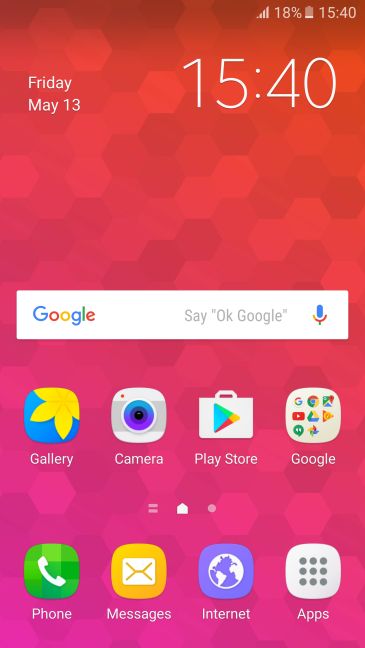
Some of the latest additions to the list of TouchWiz features are theming, which can be used to customize your smartphone in many ways and the Galaxy Labs feature which lets you access features that are still under testing - for example you can have all applications placed on the Home screen (like on iOS devices) instead of being accessed from the All apps menu. Otherwise app icons can be placed on a 4x4, 4x5 or 5x5 grid and there is no automatic alphabetical ordering, you have to do that manually.
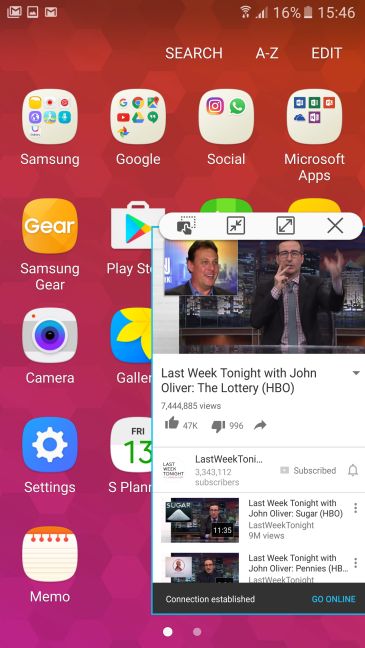
There is also a split screen mode that can be activated by long-pressing the application switcher key - apps can also be placed in a floating window or can be run as an icon (if the application supports this feature), which lets you do multitasking in a way that hasn't been seen on smartphones until quite recently.
Double-pressing the Home key lets you instantly access the camera, even if the smartphone is locked with a fingerprint. You can even view pictures in the gallery this way - but only those that were taken with this method, so no other data is accessible.
There is also gesture and voice control, screenshots can be taken by pressing the Home+Volume down key combination or by swiping across the screen with your palm. There are some nice built-in apps as well, that should be mentioned, like the Game Launcher that not only collects all your games in one place, but you can also check out the most popular games on Galaxy devices and access features that can enhance your gameplay experience. Game Tools lets you disable notifications during gameplay, record your gaming session in 1080p and even record yourself during gaming with the frontal camera.
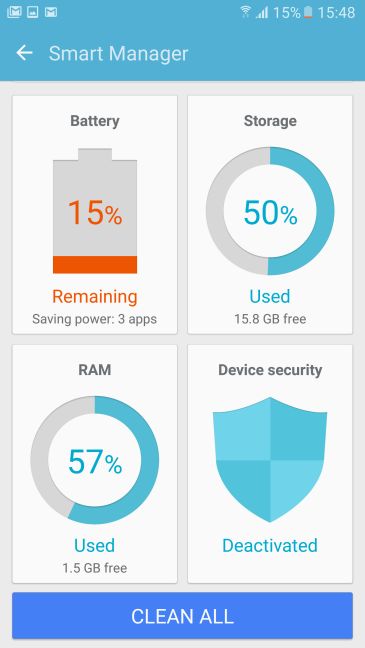
Smart stay is a nice feature that detects your face with the front camera and keeps the screen turned on while you are looking at it. Smart capture adds additional options to taking screenshots, Smart manager is a hub for managing battery, storage space, memory, and device security, Direct call lets you call the person whose contact details you are looking at, Smart alert will make the device vibrate when you pick it up to let you know about missed notification, while Easy mute mutes incoming calls and alarms if you place your hand over the screen or turn the device over.
One of the reasons I strayed away from Samsung smartphones was that they came preinstalled with tons of Samsung apps, many of which were marginally useful and could be considered as bloatware. The manufacturer, fortunately, managed to ditch this bad habit and has bundled only those apps that are really necessary or useful. You can, of course, access many more Samsung apps with a tap, if you need to.
The Samsung Galaxy S7 ships with the following bundled applications:
Calculator - a calculator app with scientific functions.
E-mail - Samsung's email client application.
Files - a simple file manager from Samsung.
Galaxy apps - get additional applications designed for Samsung smartphones.
Internet Browser - an alternative to Google's Chrome.
Memo - a simple note-taking app.
Microsoft Office - the full office suite, straight from the Redmond giant.
S Health - application for tracking your fitness and health level.
S Planner - Samsung's calendar app.
S Voice - Samsung's personal assistant.
Besides these, the Galaxy S7 also has all the major Google apps installed, so you don't have to worry about getting them.
Samsung's TouchWiz user interface has grown into a useful and handy way to work with your Android device. During its years, it has left behind many useless features and bundled apps, and it is now a much cleaner and friendlier place to visit. And if you would like to have all the Samsung apps, then they are just a tap away in the Galaxy app store.
Performance in benchmarks
We ran our batch of benchmarks on the Samsung Galaxy S7 to see how it performs:
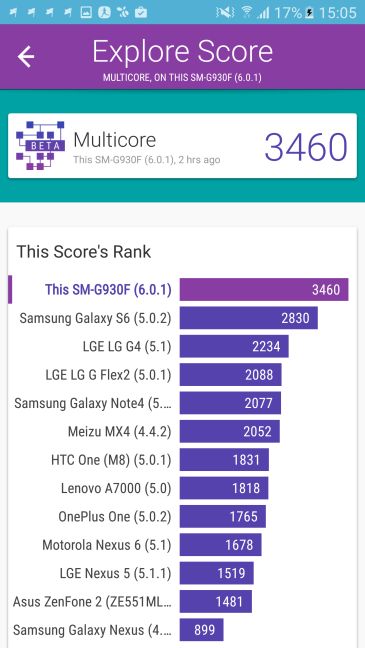
First, we tested the processor's speed, using the popular benchmark application, Vellamo. As always, we were first curious about the multicore performance, so we ran Vellamo's Multicore test, which benchmarks the processor's multithreaded capabilities. Here the Galaxy S7 scored 3460 points, is by far the best on the list. The second is the previous Galaxy smartphone (the S6) with "only" 2830 points. The upgrade is clearly a major one.
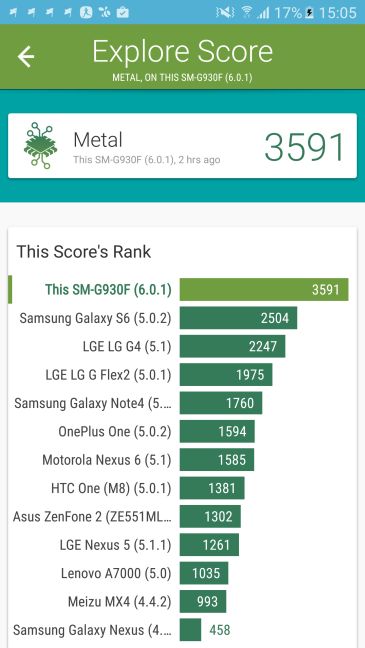
Of course, the multicore performance is not the only relevant measure of a smartphone's speed, since many applications don't even make use of the multi-core processor, but can only use a single core. In order to check Galaxy S7's single-core performance, we ran Vellamo's Metal test, where it scored 3591 points. There's no surprise in the fact that it's first yet again, but it scored a thousand points better than the Galaxy S6, leading the competition by a lot.
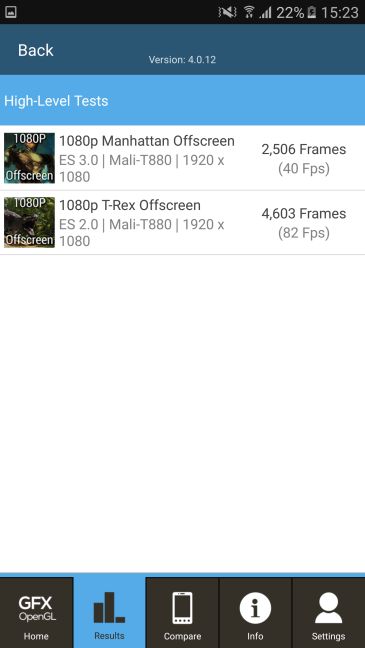
While you're us ing a high-performance smartphone, you might want to jump into gaming every once in awhile. We were eager to see the Galaxy S7's gaming performance and, in order to test its graphical capabilities, we downloaded the GFXBench GL Benchmark and went on to see how the device fares on the T-Rex and Manhattan 1080p tests.
In the T-Rex Offscreen test the Samsung Galaxy S7 rendered 4603 frames, thus resulting in an overall speed of 82 frames per second. Impressive! Not to mention that this places Samsung's latest smartphone at the top of the competition. The Manhattan Offscreen test is more demanding, usually all devices fare worse in this one, and so does the Galaxy S7, which rendered 2506 frames, that is 40 frames per second. Of course this is still a top-notch result, proving that the latest Samsung Galaxy can handle any graphically demanding task that you throw at it.
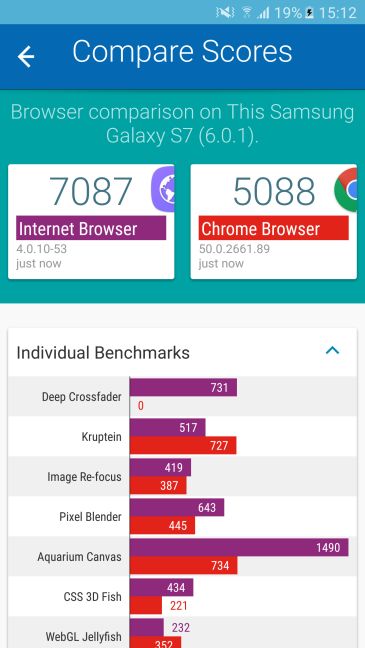
Moving on to real-world performance, we have measured one the most important features of a smartphone: browsing the web. Vellamo comes in handy again, with its Explore test, which not only tries to render all kinds of content (HTML5, CSS, JavaScript, etc.) in a web browser, but it also measures zooming and scrolling performance - tasks you do all the time when you browse the web. Using Google's Chrome browser, the Samsung Galaxy S7 received a score of 5088 points, which makes it - again - the first of the pack. And yet again, by a longshot, as LG's Flex2 scored more than a thousand points less.
We usually test the performance of the built-in web browser as well, just to see how does it compare to Chrome, but Chrome is almost always better. Not now though! The aptly named Internet Browser must be tailored to the Samsung hardware, as it scored 7087 points.
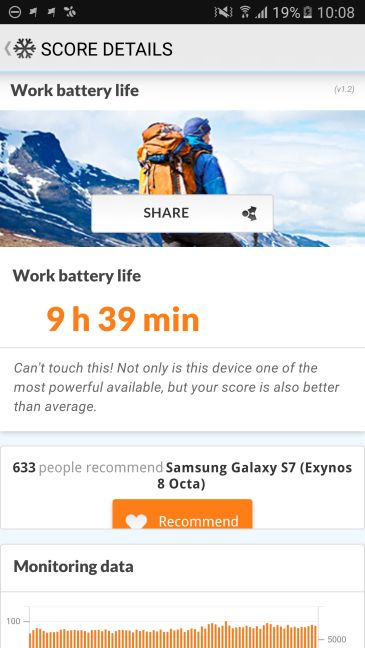
Although it doesn't affect the smartphone's performance in terms of speed, the battery's capabilities are also important. The Galaxy S7 is fitted with a 3000 mAh Li-Ion battery that should keep the device ticking for about two days. We ran PCMark's Work battery life test to see how does it fare in that benchmark and it measured a battery life of 9 hours and 39 minutes, this being benchmarked placing the smartphone under constant load, with an always-on display. There might be smartphones with slightly better battery performance, but it's sure that the Galaxy S7 has nothing to be ashamed of.
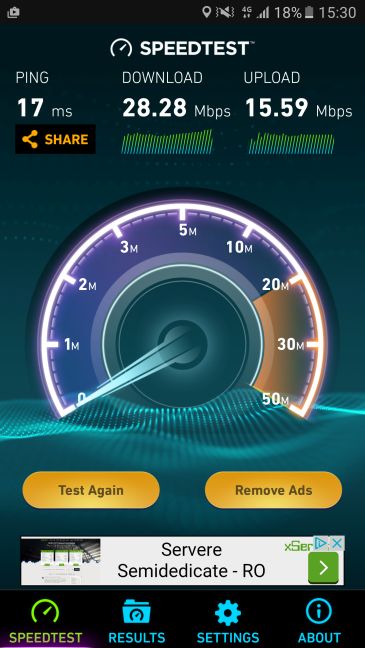
The Galaxy S7 of course has 4G LTE support and we were curious about its data transfer performance, which we have measured with Ookla's Speedtest.net application. During our tests we were using the Orange Romania mobile network and measured transfer speeds both indoors and outdoors.
There were no issues connecting to the 4G network, although the transfer speeds weren't the maximum possible, as we have measured a download speed of 28.28 Mbps and an upload speed of 15.59 Mbps. The ping time was really good, only 17 ms.
Before running these synthetic benchmarks, we already saw that the Samsung Galaxy S7 is a really powerful smartphone, that is capable of handling any task you need it to do. After checking our benchmark results it became evident that Samsung's latest flagship is possibly the fastest smartphone currently available, being on par with the latest iPhones and clearly leading the Android competition. Even with the great performance, the battery still manages to keep the juice flowing for about two days, so you won't need to sacrifice uptime for speed.
Pros and cons
The most important pros of the Samsung Galaxy S7 are:
A compact, sturdy design with a flawless construction
Beautiful screen with vivid colors
A camera that can be a great companion in any situation
User-friendly software without too much bloatware
The best performance an Android smartphone currently has to offer, matched with great battery life
As for the problems of the Galaxy S7 we can only name two:
A hefty price tag
It took quite a long time for Samsung to produce something really good again
Product rating5/5
Verdict
Flagship smartphones are always special devices to review: the expectations are high and since they usually come with a similarly high price tag, they must be analyzed quite closely to see if they are worth the asking price. In the case of the Samsung Galaxy S7 the answer is a resounding Yes!
In the era of huge and gigantic smartphones, Samsung managed to produce something that is large enough for all tasks that can be accomplished on a smartphone, but it's still so compact that you will never feel it's a burden. And all this is enclosed in a spectacular brushed metal case, topped off with a brilliant screen.
On the inside, you will get the best hardware that is currently available and you will feel this when using the smartphone: say goodbye to slowdowns, lags and problems of that kind. The Samsung Galaxy S7 offers great performance, no matter the task and it still manages to stay online for about two days. Add the great camera, the user-friendly interface, and a list of useful apps and you get something incredible. Yes, the price is not at all low, but remember that you are getting one of the best smartphones in the world.









Discussion (0)
Comments are closed.