Samsung Galaxy Note20 Ultra 5G is a luxury device aimed at people who want the latest innovation in the world of phablets. The premium price tag and colossal size didn't stop it from being preordered by many people online, so much so that Samsung bragged about its preordered performance in select markets, such as the UK. If you want to know what Samsung Galaxy Note20 Ultra 5G can do, why its cost is so high, and whether it is the right choice for you, read this detailed review:
Samsung Galaxy Note20 Ultra 5G: Who is it good for?
This massive Android phablet is a good choice for:
People who are looking for a phablet with excellent hardware and performance
Users who want one of the best camera systems on the market
People who want to enjoy watching high-resolution movies on a large mobile screen
Users who are interested in productivity and using their smartphone as a PC replacement
People with large hands who can hold a smartphone this big
Users with a generous budget who can afford luxury devices
Pros and cons
Here are some of the best things about the Samsung Galaxy Note20 Ultra 5G:
An immersive screen that's great both for movies and productivity
Excellent sound quality on both the stereo speakers and the bundled earphones
The cameras feature some impressive specs
The S Pen is responsive and precise
Excellent build quality
Fast and precise fingerprint sensor
You can connect it to a PC or use it as a PC replacement, with Samsung Dex
Fast charging both via USB and wirelessly
There are also some downsides to consider:
The sheer size and weight of this smartphone don't make it a suitable choice for people with smaller hands
We would have liked a battery with a larger capacity
Samsung should use a Qualcomm processor in all markets, not just the USA
It is not a great choice for mobile gaming
Product rating4/5
Verdict
Samsung Galaxy Note20 Ultra 5G is a premium phablet with a hefty price tag, destined for people with generous budgets. It is an excellent choice if you want the best screen or a fantastic camera system. It is perfect for enjoying high-resolution movies and for work. The S Pen is fast and precise, and it offers a great way to take notes. Also, if you want to replace your PC with a smartphone, Samsung Galaxy Note20 Ultra 5G is one of the best choices available on the market right now.
Unboxing the Samsung Galaxy Note20 Ultra 5G
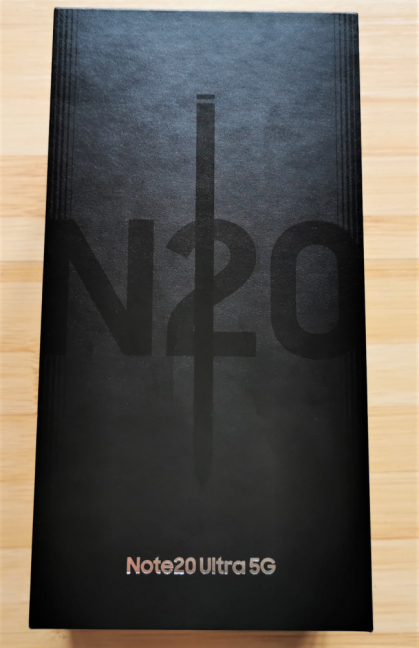
Samsung Galaxy Note20 Ultra 5G comes in a large black box with the N20 logo and the S Pen on the top. On the sides, the device's full name is printed in black letters, and you see some stickers with information about the serial number and the IMEI code of the Android smartphone that you just bought.
The packaging used for Samsung Galaxy Note20 Ultra 5G
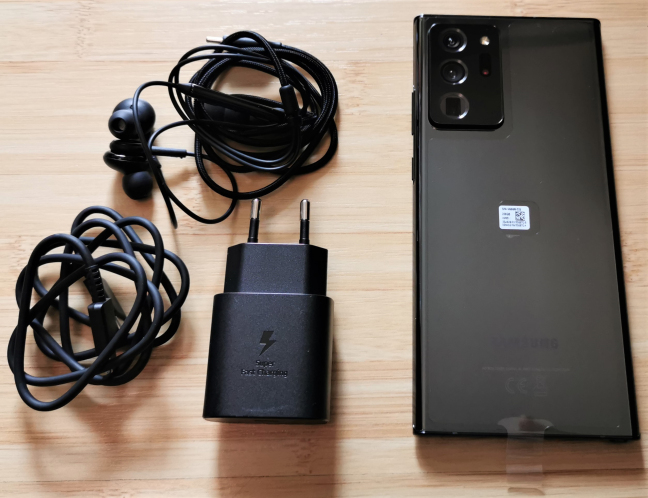
When you unbox everything, you find the smartphone itself, its charger, a pair of high-quality AKG earphones, and the data cable.
Unboxing Samsung Galaxy Note20 Ultra 5G
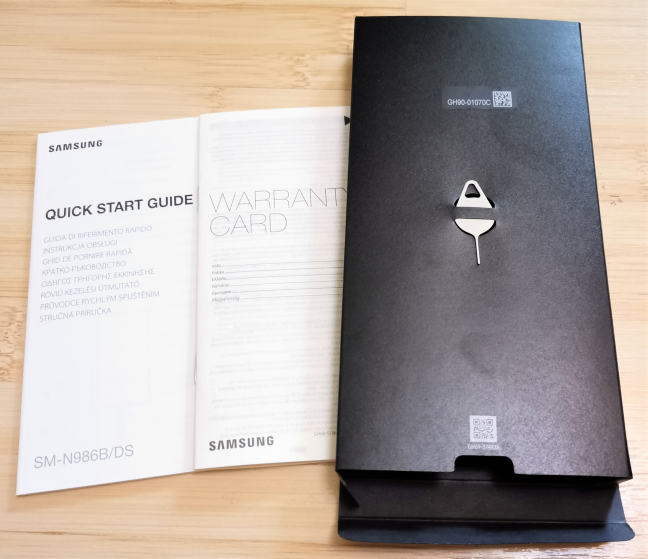
Inside a smaller box, you find the SIM eject pin, the quick start guide, and the warranty card. Unfortunately, Samsung doesn't bundle a protection case for your newly purchased smartphone. Considering how much of this phone is built using glass and how expensive it is, it would have been a welcome accessory.
The leaflets that you find inside the box
Unboxing the Samsung Galaxy Note20 Ultra 5G is an experience worthy of a premium device. Inside the package, you get everything you need, except for a protection case, which needs to be purchased separately.
Design and build quality
Samsung Galaxy Note20 Ultra 5G follows the classic Galaxy Notes design language that people know from previous years, with rounded corners and a slightly curved display. The bottom bezel is thinner than on prior models and the selfie camera cutout too. This is a giant 6.9" smartphone, that weighs 7.34 oz or 208 grams. It is 164.8 x 77.2 mm or 6.49 x 3.04 inches in length and width, and it has a thickness of 8.1mm or 0.32 inches.
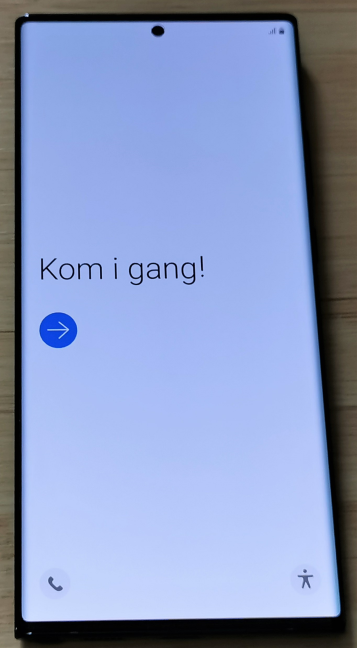
Starting the Samsung Galaxy Note20 Ultra 5G
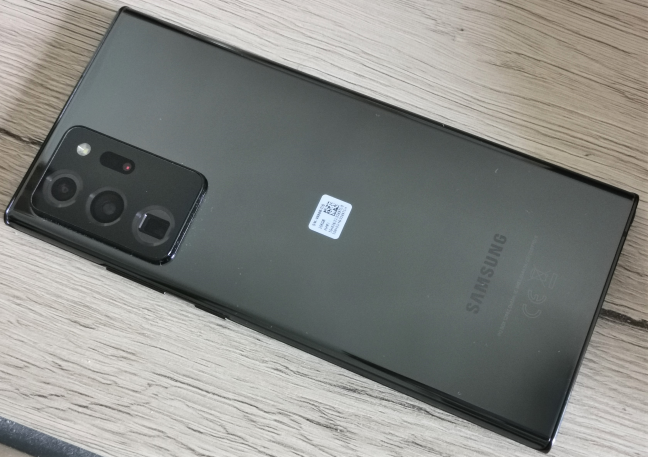
On the back, the most visible feature is the oversized camera hump that contains three lenses, the flash, and a laser sensor. It is enormous, and it makes the smartphone heavier towards the top-right corner. Samsung Galaxy Note20 Ultra 5G is available in three colors: Mystic Bronze, Black, and White. For testing, we received the Mystic Black version, which is the biggest fingerprint magnet of all versions.
The camera hump on the Samsung Galaxy Note20 Ultra 5G
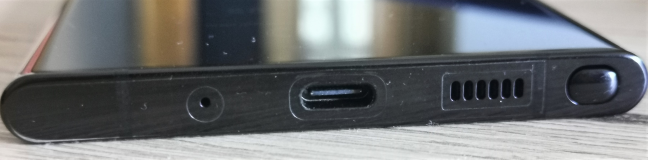
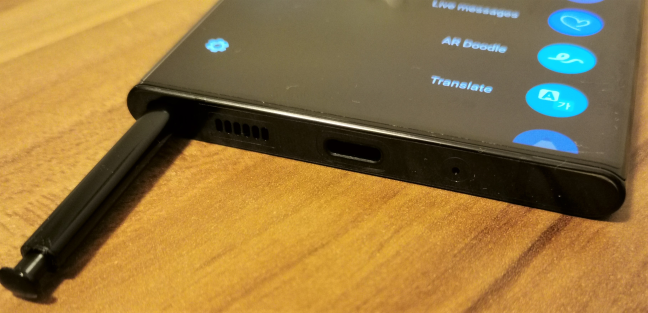
On the bottom of the smartphone, you find the S Pen, the USB charging port, that also functions as an audio port, a speaker, and a microphone.
The ports on the bottom of the Samsung Galaxy Note20 Ultra 5G
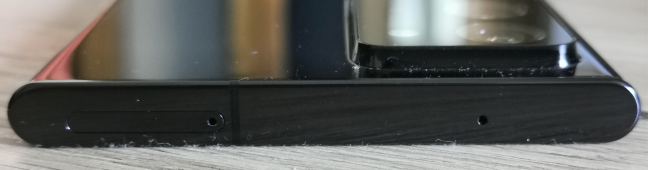
On the top side of the smartphone, you find the SIM tray and another microphone.
The top side of the Samsung Galaxy Note20 Ultra 5G
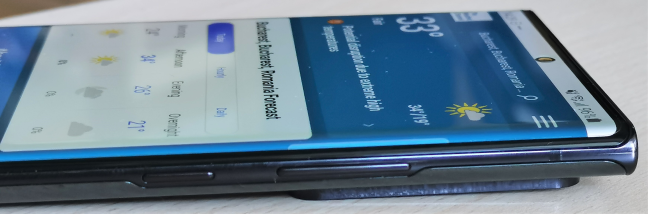
On the right side of Samsung Galaxy Note20 Ultra 5G, there are the volume keys and a programmable side key that no longer works as a Power button, as it does on many other Android smartphones.
The keys on the side of the Samsung Galaxy Note20 Ultra 5G
The smartphone is built with premium materials that are designed to last. The frame is all metal, and the screen is protected by Corning Gorilla Glass version 7 (Victus), the most durable glass on the market today. Both the S Pen and the smartphone have an IP68 certification, that is deemed fit enough to withstand dust, dirt, and sand, and is resistant to submersion up to a maximum depth of about 5 feet or 1.5m underwater for up to thirty minutes.
Samsung Galaxy Note20 Ultra 5G is a giant smartphone, made with the best materials available, that has a design worthy of a luxury product.
Hardware specifications
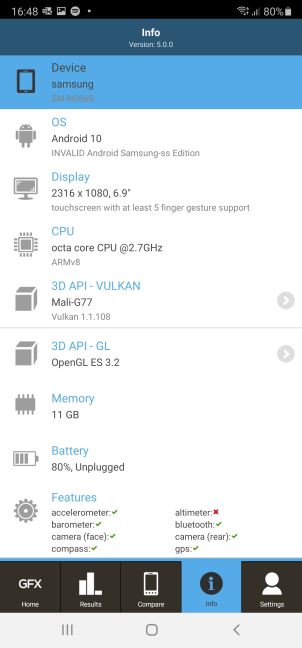
Samsung Galaxy Note20 Ultra 5G packs some powerful hardware. First of all, it features a Qualcomm SM8250 Snapdragon 865+ system on a chip (SoC) in the United States, or a Samsung Exynos 990 processor with eight cores, in other markets. We would have preferred for Samsung to use the Qualcomm processor in all markets. The graphics chip inside this smartphone can be an Adreno 650 in the USA or a Mali-G77 MP11 chip in other markets.
The hardware inside Samsung Galaxy Note20 Ultra 5G
There's also 12 GB of RAM, and 128 GB, 256 GB, or 512 GB of storage space for your apps, pictures, and videos. Considering that you can record 8K videos on this smartphone, I would recommend the 256 GB or 512 GB storage options. However, there's also the possibility of extending the storage space using a microSDXC card.
Samsung Galaxy Note20 Ultra 5G bundles an outstanding camera system. On the back, we have the following:
12 MP ultra-wide camera, with an aperture of f2.2
108 MP (yes, that's correct) wide-angle camera, with optical image stabilization, and an aperture of f1.8
12 MP telephoto camera, with an aperture of f3
A laser sensor with autofocus
The flash
The selfie camera on the front features a 10 MP objective, auto-focus, and an aperture of f2.2. These are some impressive specs, that allow you to record videos in 8K resolution and 24 frames per second, or 4K resolution and 30 or 60 frames per second.
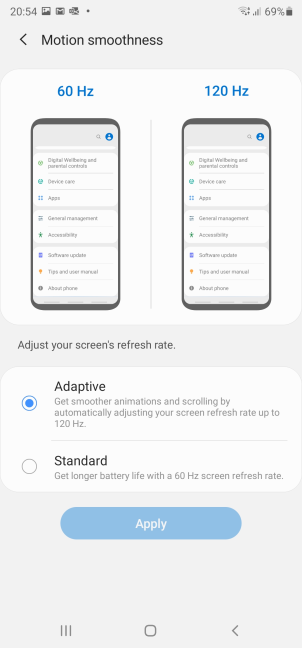
The screen is impressive, both in terms of size (6.9") and technology. Samsung Galaxy Note20 Ultra 5G has Quad HD+ Dynamic AMOLED 2X display with 16 million colors, a resolution of 1440 x 3088 pixels, a density of 496 pixels per inch (ppi), a screen to body ratio of 91.7%, with HDR10+, and a refresh rate of up to 120 Hz.
Setting up the refresh rate on the Samsung Galaxy Note20 Ultra 5G
This device works with 5G mobile networks and Wi-Fi 6 wireless networks with MU-MIMO 4x4 transfers. It also has a Bluetooth 5 chip, a GPS chip, NFC, and a USB Type-C 3.2 port.
Also, there are many sensors on it: an ultra-fast fingerprint reader (under the display), an accelerometer, gyroscope, proximity sensor, compass, and barometer.
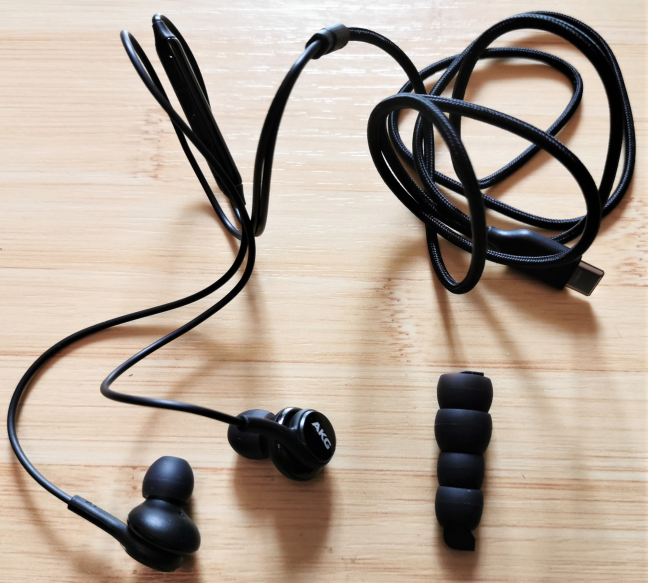
The audio equipment on the Samsung Galaxy Note20 Ultra 5G is top-notch too: the smartphone has both stereo speakers and earphones made by AKG that feature surround sound with Dolby Atmos technology (Dolby Digital, Dolby Digital Plus included). The audio jack is gone; instead, you can use the USB-C port for connecting the bundled earphones. A nice touch is that the bundled AKG earphones come with extra earbuds of different sizes to fit any ear comfortably.
AKG earphones and earbuds
A 4500 mAh Li-Ion battery powers the Samsung Galaxy Note20 Ultra 5G. Considering how large the screen is, and how much energy it consumes, we are underwhelmed by its capacity. However, this downside is offset by Samsung bundling 25W fast charging when using the USB cable and supporting fast wireless charging 2.0 at 15W.
The S Pen is Bluetooth enabled, with a battery that lasts up to 24 hours of standby time, and a diameter of 0.7mm. It also has a latency of 9 ms, and it works at up to 4096 pressure levels.
The S Pen is tucked inside Samsung Galaxy Note20 Ultra 5G
The specifications sheet for Samsung Galaxy Note20 Ultra 5G is incredibly long, and we covered the most important details. If you want more information, visit this page: Samsung Galaxy Note20 Ultra 5G Specs.
To learn more about the smartphone experience, the cameras, bundled apps, and performance in benchmarks, go to the second page of this review.
The smartphone experience on the Samsung Galaxy Note20 Ultra 5G
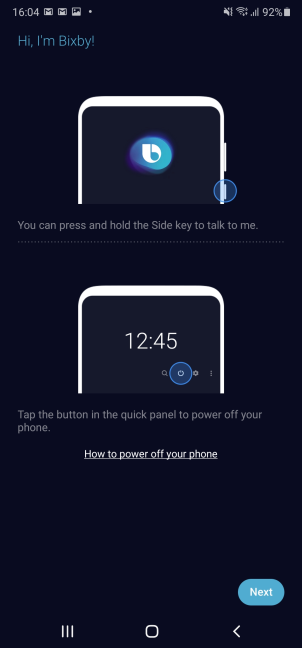
When you switch from another Android smartphone to a Samsung one, as I did, you might need a bit of time to adjust. Samsung has replaced almost everything in Android with its apps, services, and settings. One of the most annoying differences is that the side button on the right of the Samsung Galaxy Note20 Ultra 5G is no longer used to shut down or restart your device. By default, it starts Bixby, a voice assistant that some people don't want to use. You can disable Bixby and reconfigure the side button, but that's a process people shouldn't have to go through, especially on a smartphone this expensive.
Bixby is here to annoy you
I liked the fact that Samsung already had a security update available for this smartphone. As soon as I set up Android with my Google account, it asked me to download it. I hope that Samsung keeps this up and will provide updates for Android on a timely basis.
Unlocking your Samsung Galaxy Note20 Ultra 5G is a fast experience. Both the face recognition and the fingerprint reader work great, but I ended up preferring the fingerprint reader. You may like that too, but try them both first.
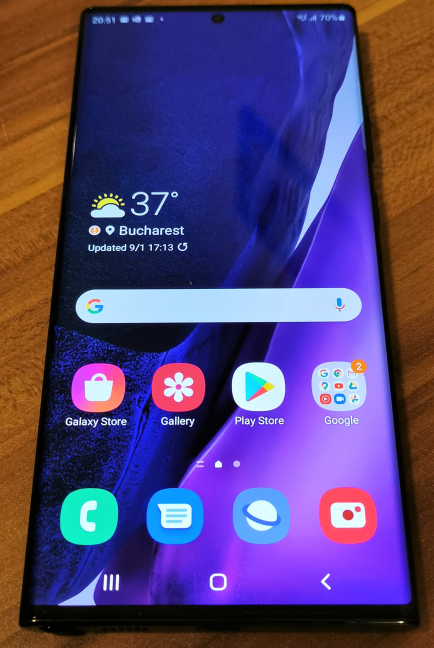
The user interface on this device looks great, and it is easy to use, fast, and fluid. There was no lag on the Samsung Galaxy Note20 Ultra 5G no matter what I did on it, mainly due to the 120 Hz refresh rate on the screen.
The user interface on the Samsung Galaxy Note20 Ultra 5G
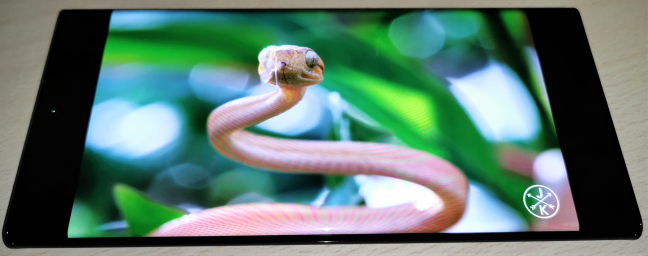
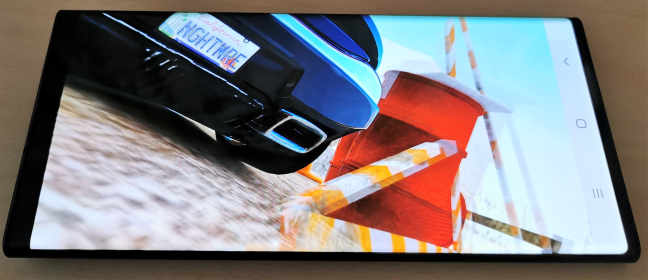
Speaking of which, the display is the main attraction on this phablet. Images are vivid, clear, and sharp. Coupled with the excellent speakers and earphones, this device is a perfect choice for viewing high-quality YouTube videos and binging Netflix in 4K. Samsung Galaxy Note20 Ultra 5G is the best smartphone I've used for video consumption.
Watching 4K movies on the Samsung Galaxy Note20 Ultra 5G
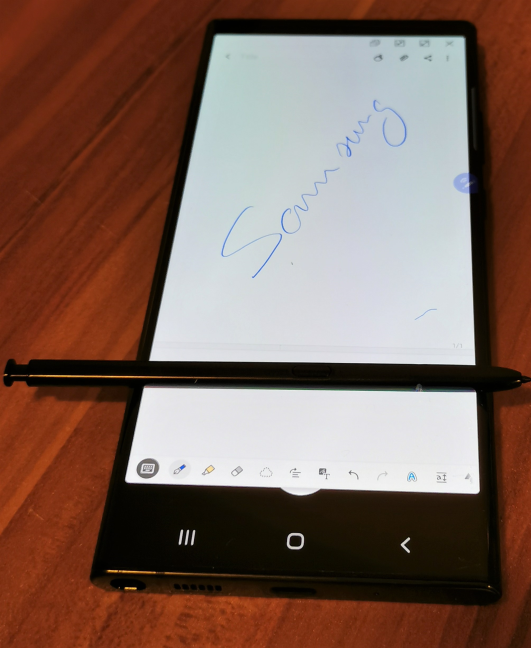
Another standout feature is the S Pen that sits nicely tucked inside. It is easy to take it out, and using it is a pleasure, no matter what you plan to do. It has a remarkable precision, and we found it useful for taking notes and navigating the user interface in a more precise manner. Speaking of navigation, one-handed use is problematic on the Samsung Galaxy Note20 Ultra 5G, even if you have large hands. Also, trying to type a message with one hand is challenging, unless you turn on the One-handed mode. This device is just too big, and using it with both hands is a better option.
Taking notes with the Samsung Galaxy Note20 Ultra 5G
I tried a bit of gaming too on the Samsung Galaxy Note20 Ultra 5G. The hardware of this phablet is powerful enough to run any game you want. However, the device is not made for gaming, and this is noticeable in several ways. First of all, if you play more than just a couple of minutes, Galaxy Note20 Ultra 5G starts to heat up a lot, and then you notice a bit of sluggishness while the battery gets drained faster. Also, holding your smartphone in landscape mode while playing Fortnite or a racing game is not comfortable because your left hand keeps hitting the camera bump all the time.
Playing games on the Samsung Galaxy Note20 Ultra 5G
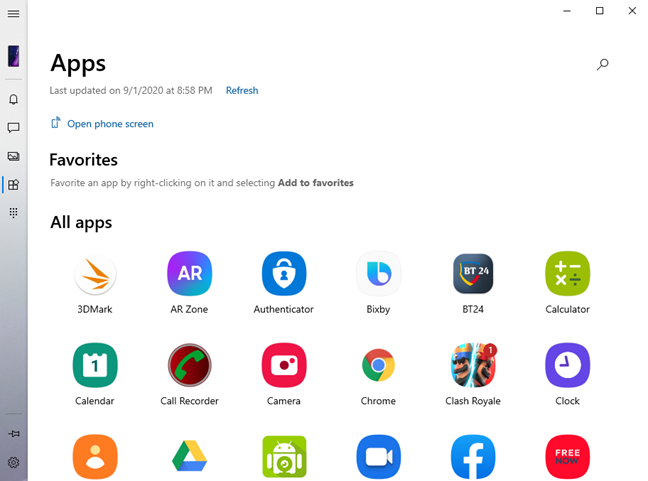
One thing this smartphone was designed to do is connect with your Windows 10 PC. Samsung and Microsoft have worked on creating an advanced integration between the two devices that offers plenty of useful features, including the ability to run the apps from your phablet on your Windows 10 PC. This integration is great when it works. Unfortunately, things can get unstable, and you encounter random crashes, forcing you to give it another try. We suspect that this is mostly Microsoft's fault, as their Your Phone app is not polished enough.
You can run your Android apps from Windows 10
If you pair it with a Samsung Dex, you can use your Samsung Galaxy Note20 Ultra 5G as a PC. This device is also more reliable for establishing connections to your PC or Mac and for exchanging files between the two devices.
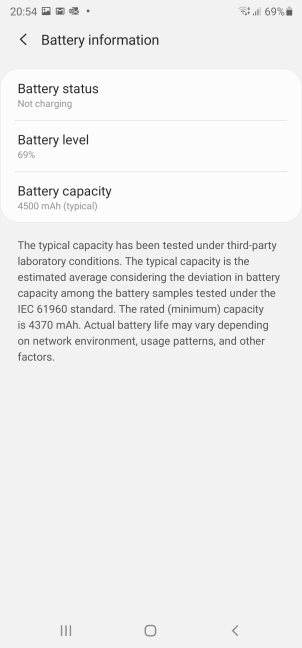
Battery life is not a strength of this device. You should get about a day in regular use, but sometimes you may have to charge it quicker than expected. If you want to improve the battery life, disable the adaptive 120 Hz screen refresh rate.
The fast charging works well though, and it should provide a full battery charge in approximately one hour and 20 minutes. Also, if you charge it for 10 minutes, you should get an extra 13-15% charge on your battery. There's also fast wireless charging available, if you don't like the standard USB-C charger.
Battery information for Samsung Galaxy Note20 Ultra 5G
Phone calls were of excellent quality, all the time, except for one minor issue. When I walked around the city for a lengthy period, the smartphone switched from one cell tower to another. If you have a phone conversation on the Samsung Galaxy Note20 Ultra 5G, it may disconnect abruptly while it changes from one tower to another. This happened several times, while talking with different people, in different parts of the city, and it is most probably a firmware bug that needs to be fixed in a future update. When I use my regular smartphone, in the same places, I do not have this issue. It manifested only on the Galaxy Note20 Ultra 5G.
Samsung Galaxy Note20 Ultra 5G is an expensive phablet that gives you tons of features and performance. While not everything about it is perfect, this device is one of the best on the market, offering a user experience that is worthy of a premium device.
The camera experience on the Samsung Galaxy Note20 Ultra 5G
When you take pictures with the Samsung Galaxy Note20 Ultra 5G, you enjoy appealing colors, with a bit of warmth and saturation added, so that they look great on your smartphone's display and on a computer. Noise reduction is excellent, as well as dynamic range. Low-light photography is excellent too, especially when using the dedicated Night mode.
The shots taken with the 108 MP camera offer improved detail versus the others, and your pictures can be zoomed in more when viewing them on a computer until you see lots of noise. One downside is the lack of autofocus on the 12 MP ultra-wide camera. Its fixed focus is not always helpful, and it doesn't always generate the best results.
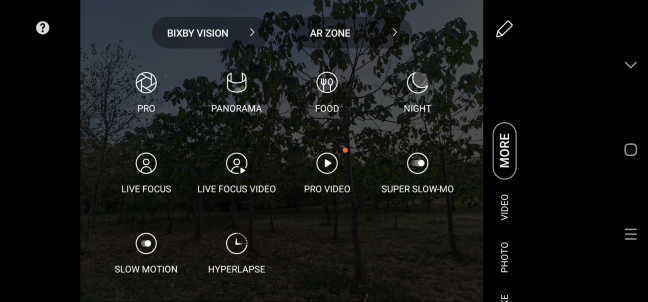
The Camera app on the Samsung Galaxy Note20 Ultra 5G
Portraits are another strength when using the cameras on the rear side of the smartphone. The subjects are well focused, and there is plenty of detail. However, the selfie camera on the front is not up to par with the rear ones. That shouldn't be a problem though, as the results you get are always good. It's just that they are not on the same level as the rear cameras.
The Camera app on the Samsung Galaxy Note20 Ultra 5G is relatively easy to use and understand, and the automatic features do a great job most of the time. If you are a photography enthusiast, you may want to try the Pro mode too, where you get to control everything you like about the pictures you are about to take.
To give you a better perspective on the results you get with Samsung Galaxy Note20 Ultra 5G, look at the gallery below. For some pictures, we used all the five available aspect ratios and all the cameras on the back, to observe the differences in results between each aspect ratio/camera:
Video recording is a huge deal on the Samsung Galaxy Note20 Ultra 5G. There are many resolutions available and frame rates supported, plus a Pro mode. Image stabilization is available in all modes, except for the 1080p resolution at 120 frames per second. More importantly, you get it when recording video in 8K or 4K, no matter the frame rate you choose. The downside about filming in 8K is that the resulting files eat up a lot of space, and there aren't that many affordable devices to showcase this resolution. We recommend sticking to the 4K or 1080p resolutions. The level of detail you get in your videos is excellent, noise is rare, image stabilization works well, and the cameras do a great job even when filming in low-light. We have three sample videos for you. The first is shot in 8K, during the evening, in a busy park:
The second is shot in 4K:
The third film is recording on a quiet street, in an old city plaza, in 1080p, at 30 frames per second:
The camera experience offered by Samsung Galaxy Note20 Ultra 5G is one of the best you can find on a smartphone today. This applies both to pictures and videos, in all resolutions and aspect ratios.
Android 10 and bundled apps
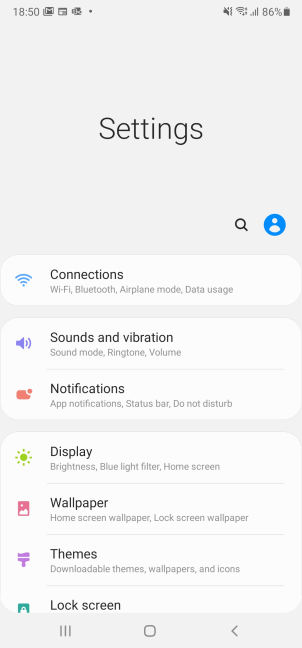
Galaxy Note20 Ultra 5G comes with Android 10 and Samsung's OneUI version 2.5. While the user interface looks great and easy to use, it is different from standard Android. If you had a smartphone from another manufacturer and just switched to Samsung Galaxy Note20 Ultra 5G, there is a bit of a learning curve. Not even the Settings app is organized the same as in stock Android.
The Settings app on the Samsung Galaxy Note20 Ultra 5G
One thing that Samsung tends to overdo is build alternative apps for everything. And it also promotes them quite aggressively. Therefore, by default, you get Bixby instead of Google Assistant, which offers an inferior experience to Google's voice assistant. You also get a Samsung app store, a Samsung web browser, a Gallery app, etc. You get the picture.
While all those apps work well, some of them don't hold a candle to those made by Google. However, there's also a notable exception: the Samsung Notes app. It does some cool stuff, like letting you highlight your handwriting and copy it as plain text. It also lets you export your notes to a Word document, PowerPoint, PDF, plain text file, or image. Since Samsung has partnered with Microsoft, there are also some built-in Microsoft apps: LinkedIn, Outlook (our favorite email client), Office, and OneDrive.
Samsung's OneUI take on Android is bloated when compared to the stock Android experience. However, OneUI looks good, it is snappy, without any weird bugs, and you can replace Samsung's apps with Google's or Microsoft's.
Performance in benchmarks
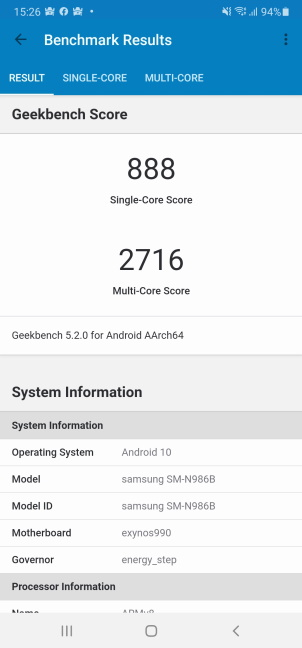
To see how powerful the processor on the Samsung Galaxy Note20 Ultra 5G is, we first ran Geekbench. It got 888 points in the Single-Core tests (similar to a OnePlus 8 Pro) and 2716 in the Multi-Core test (similar to a OnePlus 7 Pro 5G). The USA version of Galaxy Note20 Ultra 5G with a Qualcomm SM8250 Snapdragon 865+ processor should deliver even better results.
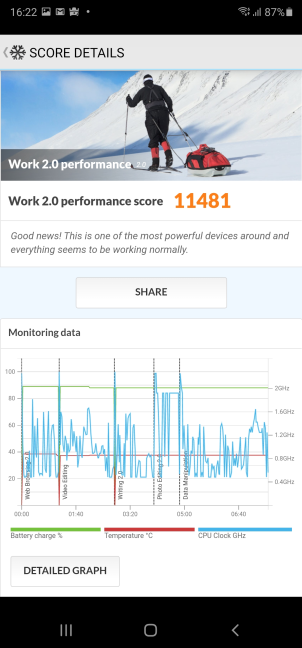
We then used PCMark for Android to measure how well Samsung Galaxy Note20 Ultra 5G fares in productivity tasks. It got 11481 points, placing it very close to Samsung Galaxy S20+ 5G and OnePlus 8 Pro.
Samsung Galaxy Note20 Ultra 5G - PCMark results
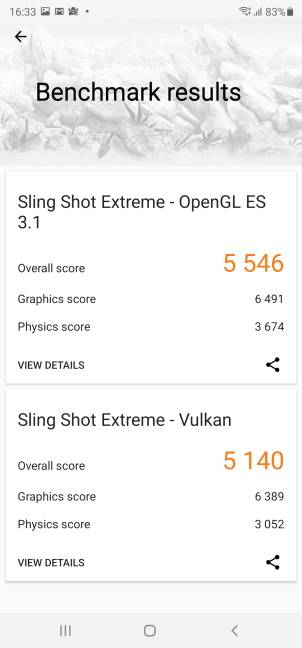
We wanted to try a gaming benchmark too, so we went for 3DMark's Sling Shot Extreme tests. Samsung Galaxy Note20 Ultra 5G got 5546 points in Sling Shot Extreme - OpenGL ES 3.1 and 5140 points in Sling Shot Extreme - Vulkan. Both scores are reasonably good and place it close to Huawei P40 Pro and an older Samsung Galaxy S10e. The USA version of this phablet should get higher scores, though.
Samsung Galaxy Note20 Ultra 5G - 3DMark results
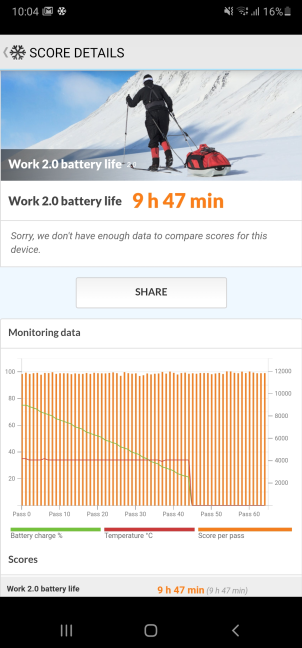
To evaluate the autonomy offered by Samsung Galaxy Note20 Ultra 5G, we used PCMark's Work 2.0 battery life test with the display brightness set to auto. The battery lasted 9 hours and 47 minutes. That is not an impressive result, and it was not a surprise, considering how large and power-hungry the display on this smartphone is. It would have helped if Samsung increased the battery capacity a bit, at least to 5000 mAh.
Samsung Galaxy Note20 Ultra 5G - Battery life test results
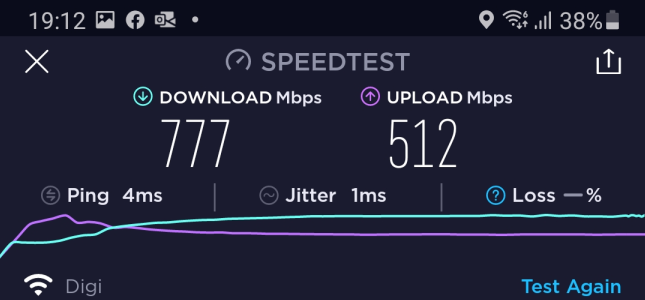
We like that Samsung Galaxy Note20 Ultra 5G offers support for the new Wi-Fi 6 standard, so we wanted to see the maximum speed we could reach on such a network. We used the SpeedTest app, and we got a maximum of 777 Mbps for the download speed. The upload speed was 512 Mbps because our internet connection is capped at this level, but Samsung Galaxy Note20 Ultra 5G could surely reach more.
Samsung Galaxy Note20 Ultra 5G - Speed on Wi-Fi 6
Our benchmarks confirmed that Samsung Galaxy Note20 Ultra 5G is a great choice for productivity and multimedia. Its hardware performs admirably for such tasks. However, gaming is not its strong point, even though it can run any mobile game without problems.
Do you like the Samsung Galaxy Note20 Ultra 5G smartphone?
Now you know our opinion about the Samsung Galaxy Note20 Ultra 5G, what we like and what we don't like about this phablet. Before closing this review, tell us what you think. Do you like this huge Android device? Would you consider buying it? If you already have it, what has been your experience with it? Comment below, and let's discuss this Android phablet.
























Discussion (0)
Comments are closed.