



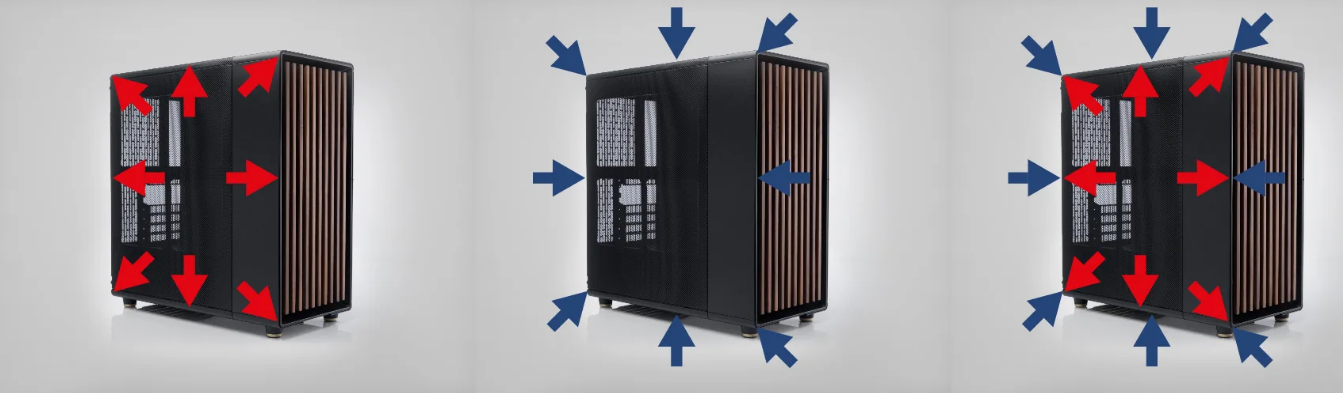
When people talk about PC cooling, they usually jump straight to fans, RGB, or liquid coolers. But the real foundation of good cooling is much simpler.
It’s airflow.
You can have the best components and still run into high temperatures if the airflow inside your case isn’t right. And the confusing part is that there’s no single “default” setup that works for everyone.
There are three primary airflow configurations used in modern PC builds. Each one has its place, but only one tends to make the most sense for most users.
What Airflow Really Means
Airflow is simply how air moves through your PC case.
- Cool air comes in (intake)
- Hot air goes out (exhaust)
That movement determines:
- Component temperatures
- Dust buildup
- Overall system stability
The goal is not just moving air, but moving it in the right direction consistently.
1. Positive Airflow (More Intake Than Exhaust)
Positive airflow means your system has more intake fans than exhaust fans.
So:
- More air is being pushed into the case
- Excess air naturally exits through vents and gaps
What It Feels Like in Practice
This setup creates a slight internal pressure that pushes air outward.
The biggest advantage is dust control.
- Air is constantly moving out of small openings
- Dust is less likely to enter from unfiltered gaps
Cooling Performance
- Generally good for most builds
- Fresh air is constantly supplied to components
Downsides
- If airflow is not directed properly, hot air can get trapped
- Slightly less efficient heat removal compared to strong exhaust setups
Best For
- Most gaming PCs
- Dust-prone environments
- Balanced everyday use
2. Negative Airflow (More Exhaust Than Intake)
Negative airflow is the opposite.
- More air is being pulled out than pushed in
- Air enters through any available opening
What It Feels Like
The case creates a slight vacuum effect.
Air is pulled in from:
- Vents
- Gaps
- Unfiltered openings
Cooling Performance
- Very effective at removing heat quickly
- Hot air does not linger inside the case
Downsides
- Dust buildup increases significantly
- Air enters from uncontrolled paths
Over time, this can lead to:
- Dirtier components
- More maintenance
Best For
- Short-term high-performance setups
- Open test benches
- Environments where dust is not a concern
3. Neutral Airflow (Balanced Intake and Exhaust)
Neutral airflow tries to balance intake and exhaust equally.
- Air in = air out
In theory, this sounds ideal.
What It Feels Like
Air moves through the case in a controlled, predictable way.
There’s no strong pressure pushing or pulling.
Cooling Performance
- Stable and consistent
- No extreme airflow behavior
Downsides
- Hard to achieve perfectly in real setups
- Small imbalances can shift it toward positive or negative
Best For
- Carefully tuned builds
- Users who want predictable airflow behavior
What Actually Matters More Than the Type
Before choosing an airflow type, there are two things that matter even more:
1. Airflow Direction
Air should move in a clear path:
- Front → intake
- Back/top → exhaust
If airflow is chaotic or conflicting:
- Cooling efficiency drops
- Hot air recirculates
2. Fan Placement
Even a “perfect” airflow type fails with poor placement.
- Front fans should bring in cool air
- Rear and top fans should remove heat
This creates a natural flow that supports cooling.
Real-World Insight
Most people overthink airflow type and underthink airflow path.
A well-directed positive airflow setup often performs better than a poorly designed neutral setup.
Because in real usage:
- Consistency matters more than theory
- Dust management matters over time
- Simplicity leads to better results
So What Is the Optimal Cooling Setup
For most users, the best setup is:
Slightly positive airflow with a clear front-to-back path
This gives you:
- Consistent cooling performance
- Lower dust buildup
- Easy maintenance
- Stable long-term behavior
A Practical Example
- 2–3 front intake fans
- 1 rear exhaust fan
- Optional top exhaust fans
This setup works reliably across:
- Gaming PCs
- Workstations
- Everyday builds
Final Thoughts
Airflow is not about maximizing fans or chasing perfect balance. It’s about creating a controlled, efficient path for air to move through your system.
- Negative airflow removes heat quickly but increases dust
- Neutral airflow is stable but hard to maintain
- Positive airflow offers the best balance for most users
In the end, the goal is simple:
Keep cool air flowing in, hot air flowing out, and everything moving in one direction
Get that right, and your cooling setup will take care of itself.



Discussion (0)
Be the first to comment.