



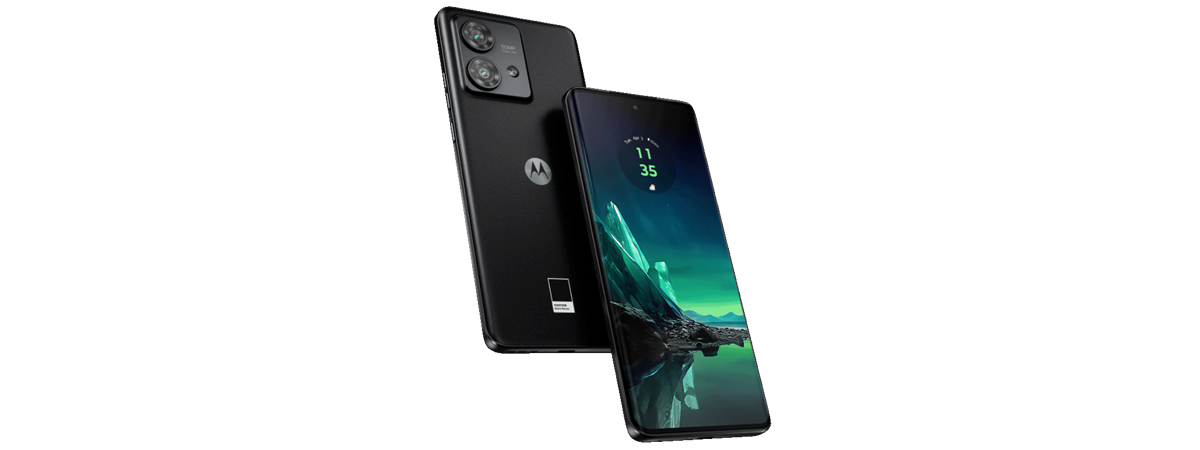
In recent years, many premium smartphones have failed to deliver truly exciting innovation. Most of them felt like tiny incremental updates over last year’s models. Fortunately, this is less of an issue in the mid-range sector: in 2023, we’ve got some exciting product launches with surprises that fundamentally increase the quality of the user experience. Motorola Edge 40 Neo is one of those exciting products, a mid-range smartphone that looks amazing and feels great to use. Not only does it offer IP68-rated water and dust protection, but it also has excellent mid-range hardware and a premium finish. If you want to know more about this product, its strengths, and weaknesses, read my review for the Motorola Edge 40 Neo:
![Verdict]()

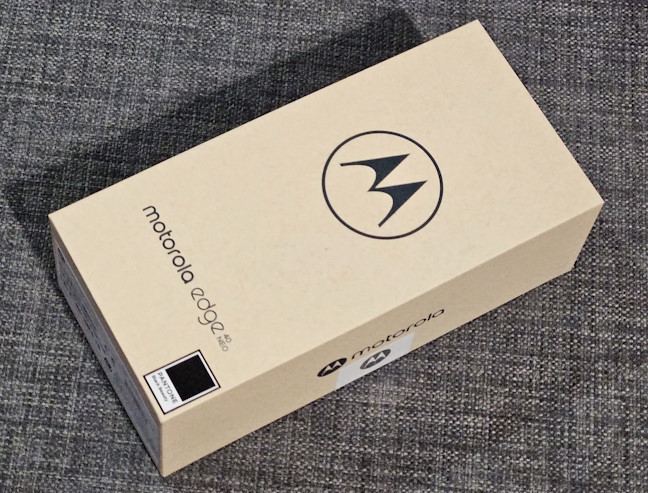
 The packaging for Motorola Edge 40 Neo is made of recycled materials
On the sides, there’s a sticker with details about the exact phone you’ve bought, its serial number, production date, IMEI code, and so on. When you open the box, you see the phone wrapped in a protective paper sheet that features a large Motorola logo.
The packaging for Motorola Edge 40 Neo is made of recycled materials
On the sides, there’s a sticker with details about the exact phone you’ve bought, its serial number, production date, IMEI code, and so on. When you open the box, you see the phone wrapped in a protective paper sheet that features a large Motorola logo.
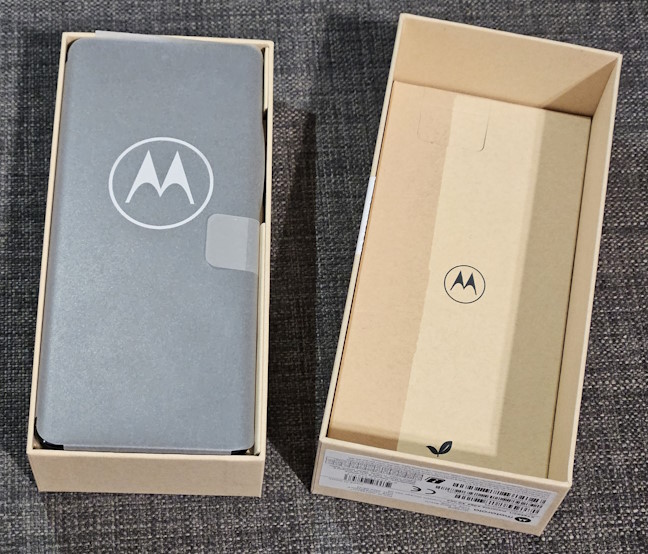
 Open the box to see the phone
Continue unwrapping to find the phone itself, its 68 Watts fast charger, a USB cable, and a smaller box with some surprises inside.
Open the box to see the phone
Continue unwrapping to find the phone itself, its 68 Watts fast charger, a USB cable, and a smaller box with some surprises inside.
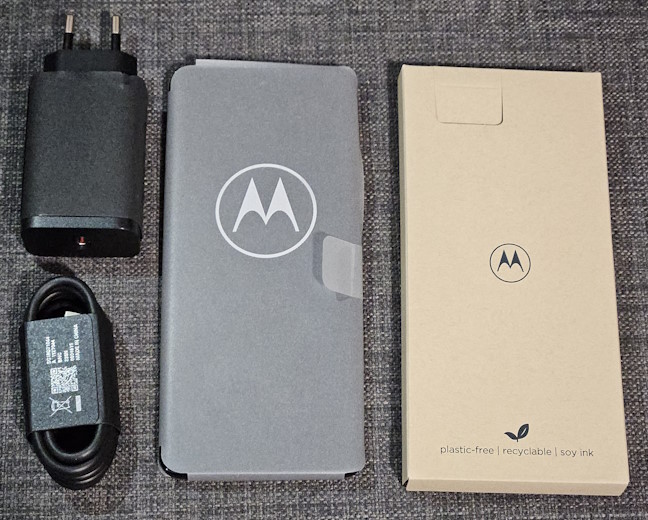
 You get a fast charger in the box
When you unpack everything, you also find a protective case made in partnership with agood company that makes smartphone cases from biodegradable plant-based materials. The Motorola Edge 40 Neo cases are manufactured using flax seeds and hemp, matching your phone’s color. Alongside all the accessories, you also get a SIM tool, a leaflet describing the collaboration between Motorola and agood company, the user guide, and some legal and safety documentation.
You get a fast charger in the box
When you unpack everything, you also find a protective case made in partnership with agood company that makes smartphone cases from biodegradable plant-based materials. The Motorola Edge 40 Neo cases are manufactured using flax seeds and hemp, matching your phone’s color. Alongside all the accessories, you also get a SIM tool, a leaflet describing the collaboration between Motorola and agood company, the user guide, and some legal and safety documentation.
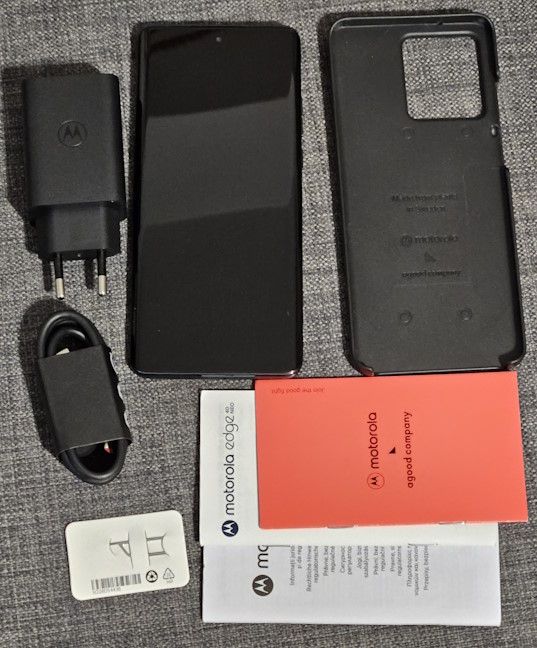
 Everything you find inside the box
Many unboxing experiences tend to be boring. However, I thoroughly enjoyed unpacking the Motorola Edge 40 Neo thanks to the company’s focus on using plastic-free recycled materials and providing accessories missing on today’s premium smartphones.
Everything you find inside the box
Many unboxing experiences tend to be boring. However, I thoroughly enjoyed unpacking the Motorola Edge 40 Neo thanks to the company’s focus on using plastic-free recycled materials and providing accessories missing on today’s premium smartphones.
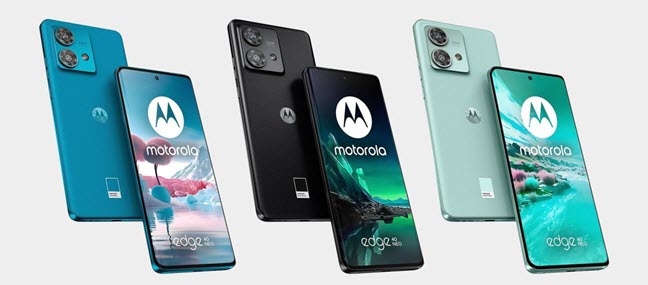
 The color versions for Motorola Edge 40 Neo
Motorola Edge 40 Neo has a classic smartphone design with rounded edges and a curved screen. As you would expect, the selfie notch is centered on the top side of the screen. There’s also a speaker grille just above the screen on the top.
The color versions for Motorola Edge 40 Neo
Motorola Edge 40 Neo has a classic smartphone design with rounded edges and a curved screen. As you would expect, the selfie notch is centered on the top side of the screen. There’s also a speaker grille just above the screen on the top.
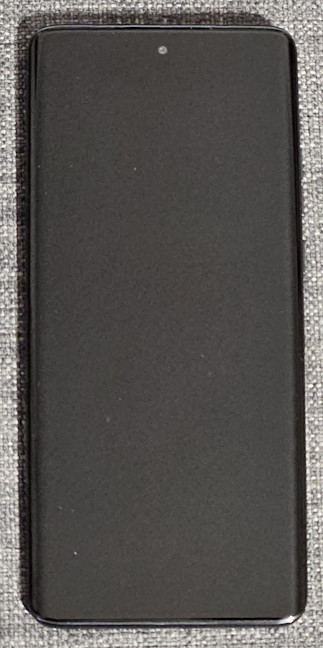
 Motorola Edge 40 Neo
The buttons are positioned like on most Android smartphones nowadays: on the phone’s right side. What’s different is that you have two Volume buttons for increasing and decreasing the sound level and the Power button. This button can open Google Assistant or the Power menu, and its behavior can be customized from the phone’s settings.
Motorola Edge 40 Neo
The buttons are positioned like on most Android smartphones nowadays: on the phone’s right side. What’s different is that you have two Volume buttons for increasing and decreasing the sound level and the Power button. This button can open Google Assistant or the Power menu, and its behavior can be customized from the phone’s settings.
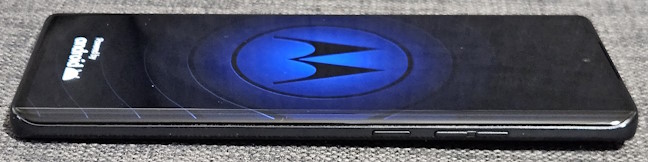
 The buttons on the right side of the phone
The left side of the Motorola Edge 40 Neo doesn’t have any buttons.
The buttons on the right side of the phone
The left side of the Motorola Edge 40 Neo doesn’t have any buttons.
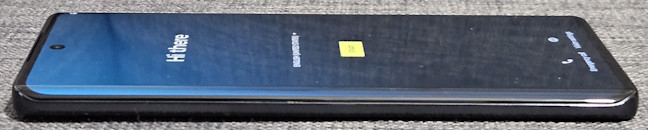
 No buttons on the left side of the phone
The bottom edge of the phone holds the SIM tray, the USB Type C port (works using USB 2.0), a microphone, and a speaker.
No buttons on the left side of the phone
The bottom edge of the phone holds the SIM tray, the USB Type C port (works using USB 2.0), a microphone, and a speaker.
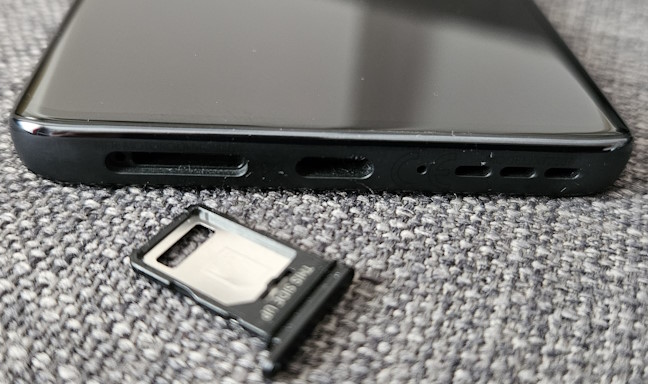
 The bottom side of the Motorola Edge 40 Neo
On the top edge, you have another microphone and the Dolby Atmos logo printed discreetly. As you can see from the pictures included in this review, this phone doesn’t have a headphone jack.
The bottom side of the Motorola Edge 40 Neo
On the top edge, you have another microphone and the Dolby Atmos logo printed discreetly. As you can see from the pictures included in this review, this phone doesn’t have a headphone jack.
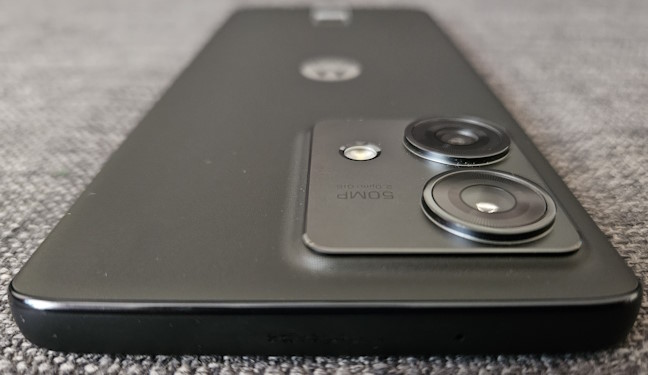
 The top edge of the phone
On the back of the Motorola Edge 40 Neo, you have an area that holds the camera system and the LED flash. In the middle, you see the Motorola logo, and on the bottom, the Pantone color of your phone. The PANTONE Black Beauty has a matte finish that looks good and feels pleasant to touch.
The top edge of the phone
On the back of the Motorola Edge 40 Neo, you have an area that holds the camera system and the LED flash. In the middle, you see the Motorola logo, and on the bottom, the Pantone color of your phone. The PANTONE Black Beauty has a matte finish that looks good and feels pleasant to touch.
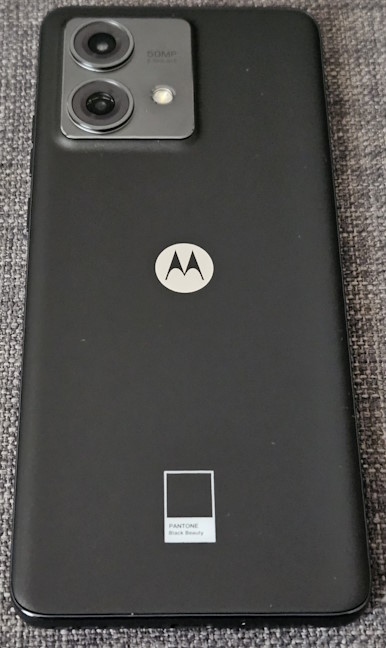
 The back is quite elegant
For those curious about the protection cover, here’s how it looks when you attach it to the phone. It neatly protects the phone while giving you easy access to all its buttons and ports. I appreciate that it weighs only 26 grams (0.9 ounces). Therefore, when you attach it to the phone, the device doesn’t get as heavy as it does with protection covers from other brands.
The back is quite elegant
For those curious about the protection cover, here’s how it looks when you attach it to the phone. It neatly protects the phone while giving you easy access to all its buttons and ports. I appreciate that it weighs only 26 grams (0.9 ounces). Therefore, when you attach it to the phone, the device doesn’t get as heavy as it does with protection covers from other brands.
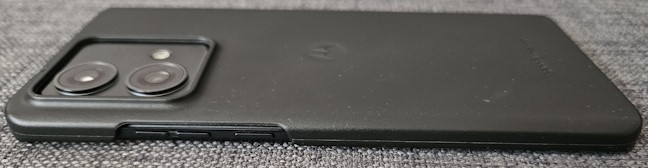
 Motorola Edge 40 Neo with the protection cover
The build quality of the Motorola Edge 40 Neo is quite good. It doesn’t feel like it can bend or break easily, and it’s also pleasant to hold in your hands and use. Many will appreciate that it comes with IP68-certified dust and water resistance.
Motorola Edge 40 Neo with the protection cover
The build quality of the Motorola Edge 40 Neo is quite good. It doesn’t feel like it can bend or break easily, and it’s also pleasant to hold in your hands and use. Many will appreciate that it comes with IP68-certified dust and water resistance.
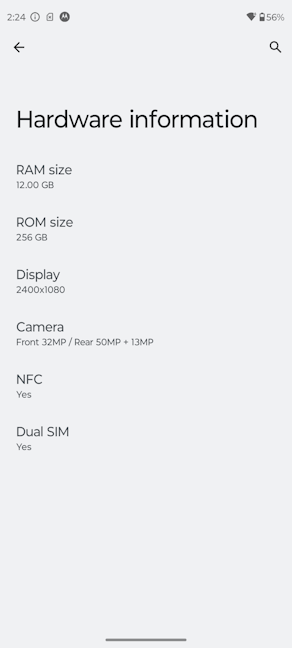
 The hardware inside the Motorola Edge 40 Neo
The display is 6.55 inches and uses an AMOLED panel with a 2400 x 1080 pixels resolution and a maximum refresh rate of 144 Hz. Unfortunately, it doesn’t come with LTPO, so it doesn’t change its refresh rate dynamically depending on how you use the phone. You manually set the refresh rate to the desired level, and based on your chosen value, your battery life takes a hit or not. The screen has a pixel density of 402 ppi, is HDR10+ certified, and has a peak brightness of 1300 nits. Another important aspect is that the screen is protected by Gorilla Glass 3 for more endurance.
The hardware inside the Motorola Edge 40 Neo
The display is 6.55 inches and uses an AMOLED panel with a 2400 x 1080 pixels resolution and a maximum refresh rate of 144 Hz. Unfortunately, it doesn’t come with LTPO, so it doesn’t change its refresh rate dynamically depending on how you use the phone. You manually set the refresh rate to the desired level, and based on your chosen value, your battery life takes a hit or not. The screen has a pixel density of 402 ppi, is HDR10+ certified, and has a peak brightness of 1300 nits. Another important aspect is that the screen is protected by Gorilla Glass 3 for more endurance.
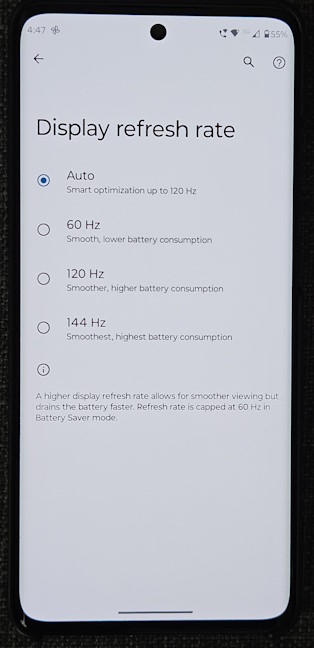
 The refresh rate for Motorola Edge 40 Neo
The front selfie camera uses a 32-megapixel lens with an f/2.4 aperture. On the back, we get a 50 Megapixel wide camera, with an f/1.8 aperture, and an ultra-wide lens, with 13 Megapixels and an f/2.2 aperture. Only the main wide camera offers optical image stabilization. The front camera can record video at a maximum resolution of 1080p and 60 frames per second. The rear cameras can record video in up to 4K resolution and 30 fps.
The refresh rate for Motorola Edge 40 Neo
The front selfie camera uses a 32-megapixel lens with an f/2.4 aperture. On the back, we get a 50 Megapixel wide camera, with an f/1.8 aperture, and an ultra-wide lens, with 13 Megapixels and an f/2.2 aperture. Only the main wide camera offers optical image stabilization. The front camera can record video at a maximum resolution of 1080p and 60 frames per second. The rear cameras can record video in up to 4K resolution and 30 fps.
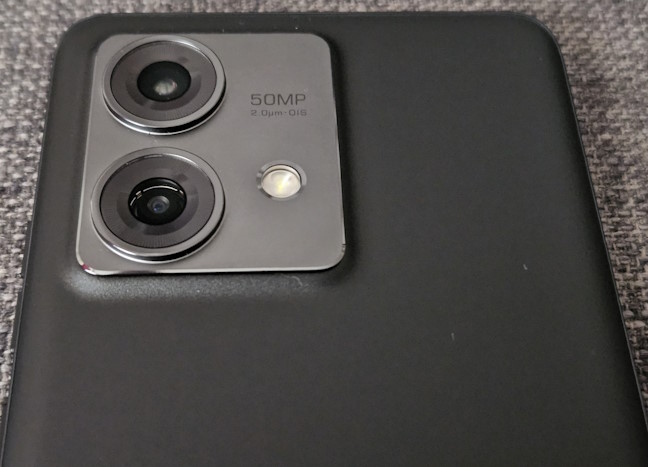
 The main cameras
The phone’s battery is non-removable and has a capacity of 5000 mAh. Motorola Edge 40 Neo is also capable of 68-watt fast charging. However, you must enable the Charge boost feature in the Settings app to benefit from it.
The main cameras
The phone’s battery is non-removable and has a capacity of 5000 mAh. Motorola Edge 40 Neo is also capable of 68-watt fast charging. However, you must enable the Charge boost feature in the Settings app to benefit from it.
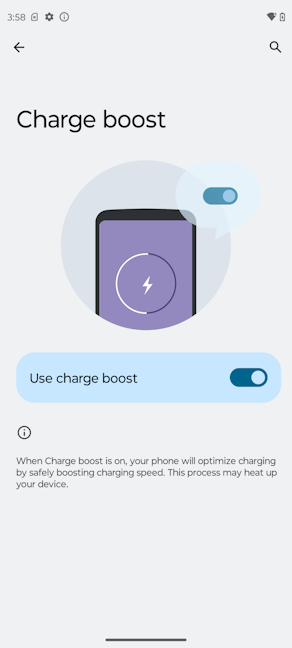 Enable Charge boost for fast charging
The technical specifications of Motorola Edge 40 Neo are quite competitive for a phone in its price area. The phone has excellent connectivity options, a good mid-range chipset, solid fast charging, and a beautiful screen that’s also very responsive. For more information, visit the phone’s official webpage: Motorola Edge 40 Neo.
If you want to know about the user experience offered by the Motorola Edge 40 Neo, the quality of its cameras, its performance in benchmarks, and its software, read the next page of this review.
Enable Charge boost for fast charging
The technical specifications of Motorola Edge 40 Neo are quite competitive for a phone in its price area. The phone has excellent connectivity options, a good mid-range chipset, solid fast charging, and a beautiful screen that’s also very responsive. For more information, visit the phone’s official webpage: Motorola Edge 40 Neo.
If you want to know about the user experience offered by the Motorola Edge 40 Neo, the quality of its cameras, its performance in benchmarks, and its software, read the next page of this review.
 Call quality is excellent
The AMOLED display of the phone looks great, even when used outdoors. It has excellent brightness, mostly good color accuracy, and HDR content looks great. Unfortunately, the approach taken by Motorola for handling the high refresh rate is rudimentary. You can choose between four levels, but you don’t get adaptive refresh rates like on other phones. If you want to maximize battery life, it’s best to set the display to work at 60 Hz. If you want maximum responsiveness, set it at 144 Hz, but remember that the phone’s autonomy takes a serious hit on with this setting.
Call quality is excellent
The AMOLED display of the phone looks great, even when used outdoors. It has excellent brightness, mostly good color accuracy, and HDR content looks great. Unfortunately, the approach taken by Motorola for handling the high refresh rate is rudimentary. You can choose between four levels, but you don’t get adaptive refresh rates like on other phones. If you want to maximize battery life, it’s best to set the display to work at 60 Hz. If you want maximum responsiveness, set it at 144 Hz, but remember that the phone’s autonomy takes a serious hit on with this setting.
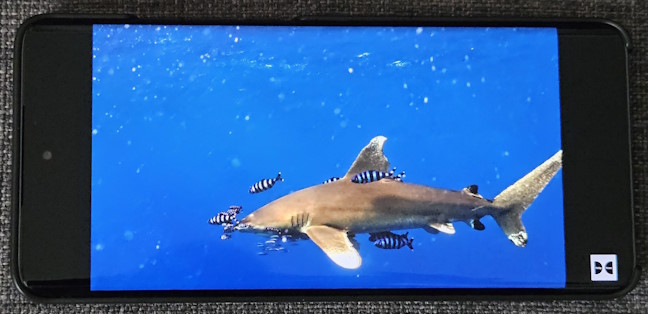
 Motorola Edge 40 Neo displays HDR content well
Speaking of battery life, in real-life, the Motorola Edge 40 Neo can last for a day of normal use on a full charge, and up to 36 hours in lighter use, with the refresh set to 60 Hz. Unfortunately for Motorola, other competitors in this price range can deliver up to two days of autonomy on a full charge.
Luckily, on the charging side, things look great: Motorola promises that the phone’s 68 Watts fast charger will take the battery from 0% to 50% in just fifteen minutes. In my testing, the battery charged from 0% to 43% in fifteen minutes. In 30 minutes, the battery went up to 75%, and in 45 minutes, it was at 99%. I found it odd that the last percentage took four minutes to charge. Therefore, the 68 Watts fast charger delivered a full battery charge in 49 minutes. It’s a very good result, don’t you think?
Motorola Edge 40 Neo displays HDR content well
Speaking of battery life, in real-life, the Motorola Edge 40 Neo can last for a day of normal use on a full charge, and up to 36 hours in lighter use, with the refresh set to 60 Hz. Unfortunately for Motorola, other competitors in this price range can deliver up to two days of autonomy on a full charge.
Luckily, on the charging side, things look great: Motorola promises that the phone’s 68 Watts fast charger will take the battery from 0% to 50% in just fifteen minutes. In my testing, the battery charged from 0% to 43% in fifteen minutes. In 30 minutes, the battery went up to 75%, and in 45 minutes, it was at 99%. I found it odd that the last percentage took four minutes to charge. Therefore, the 68 Watts fast charger delivered a full battery charge in 49 minutes. It’s a very good result, don’t you think?
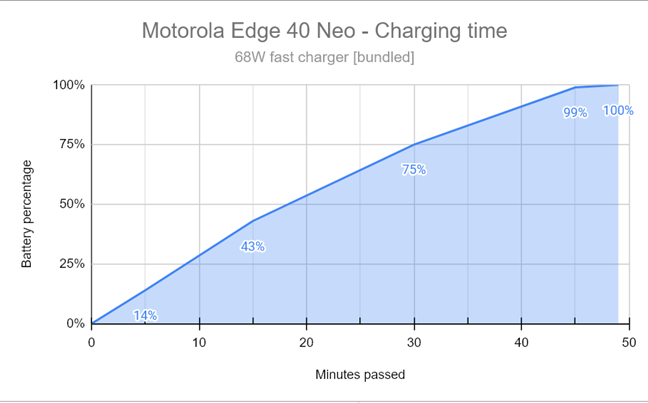
 The charging time for Motorola Edge 40 Neo
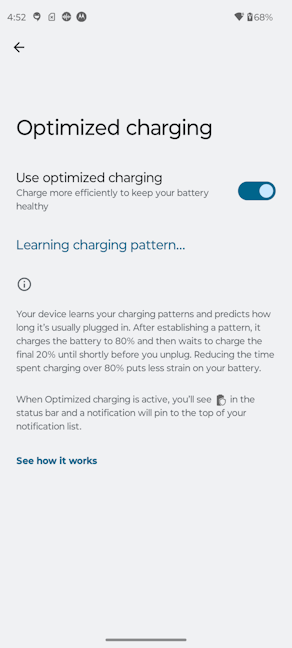
One aspect worth mentioning is that wireless charging is unavailable on the Motorola Edge 40 Neo. Also, if you enable fast charging, the phone tends to heat quite a lot when charging. It may be a good idea to enable the Optimized charging feature to put less strain on the battery.
The charging time for Motorola Edge 40 Neo
One aspect worth mentioning is that wireless charging is unavailable on the Motorola Edge 40 Neo. Also, if you enable fast charging, the phone tends to heat quite a lot when charging. It may be a good idea to enable the Optimized charging feature to put less strain on the battery.
 Using optimized charging is a good idea
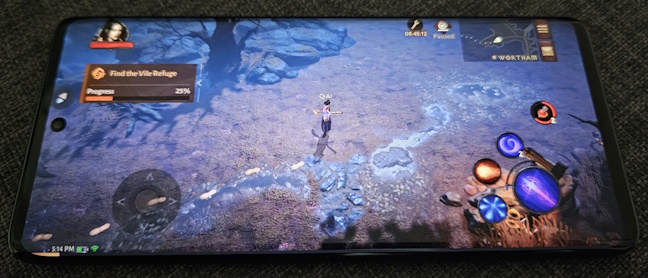
On the Auto refresh mode, games use a refresh rate of 60 Hz. Considering this device isn’t made for games, this should be OK for most people. However, if you want to, you can change this setting per game and enable a refresh rate of 120 Hz or 144 GHz. When it comes to mobile gaming, don’t expect high performance. For gaming without stuttering, it’s best to lower your graphics settings. Also, the phone might heat up relatively quickly when you’re playing demanding titles.
Using optimized charging is a good idea
On the Auto refresh mode, games use a refresh rate of 60 Hz. Considering this device isn’t made for games, this should be OK for most people. However, if you want to, you can change this setting per game and enable a refresh rate of 120 Hz or 144 GHz. When it comes to mobile gaming, don’t expect high performance. For gaming without stuttering, it’s best to lower your graphics settings. Also, the phone might heat up relatively quickly when you’re playing demanding titles.
 Gaming works well on the Motorola Edge 40 Neo
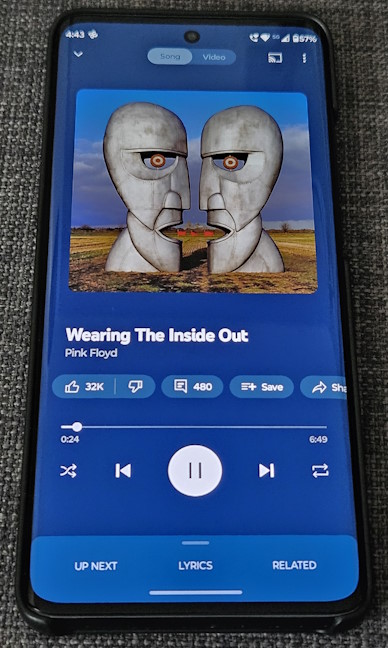
Motorola Edge 40 Neo has a hybrid stereo speaker setup, which is very loud. However, it lacks bass when listening to music, and the sound is too high-pitched when you set the volume to the maximum. My ears were much happier when I lowered the volume, and the Dolby Atmos settings on the phone made my experience quite enjoyable. Overall, this phone delivers a good audio experience, a better one than its direct competitor, the realme 11 Pro.
Gaming works well on the Motorola Edge 40 Neo
Motorola Edge 40 Neo has a hybrid stereo speaker setup, which is very loud. However, it lacks bass when listening to music, and the sound is too high-pitched when you set the volume to the maximum. My ears were much happier when I lowered the volume, and the Dolby Atmos settings on the phone made my experience quite enjoyable. Overall, this phone delivers a good audio experience, a better one than its direct competitor, the realme 11 Pro.
 Motorola Edge 40 Neo has built-in loud speakers
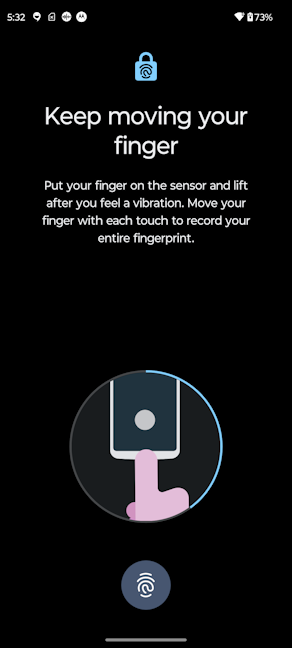
The fingerprint reader on the bottom of the screen is quite precise and quick to respond. However, it tends to be placed lower than on many other smartphones, and it may be difficult to adjust to its positioning, especially when you need to quickly unlock the phone and use it with just one hand. Face unlock is easy to set up, and it also works well. If you don’t like the positioning of the fingerprint sensor, this is the method you may want to opt for instead.
Motorola Edge 40 Neo has built-in loud speakers
The fingerprint reader on the bottom of the screen is quite precise and quick to respond. However, it tends to be placed lower than on many other smartphones, and it may be difficult to adjust to its positioning, especially when you need to quickly unlock the phone and use it with just one hand. Face unlock is easy to set up, and it also works well. If you don’t like the positioning of the fingerprint sensor, this is the method you may want to opt for instead.
 The fingerprint sensor is lower than on most phones
The user experience you get from Motorola Edge 40 Neo is quite positive. You can enjoy a good-looking smartphone with excellent build quality, a beautiful screen, solid performance, software with little bloatware, and pretty good fast charging.
The fingerprint sensor is lower than on most phones
The user experience you get from Motorola Edge 40 Neo is quite positive. You can enjoy a good-looking smartphone with excellent build quality, a beautiful screen, solid performance, software with little bloatware, and pretty good fast charging.

 When using 2x zoom you may get some dull colors
Night photography is among the best I’ve seen on a mid-range device like this one. The photos I shot in low light with the main camera have good colors, plenty of detail, and excellent sharpness. However, on the ultrawide camera or when using zoom, night photos sometimes come out with lower dynamic range, decreased detail, and increased noise. I shot the same subject several times at night using the ultrawide camera and then the wide one. I noticed that the ultrawide struggles quite often and delivers results that are lower in quality than those shot with the main wide camera.
When using 2x zoom you may get some dull colors
Night photography is among the best I’ve seen on a mid-range device like this one. The photos I shot in low light with the main camera have good colors, plenty of detail, and excellent sharpness. However, on the ultrawide camera or when using zoom, night photos sometimes come out with lower dynamic range, decreased detail, and increased noise. I shot the same subject several times at night using the ultrawide camera and then the wide one. I noticed that the ultrawide struggles quite often and delivers results that are lower in quality than those shot with the main wide camera.
 Night photography isn't great on the ultrawide lens
The ultrawide camera also acts as a macro camera, and although it comes with autofocus, you should be careful when shooting close-ups. While I love that this phone comes with a Macro shooting mode, some macro photos I took aren’t exactly well-focused. And while the details are excellent, the colors can sometimes become too vivid, and the details can easily get lost because of the too high contrast.
Night photography isn't great on the ultrawide lens
The ultrawide camera also acts as a macro camera, and although it comes with autofocus, you should be careful when shooting close-ups. While I love that this phone comes with a Macro shooting mode, some macro photos I took aren’t exactly well-focused. And while the details are excellent, the colors can sometimes become too vivid, and the details can easily get lost because of the too high contrast.

 Some macro shots are too vivid
Selfies are excellent: the Motorola Edge 40 Neo does a great job focusing on the subject and rendering natural-looking skin texture complexion, and the blur effect behind the subject is not too pronounced either.
Some macro shots are too vivid
Selfies are excellent: the Motorola Edge 40 Neo does a great job focusing on the subject and rendering natural-looking skin texture complexion, and the blur effect behind the subject is not too pronounced either.

 Selfies tend to look great
To get a complete perspective of the camera experience you get from the Motorola Edge 40 Neo, browse through the pictures embedded in the gallery below:
Selfies tend to look great
To get a complete perspective of the camera experience you get from the Motorola Edge 40 Neo, browse through the pictures embedded in the gallery below:

 Detail, sharpness, and colors in videos are great, and image stabilization works. Focusing is nicely done too. The only things I can hold against the Edge 40 Neo are the videos recorded with the ultrawide camera, which come out a bit too dark, and zooming, which decreases video quality significantly. However, considering this is a mid-range device with no telephoto lens, that’s understandable. If you’re curious to watch some videos recorded with this phone, here’s a landscape filmed during the day, in which I also used the zoom feature. It is shot in 4K at 30 frames per second:
Here’s also a more action-oriented video where I captured some karts racing one another in 1080p at 30 fps:
And lastly, here’s a night video recorded in 1080p at 30 fps, where I also used the zoom feature:
Motorola Edge 40 Neo offers a solid photo and video recording experience, which is often more than you’d expect from a device in its price range. While it’s not perfect, and the ultrawide camera is not as good as the main wide camera, you get a mostly rewarding experience.
Detail, sharpness, and colors in videos are great, and image stabilization works. Focusing is nicely done too. The only things I can hold against the Edge 40 Neo are the videos recorded with the ultrawide camera, which come out a bit too dark, and zooming, which decreases video quality significantly. However, considering this is a mid-range device with no telephoto lens, that’s understandable. If you’re curious to watch some videos recorded with this phone, here’s a landscape filmed during the day, in which I also used the zoom feature. It is shot in 4K at 30 frames per second:
Here’s also a more action-oriented video where I captured some karts racing one another in 1080p at 30 fps:
And lastly, here’s a night video recorded in 1080p at 30 fps, where I also used the zoom feature:
Motorola Edge 40 Neo offers a solid photo and video recording experience, which is often more than you’d expect from a device in its price range. While it’s not perfect, and the ultrawide camera is not as good as the main wide camera, you get a mostly rewarding experience.
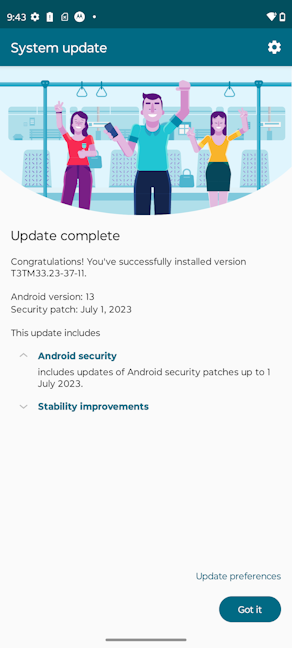 You get upgrades to two major Android versions
Alongside the usual Google apps built into Android, the list of software preinstalled on the Motorola Edge 40 Neo includes the following:
You get upgrades to two major Android versions
Alongside the usual Google apps built into Android, the list of software preinstalled on the Motorola Edge 40 Neo includes the following:
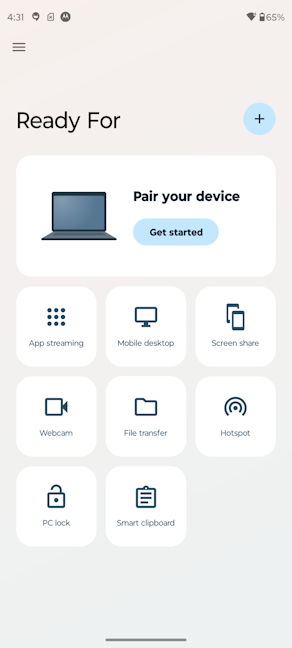 Ready For is a useful app
Motorola Edge 40 Neo has some of the least bloated software on the market, with few apps and features added by its manufacturer, which mostly increases the phone’s usefulness instead of slowing it down with things you may not want or need.
Ready For is a useful app
Motorola Edge 40 Neo has some of the least bloated software on the market, with few apps and features added by its manufacturer, which mostly increases the phone’s usefulness instead of slowing it down with things you may not want or need.
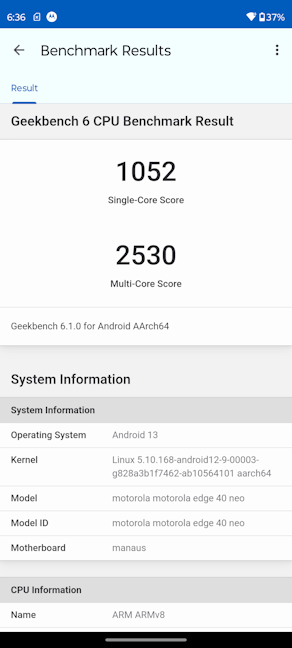 Motorola Edge 40 Neo - Geekbench 6 scores
I continued by running PCMark for Android, a benchmarking app that evaluates the phone’s performance when running regular apps and performing productivity tasks. It scored 14716 points, typical for a mid-range smartphone in its price range. Furthermore, the battery lasted almost 11 hours, which is a decent result. However, other mid-range smartphones with similar batteries can last a few hours longer.
Motorola Edge 40 Neo - Geekbench 6 scores
I continued by running PCMark for Android, a benchmarking app that evaluates the phone’s performance when running regular apps and performing productivity tasks. It scored 14716 points, typical for a mid-range smartphone in its price range. Furthermore, the battery lasted almost 11 hours, which is a decent result. However, other mid-range smartphones with similar batteries can last a few hours longer.
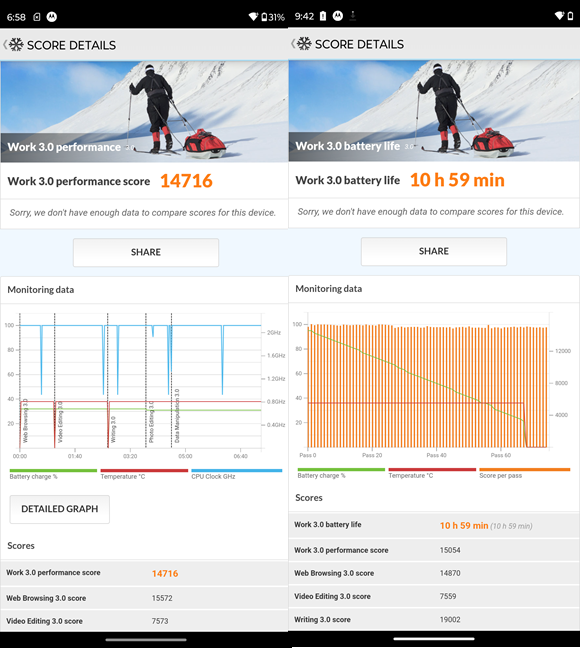
 Motorola Edge 40 Neo - PCMark scores
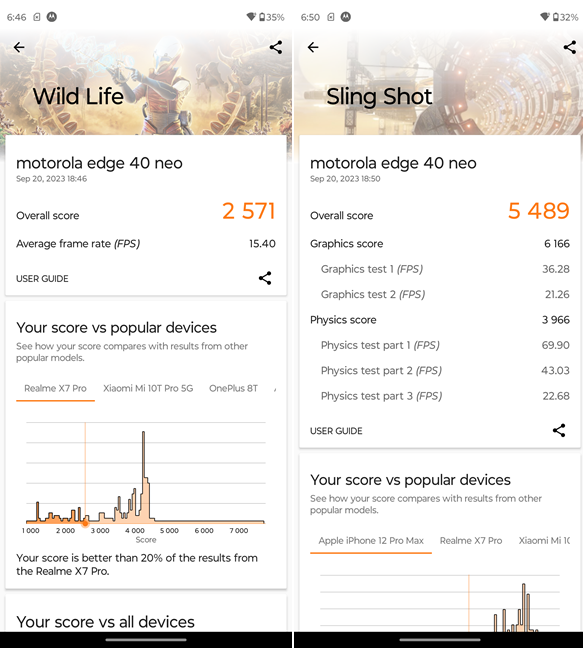
I moved on to gaming and ran 3DMark. In the Wild Life test, the phone had an average frame rate of 15.4, which is not a lot. This test shows Motorola Edge 40 Neo is not a great performer when running more demanding games with top-notch graphics. The average framerates were higher in the Sling Shot test, which is less demanding.
Motorola Edge 40 Neo - PCMark scores
I moved on to gaming and ran 3DMark. In the Wild Life test, the phone had an average frame rate of 15.4, which is not a lot. This test shows Motorola Edge 40 Neo is not a great performer when running more demanding games with top-notch graphics. The average framerates were higher in the Sling Shot test, which is less demanding.
 Motorola Edge 40 Neo - 3DMark scores
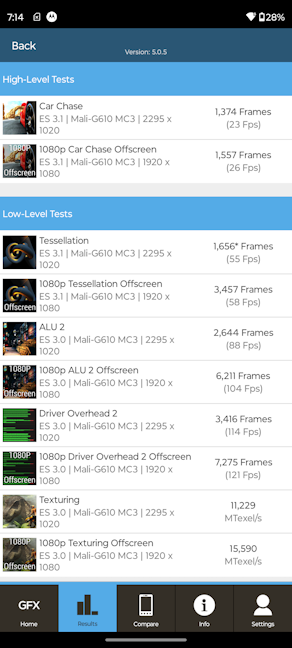
I also ran GFXBench 5.0 and chose the Car Chase and 1080p Car Chase Offscreen tests. The number of fps (frames per second) rendered by Motorola Edge 40 Neo was rather average, proving once again that this device is not made for gaming, even though it can run games, especially if you set their visuals to a lower quality level.
Motorola Edge 40 Neo - 3DMark scores
I also ran GFXBench 5.0 and chose the Car Chase and 1080p Car Chase Offscreen tests. The number of fps (frames per second) rendered by Motorola Edge 40 Neo was rather average, proving once again that this device is not made for gaming, even though it can run games, especially if you set their visuals to a lower quality level.
 Motorola Edge 40 Neo - GFXBench 5 scores
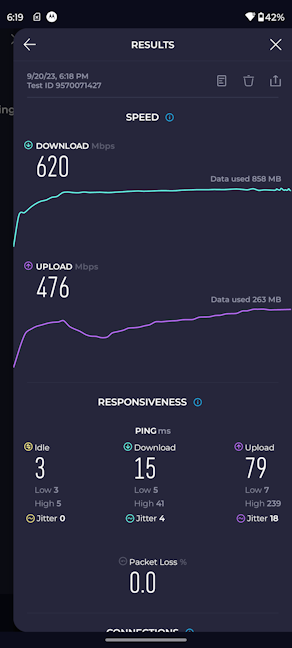
For the last benchmark, I chose SpeedTest, which shows how fast Wi-Fi 6 connectivity can be on this smartphone. As you can see, I reached a respectable download speed of 620 Mbps. Other, more expensive phones are even faster. However, I was satisfied with the results.
Motorola Edge 40 Neo - GFXBench 5 scores
For the last benchmark, I chose SpeedTest, which shows how fast Wi-Fi 6 connectivity can be on this smartphone. As you can see, I reached a respectable download speed of 620 Mbps. Other, more expensive phones are even faster. However, I was satisfied with the results.
 Motorola Edge 40 Neo - SpeedTest results on Wi-Fi 6
The benchmark results show that the Motorola Edge 40 Neo is a solid mid-range smartphone that provides good performance for productivity tasks and casual gaming. However, you’ll have to lower the graphics quality for demanding games if you want them to run without stuttering at decent frame rates. The battery life offered by Motorola Edge 40 Neo is OK, but it doesn’t beat that of its competitors.
Motorola Edge 40 Neo - SpeedTest results on Wi-Fi 6
The benchmark results show that the Motorola Edge 40 Neo is a solid mid-range smartphone that provides good performance for productivity tasks and casual gaming. However, you’ll have to lower the graphics quality for demanding games if you want them to run without stuttering at decent frame rates. The battery life offered by Motorola Edge 40 Neo is OK, but it doesn’t beat that of its competitors.
Motorola Edge 40 Neo: Who is it good for?
This phone is a great choice for:- Users who want a good-looking smartphone
- Those looking for a competent device at a mid-range price
- Users who want fast charging on their smartphone
- People interested in buying products that do more to respect the environment
Pros and cons
These are the things I consider pros about the Motorola Edge 40 Neo:
- Beautiful design with good-looking colors
- Fast 144 Hz display with excellent brightness
- Clean software with little to no bloatware
- Potent mid-range hardware
- Useful fast charging
- IP68-certified dust and water resistance
- Packaging and accessories that are friendly to the environment
- Battery life could be better
- You only get two major Android updates
Verdict
The Motorola Edge 40 Neo is an elegant product with a nice grip, excellent software, a fast and bright display, and top-notch build quality. The color specialists at Pantone did a great job in helping Motorola design a beautiful phone, and the company’s focus on using recycled materials for the packaging and offering a recyclable protection case is something I greatly appreciate. The phone’s camera system is quite competent for its price, and the fast charging you get works well. While the phone’s battery life isn’t impressive, it isn’t bad either. I like the Motorola Edge 40 Neo, and it’s one of my favorite phones this year. While it isn’t perfect, it is one of the best mid-range smartphones you can get today.Unboxing the Motorola Edge 40 Neo
I started liking the Motorola Edge 40 Neo as soon as I saw its packaging: it’s simple, without any plastics involved, made of 60% recycled materials and everything on it is printed with soy ink. You see the Motorola logo on the top cover, the product name, and the Pantone sticker with the color you’ve bought.Design and build quality
The Motorola Edge 40 Neo is available in three color variants: PANTONE Black Beauty, PANTONE Soothing Sea, and PANTONE Caneel Bay. They’re all beautiful, and they have matching protection cases to boot. For this review, I received the black version, which is 159.63 x 71.99 x 7.79 millimeters or 6.28 x 2.83 x 0.31 inches in size, weighing 170 grams or 5.99 ounces. The Soothing Sea and Caneel Bay models have a back of vegan leather, making them 0.10 mm thicker and 2 grams “heavier” than the black one. In contrast, the black version has an acrylic back.Hardware specifications
The hardware inside the Motorola Edge 40 Neo is that of a capable mid-range device. The phone has an octa-core MediaTek Dimensity 7030 chipset, which provides 5G mobile connectivity, Wi-Fi 6E compatibility, Bluetooth 5.3, and NFC. The phone has 12 GB of RAM and 256 GB of storage space. Unfortunately, there’s no support for extending it through a microSD card. The Motorola Edge 40 Neo offers Dual-SIM connectivity, but only in a one nano SIM and one eSIM configuration.The smartphone experience on the Motorola Edge 40 Neo
Even though the Motorola Edge 40 Neo is not a small phone, its weight, materials, and form factor make it easy to use. The phone is very compact, feels light, and is easy to use even with just one hand. While testing it as a phone, I had a positive experience. I enjoyed excellent mobile connectivity and clear voice calls, sometimes better than with my daily driver (a Samsung Galaxy S23). The selfie cam is also quite capable when you want to enjoy video chats with friends and family on WhatsApp or other platforms.The camera experience on the Motorola Edge 40 Neo
The camera system on the Motorola Edge 40 Neo is surprisingly capable, and it offers better-than-average performance, with good-quality photographs in various situations. Both the main rear camera and the ultrawide one produce detailed photos with excellent dynamic range and sharp contrast. The photos you shoot with this phone look almost great in excellent lighting conditions, like in daylight. Why almost? Because, in some cases, it feels like the colors aren’t quite natural. They’re not oversaturated or too vivid like the renditions I often see on Samsung Galaxy devices. Instead, while many of the photos I took with the Edge 40 Neo have natural colors, many others look dull, with washed-out colors. This seems especially true for the photos I shot using the main wide camera when using 2x zoom, as the ultrawide sensor appears to offer a bit more punchy colors.
Detail, sharpness, and colors in videos are great, and image stabilization works. Focusing is nicely done too. The only things I can hold against the Edge 40 Neo are the videos recorded with the ultrawide camera, which come out a bit too dark, and zooming, which decreases video quality significantly. However, considering this is a mid-range device with no telephoto lens, that’s understandable. If you’re curious to watch some videos recorded with this phone, here’s a landscape filmed during the day, in which I also used the zoom feature. It is shot in 4K at 30 frames per second:
Here’s also a more action-oriented video where I captured some karts racing one another in 1080p at 30 fps:
And lastly, here’s a night video recorded in 1080p at 30 fps, where I also used the zoom feature:
Motorola Edge 40 Neo offers a solid photo and video recording experience, which is often more than you’d expect from a device in its price range. While it’s not perfect, and the ultrawide camera is not as good as the main wide camera, you get a mostly rewarding experience.
Android 13 updates policy and bundled apps
One of the aspects I love about the Motorola Edge 40 Neo is that it comes with one of the less bloated Android 13 implementations on the market. The operating system received only a few minor changes and benefits from some added functionality created by Motorola. Unfortunately, when it comes to updates, this phone will get only two major Android upgrades and three years of security updates.- CallApp - an app that tells you who is calling, including when you get calls from unknown numbers, blocks spam, and helps you record calls.
- Device Help - an app that helps you diagnose problems with your phone, check your warranty status, and contact Motorola for support when required.
- Dice Dreams - the only pre-installed game on your phone. It uses a free-to-play model with paid options, and you can build your own kingdom, attack other players, steal treasures, etc. Luckily, it can be uninstalled with ease.
- Dolby Atmos - the app allows you to fine-tune the loudspeakers on your phone and have them provide a better listening experience based on what you want to do: listen to music, watch movies, listen to podcasts, etc.
- Family Space - if you are a parent, you can create a space for your children where they only get access only to the apps you specify, set time limits, and so on.
- Interactive wallpapers - an app that allows you to browse a collection of wallpapers for your phone and install those that interest you.
- LinkedIn - the social network for work and business.
- Moto - the app allows you to personalize your phone and choose custom fonts and colors, manage the gestures you can use to control your phone, optimize the display’s settings, and more.
- Moto Connect - you can use the app to connect your phone to nearby displays like your smart TV.
- Moto Secure - allows you to enable and use all kinds of security features, like a secure folder that’s password protected, turn on phishing detection, enable a PIN pad scramble, etc.
- Motorola Notifications - you can subscribe to receive notifications from Motorola about features you may be interested in, information about software updates, new products, special offers, invitations to studies, and surveys. I imagine most people won’t be too fond of them, in which case, it’s best to ignore the app, as it won’t send you any notifications without your permission.
- Ready For - this app allows you to connect your phone to other devices like your Windows laptop, a TV, or a monitor. It opens many productive opportunities, including accessing your Android apps from your computer or using the phone as a webcam for clearer video calls on your PC. This is one of the preinstalled apps I highly recommend you try out.
- Recorder - a simple voice recorder that can be useful at times.
- Weather24 - a useful weather app that looks good and is easy to use.
Performance in benchmarks
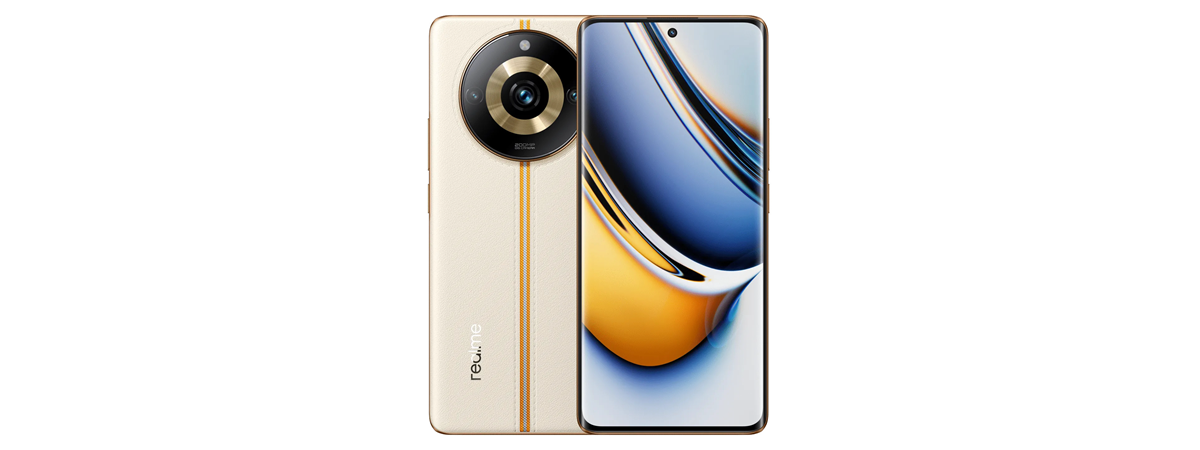
If you want to know how the Motorola Edge 40 Neo performs in benchmarks and compares to other phones, you’ve come to the right place. As always, I started with Geekbench 6, where the phone scored 1052 points for its single-core performance and 2530 points for its multi-core performance. These results are slightly better than what you get from a realme 11 Pro - one of the direct competitors for Motorola Edge 40 Neo.
Discussion (6)
Is the Black colour variant slippery? Does it have any heating issues for normal usage?
No, the black variant is not slippery. I noticed the phone heating quite a bit during charging. However, during normal use, I didn’t notice any suspicious heating issues.
Does this phone output video over a usb-c to HDMI cable? So that you can connect the phone directly (wired) to a Monitor or Television for ready for?
It should be able to do that, yes.
I believe it does “change its refresh rate dynamically depending on how you use the phone”. You yourself mention the “auto” setting for this. I believe on this setting it varies between 60, 90 and 120 Hz. OK it does not go below 60 but is not “always on” either.
That’s true. However, an LTPO screen would dynamically change the refresh rate from 1 Hz to 144 Hz, depending on how you use the phone. Motorola’s implementation on this model is not as advanced.