



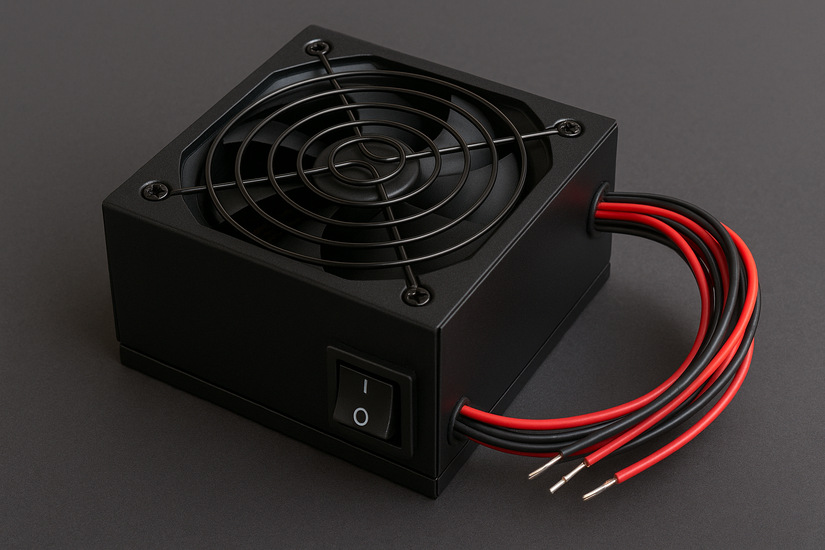
The power supply unit is the one component most PC builders think about last and regret the most. People spend hours choosing the right GPU and CPU, then rush the PSU decision. The result is either cable chaos that restricts airflow, or overspending on features a basic build does not need.
One of the first decisions you face when buying a PSU is whether to go modular, semi-modular, or non-modular. The choice does not affect how much power the unit delivers or how efficiently it converts electricity. It affects how many cables live inside your case and whether you can remove the ones you do not need.
Here is what each type actually means and how to choose the right one.
What Each Type Actually Means
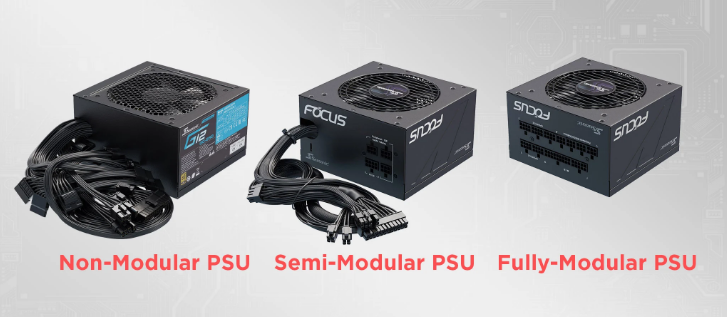
Non-modular PSUs come with all cables permanently attached to the unit. Every cable the PSU will ever use is hardwired in from the factory. You cannot remove them. Whether you need them or not, they are all there when the PSU arrives.
Fully modular PSUs have no cables attached. The PSU ships with a set of detachable cables, each connecting via a socket on the back of the unit. You plug in only the cables your build needs and leave the rest in the box.
Semi-modular PSUs sit between the two. The essential cables, specifically the 24-pin motherboard connector and the CPU power cable, are permanently attached. Everything else, including PCIe cables for your GPU, SATA cables for storage, and peripheral connectors, is detachable.
These three types are available across every price tier and efficiency rating. You can buy a budget Gold-rated non-modular unit and a budget Gold-rated modular unit from the same manufacturer at similar wattages. The modularity is a separate variable from power quality.
What Changes With Each Type
Cable Management and Airflow
This is where the difference between modular and non-modular is most visible and most practically significant.
A typical PC build uses around six to eight of the cables a PSU provides. A non-modular unit gives you all twelve to fifteen, including ones for optical drives, additional SATA devices, and extra peripheral connectors most modern builds will never use. The unused cables have to go somewhere. Most builders bundle them with zip ties and stuff them into unused drive bays or behind the motherboard tray.
This works, but it is never as clean as simply not having those cables in the first place. Bundled cables compress poorly, occupy space behind the motherboard tray, and can block rear exhaust paths in smaller cases. In large mid-towers this matters less. In compact cases it matters considerably.
Modular builds allow you to route only the cables your components actually need. Thermal benchmarks consistently show that cleaner cable layouts reduce internal case temperatures by two to four degrees Celsius under sustained load. This is not a dramatic difference for most builds, but it is real and cumulative.
Installation and Maintenance
Installing a non-modular PSU means routing all cables even before you know which ones you need. Many builders find themselves weaving a bundle of unused cables around components to get them out of the way, then trying to tuck them somewhere that does not block airflow or look visibly cluttered through the side panel.
Modular installation involves connecting only the cables your build requires. For a typical gaming build with one GPU and a few storage drives, you might plug in the 24-pin motherboard cable, one or two CPU power cables, one or two PCIe cables, and two or three SATA cables. Everything else stays in the box.
Maintenance and upgrades are also easier with a modular unit. Removing a modular PSU from a case means detaching the cables from the unit's back panel, then unscrewing it. The cables remain connected to your components and can be reused exactly as they are if you are just swapping the PSU. Removing a non-modular PSU means unplugging every cable from every component, undoing your cable management entirely, and starting over when the new unit goes in.
Price
All things equal, a modular PSU costs approximately ten to twenty percent more than an equivalent non-modular unit from the same manufacturer at the same wattage and efficiency rating.
Looking at the budget end, the difference is often ten to fifteen dollars. At the mid-range, it can be twenty to forty dollars. At the high-end, modular units from premium brands command a larger premium in absolute terms but the percentage gap narrows.
Semi-modular units typically sit in the middle, costing five to fifteen dollars more than a non-modular equivalent and five to twenty dollars less than a fully modular one. For many builders, semi-modular represents the best balance of price and practicality.
Does Modular vs Non-Modular Affect Performance?
No. The electrical output, power delivery quality, and efficiency of a PSU depend on its internal components, capacitor quality, and efficiency rating. They have nothing to do with whether cables are removable.
Early modular PSUs from around 2009 had measurably higher electrical resistance at the detachable connectors, which theoretically reduced efficiency. Modern manufacturing tolerances have eliminated this concern. In real-world testing, efficiency differences between modular and non-modular units of equivalent specification are negligible.
The components that actually determine PSU reliability and power quality are the efficiency certification, the brand's quality tier, the capacitor rating, and the protections included against overvoltage, undervoltage, short circuits, and overcurrent. Choose on these factors first. Modularity is a secondary consideration.
Which Type Suits Which Build
Non-Modular
Non-modular PSUs are the right choice for budget builds where every pound or dollar matters, basic office or productivity computers that will never be opened again, builds inside opaque cases where internal aesthetics are irrelevant, and first-time builders who want to minimise complexity and just get the system running.
If you are building a computer for someone who will use it as a simple desktop for work or school and never intend to upgrade or modify it, a quality non-modular unit from a reputable brand at the right wattage is entirely appropriate.
Fully Modular
Fully modular PSUs are the right choice for gaming and enthusiast builds in cases with glass side panels where internal appearance matters, compact and small form factor cases where every cable takes up meaningful space, builders who plan to upgrade components regularly and want easy maintenance, and systems built for aesthetics with custom-sleeved cables or specific colour schemes.
The ability to use custom cables, which are available from multiple third-party manufacturers in a wide range of colours and designs, is exclusive to modular PSUs. If the inside of your build is part of the presentation, fully modular is the only option.
Semi-Modular
Semi-modular PSUs are the right choice for most mainstream gaming builds. The permanently attached cables are the ones you always need, the 24-pin and CPU power connectors, so you lose nothing by having them fixed. The removable PCIe, SATA, and peripheral cables allow you to keep only what is relevant to your specific hardware configuration.
For most builds, semi-modular is the practical sweet spot. You get cleaner cable management than non-modular without paying the full premium of a completely detachable system.
One Important Warning
Never mix cables between modular PSUs from different manufacturers. The connector shapes can be identical, but the pinouts are frequently different between brands. Plugging a Corsair modular cable into a Seasonic PSU, or any other cross-brand combination, can damage or destroy components.
Always use the cables that came with your specific PSU. If you need additional cables or want to replace them with custom ones, buy cables confirmed to be compatible with your exact PSU model.
Comparison at a Glance
| Non-Modular | Semi-Modular | Fully Modular | |
|---|---|---|---|
| Cable flexibility | None | Partial | Full |
| Price | Lowest | Mid | Highest |
| Cable management | Hardest | Moderate | Easiest |
| Airflow benefit | Lowest | Moderate | Best |
| Best for | Budget builds | Mainstream gaming | Enthusiast builds |
| Installation complexity | Simple | Moderate | Most involved |
| Upgrade friendliness | Low | Moderate | High |
Frequently Asked Questions
Does a modular PSU deliver power more reliably than a non-modular one?
No. Power delivery reliability depends entirely on the PSU's internal components, efficiency rating, and build quality. The modularity of the cables has no effect on electrical output quality or reliability. A high-quality non-modular unit from a reputable brand will outperform a low-quality modular unit in every measure of reliability.
Can I buy modular cables separately if I lose one?
Yes, from the original manufacturer and from third-party cable makers. However, always verify that any replacement or custom cables are confirmed compatible with your specific PSU model. The connector shapes look similar across brands but the pinouts differ, and using incompatible cables can cause serious component damage.
Is semi-modular always better than non-modular for a gaming build?
For most gaming builds, yes. The extra cost is modest and the practical benefit of having removable PCIe and SATA cables is meaningful. The fixed 24-pin and CPU cables are ones you need anyway, so you lose no flexibility by having them permanently attached. The cleaner cable routing improves airflow and makes future upgrades significantly less frustrating.



Discussion (0)
Be the first to comment.