




Microsoft Edge Canary is testing a new Copilot menu in the browser toolbar that groups several actions in one dropdown. It gives quick access to chat and page-based actions from a single entry point.
The change is confirmed by a tooltip labeled “Copilot menu” on the toolbar button. Opening it shows three options: 'Summarize page', 'Chat', and 'Talk to Copilot + Share tab'. All three options are visible and working in testing.
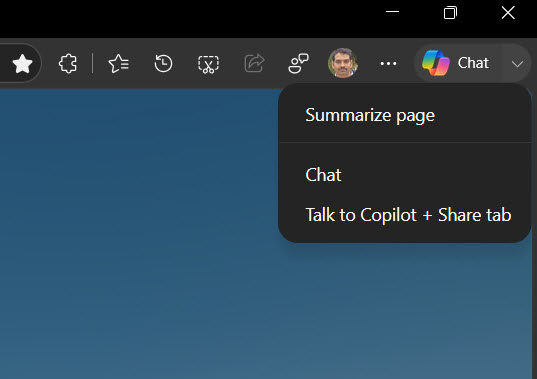
Each option starts a different type of interaction. “Summarize page” generates a short summary of the current page. “Chat” opens a regular Copilot session. The “Talk to Copilot + Share tab” option opens Copilot Vision in the sidebar with the current tab shared as context.
Copilot in Edge is already available from a toolbar button that opens the sidebar. This menu builds on that entry point by adding quick actions and a direct way to launch Copilot Vision with the current tab. It removes the need to open the sidebar first and then choose an action.
The menu also makes the different Copilot modes more visible. Users can choose between a quick page summary, a general chat session, or a Vision session tied to the current tab. Each option leads to a different type of interaction instead of a single entry that handles everything.
Another detail is how the “Share tab” option works. The tab is passed into Copilot Vision at the start of the session, so the assistant can respond based on the page without requiring an extra step. This keeps the interaction tied to the content already open.
The Copilot menu is currently being tested in Edge Canary on desktop and has not yet appeared in stable or beta channels.

Discussion (0)
Be the first to comment.