




Fitbit offers one of the most diverse wearable lineups in the fitness world, but that variety also makes it difficult to know exactly which model you own. If you recently found an older tracker, upgraded your device, or inherited a Fitbit from someone else, identifying your Fitbit model helps you unlock the right features, accessories, and app settings.
This guide explains how to identify any Fitbit using appearance, design details, display style, and built-in features. Each section supports accurate Fitbit model recognition without guesswork, giving you clear ways to determine your Fitbit version at home.
Why Identifying Your Fitbit Model Matters
Knowing your Fitbit model ensures proper setup, compatible bands, correct chargers, and access to all available tracking tools. Since Fitbit devices share similar shapes and names, model recognition avoids confusion and saves time during troubleshooting or upgrades.
When you identify your Fitbit correctly, you also get the most accurate health insights because the Fitbit app adjusts features based on the exact device you own.
Identifying Fitbit Models By Appearance
The fastest method for identifying your Fitbit is visual recognition. Different Fitbit families have unique silhouettes, band styles, and display designs that make each line easy to distinguish once you know what to look for.
Wristband-Style Trackers
Fitbit’s slim wristband trackers include the Charge, Luxe, Inspire, and older Alta models. These devices share a narrow shape but have distinct visual cues:
- Fitbit Charge Series: A thicker band, vertical screen, and a slightly raised module.

- Fitbit Inspire Series: Lightweight build, curved body, and smaller display area.

- Fitbit Luxe: Polished, jewelry-style finish and a full-color touchscreen.
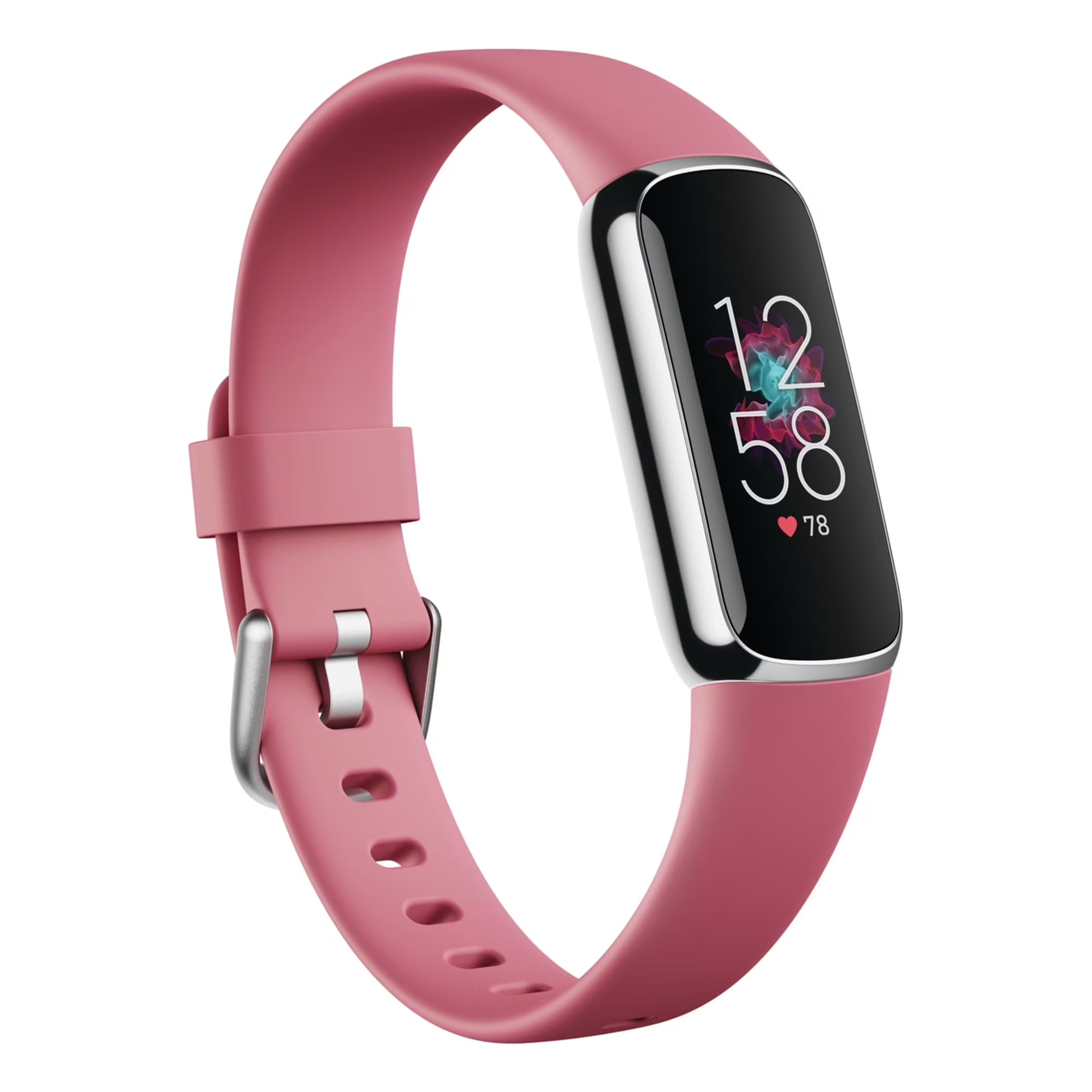
- Fitbit Alta / Alta HR: Slim metallic frame with a narrow monochrome screen.
These differences help with quick Fitbit model recognition, especially for older devices still in circulation.
Smartwatch-Style Trackers
Fitbit smartwatches introduce larger displays and square or rounded faces. They differ noticeably from slimmer bands.
- Fitbit Versa Series: Square-shaped touchscreen, rounded corners, and multiple color options.
- Fitbit Sense / Sense 2: Similar to Versa but includes advanced sensors such as ECG and skin temperature.
- Fitbit Ionic: Angular aluminum case and built-in GPS, discontinued but still used by some owners.
If your Fitbit resembles a smartwatch, it likely belongs to the Versa or Sense lineup unless it has the older metallic Ionic design.
Clip-On and Specialty Trackers
A few Fitbit models were designed for clipping onto clothing instead of being worn on the wrist. These compact models include:
- Fitbit Zip: Small pebble-shaped tracker with a basic screen.
- Fitbit One: Slim capsule-style device with a soft silicone clip case.
- Fitbit Flex: Minimal screen with indicator dots embedded into a rubber wristband.
These devices are less common now but remain important in accurate Fitbit device identification.
Identifying Fitbit Models By Features
If appearance alone does not help identify your Fitbit, built-in features provide clear clues. Each Fitbit model includes specific tools that narrow down the possibilities quickly.
Heart Rate Monitoring
If your Fitbit has heart rate sensors on the back, it belongs to one of the more advanced lines such as Charge HR models, Inspire HR, Luxe, Versa, or Sense. Older models like the original Charge or Alta do not have heart rate sensors.
SpO2 And ECG Capabilities
Only higher-end Fitbit models support SpO2 readings or ECG. If you see SpO2 graphs in your app or have an ECG button on the screen, you likely own a Sense, Versa 3/4, or Charge 5/6.
Smartwatch Features
If your Fitbit receives calls, displays apps, supports contactless payments, or controls music, it belongs to the smartwatch category rather than basic trackers.
- Versa and Sense Series: Offer Fitbit Pay, app notifications, and customizable watch faces.
- Ionic: Supports built-in GPS and larger standalone apps.
Display Style
The display often reveals the model family:
- Monochrome vertical screen: Inspire or older Charge models.
- Full-color curved display: Luxe or Charge 5.
- Large square touchscreen: Versa or Sense.
These visual cues make Fitbit model recognition more straightforward when you cannot rely solely on the device shape.
How To Identify Your Fitbit Using The App
The Fitbit app provides one of the easiest ways to identify your Fitbit model if you already have the device paired. You can check the exact model name inside your profile.
Use these steps to determine your Fitbit version through the app:
- Open the Fitbit app on your phone.
- Tap your Profile icon in the top corner.
- Select your Fitbit device from the list.
- Look for the full model name displayed on the device page.
- Compare design photos online if needed to confirm the exact version.
This method helps with accurate identifying of your Fitbit even if the device looks similar to other models.
Tips For Accurate Fitbit Model Recognition
If you still struggle to identify your Fitbit, a few additional checks can help you confirm the right device.
- Check the back of the device for model codes or engraving.
- Search the charger type online since each Fitbit family uses its own charging style.
- Compare your device to official product photos from Fitbit support pages.
- Look at your device’s band attachment style, which differs between models.
- Check whether your Fitbit supports advanced features like GPS or ECG.
The more details you check, the easier it becomes to pinpoint exactly which Fitbit you own.
FAQ
How Do I Know Which Fitbit I Have?
Open the Fitbit app, tap your profile, then select your device. The exact model name appears on the device page.
Can Two Fitbit Models Look Almost Identical?
Yes. Inspire, Charge, and Alta models look similar but have different thicknesses, display styles, and back sensor layouts.
Where Can I Find The Model Number?
Many Fitbit devices have small engravings or printed codes on the back or under the band.
Does Every Fitbit Have A Color Screen?
No. Only specific models like the Luxe, Charge 5, Sense, and Versa use full-color displays.
Can I Identify My Fitbit By Its Charger?
Often, yes. Each family uses a unique charger shape or clip design.
Can Clip-On Fitbits Still Be Identified?
Yes. Zip, One, and Flex all have distinctive shapes and display styles that make them easy to recognize.
Summary
- You can identify your Fitbit by appearance, screen type, features, or by checking the device name inside the Fitbit app.
- Slim trackers include Charge, Inspire, Luxe, and Alta models; smartwatches include Versa, Sense, and Ionic.
- Clip-on models like Zip, One, and Flex have unique shapes that make them easy to spot.
- Features such as heart rate, ECG, GPS, and SpO2 quickly narrow down the possible models.
- The Fitbit app remains the most reliable way to see your exact model name for confirmation.
- Matching design details, charger style, and sensors helps you confidently identify any Fitbit model.
Conclusion
Identifying your Fitbit model does not need to be complicated. By examining the design, screen type, features, and app details, you can quickly determine your Fitbit version with confidence. Whether you are setting up a hand-me-down device or upgrading to something new, understanding which model you own ensures a smoother experience and access to all the right tools.
With this guide to Fitbit model recognition, you can move forward knowing your device, its capabilities, and the best way to personalize your fitness tracking journey.

Discussion (0)
Be the first to comment.