




Voicemail on iPhone causes confusion because Apple does not offer a true on-off switch. Most solutions rely on limiting access, disabling notifications, or asking your carrier to remove voicemail entirely. The steps below help you stop voicemail alerts, hide Visual Voicemail, or fully disable voicemail when your carrier allows it.
Table of contents
- Why you can’t fully turn off voicemail on iPhone
- What “turning off voicemail” actually means on iPhone
- How to disable Visual Voicemail on iPhone
- How to stop voicemail notifications on iPhone
- How to disable voicemail through your carrier
- Carrier-specific voicemail behavior on iPhone
- What happens when someone calls after voicemail is disabled
- Best workaround if you want zero voicemail messages
- Common mistakes to avoid
- Tips
- Summary
Why you can’t fully turn off voicemail on iPhone
Apple ties voicemail to your carrier, not iOS itself. Because of that, iPhone settings cannot fully disable voicemail for most users. Only carriers can remove voicemail at the network level.
What “turning off voicemail” actually means on iPhone
Turning off voicemail usually means one of three things. You hide Visual Voicemail, silence notifications, or ask your carrier to disable voicemail completely. Each option leads to a different result.
How to disable Visual Voicemail on iPhone
Visual Voicemail depends on cellular data. Blocking its access prevents messages from loading or syncing.
Turn off cellular data for the Phone app
This stops Visual Voicemail from downloading messages.
- Open Settings.
- Tap Cellular.
- Scroll to Phone.
- Turn off the toggle.
Voicemail messages stop appearing in the Phone app after this change.
Remove voicemail tab access (carrier-dependent)
Some carriers hide the Voicemail tab when Visual Voicemail is disabled. Others keep the tab visible but non-functional. This behavior depends entirely on your network provider.
How to stop voicemail notifications on iPhone
This option works best if you only want silence.
Disable voicemail notifications from Settings
You can stop alerts without changing carrier features.
- Open Settings.
- Tap Notifications.
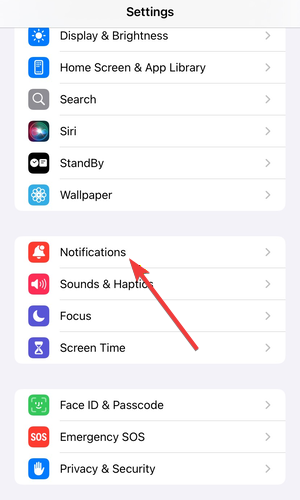

- Select Phone.
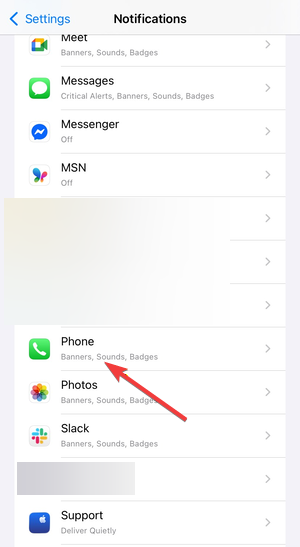

- Turn off Allow Notifications.
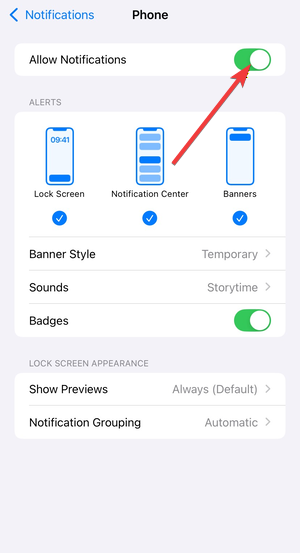

Your iPhone no longer shows voicemail alerts or lock screen prompts.
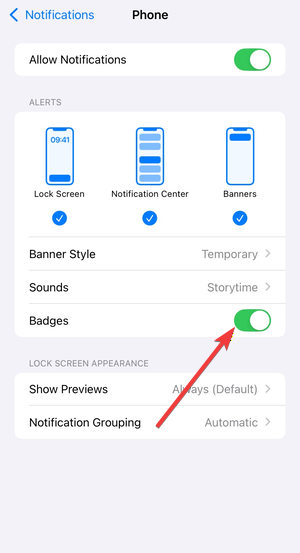
Turn off voicemail badge count
This removes the unread voicemail number on the Phone app icon.
- Open Settings.
- Tap Notifications.
- Select Phone.
- Turn off Badges.
How to disable voicemail through your carrier
Carrier-level changes offer the only true way to disable voicemail.
Turn off voicemail with carrier short codes
Some carriers support voicemail disable codes. These codes vary by region and carrier. Dial the code from the Phone app and follow the prompts if available.
Contact carrier support to remove voicemail
Ask support to remove voicemail from your line entirely. Confirm that calls will ring until they disconnect. This option works best for business lines or advanced plans.
Carrier-specific voicemail behavior on iPhone
Each major carrier handles voicemail differently.
AT&T voicemail limitations on iPhone
AT&T usually does not allow full voicemail removal. Most users must rely on notification controls or Visual Voicemail workarounds.
Verizon voicemail disable options
Verizon may disable voicemail on request. Availability depends on your plan and account type.
T-Mobile voicemail workarounds
T-Mobile allows voicemail suppression in some cases. Support may offer network-level changes or app-based controls.
What happens when someone calls after voicemail is disabled
Calls continue ringing until the caller hangs up. Callers cannot leave messages. Missed calls still appear in your call history.
Best workaround if you want zero voicemail messages
Disable voicemail notifications and turn off cellular data for the Phone app. Then contact your carrier to request voicemail removal. This combination stops alerts and prevents message storage.
Common mistakes to avoid
Many guides claim iOS includes a voicemail toggle. That setting does not exist. Avoid third-party apps that promise voicemail removal, as they cannot change carrier features.
Tips
- Disable notifications first for the fastest result.
- Use carrier support chat instead of phone calls for written confirmation.
- Test voicemail behavior after each change.
- Restart your iPhone after carrier-level updates.
Summary
- iPhone settings cannot fully disable voicemail.
- Visual Voicemail depends on cellular data access.
- Notification controls silence voicemail alerts.
- Carriers control true voicemail removal.
Voicemail on iPhone works as a carrier service, not a system feature. If you want silence, notification controls solve the problem fast. If you want voicemail gone entirely, contact your carrier and confirm removal before relying on workarounds.



Discussion (0)
Be the first to comment.