




If you want to learn how to set up Netflix with T-Mobile, the process is simple as long as your plan includes Netflix On Us. Many T-Mobile plans offer built-in access to Netflix, making it easy to activate your subscription without paying extra. At the time of writing, this method still works and remains the official way to unlock Netflix using your T-Mobile account.
This guide walks you through checking your eligibility, linking your accounts, and starting your Netflix streaming. The steps also apply if you already have a Netflix account and want T-Mobile to take over billing.
Once you confirm your plan includes Netflix, you only need a few minutes to activate your subscription and begin streaming on any device. Follow the steps below to get started.
Steps To Set Up Netflix With T Mobile
- Open your browser and sign in to your T-Mobile account.

- Go to your plan details and confirm that your line is eligible for Netflix On Us.
- Select the Netflix On Us section and choose Activate to begin setup.
- Follow the activation prompts. T-Mobile may ask you to log in to an existing Netflix account or create a new one.

- If you already have a Netflix subscription, link it so T-Mobile can take over billing.
- Wait for the confirmation message from T-Mobile and Netflix.
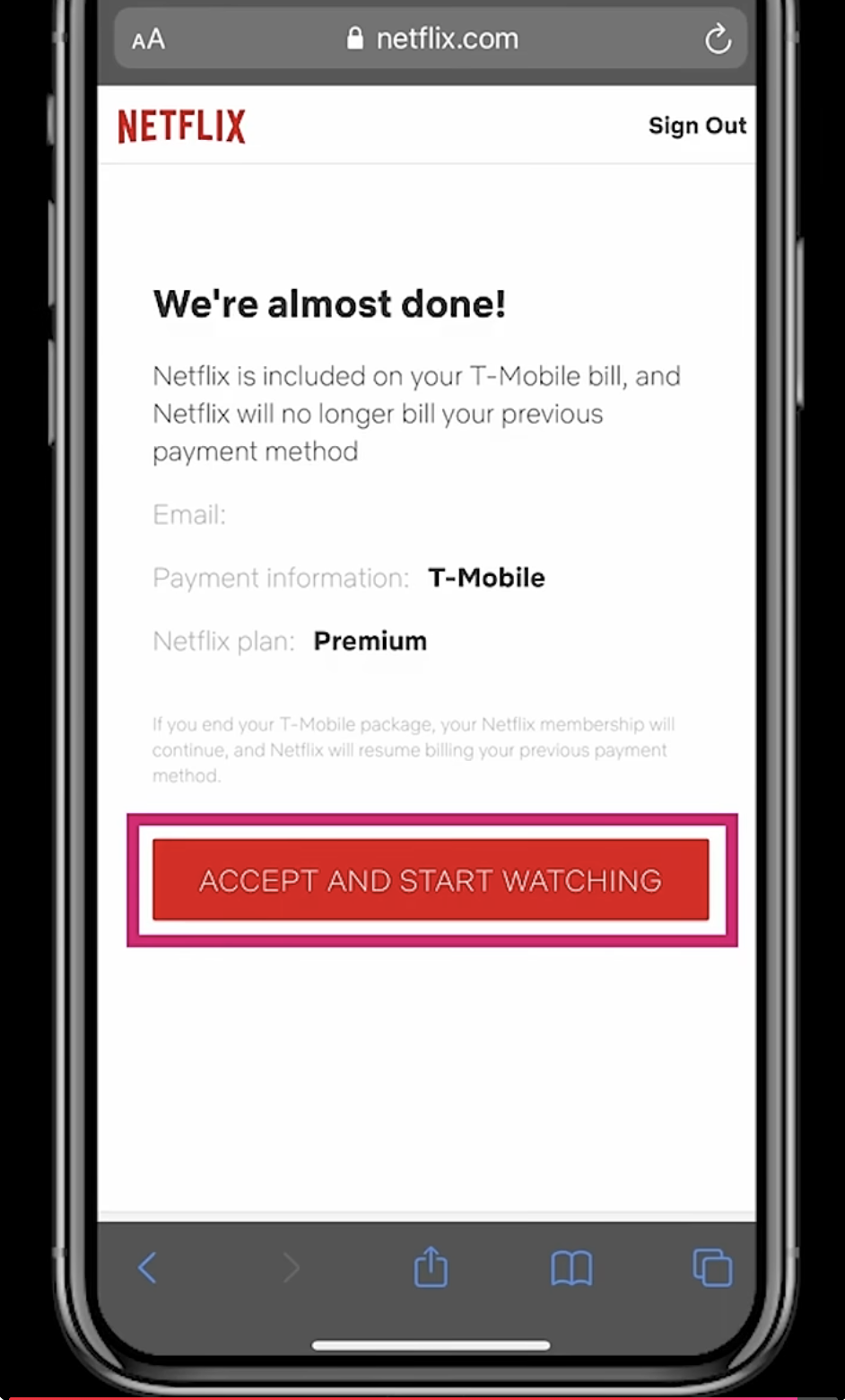
- Click Accept and Start Watching. Open the Netflix app on any device and sign in to start streaming.
Troubleshooting Common Problems
If Netflix activation fails, the issue usually relates to plan eligibility or account linking. These fixes help resolve most activation errors.
- Confirm that your T-Mobile plan supports Netflix On Us.
- Make sure you are the Primary Account Holder when activating Netflix.
- Check that your Netflix account is not already billed through another partner subscription.
- Remove any expired or duplicate Netflix payment methods before linking.
- Sign out of Netflix on all devices and try activating again.
Tips
- You can upgrade your Netflix plan inside your T-Mobile account if you want more screens or better video quality.
- Families with multiple lines may need to assign Netflix access to only one line.
- If you already paid Netflix directly, your next month may show a zero balance once T-Mobile takes over billing.
- Download episodes for offline viewing when using limited mobile data.
FAQ
Does every T-Mobile plan include Netflix?
No. Only select Magenta and Go5G plans offer Netflix On Us. Always check your exact plan first.
Can I use my existing Netflix profile?
Yes. When linking your account, your watch history and profiles stay the same.
What if I already pay Netflix through Apple or Google?
You must cancel that billing cycle first, then activate Netflix through T-Mobile.
Does Netflix On Us include 4K?
Some plans include Standard HD, while others include Premium 4K. Plan type determines the video tier.
Summary
- Sign in to your T-Mobile account.
- Verify that your plan includes Netflix On Us.
- Activate the Netflix benefit and link your account.
- Wait for the confirmation email.
- Start streaming Netflix on any device.
Conclusion
Learning how to set up Netflix with T Mobile takes only a few minutes, and it instantly adds value to your wireless plan. Once activated, Netflix On Us covers your subscription billing and lets you watch on any supported device. As long as your plan remains eligible, your Netflix access continues without extra monthly cost. Activate the benefit, sign in to Netflix, and enjoy unlimited streaming whenever you want.


Discussion (0)
Be the first to comment.