



If you no longer want to keep your Netflix account, the platform gives you simple tools to cancel your membership and remove your information. Knowing how to delete a Netflix account helps you control your billing, protect your data, and stop future charges. At the time of writing, Netflix still requires you to cancel your subscription before the account itself can close permanently.
You can complete the entire process from a browser or mobile device, and each option follows the same steps: access your account settings, cancel your membership, confirm the cancellation, and optionally delete any individual profiles. After cancellation, Netflix will automatically remove your account after a short retention period if no balance remains.
Step 1: Log in to your Netflix account
Start by signing in on your preferred device. Logging in gives you access to the settings required to cancel your membership.
- Open the Netflix website or app.
- Select Sign In and enter your email and password.

- Choose your main profile to continue.
Step 2: Open your account settings
Your account settings page contains all billing and membership controls. This is where you start the cancellation process.
- Select your profile icon in the upper-right corner.
- Choose Account from the dropdown menu.
- Enter your password again if Netflix asks for verification.
Step 3: Cancel your Netflix membership
Canceling your membership stops future billing and begins the process that removes your Netflix data. You will still keep access until the end of your billing period.
- Scroll to Membership & Billing.
- Select Cancel Membership.
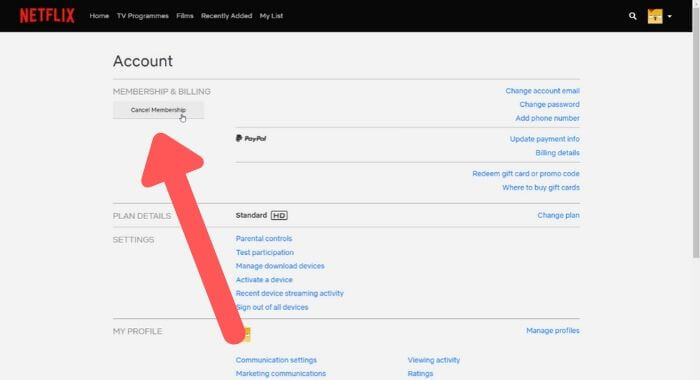
- Choose Finish Cancellation to confirm.

If you subscribed through a third-party provider, such as a mobile carrier or TV service, the cancellation button will direct you to that provider’s website or app instead.
Step 4: Confirm the cancellation
Netflix will show a confirmation page outlining when your billing ends and what happens to your data. Confirming this screen officially stops your subscription.
- Review the cancellation summary.
- Select Confirm Cancellation.
- Wait for Netflix to display the success message.
Step 5: Delete individual profiles (optional)
If you want to remove personal recommendations, watch history, or kids’ profiles before your account closes, you can delete profiles individually.
- From the account settings page, scroll to Profile & Parental Controls.
- Select the profile you want to remove.
- Choose Delete Profile and confirm.
Step 6: Wait for Netflix to permanently delete the account
Once your membership is canceled, Netflix will automatically delete your entire account after their retention period ends, as long as no billing remains. You do not need to take extra action unless Netflix support asks for verification.
Troubleshooting common problems
- You do not see “Cancel Membership”: Your subscription may be billed through a third-party provider. Follow the link Netflix gives you.
- You cannot sign in: Use the Forgot Password option to reset your login details.
- Your account is still active after canceling: Access continues until the end of your billing period.
- Charges continue: Ensure you canceled through the correct provider and confirm no additional profiles are using your credentials.
Tips
- Download any receipts you may need before deleting the account.
- Remove connected devices from your account for added security.
- Delete profiles you no longer want before the retention window ends.
- Check for secondary emails that may have been used to sign up.
FAQ
Does Netflix delete my account immediately?
Not immediately. Netflix deletes it after the retention period once billing ends.
Can I reactivate later?
Yes. Signing in and restarting your membership reactivates your account if it has not been fully purged yet.
What happens to my profiles?
They remain during your billing period but disappear after account deletion.
Can I delete my account without canceling my membership?
No. You must cancel your subscription first.
Summary
- Log in to your Netflix account.
- Open your account settings.
- Cancel your membership.
- Confirm the cancellation.
- Delete optional profiles.
- Wait for Netflix to remove your account permanently.
Conclusion
Deleting a Netflix account only takes a few steps, and the process works the same across most devices. By canceling your membership, confirming the changes, and removing any individual profiles, you ensure your data clears from the service. Once your billing period ends, Netflix automatically begins permanent account removal, giving you full control over your subscription and personal information.


Discussion (0)
Be the first to comment.