




If you want to see who shared your Instagram post, Instagram only gives limited visibility. You can see how many times a post was shared and who reshared it to their Story, but you cannot see who shared it via private messages.
Below, you’ll find exactly what Instagram shows, what it hides, and how to check every available option.
Table of contents
- What Instagram actually lets you see about shares
- How to see how many times your post was shared
- How to see who shared your post to their Story
- Can you see who shared your post via DM?
- Business vs creator vs personal accounts
- Common myths and false claims
- What you can do instead to track engagement
- Tips
- FAQs
- Summary
What Instagram actually lets you see about shares
Instagram protects user privacy around sharing. Because of this, it limits what post creators can access.
Why Instagram doesn’t show names for most shares
Instagram treats direct shares as private conversations. Anyone who sends your post through DMs stays anonymous to the creator.
How to see how many times your post was shared
Instagram Insights shows the total number of shares, not individual users.
Requirements for seeing share counts
You need a Business or Creator account. Personal accounts do not include Insights.
Steps to check shares using Instagram Insights
- Open Instagram and go to your profile.
- Tap the post you want to check.
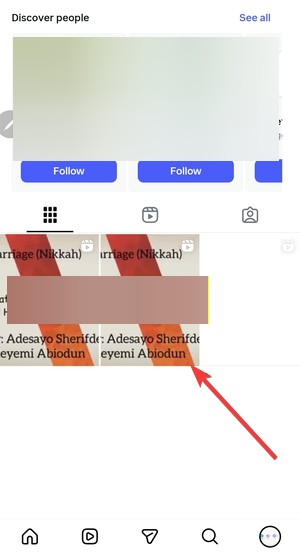

- Next, tap the three vertical dots under the post.
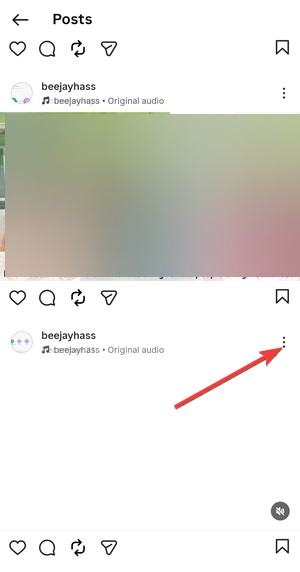

- Next, tap View insights.
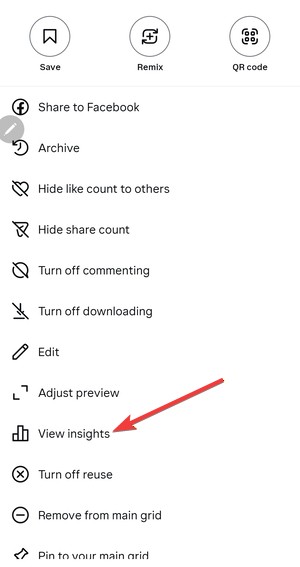

- Look for the paper-plane icon to see total shares.
Instagram updates this data in near real time, but short delays can occur.
How to see who shared your post to their Story
This is the only case where usernames may appear.
When Instagram shows Story reshares
Instagram shows Story reshares only if:
- The account stays public.
- The Story remains active for 24 hours.
How to view Story reshares before they expire
- Open the original post.
- Tap the three-dot menu.
- Select View story reshares if available.
- Tap each Story to see the username.
Once the Story expires, Instagram removes this data.
Can you see who shared your post via DM?
No. Instagram never reveals DM share identities.
Why DMs are always private
Direct messages fall under private communication rules. Instagram does not provide creator-side visibility for these actions.
Business vs creator vs personal accounts
Your account type determines how much data you can access.
What Business and Creator accounts unlock
Business and Creator accounts unlock:
- Post Insights
- Share counts
- Reach and engagement breakdowns
What personal accounts cannot see
Personal accounts cannot access:
- Share counts
- Detailed engagement metrics
- Audience analytics
Switching account types takes less than a minute and keeps your posts intact.
Common myths and false claims
Misinformation around Instagram sharing spreads quickly.
Third-party apps that claim to show who shared your post
No third-party app can access private share data. These apps usually request risky permissions or collect account data.
“Hidden” Instagram settings that don’t exist
Instagram does not include hidden menus, secret toggles, or developer modes that reveal private shares.
What you can do instead to track engagement
While names stay hidden, signals still exist.
Using saves, reach, and interactions as signals
High saves and reach increases often correlate with frequent sharing. These metrics help estimate content performance.
Encourage visible resharing
Ask followers to reshare posts to their Stories or tag you directly. This creates visible attribution.
Tips
- Switch to a Creator account if you want Insights access.
- Check Story reshares within 24 hours.
- Ignore apps promising full share visibility.
- Track saves and reach to estimate sharing impact.
- Prompt followers to tag you when resharing.
FAQs
Can I see who shared my Instagram Reel?
You can only see Story reshares and total share counts, not DM shares.
Why don’t I see the “View insights” option?
Your account is likely personal or the post is too new.
Do Stories show every person who reshared my post?
Stories only show public reshares that remain active.
Does Instagram notify users when I check reshares?
Instagram does not send notifications for viewing reshares.
Summary
- Instagram hides DM share identities.
- Insights show total share counts for eligible accounts.
- Story reshares reveal usernames temporarily.
- Business and Creator accounts unlock analytics.
- Third-party apps cannot bypass Instagram limits.
Instagram only allows partial visibility into post sharing. You can track share counts and Story reshares, but private shares remain hidden by design. For deeper insights, switch account types and focus on engagement signals that reflect real audience interest.


Discussion (0)
Be the first to comment.