




A PlayStation Plus free trial lets you experience online play, game trials, and cloud saves without paying up front. It usually lasts seven or fourteen days and is only available to new users. Here’s how to redeem it on your console, computer, or phone.
1) Check if you’re eligible for a free trial
Before you start, make sure you qualify for the offer. Sony limits the trial to first-time subscribers, and you must have a valid payment method linked to your PlayStation Network account. Also, the region of your payment method must match the region set on your PSN account.
The free trial works only once per region per account. If you’ve previously had any PlayStation Plus plan, even years ago, the system won’t show the trial banner again. You can check past subscriptions under Settings > Users and Accounts > Payment and Subscriptions.
2) Redeem the PlayStation Plus free trial on PS4 and PS5
Turn on your PS5 and sign in to your PSN account. Next, open the PlayStation Store from the home screen and select PlayStation Plus in the sidebar. Choose your preferred tier - Essential, Extra, or Premium.

If eligible, you’ll see a Free Trial label, select it, and add or confirm your payment method. Finally, select Subscribe and your trial begins immediately.
3) Redeem the trial via a web browser
Go to the official PlayStation Store website and sign in with your PSN credentials. Next, click PlayStation Plus from the top navigation bar and choose a tier that shows the Free Trial tag or with the price set at 0 and the recurring price underneath. Lastly, confirm payment details and select Subscribe.
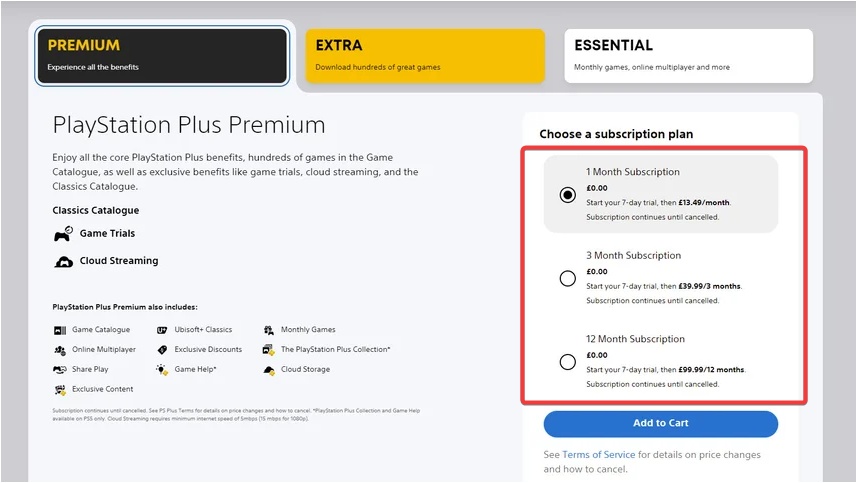
Once activated, the subscription syncs automatically with your PS4 or PS5 console.
4) Redeem the trial using the PlayStation app
Open the app and sign in with your PSN account. Then, tap the PlayStation Store tab at the bottom and scroll to PlayStation Plus. Now, choose your plan, tap Free Trial, and confirm.
5) Verify your subscription

To confirm activation, navigate to Settings > Users and Accounts > Payment and Subscriptions > Subscriptions. The page should show your PlayStation Plus plan and expiration date. If it says Active Trial, your account is set.
6) Cancel before the trial ends
If you don’t plan to continue the subscription, turn off auto-renewal to avoid being charged when the trial expires. Then on PS5, go to Settings > Users and Accounts > Payment and Subscriptions > Subscriptions > PlayStation Plus. Now, select Cancel Subscription.
On PS4, open Settings > Account Management > Account Information > PlayStation Subscriptions > PlayStation Plus. Lastly, click Turn Off Auto-Renew.
You can also cancel online from the account management page or within the PlayStation App under Subscriptions. Confirmation emails are sent immediately after cancellation.
Troubleshooting common problems
- Free trial option missing: This usually means you’ve already used a trial, or it’s unavailable in your region. Try changing the country setting or creating a new PSN account in a supported region.
- Payment method errors: If your card or PayPal isn’t accepted, check that your billing address matches your PSN region. Prepaid cards and virtual debit cards often fail verification.
- Trial didn’t activate after checkout: Restart your console and check your subscription list again. If it still shows inactive, contact PlayStation Support through the Help menu.
Tips for getting the most from your free trial
- Download the monthly free games to keep them while subscribed.
- Try cloud streaming and classic catalog titles on Premium.
- Activate auto-upload for saves to test cloud storage.
- Play a few multiplayer sessions to check connection stability.
FAQs
Can I get another free trial with a new account? Yes, but only if the new account hasn’t had an active PlayStation Plus plan in the same region. You’ll still need unique payment details.
Do I need a payment method for the trial? Yes. Sony requires a valid payment method to start any trial, even when it’s free.
What is the duration of the free trial? Free trials are typically seven days in the US but can be 14 days in other markets like the UK or Australia. Availability and duration depend on local promotions. Always confirm the offer duration on your screen before starting.
Can I upgrade or downgrade tiers during the trial? You can upgrade to a higher tier, but it may convert the trial into a paid plan immediately. Downgrades take effect after the billing cycle.
What happens to my saved games after the trial ends? Your cloud saves remain stored for six months, but you can’t access them until you resubscribe or manually back them up to your console.
Summary
- Confirm you’re eligible for a PlayStation Plus free trial.
- Redeem it on your PS5, PS4, browser, or mobile app.
- Verify activation in your account settings.
- Turn off auto-renew to avoid charges after the trial.
Conclusion
Redeeming your PlayStation Plus free trial is the easiest way to explore online gaming, cloud saves, and the latest free monthly titles without spending anything upfront. Whether you activate it on a PS5, PS4, or through the PlayStation App, the process takes only a few minutes when you meet the eligibility requirements.
Always remember to verify your subscription and disable auto-renewal before the trial ends to avoid unwanted charges. Once you’ve tested the benefits, you can choose the tier that fits your gaming style best - Essential for online play, Extra for a large game catalog, or Premium for cloud streaming and classic titles.

Discussion (0)
Be the first to comment.