




Logging into Roblox is quick once you know the steps for your device. You only need your username (or email or phone) and password. On PC, you can use a browser or the Roblox app. On Android or iPhone, you sign in through the Roblox app. Lastly, on Xbox, you link your account using your credentials from another device.
Read on for step-by-step instructions, tips for common login problems, and ways to secure your account.
How to Log in on PC
You can log in using a web browser or the Roblox desktop app.
Using a Browser

- Open your browser and visit roblox.com/login.
- Enter your username, email, or phone number.
- Enter your password.
- Select Log In.
If you have two-step verification enabled, enter the code sent to your email or authenticator app before you access your account.
Using the Roblox App on PC
- Download Roblox from the official website or app store.
- Open the app.
- Type your login details and sign in.
- Complete any verification prompts.
Tips for PC Login
- Keep your browser updated.
- If scripts or captchas fail, try a different browser or disable extensions.
- If you run into errors, clear browser cache and cookies.
How to Login on Mobile (Android and iPhone)
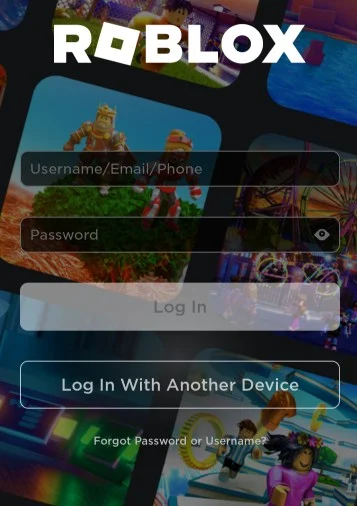
- Install the Roblox app from Google Play or the App Store.
- Open the app.
- Tap Log In.
- Enter your username or email and password.
- Tap Log In again.
If your login fails, check your network connection first. Make sure you have the latest version of the app installed.
How to Login on Xbox

Logging into Roblox on Xbox involves linking your account to your Xbox profile.
- Turn on your Xbox and open Roblox.
- You will see a code on your screen.
- On a phone or PC, open the Roblox login page.
- Choose Log In with Another Device or follow the prompt to enter the code shown on the console.
- Enter your username or email and password on the other device.
- Confirm the link.
If this does not work, make sure you are using the correct login details and that the account is not already linked to another Xbox account. You may need to reset your password if credentials fail.
Quick Login Options
Roblox supports Quick Login between devices you already trust. You can generate a one time code on the new device and approve it on a device where you are already signed in.
How Quick Login Works
- On the new device, select Log In with Another Device.
- A six-digit code appears.
- On your signed-in device, go to Account Settings and then Quick Login and enter the code.
- Approve the login.
This option streamlines signing in without entering your password again.
Login Troubleshooting
If you cannot sign in, check these common issues.
Easy Checks
- Verify your username or email.
- Check Caps Lock and extra spaces while typing.
- Make sure your internet connection is stable.
- Update the Roblox app or browser.
Clean Cache
On web, clear your browser cache and cookies. On mobile, clear the app cache or reinstall the app.
Two-Step Verification Problems
If you do not receive 2FA codes, confirm your email and phone number in account settings. Use backup codes if available.
Xbox Login Errors
Xbox does not support login through social accounts like Facebook or Google. You must use your Roblox account password.
Login Table by Device
| Device | Method | Requires |
|---|---|---|
| PC browser | roblox.com/login | Username or Email or Phone plus Password |
| PC app | Roblox app | Username or Email plus Password |
| Android | Roblox app | Username or Email plus Password |
| iPhone | Roblox app | Username or Email plus Password |
| Xbox | Linked via code | Roblox credentials plus other device |
Frequently Asked Questions
Why can’t I login to Roblox?
Usually you entered the wrong username or password. If correct, try clearing cache, updating the app, or resetting your password.
Can I stay logged in?
Yes. On most devices, select the option to stay logged in when you see it.
Is Quick Login secure?
Yes. Roblox uses one time codes and device approval to protect your account.
What if I forget my password?
Use the Forgot Password or Username link on the login page to reset it via email or phone.
Do I need to verify my age to log in?
Age verification may be required to use chat features, but not to sign in. Roblox now enforces age checks for chats and groups based on age settings.
Summary
Logging into Roblox works the same across platforms. Enter your login details, complete any verification, and start playing. If you run into issues, updating the app, clearing cache, or resetting your password solves most problems. You can also use Quick Login to connect new devices without retyping your password. Stay logged in by enabling the option when available.


Discussion (0)
Be the first to comment.