




Many users look up how to jailbreak Roku TV, hoping to install apps like Kodi or other third-party streaming tools. The truth is Roku uses a closed operating system, so true jailbreaking (like rooting or unlocking Android) isn’t possible. However, there are several legitimate and safe methods to expand what you can stream on your Roku device without voiding your warranty or violating Roku’s terms.
Below, we’ll explain what jailbreaking really means, why Roku blocks it, and five effective workarounds like screen mirroring, AirPlay, in-app casting, screen mirroring apps, and USB playback that help you achieve a similar result.
What Does Jailbreaking Mean?
Jailbreaking refers to removing manufacturer-imposed restrictions on a device’s operating system to allow unauthorized apps or software installations. On platforms like iOS or Fire TV, this can mean adding custom apps that aren’t available in the official store.
So when people ask about jailbreaking Roku, they mean unlocking the Roku OS to install third-party apps such as Kodi. But because Roku’s firmware is closed-source, it cannot be modified or rooted in the same way. Still, you can use built-in Roku features and supported tools to stream external content safely.
Can You Jailbreak Roku?
Unfortunately, no. You can’t truly jailbreak Roku; its OS is protected against unauthorized changes. Unlike FireStick, which runs on Android, Roku blocks the installation of external APKs or third-party apps outside the Roku Channel Store.
However, that doesn’t mean you’re stuck with the default channels. With the following five methods, you can stream virtually any content you want by mirroring or casting from another device or playing files locally via USB.
How to “Jailbreak” Roku TV (5 Safe Alternatives)
While you can’t modify Roku’s OS, you can use these five methods to expand your entertainment options safely and effectively.
1. Activate Roku’s Screen Mirroring (Android & Windows)
Roku models released after 2017 include a built-in Screen Mirroring option, allowing Android and Windows users to project their screens directly onto the TV. This is the closest real-world method to “how to jailbreak Roku TV.”
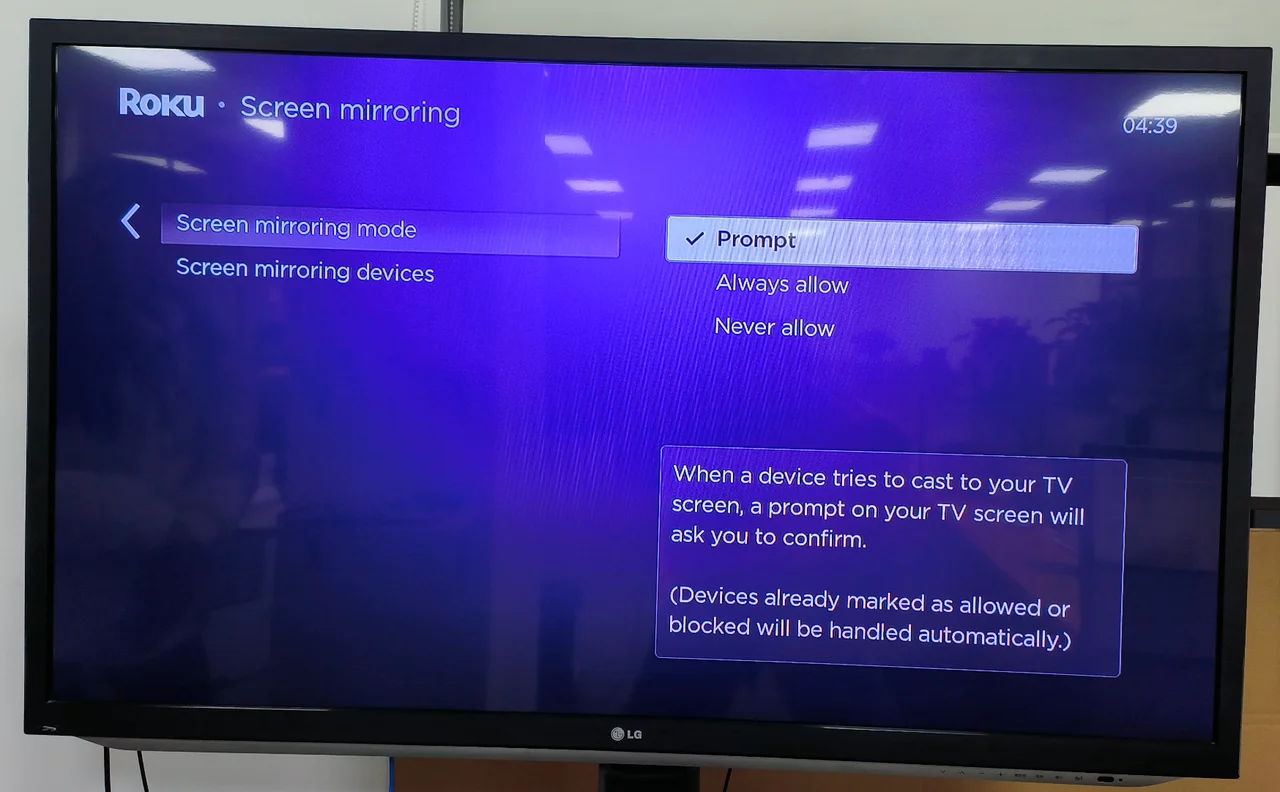
- On your Roku TV, go to Settings > System > Screen mirroring.
- Under Screen mirroring mode, select Prompt or Always allow.
- On your Android phone, enable your device’s mirroring feature (Smart View, Quick Connect, AllShare Cast, or Display Mirroring).
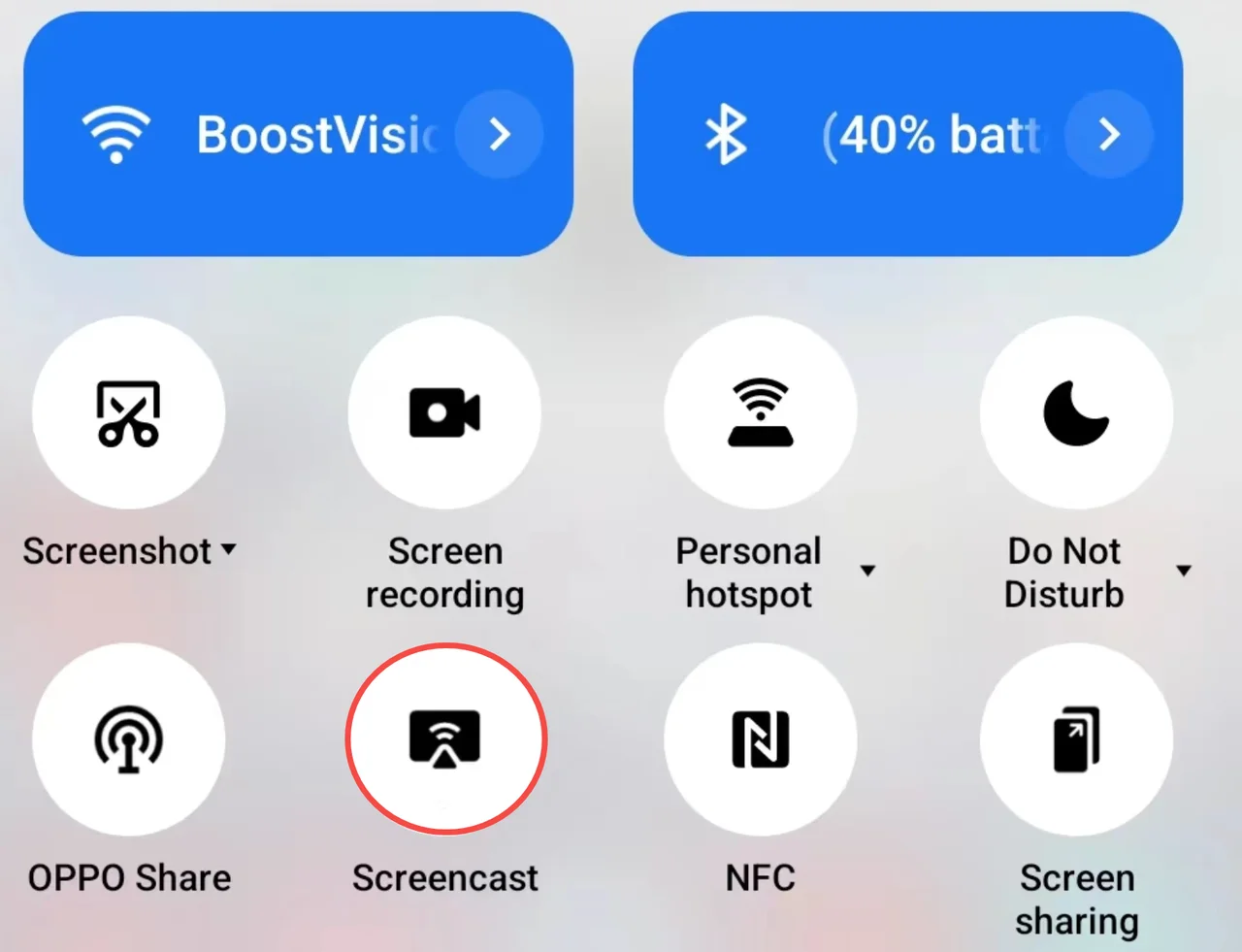
- Select your Roku device from the available list.
- Accept the mirroring request on your TV when prompted. Your Android or Windows screen will now display on the Roku TV.
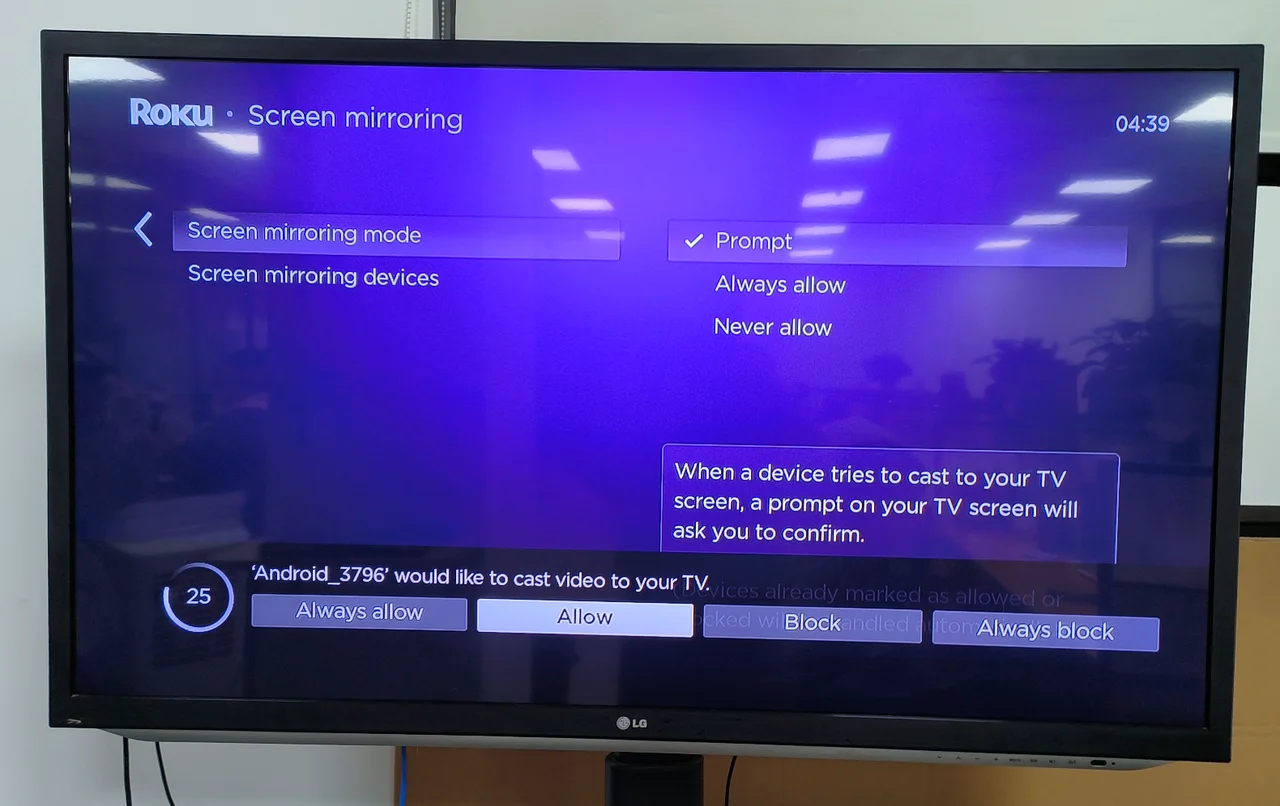
This method lets you stream videos, open apps like Kodi, and even browse the web right from your phone or PC, all displayed on your Roku screen.
2. Use Roku’s AirPlay and HomeKit (Apple Devices)
If you’re using an iPhone, iPad, or Mac, AirPlay is your best alternative to jailbreaking Roku. Roku OS 9.4 and newer versions support AirPlay and Apple HomeKit integration, making it easy to stream from your Apple device to your Roku TV.
- Ensure your Roku device supports AirPlay (check under Settings > Apple AirPlay and HomeKit).
- Toggle AirPlay ON, then connect your Roku and Apple device to the same Wi-Fi network.
- On your iPhone or iPad, open Control Center and tap the Screen Mirroring icon (two overlapping rectangles).
- Select your Roku device from the list.
- Enter the code displayed on your Roku screen into your iPhone or iPad. Your Apple screen will now be mirrored to Roku.
This option lets you stream apps, play iTunes movies, or even share your photo gallery directly on your Roku TV screen.
3. Use Built-In Cast Options in Streaming Apps
Many popular apps, like YouTube, Netflix, and Disney+, have a built-in Cast icon that lets you send video directly to Roku devices. You don’t need to mirror the entire screen; just the video feed itself.
- Connect both your mobile device and Roku to the same Wi-Fi network.
- Open a streaming app with a Cast icon (for example, YouTube).
- Tap the Cast icon on the video playback screen.
- Choose your Roku device from the list and approve the request on your TV.
This method streams media content, not your entire screen, reducing lag and improving performance.
4. Use a Screen Mirroring App (Android & iOS)
If your phone doesn’t natively support mirroring or you want more flexibility, you can use a third-party app such as Screen Mirroring - TV Cast by BoostVision. It supports both Android and iOS and connects easily to Roku.
- Download Screen Mirroring - TV Cast on your smartphone.
- Ensure your Roku’s Screen mirroring mode is set to Prompt or Always allow.
- Connect both devices to the same Wi-Fi network.
- Launch the app and tap Tap to Connect.
- Select your Roku device and choose Connect.
- Enable the Screen Mirror or TV Cast option to stream content from your phone.
This app provides a reliable workaround for both Android and iPhone users who want to display media or apps that Roku doesn’t support natively.
5. Play Content from a USB Drive
Some Roku TV models include a USB port. You can use this to watch downloaded content directly in the Roku Media Player, without mirroring or using streaming apps.
- Insert a USB drive into the port on the side or back of your Roku TV.
- Make sure the drive is formatted as FAT16, FAT32, NTFS, EXT2, EXT3, or HFS+.
- Install and open the Roku Media Player app from the Roku Channel Store.
- Select All to browse files and play supported videos, music, or photos from the USB drive.
This method is beneficial when you want to play media offline or watch local files without using your phone or Wi-Fi.
FAQs About Jailbreaking Roku
Can Roku be jailbroken?
No. Roku OS is closed and can’t be jailbroken to install unauthorized apps like Kodi. However, you can mirror or cast content from other devices.
What does jailbreaking Roku do?
In theory, it removes restrictions to allow third-party apps. In practice, you can only “simulate” jailbreaking through mirroring or casting content from other devices.
Is it legal to mirror apps to Roku?
Yes. Using mirroring and casting features is fully supported by Roku. Just avoid streaming or sharing pirated content.
Can I watch Kodi on Roku?
Yes, indirectly. Install Kodi on your phone or PC, then mirror or cast it to your Roku using one of the methods above.
Conclusion
While you can’t truly jailbreak Roku TV, you can still stream whatever you want using screen mirroring, AirPlay, casting, or USB playback. These official, safe methods enhance your streaming experience without voiding your warranty or risking your account.
At the time of writing, these five approaches remain the best alternatives to jailbreaking and allow you to get the most out of your Roku device safely and effectively.


Discussion (0)
Be the first to comment.