




Android tablets are versatile, but they can’t run iOS apps natively. Apple’s ecosystem uses different frameworks, so installing iPhone or iPad apps directly on Android isn’t possible. However, you can still enjoy official Apple services and access many through the browser or approved apps. We will show you how to do this safely in this guide
1) Get official Apple apps on the Google Play Store
Apple officially supports a few of its apps, like Apple Music, Apple TV, Move to iOS, and Beats on Android. You can find them on the Google Play Store and install them like any other app.
To get these apps, open the Google Play Store on your Android tablet and type the Apple app name, such as Apple Music. Next, tap Install and wait for the download to finish.

Open the app and sign in with your Apple ID credentials. Once installed, you can use the app just like on iPhone or iPad, though some visual layouts may differ slightly on tablets.
2) Using web versions of Apple services
If a particular Apple app isn’t available for Android, you can often use its web version. Open Chrome or another browser and visit the service’s official site, such as iCloud, Apple TV, or Apple Music.
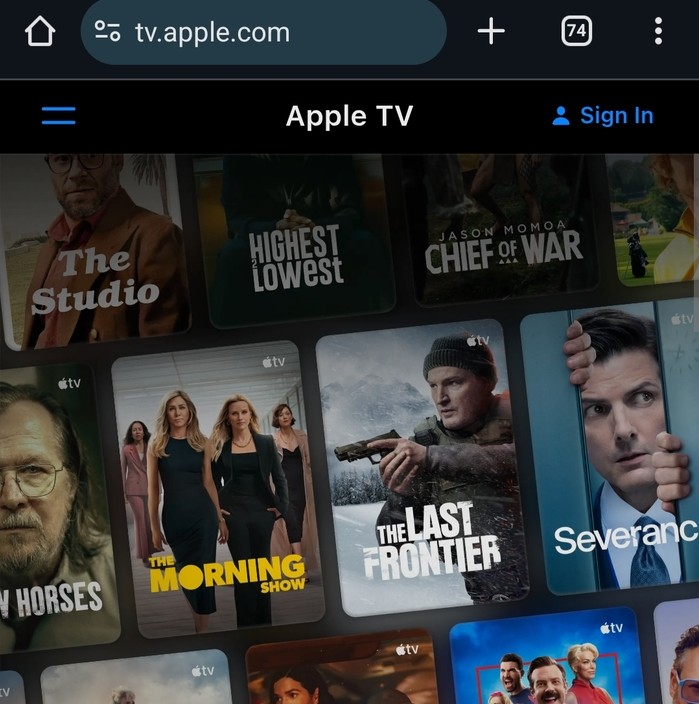
You just need to sign in with your Apple ID, and you will be able to use these apps. To make it easier to access the app in the future, tap the menu icon in Chrome and choose Add to Home screen for a quick-access shortcut.
3) Running iOS apps via emulators on Android
Emulators mimic iOS environments, letting you run certain iPhone apps on Android. Popular tools like iEMU, Cider, or web-based platforms such as Appetize.io can simulate iOS apps in a limited form.
To use this method, download a trusted iOS emulator app or visit a web emulator. Allow installation from unknown sources in your Android settings and launch the emulator.

Now, you can search and use any iOS app of your choice
Tip: Emulators are resource-heavy and may slow down your tablet. Some apps won’t function as intended, and others may not launch at all. Always verify download sources, as many third-party emulators host malware or cloned apps.
4) Alternative Android apps that replace Apple tools
If an Apple app isn’t supported, Android has reliable alternatives that provide similar functions:
- Google Keep instead of Apple Notes
- Google Meet or Zoom instead of FaceTime
- Signal or WhatsApp instead of iMessage
- Google Photos instead of iCloud Photos
Each option works natively on Android and syncs across devices using your Google account.
5) Troubleshooting Apple app issues on Android tablet
- Clear the app cache and restart your tablet if the app freezes or crashes.
- Update the app via Google Play to ensure compatibility.
- Reinstall the app and re-sign in with your Apple ID if sync errors occur.
- Check your internet connection if streaming services fail to load.
Tips for getting the best experience
- Use a modern browser like Chrome or Firefox for web-based Apple apps.
- Enable landscape mode for wider layouts on tablets.
- Pair a Bluetooth keyboard for smoother navigation and typing.
- Create home screen shortcuts for quick access to Apple web apps.
FAQs about Apple apps on Android tablets
Can I use iMessage on Android? No, Apple restricts iMessage to its own ecosystem. You can use Signal or WhatsApp instead.
Can I play iOS games through emulators? Some may work, but performance and input lag often make them unstable. Stick to Android versions of popular games.
Is syncing Apple Notes possible? Not directly, but you can copy content via iCloud web or switch to Google Keep for cross-platform note-taking.
Summary
- You can’t directly install iOS apps on Android tablets due to system differences.
- Official Apple apps like Music and TV are available on the Google Play Store.
- Web versions such as iCloud and Apple Music let you access Apple services through a browser.
- iOS emulators exist but have performance and security limitations.
- Android has reliable alternatives for tools like Notes, FaceTime, and iMessage.
Conclusion
You can’t directly install iOS apps on Android tablets, but you can use official Apple apps from the Play Store or browser-based services. Emulators offer limited functionality, and safer Android alternatives often deliver better performance. Stick with verified apps for a secure and consistent experience.


Discussion (0)
Be the first to comment.