




If a recent update removed features you like or caused compatibility issues, learning how to download older version of apps gives you a reliable way to restore a working build. Many users prefer older app versions when major interface changes, performance drops, or new bugs make the latest release unusable.
This guide explains safe, accurate methods for downloading older app versions on Android and iOS. You also see the risks, legitimate sources, and how to avoid corrupted files or unsafe downloads.
Why You May Need Older Versions Of Apps
Before you download older app versions, it helps to understand why this option exists and when it makes sense.
- Device Compatibility: Older devices sometimes cannot run new app updates smoothly.
- Removed Features: Developers occasionally remove tools or layouts users rely on.
- Performance Issues: Heavy updates may slow down older phones or tablets.
- User Preference: Some users simply prefer the older interface or workflow.
- Bug Avoidance: New updates sometimes introduce bugs that were not present before.
- App Dependencies: Certain modified or enterprise setups require a specific older version.
Now let’s check how to find out whether older app versions are available and how to install them safely.
How To Check If Older App Versions Exist
Not every app allows access to its version history, but several reliable options exist to determine availability.
- Check the app’s page in the App Store or Google Play for version history or alternative builds.
- Visit the developer’s official website and look for a downloads or releases section.
- Check verified third-party repositories that store Android APK history.
- Browse app forums where users share links to older versions and changelogs.
Once you confirm the version exists, you can proceed with platform-specific steps.
How To Download Older Versions of Apps On Android
Android makes reinstalling older app versions easier by allowing you to sideload APK files. Still, safety is critical, so use trusted sources only.
- Open Google Play and check if the developer offers previous versions under App Info or Version History.
- Visit a trusted repository that archives older Android APKs and search for the specific app version you want.
- Enable “Install Unknown Apps” for your browser or file manager in Android settings.
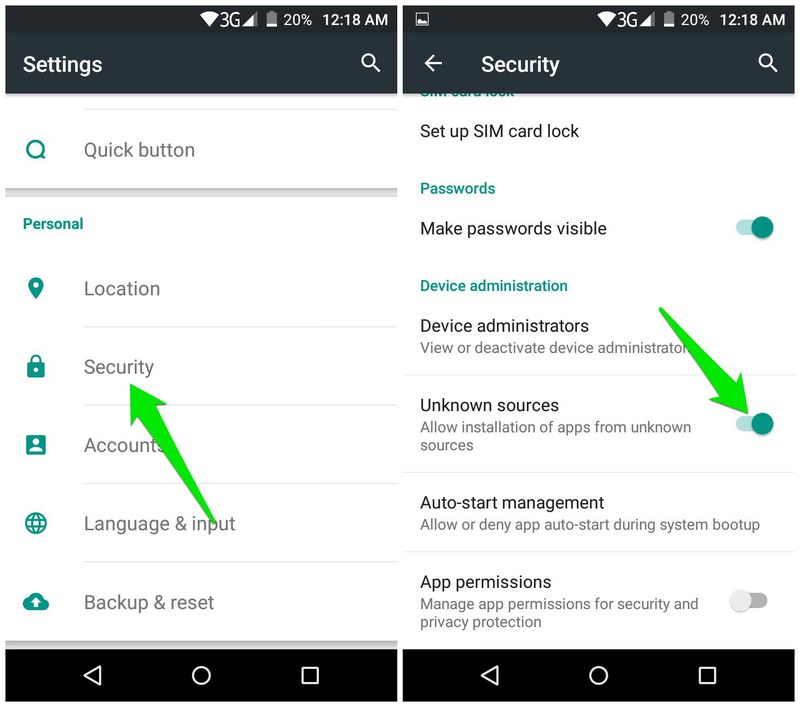
- Download the APK file and tap it to install the older version.
- Turn off auto-updates in Google Play to avoid automatic reinstallation of the latest version.

Always verify the signature and ensure the file comes from a legitimate source before installing older app versions.
How To Download Older Version Of Apps On iOS

Apple restricts manual installations, but you can still access older app versions under the right conditions. At the time of writing, these methods remain the most reliable.
- Open the App Store and check the app’s Version History. Some apps allow you to download a compatible older version automatically.
- Sign in with an Apple ID that previously downloaded the older build. Apple may offer the last compatible version for your device.
- Use a computer with iTunes (older versions) to download the app, then sync it to the device if allowed.
- Check reputable iOS community forums for guidance on retrieving earlier builds when supported by the developer.
- Avoid unofficial IPA downloads or unverified sideloading tools because they can harm device security.
iOS remains more restrictive than Android, so your options depend heavily on whether Apple still authorizes that version.
Risks Of Installing Older App Versions
Older app versions can solve compatibility problems, but they also bring important limitations.
- Missing security updates make devices more vulnerable.
- Developers usually stop supporting older builds.
- Older versions may break when paired with newer system updates.
- Some features may simply stop working if server APIs change.
- Data formats may differ and cause loss or corruption when rolling back.
- Untrusted sources may distribute modified or unsafe app files.
For these reasons, always balance convenience with security before installing previous app versions.
Best Practices For Safe App Version Downgrades
If you want to download older version of apps safely, these guidelines help minimize issues.
- Back up your phone before installing any older app versions.
- Download only from trusted archives or official developer pages.
- Read user feedback about specific versions before installing.
- Disable automatic app updates to prevent forced upgrades.
- Check compatibility with your current operating system version.
Following these steps reduces security risks and ensures the older version runs smoothly.
Conclusion
Learning how to download older version of apps helps you maintain compatibility, restore removed features, and fix performance issues on both Android and iOS devices. While Android offers more flexibility with APK sideloading, iOS users can still access older builds when Apple authorizes them for specific devices.
Use only trusted sources, protect your device with backups, and weigh the benefits against the risks. With the right approach, you can safely run the app version that works best for your device and workflow.


Discussion (0)
Be the first to comment.