




GTA 5 Roleplay (RP) is a multiplayer mod built for Grand Theft Auto V that lets you live out alternate lives inside Los Santos - working as a police officer, taxi driver, or even a criminal. Unlike standard GTA Online, RP uses community-made servers with strict role rules.
While downloading and installing the mod is pretty straightforward, you need the following to get started:
- Legitimate copy of GTA V from Steam, Epic Games, or the Rockstar Launcher.
- PC that meets the minimum requirements
- Updated game.
- Stable broadband connection is also essential for multiplayer stability.
With these ready, here’s how to safely download and install GTA 5 RP on your Windows PC.
Step 1: Verify your GTA V installation
First, make sure your GTA V installation works correctly. Launch the game once through your platform to confirm. Then, locate your install directory—you’ll need it later to connect FiveM.
- Steam:
C:\Program Files (x86)\Steam\steamapps\common\Grand Theft Auto V - Epic Games:
C:\Program Files\Epic Games\GTAV - Rockstar Launcher:
C:\Program Files\Rockstar Games\Grand Theft Auto V
Step 2: Download and install the FiveM client
FiveM is the most widely used platform for GTA 5 RP. It acts as a custom launcher that connects your GTA V copy to roleplay servers. Download the installer from the official site and run it. Allow Windows Firewall permissions if prompted.

When FiveM opens for the first time, it may ask you to locate your GTA V folder. Select the directory from Step 1 and confirm. FiveM will then verify your files and install the required components.

Step 3: Join a GTA RP server
After installation, launch FiveM and select Play. You’ll see a list of active RP servers. Browse by name, popularity, or language to find one that fits your interests.
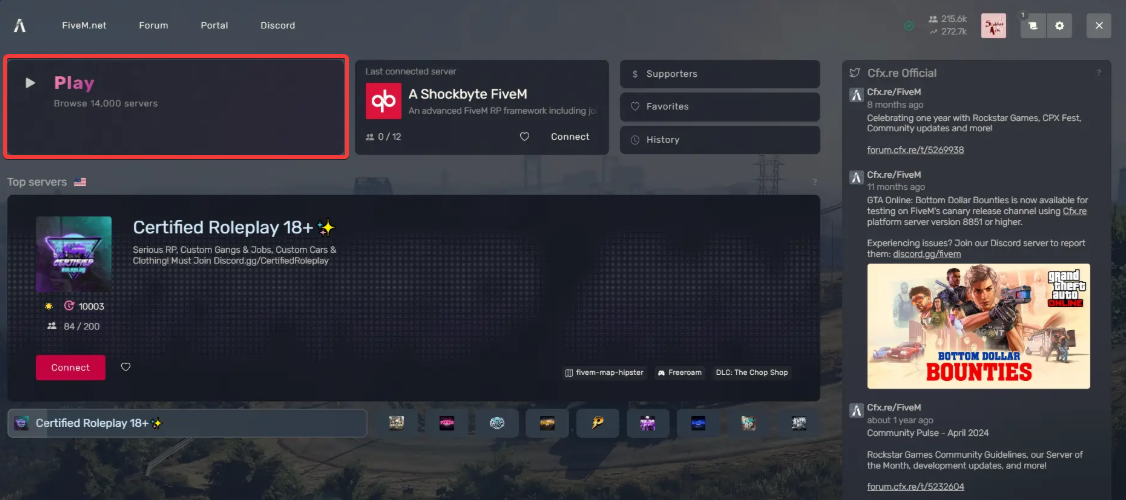
Some servers are open, while others require a whitelist application. Choose one based on your play style - casual, realistic, or story-driven. After this, most servers will ask you to create a character with a name, background, and role.
Take your time - your story affects how others interact with you. Many communities value consistent behavior and immersive dialogue.
Step 4: Optimize performance
RP servers can be demanding. To avoid lag, adjust your graphics settings. Lower texture quality, disable VSync, and cap your frame rate for smoother performance on mid-range PCs. Also, apply the following recommended settings:
- Resolution: 1920x1080
- Texture quality: Medium
- Shadow quality: Low
- VSync: Off
- Population density: 50%
Troubleshooting common GTA 5 RP download issues
- FiveM fails to launch or can’t find GTA V: Double-check that your folder path is correct. Verify your GTA V installation through Steam or Epic to restore any missing files.
- Whitelist not approved yet: Wait for confirmation before joining the server.
- Server list empty: Check your firewall or antivirus settings.
- Crash on startup: Reinstall FiveM and restart your PC.
Tips for a Better RP Experience
- Use a microphone for real-time voice interaction.
- Join your server’s Discord for rule updates and job postings.
- Stay in character - RP communities value consistent roleplay.
- Use only verified RP platforms to avoid malware or stolen credentials.
- Back up your GTA V folder before adding mods.
- Avoid joining random Discord links promising exclusive RP servers.
- To keep your main Rockstar account secure, never switch between GTA Online and RP on the same modded client. Keep your official version separate.
FAQs About GTA 5 RP
- Do I need to buy GTA 5 again? No, you only need one legal copy of the game.
- Is GTA RP free? Yes, but some servers have optional VIP tiers.
- Can I get banned for using FiveM? Not if you keep RP separate from GTA Online.
- Is RP available on consoles? No, RP mods only work on PC.
Summary
- Verify your GTA V installation and locate the game folder.
- Download and install the FiveM client.
- Join an RP server that matches your style.
- Adjust settings for smoother gameplay.
- Troubleshoot issues and stay safe while playing.
Conclusion
Setting up GTA 5 RP on PC takes only a few steps once you know the right tools. By using the FiveM client, linking your GTA V installation, and choosing the right server, you can dive into a whole new version of Los Santos built by its community. Lastly, follow the setup and safety tips above to avoid crashes, maintain smooth performance, and protect your Rockstar account.


Discussion (0)
Be the first to comment.