




The LSPDFR mod (Los Santos Police Department First Response) lets you play GTA 5 as a police officer. You can patrol, respond to calls, and arrest suspects in single-player mode. Follow these steps to download, install, and run it safely on PC.
Step 1: Check requirements
You need a legal PC copy of GTA 5 from Steam, Epic Games Store, or Rockstar Launcher. Cracked copies and repacks can break the mod or crash the game on launch. So, check your game version and info before proceeding.
Also, it is important that you back up GTA 5 before installing any mods. Open your GTA 5 folder, copy it, and paste it somewhere safe as GTA 5 Backup. If the mod breaks something, you can restore this copy instead of reinstalling the whole game.
Step 2: Download the latest LSPDFR installer
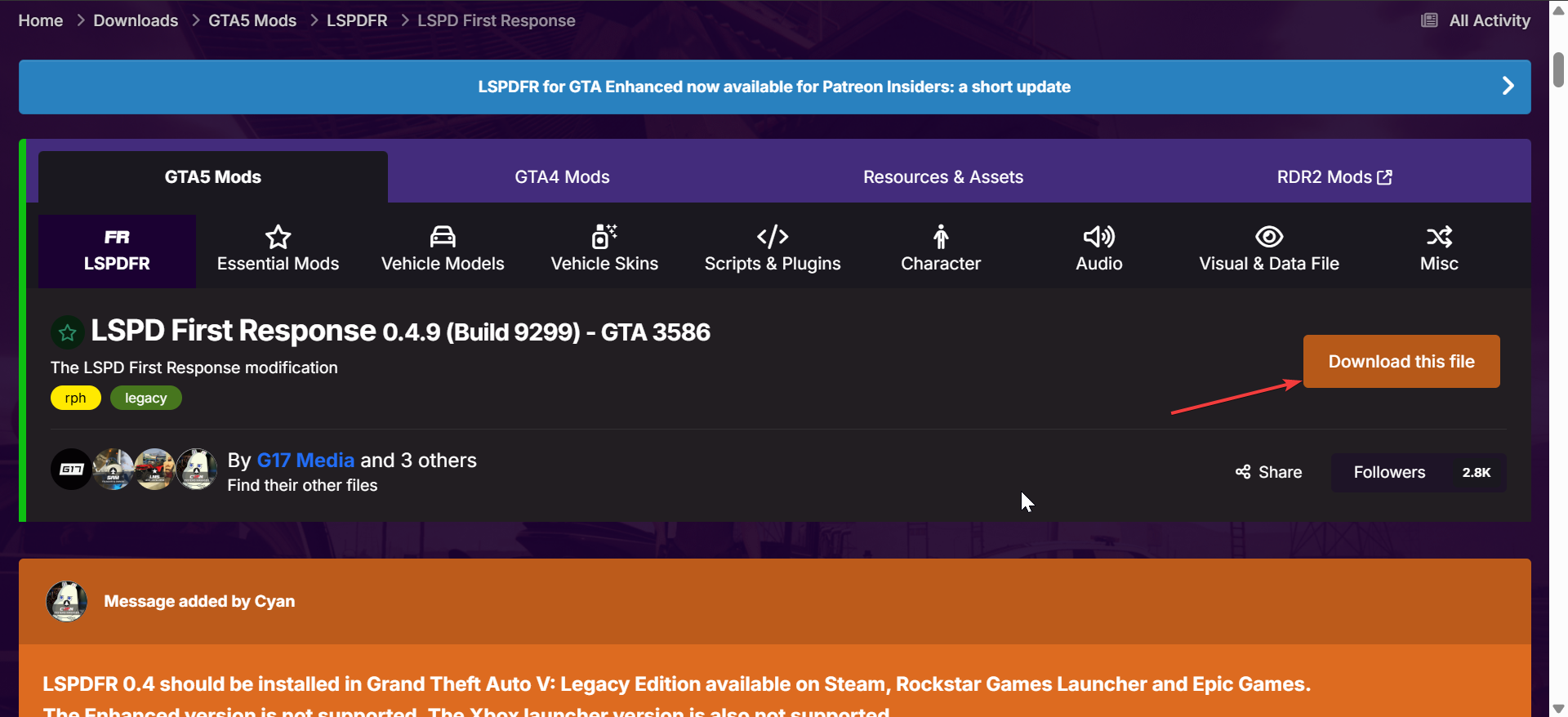
Go to the official LSPDFR page and click the Downloads button at the top. Click the Download button for the newest release of LSPDFR and click the Download this file button on the next page. Check the version number against your GTA 5 build so you know it will load without crashing.
Step 3: Extract the files
After the download is complete, move the downloaded zip file to your Grand Theft Auto V folder. Now, right-click the file and select Extract All. Click the Extract button on the next page, and if you are asked to overwrite, select Yes.

Next, ensure that your Grand Theft Auto V folder contains the following files:
- An LSPDFR folder with audio, chars, and data folders
- A Plugins folder with LSPD First Response.dll inside it
- A RAGEPluginHook.exe file
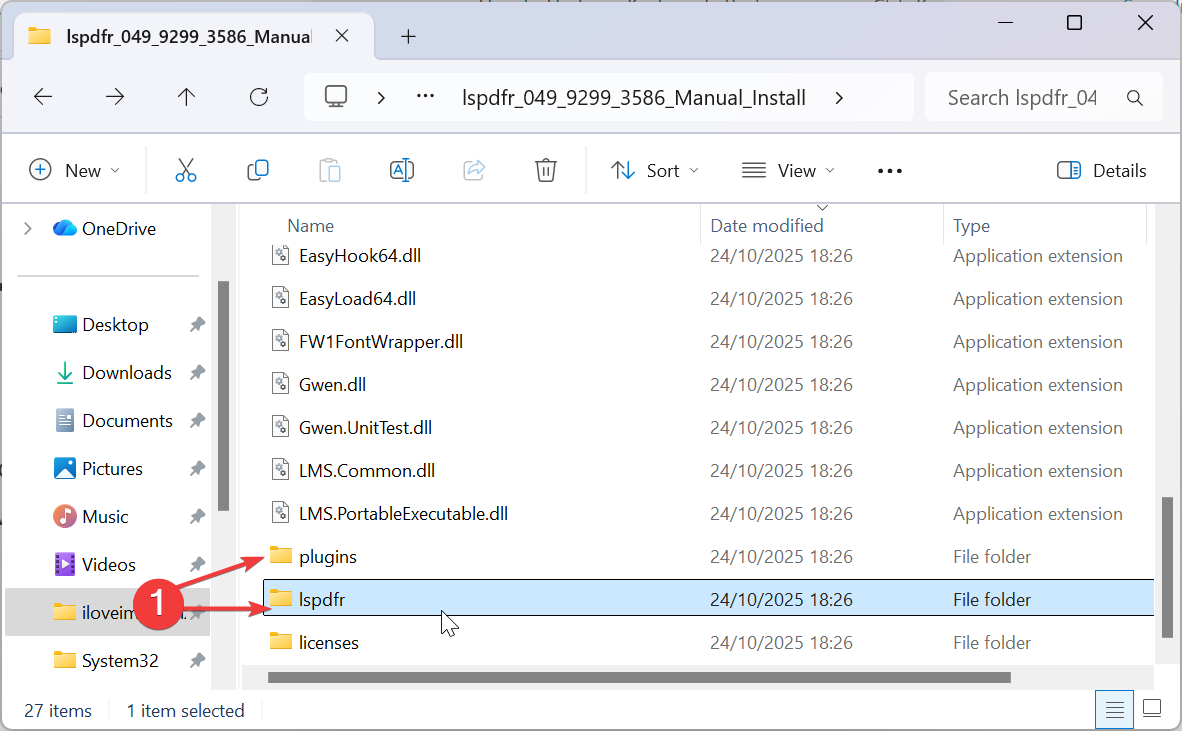
Step 4: Run the first-time configuration

In the GTA 5 folder, double-click RAGEPluginHook.exe. On first launch, it will create backups, set the load delay, and prep the plugin loader. Accept the defaults so the mod boots cleanly. Now, you should see that the police station locations have been marked on your map, meaning that LSPDFR is active
Step 5: How to start playing as a police officer
From now on, do not start GTA 5 from the normal shortcut. Instead, run RAGEPluginHook.exe. This is what actually loads LSPDFR and related police plugins. When the game loads, press F4 or accept the on-screen prompt to go on duty. You’ll spawn near or inside a police station, choose a uniform, and pick a patrol car.
Step 6: Updating and Maintaining LSPDFR
- Disable auto-updates: New GTA 5 patches can break LSPDFR until the mod updates. Turn off automatic updates in your launcher so the game doesn’t update in the middle of a working mod setup.
- Back up before updating: Before you install a new GTA 5 patch or a new LSPDFR version, copy the whole GTA 5 folder again. If the new version crashes, you can roll back instantly without redownloading the game.
- Uninstall LSPDFR safely: To remove the mod, delete the LSPDFR and Plugins folders you added. Then, verify the game files in your launcher to restore any changed originals. This resets you to a clean single-player build.
Troubleshooting common issues
- Game crashes on load: If GTA 5 freezes or closes during startup, ScriptHookV or RAGE Plugin Hook may be out of date. Update them and temporarily move other mods out of the folder to confirm there’s no conflict.
- Missing menu or plugin not loading: If you don’t see the duty prompt, check the Plugins folder in GTA 5. Make sure the LSPDFR files are actually copied. You can also relaunch RAGEPluginHook.exe and enable Force Load All Plugins.
- Do not use mods in GTA Online: LSPDFR is for single-player only. Going into GTA Online with mods can trigger Rockstar's anti-cheat. Keep two folders: one modded for single-player and one clean for online.
Tips for better gameplay
- Install high-quality police car packs and realistic weapons to boost immersion.
- Use a mod manager so you can toggle plugins without doing manual file work.
- Keep only the plugins you actually use to reduce crashes.
- Joining LSPDFR communities gives you new callouts and side missions.
FAQs
Is LSPDFR free? Yes. LSPDFR is free to download and use on the PC version of GTA 5.
Does it work on PS5 or Xbox? No. LSPDFR only runs on the Windows PC release of GTA 5. Console versions do not support these plugins.
Can it affect GTA Online? Yes. If you launch GTA Online with mods still loaded, that can trigger anti-cheat. Always keep a clean, unmodded install for online sessions.
Why does GTA 5 crash after installing the mod? The most common cause is an outdated ScriptHookV or RAGE Plugin Hook. Update them, then relaunch using RAGEPluginHook.exe.
Where is the safest place to download LSPDFR? The safest option is the official LSPDFR release from the mod’s main site. Avoid random mirrors and repacks.
Summary
- Check your GTA 5 platform and make a full backup of the install folder.
- Download ScriptHookV, RAGE Plugin Hook, and LSPDFR.
- Extract the LSPDFR ZIP and copy the files into the GTA 5 directory.
- Run RAGEPluginHook.exe instead of the normal game launcher.
- Go on duty in-game and start playing as a police officer in single-player.
Conclusion
Installing LSPDFR for GTA 5 lets you experience the game from a completely new angle. By following the right steps and using verified tools, you can turn Los Santos into your own police simulation world. Always back up your files, keep mods updated, and launch the game through RAGE Plugin Hook for smooth performance.
With the setup complete, you can now patrol the city, respond to emergencies, and enjoy a deeper, more immersive GTA 5 experience. Stay safe, stay professional, and keep the streets of Los Santos under control.

Discussion (0)
Be the first to comment.