




Downloading games on a PS3 still works well, even though the console is old. You can install new purchases, restore older titles, and redeem codes directly from your system.
This guide shows you every supported method and includes fixes for common download problems.
1) What you need before downloading PS3 games
You avoid many errors if you check a few things first. Confirm your PSN account, firmware version, and available HDD space before you start any download.
Check your PSN account status
Sign in to your PSN account and open your purchase history. This step confirms that your account still holds your previous PS3 purchases.
Verify your PS3 system software version
Go to Settings > System Update and install the latest firmware. Updated firmware prevents access problems with the PlayStation Store and account services.
Confirm available storage on the PS3
Open Settings > System Settings > System Information to view free space. Keep at least double the listed game size free, because the console needs space to unpack and install files.

2) Download games directly from the PlayStation Store
Open the Store and use the search box to find a title quickly. You can also browse categories if you want to discover new content.

Next, select the correct game edition and start checkout. Verify the region and version, so you avoid purchasing the wrong release. Lastly, after purchase, open the Download Queue and confirm that your game appears there.
3) Re-download previously purchased PS3 games
Your PSN account stores a full history of purchased content. You can use that list to restore games after a reset or HDD replacement.
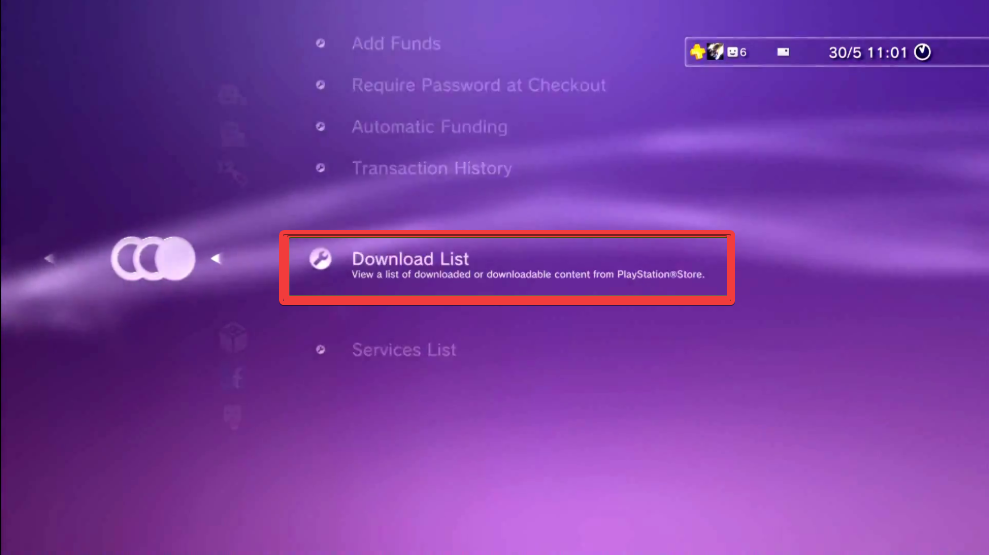
Just go to PlayStation Network > Account Management > Download List. Next, highlight the game you want, then choose to download it again. The console adds it to the queue and installs it after the download finishes.
4) Download PS3 games with redeemable codes
Open PlayStation Network > Redeem Codes and type the voucher carefully. Confirm the preview screen to ensure the code unlocks the intended game.
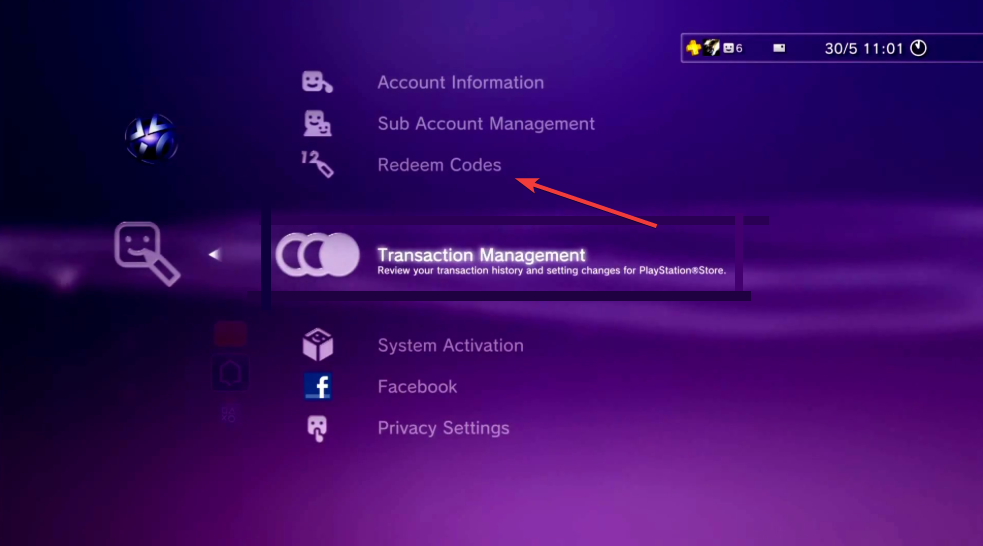
After the system accepts the code, choose Download. The PS3 adds the game to your queue, and you can track it in the Download Queue page.
5) Troubleshooting common PS3 download errors
- Fix “corrupted data” download errors: Open Game > Game Data Utility and delete the incomplete or corrupted entry. Start the download again so the console creates a fresh, clean file.
- Resolve PSN connection errors such as 80710A06: Restart your router and modem, then test the connection from Settings > Network Settings > Internet Connection Test. If the error persists, adjust DNS and try another test.
- Rebuild the PS3 database: Turn off the console, then start it in Safe Mode and choose Rebuild Database. This process reorganizes data, which often fixes stuck downloads and slow Store navigation.
Tips for downloading games on PS3
- Queue big downloads overnight when fewer devices use your home network.
- Always check free space before you buy a large digital title.
- Use wired Ethernet whenever possible for long downloads.
- Keep your PS3 firmware current to avoid Store and account issues.
- Back up saves regularly, so you can safely delete games to free space.
- Avoid downloads during PSN maintenance windows
FAQs about downloading games on PS3
Can you still download games on PS3 today? Yes, you can still download PS3 games, provided PSN services in your region stay online and your account holds the license. Some older titles may disappear, but your Download List usually keeps them available.
How long do PS3 game downloads usually take? Download time depends on your internet speed and PSN congestion. A wired connection and off-peak hours usually give the best results.
Can I play another game while a download runs? You can often play smaller or offline games while downloads continue in the background. Heavy online games may slow the download or cause it to pause if the system needs bandwidth.
Do I lose downloaded games if I replace the hard drive? You keep the licenses on your PSN account, not on the drive. After you install a new drive and system software, you simply sign in again and re-download your games using a USB drive, simply transferring your games, or downloading from the Download List.
Summary
- Prepare your PS3 by checking PSN access, firmware, and free storage.
- Download games directly from the Store or restore them from the Download List.
- Redeem codes for bundled or special edition content and start downloads right away.
- Stabilize your network, fix common error codes, and manage space for large titles.
- Upgrade the hard drive if you need more room for a big digital game library.
When you handle your PSN account, storage, and network connection carefully, downloading games on a PS3 stays smooth and reliable. You unlock more value from your console, keep your library organized, and avoid most of the errors that frustrate other users.

Discussion (0)
Be the first to comment.