




Changing a product key in Windows 11 sounds like something you should only do if you really know what you’re doing. In reality, it’s simple and safe.
What trips people up is not the process. It’s understanding when it actually makes sense to change the key and what will happen after you do.
Once that’s clear, the rest is straightforward.
What Changing the Product Key Actually Does
Think of your product key as your license identity.
When you change it:
- Windows tries to activate using the new key
- Your edition may change (for example, Home to Pro)
- Additional features may unlock automatically
What it does not do:
- It does not delete files
- It does not reset your system
- It does not affect your apps
You’re not changing your system. You’re changing how it’s licensed.
When You Actually Need to Change It
Most people never need to touch this setting. If your system is activated and working, there’s nothing to fix.
You should change your key in a few specific situations.
You’re Upgrading Windows Edition
This is the most common reason.
If you move from:
- Home → Pro
Entering a Pro key upgrades your system without reinstalling Windows.
Your Current Key Isn’t Working
If Windows shows activation errors, it’s usually because:
- The key is invalid
- It’s already in use
- It doesn’t match your edition
Replacing it with a valid key fixes the issue.
You Bought a New License
If you’ve purchased a retail key separately, you’ll need to apply it manually.
The Easiest Way to Change Your Product Key
You don’t need command lines or advanced tools. The built-in settings are enough.
Steps
- Open Settings
- Go to System > Activation
- Click Change product key
- Enter your new key
- Follow the prompts
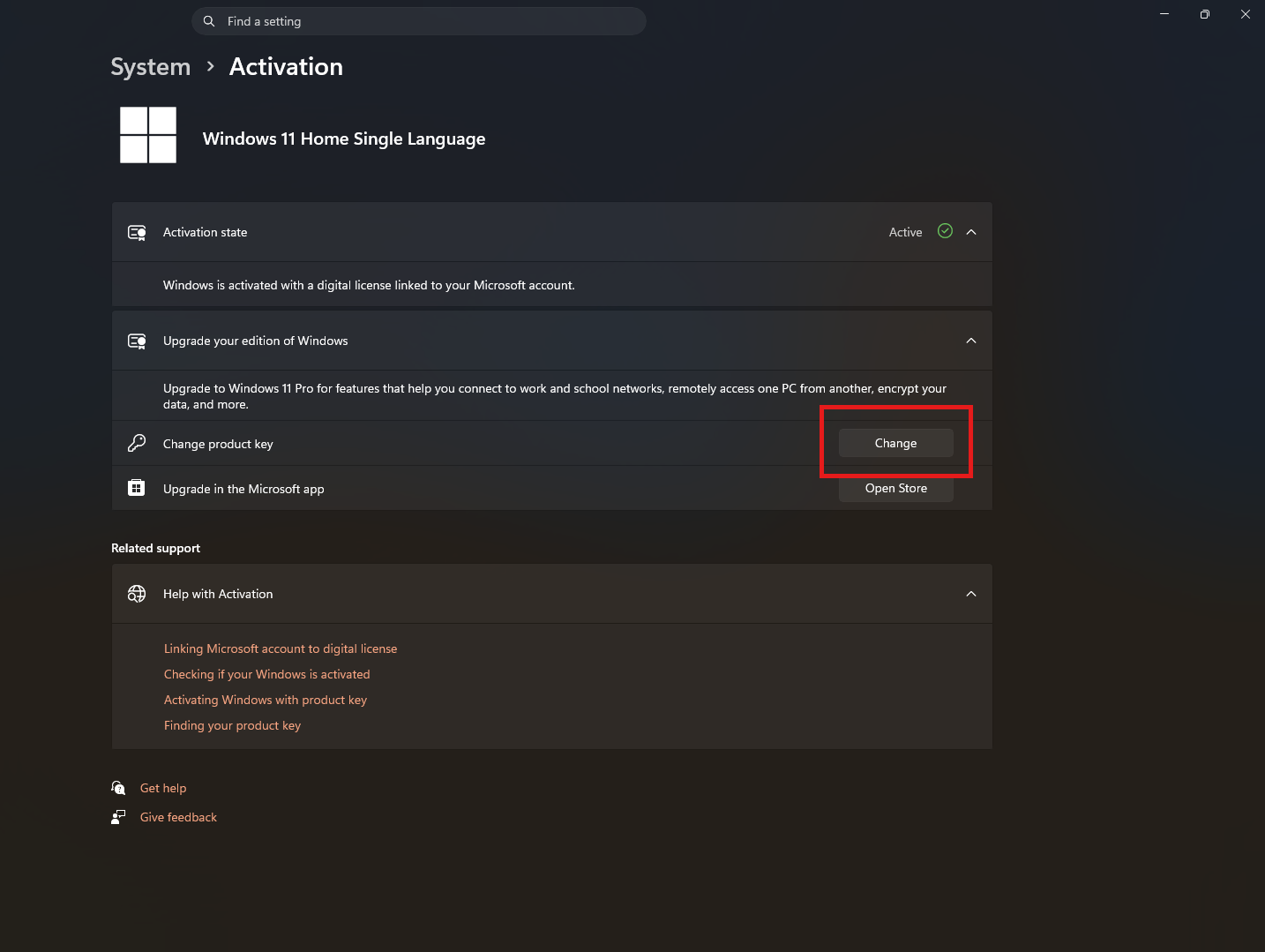
That’s it. Windows will handle the rest.
If the key is valid, activation happens almost immediately.
What Happens After You Enter the New Key
This is where people tend to overthink things.
If everything is correct:
- Windows activates
- Features update automatically (if you changed editions)
- Your system continues as usual
You don’t lose anything. There’s no reset or reinstall.
If something is wrong:
- Windows will show an error
- Nothing breaks
- You can try again with a correct key
A More Technical Method (When You Need It)
If for some reason the Settings method doesn’t work, you can use Command Prompt.
Run as administrator:
slmgr /ipk YOUR-PRODUCT-KEY
slmgr /ato
This installs the key and forces activation.
It’s useful for troubleshooting, but unnecessary for most users.
Where Most People Go Wrong
The process is simple. The mistakes are usually basic.
- Entering the wrong key (small typos matter)
- Using a Home key on a Pro system or vice versa
- Trying to reuse a key already tied to another device
These aren’t technical issues. They’re mismatches.
A Practical Way to Think About It
Changing a product key is not something you do to “optimize” your system.
It’s something you do when:
- You need a different license
- Your current activation isn’t valid
If your system says “Windows is activated”, you’re already where you need to be.
Should You Change Your Product Key?
Ask a simple question:
Is there a clear reason to do it?
If yes, go ahead. It’s safe and quick.
If not, leave it alone. You gain nothing by changing it unnecessarily.
Final Thoughts
Changing a product key in Windows 11 is one of those tasks that feels more serious than it is.
Once you understand that it only affects activation, not your system itself, the process becomes straightforward.
The real value is not in knowing how to change it. It’s in knowing when it actually matters.
FAQs
Will changing the product key delete my data
No, your files and apps remain untouched.
Can I upgrade from Home to Pro using a key
Yes, entering a Pro key upgrades your system.
Do I need internet to activate Windows
Yes, activation usually requires an internet connection.
What happens if the key is invalid
Windows will show an error and remain unchanged.
Can I reuse a product key
Only if it’s a retail key and not already in use on another device.



Discussion (0)
Be the first to comment.