




Here’s how to change PayPal username the right way. You’ll see what “username vs name” means, when documents are required, and how to avoid profile errors.
At the time of writing, PayPal ties your account to your legal name. You can change PayPal name with proof, but the PayPal.Me link has strict limits.
Username vs Name: What Changes and What Doesn’t
PayPal username vs name causes confusion. Your sign-in uses an email, while your profile shows your legal name on invoices and receipts.
- How to change name on PayPal: You update the profile name that customers and merchants see.
- Change PayPal.Me username: You can’t rename an existing PayPal.Me link. You can turn it off, or create a new one on a different account.
- Change business name on PayPal: You can update the public business name with proof of registration.
Before You Start: Documents and Tips
- PayPal name change documents: Have a government ID, marriage certificate, court order, or business paperwork ready for major changes.
- Minor corrections: Small fixes may not need documents.
- Access: Use a desktop browser for the most reliable flow; the app works, but menus vary by region.
Change PayPal Name (Personal Account)
Follow these steps to change PayPal name on a personal account. Use bullets to keep each action clear.
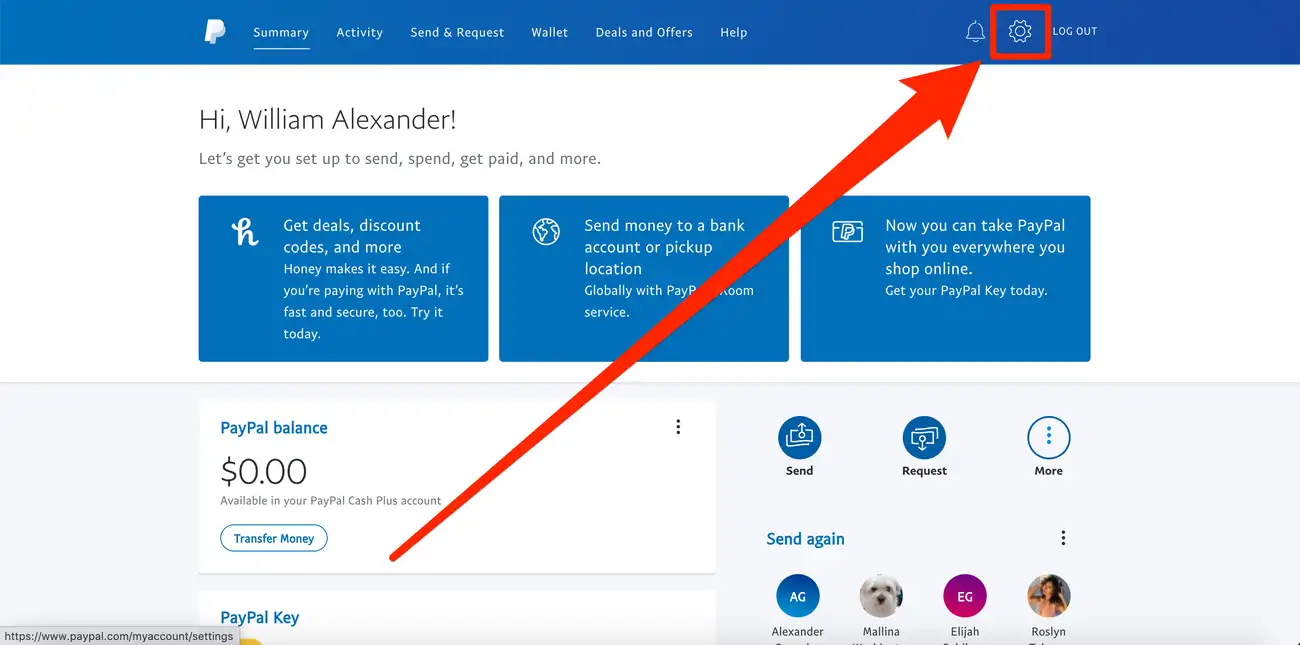
- Sign in and open Settings (gear icon).
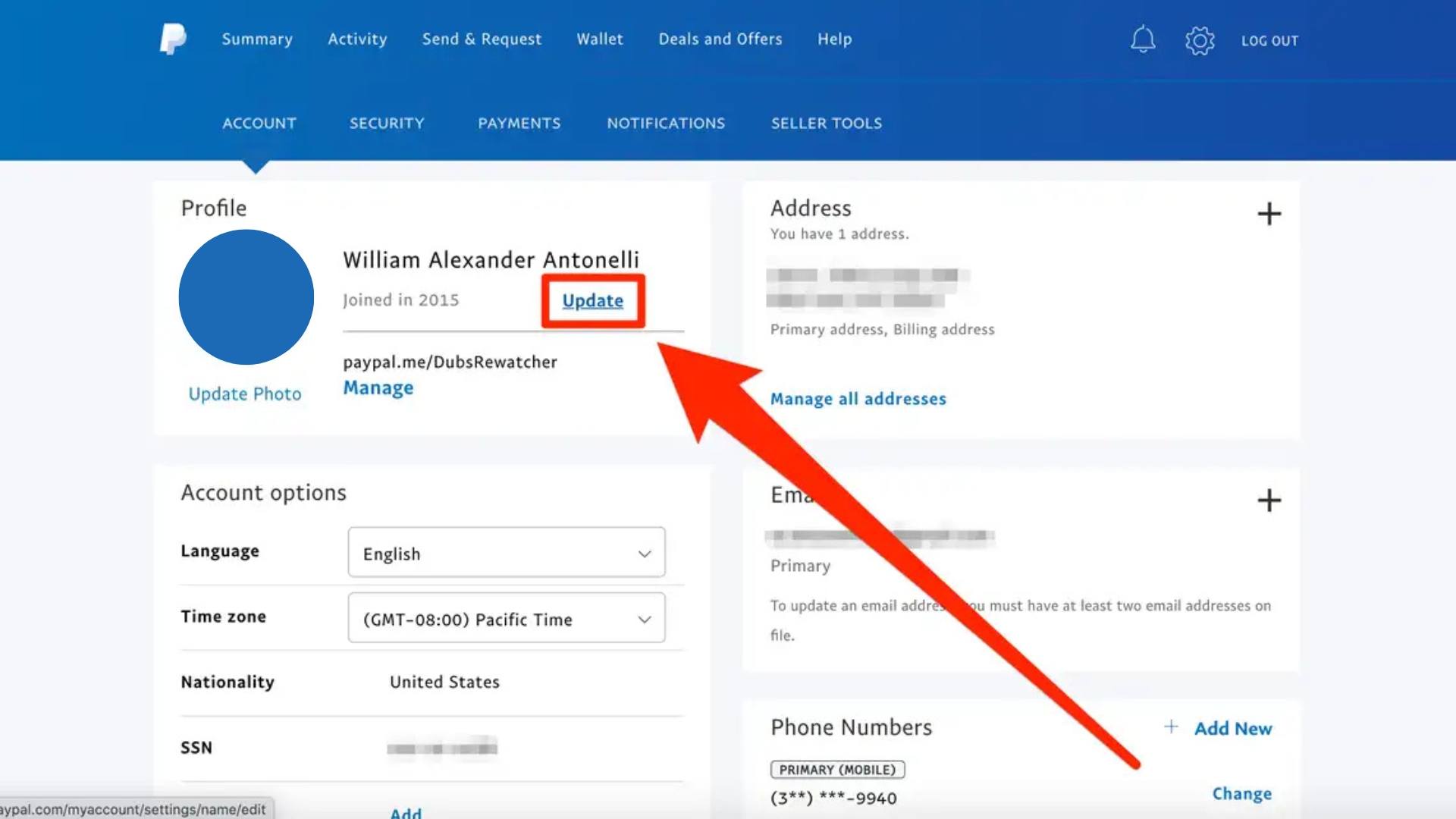
- You'll see the name currently tied to your PayPal account. Click Update/Change to make the change.
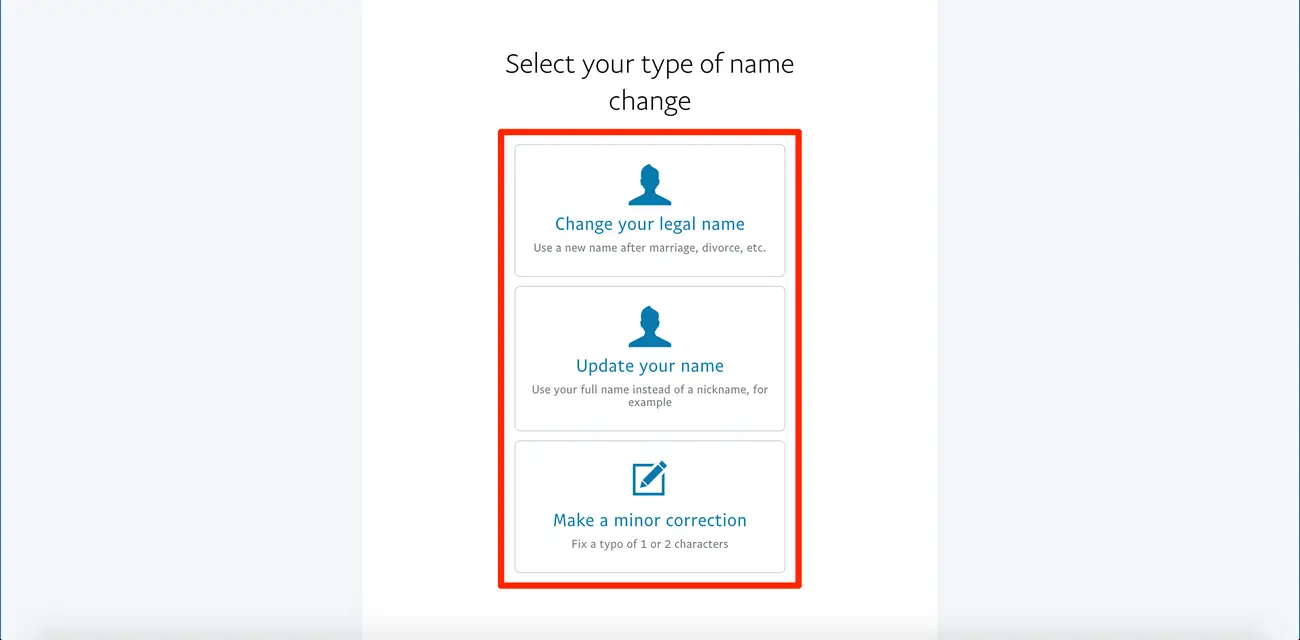
- Choose the type: minor correction (can only be done once) or legal name change.
- Upload PayPal name change documents if requested.
- Submit and watch for confirmation in your email.
Change Business Name on PayPal (Business Account)
Business profiles show your brand on invoices and checkout. Here’s how to update it.
- Open Settings and go to Business information.
- Choose Update next to your business name.
- Select the reason for the change.
- Upload registration or tax documents if prompted.
- Submit and verify the update on a test invoice or request.
Change PayPal Username on Mobile (Quick Path)
You can complete the flow in the app, but menus may differ by device.
- Open the PayPal app and tap your profile photo or initials.
- Tap Settings → Account info.
- Tap Change name and pick the change type.
- Upload documents, then submit.
- Confirm the change from the email PayPal sends.
If you need to fix a PayPal.Me link
You can’t change PayPal.Me username once created, but you can keep payments smooth.
- Turn off the PayPal.Me link in settings if it no longer fits your brand.
- Create a new PayPal.Me link on a different account that matches your current name.
- Update payment buttons, invoices, and profiles to the correct link.
Troubleshooting Common Errors
- Documents rejected: Re-upload sharper scans, match the account name exactly, and include both sides if required.
- Can’t find the menu: Use a desktop browser. Menus can differ in the app by region.
- Pending review: Reviews can take time. Avoid resubmitting unless PayPal asks for more info.
- Merchant mismatch: Update your new name with marketplaces, invoices, and billing tools to prevent confusion.
FAQs
Can I change PayPal name without documents?
Minor corrections may go through without proof. Full legal changes usually need documents.
Why can’t I change PayPal.Me username?
The PayPal.Me link is fixed. You can disable it and create a new link on a different account if you need a new handle.
Does how to change PayPal username update my email login?
No. Email addresses are separate. Add or remove emails in Settings → Email, then set your preferred address.
Will customers see the change immediately?
Invoices and payment pages show the updated name after approval. Update external profiles and storefronts to match.
Summary
- Use Change name in Settings and pick the correct change type.
- Upload PayPal name change documents for legal or business updates.
- Remember PayPal username vs name: your email login differs from the displayed name.
- You can’t change PayPal.Me username; disable and rebuild with a new account if needed.
- change business name on PayPal with official paperwork, then update your sales channels.
Conclusion
The fastest path for how to change PayPal username starts in Settings: choose the right change type, upload clean proof, and sync your storefronts. Handle PayPal.Me by disabling and rebuilding if you need a new handle, and keep your brand consistent across every payment touchpoint.


Discussion (0)
Be the first to comment.