




You can add music to a Fire tablet in several ways, depending on where your songs are stored. A USB cable works best for large local libraries, while an SD card or cloud service helps if you prefer wireless access. This guide walks you through every method and shows you how to fix missing tracks or storage issues.
Table of contents
- 1) Add music to your Fire tablet using a USB cable
- 2) Add music using a microSD card
- 3) Add music to your Fire tablet from cloud services
- 4) Add music using popular streaming apps
- 5) Add music to your Fire tablet from iTunes or Apple Music
- Troubleshooting music not showing on your Fire tablet
- Tips for organizing your music
- FAQs
- Summary
1) Add music to your Fire tablet using a USB cable
Connect the Fire tablet to your PC with a USB cable. Next, unlock the tablet and choose File Transfer so it appears in File Explorer or Finder under Fire or Internal Storage.

Now, open the tablet storage and place your tracks in the Music folder. The Music app indexes these files instantly and adds them to your library. Finally, eject the tablet from your computer to prevent damaged files.
2) Add music using a microSD card
Format the card in Fire OS for best compatibility. Next, connect the card to your computer and copy songs into clear folders like Music, Albums, or Artists. Now, place the card into the SD Card slot on your Fire tablet.

Finally, open Settings > Storage and choose the SD card for media. The Music app scans the card and adds its songs to your library.
3) Add music to your Fire tablet from cloud services
Start by uploading personal tracks to your Amazon account on a computer. The Fire tablet syncs them to the Amazon Music app for streaming or offline listening. Next, open Amazon Music on your tablet and download playlists for offline use. This works when you travel or want to limit data usage.

Alternatively, you can upload your MP3 files to a cloud folder like Google Drive and open them inside a compatible music player. Files download locally and play like regular audio.
4) Add music using popular streaming apps
Streaming apps make it easy to download playlists for offline listening.
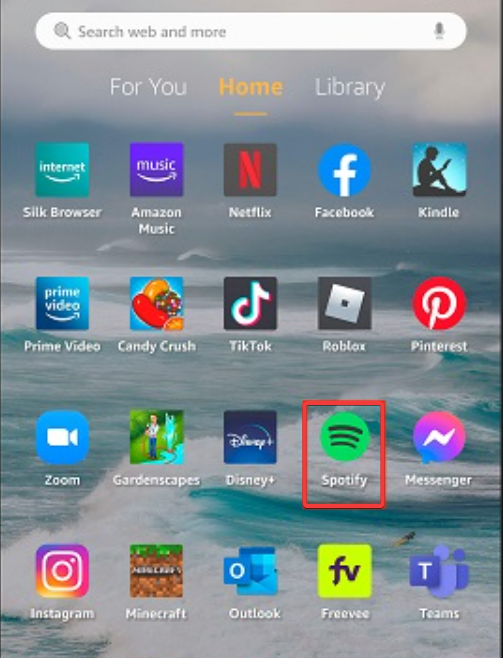
Use Spotify, Deezer, or YouTube Music
You can install YouTube on your Fire tablet, as well as, Spotify, and YouTube Music to download songs or albums inside each app to store them offline. Fire OS supports these apps directly from the Amazon Appstore.
Manage storage and offline files
Open each app’s settings menu to adjust download quality and storage limits. This helps you control how much space your tablet uses.
5) Add music to your Fire tablet from iTunes or Apple Music
Many users keep their library in iTunes. Exporting tracks helps you move them to a Fire tablet.
Go to iTunes on your PC and convert your songs to MP3 using File > Convert. Only DRM-free tracks work on a Fire tablet.
You can now copy your exported MP3s to the tablet using USB or an SD card. Place them in the Music folder so the app can read them.
Troubleshooting music not showing on your Fire tablet
- Music not appearing in the library: Open the Music app settings and clear its cache. Restart the tablet to rebuild the music index.
- Fire tablet not detected by Windows or macOS: Try another USB cable and confirm File Transfer mode is active. Restart both devices if the tablet still doesn’t show up.
- SD card not recognized: Reinsert the card or format it in Settings > Storage. A fresh format removes corrupted data.
- Unsupported file formats: Convert unsupported files to MP3 or AAC for best results. This ensures smooth playback across apps.
Tips for organizing your music
- Use clear folder names and album structures
- Sort music by artist or album so apps recognize it properly.
- Maintain consistent tags
FAQs
Can I play FLAC files on a Fire tablet? Yes. Fire OS supports FLAC in most players, including VLC.
Why won’t Amazon Music show my uploaded songs? Make sure you uploaded DRM-free MP3 files and signed in with the same Amazon account.
Can I download music directly from a website? Yes. Download MP3 files from trusted sources and open them with a music player.
How much music fits on a microSD card? A 128 GB card holds thousands of MP3 tracks, depending on bitrate and file size.
Summary
- You can add music with USB, SD card, cloud storage, or streaming apps.
- Place MP3 files in the Music folder for instant indexing.
- iTunes users must convert songs to DRM-free MP3 before transfer.
- Fix missing files by clearing the cache, rescanning folders, or reformatting the SD card.
You can now listen to your music collection on a Fire tablet using whichever method fits your setup. These steps give you reliable transfers, clean organization, and simple troubleshooting when tracks don’t appear.


Discussion (0)
Be the first to comment.