




Many OneDrive users, including myself, rely on this cloud-storage service for backing up pictures and videos taken with their smartphones or digital cameras. However, there’s one feature of this service that some may find annoying: OneDrive automatically creates albums with past pictures you’ve taken on the same day but years ago. And, when it does that, it displays a daily “On this day” notification encouraging you to look back at your memories. While some people like this feature, others don’t and want to turn OneDrive memories off. If you’re in the second category, here’s how to stop OneDrive from sending you “On this day” notifications on Windows 10 and Windows 11:
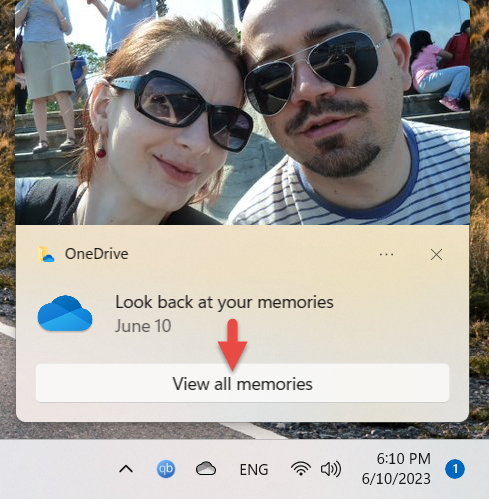
 Do you want to Look back at your memories?
This album includes all the pictures stored on your OneDrive, that were taken on the same day you got the notification but in another year. These could be fond memories of yours, but you may also come across some boring or inappropriate pictures you don’t want to be reminded of.
Do you want to Look back at your memories?
This album includes all the pictures stored on your OneDrive, that were taken on the same day you got the notification but in another year. These could be fond memories of yours, but you may also come across some boring or inappropriate pictures you don’t want to be reminded of.
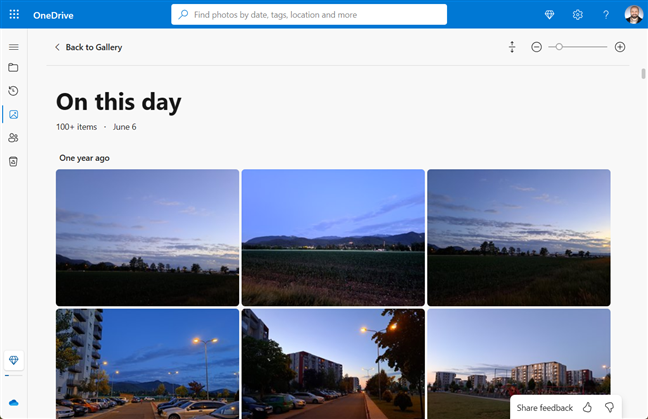
 The On this day album created by OneDrive
These “On this day” OneDrive albums also appear in the Photos app. They’re in your personal OneDrive cloud storage section on the left, under Memories. When you click or tap Memories, several albums with highlights from the past are listed on the right, including the “On this day” album.
The On this day album created by OneDrive
These “On this day” OneDrive albums also appear in the Photos app. They’re in your personal OneDrive cloud storage section on the left, under Memories. When you click or tap Memories, several albums with highlights from the past are listed on the right, including the “On this day” album.
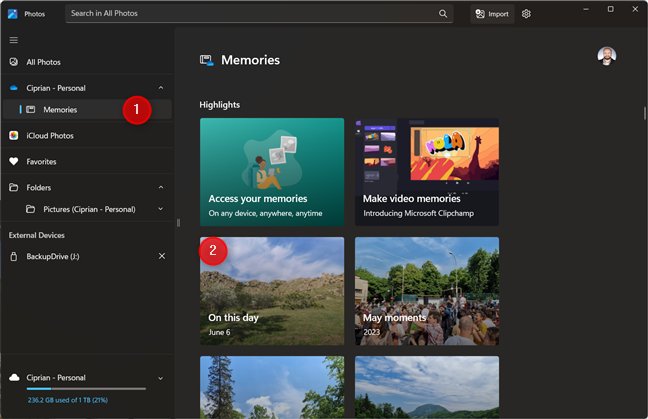 On this day albums in the Photos app
TIP: If there are images you’d like to keep out of sight, here’s how to exclude your OneDrive (and iCloud) pictures from the Photos app in Windows 10 and Windows 11.
Depending on their OneDrive settings, some people also get email notifications about these automatically generated albums on their Microsoft accounts.
On this day albums in the Photos app
TIP: If there are images you’d like to keep out of sight, here’s how to exclude your OneDrive (and iCloud) pictures from the Photos app in Windows 10 and Windows 11.
Depending on their OneDrive settings, some people also get email notifications about these automatically generated albums on their Microsoft accounts.
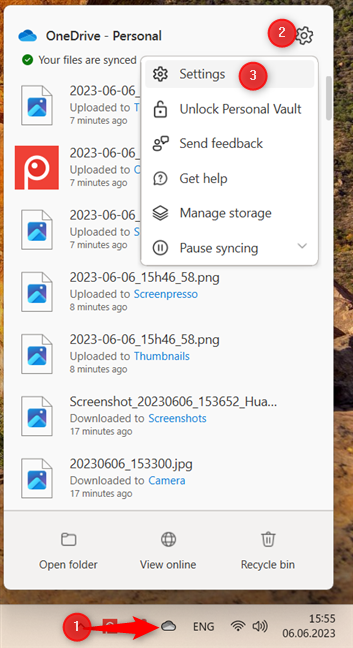
 Click OneDrive > Settings > Settings
TIP: If you don’t see the OneDrive icon in the system tray, click or tap the “Show hidden icons” button first: its icon is a small “up” arrow.
This opens the OneDrive Settings window, shown in the following screenshot. In it, select Notifications on the left sidebar. Then, on the right, look for the switch called Notify me when “On this day” memories are available. By default, this switch is turned On. Click or tap on it to turn Off your OneDrive memories notifications.
Click OneDrive > Settings > Settings
TIP: If you don’t see the OneDrive icon in the system tray, click or tap the “Show hidden icons” button first: its icon is a small “up” arrow.
This opens the OneDrive Settings window, shown in the following screenshot. In it, select Notifications on the left sidebar. Then, on the right, look for the switch called Notify me when “On this day” memories are available. By default, this switch is turned On. Click or tap on it to turn Off your OneDrive memories notifications.
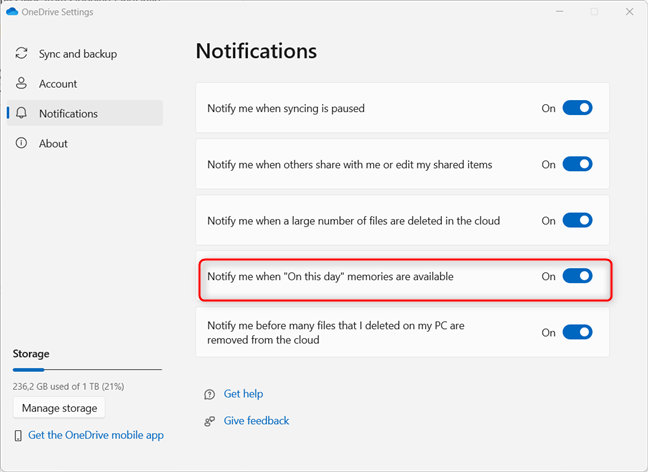
 Disable On this day memories
Close the OneDrive Settings window, and you’re done: OneDrive no longer shows any new notifications for memories on your Windows 10 or Windows 11 computer or device.
TIP: If you’re using an Android smartphone or tablet, here’s how to turn off OneDrive’s “On This Day” notifications on Android devices, including Samsung Galaxy phones.
Disable On this day memories
Close the OneDrive Settings window, and you’re done: OneDrive no longer shows any new notifications for memories on your Windows 10 or Windows 11 computer or device.
TIP: If you’re using an Android smartphone or tablet, here’s how to turn off OneDrive’s “On This Day” notifications on Android devices, including Samsung Galaxy phones.
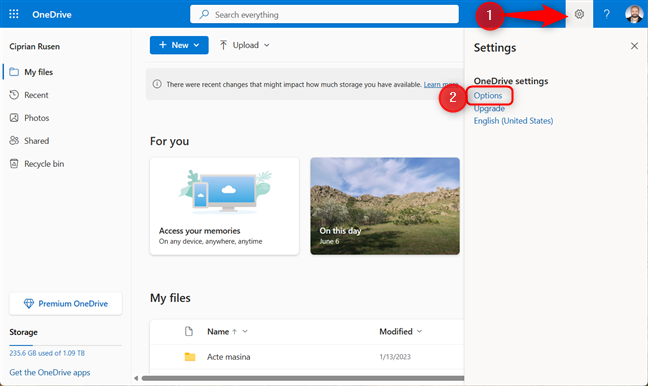
 On the OneDrive website, go to Settings > Options
You then see a new page with all the OneDrive settings that you can configure. On the left sidebar, select Notifications, and on the right, uncheck “On this day memories are available.” Click or tap Save at the bottom, and you’re done.
On the OneDrive website, go to Settings > Options
You then see a new page with all the OneDrive settings that you can configure. On the left sidebar, select Notifications, and on the right, uncheck “On this day memories are available.” Click or tap Save at the bottom, and you’re done.
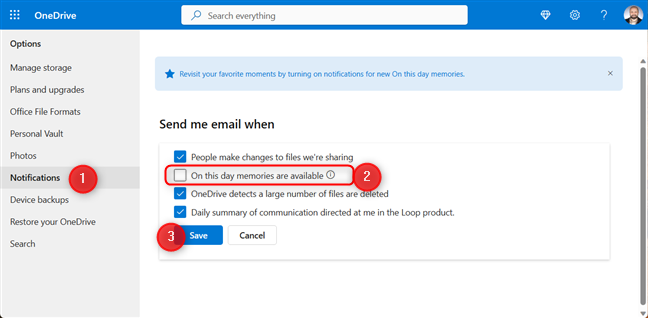
 Disable On this day memories
OneDrive will no longer send you email notifications about “On this day” memories.
Disable On this day memories
OneDrive will no longer send you email notifications about “On this day” memories.
OneDrive created a memory for you: On This Day albums
If you use OneDrive on Windows 10 or Windows 11, you might get a daily notification urging you to “Look back at your memories” and displaying a picture you took on the same day, sometime in the past. Suppose you click or tap the “View all memories” button in this notification. In that case, your default web browser loads the OneDrive website, where you see your newly generated “On this day” album, similar to the screenshot below.How to turn off OneDrive’s memories
Regardless of whether you’re using Windows 10 or Windows 11, the steps for blocking these OneDrive notifications are the same. First, click or tap the OneDrive cloud icon in the system tray (the bottom-right corner of the taskbar). In the OneDrive window that opens, click or tap the Settings cogwheel icon, and then choose Settings in the subsequent menu.How to stop OneDrive from sending emails about On This Day memories
Some OneDrive users also receive emails from Microsoft about their “On this day” memories. To prevent these emails, go to the OneDrive website in your favorite web browser and sign in with the Microsoft account you’re using for OneDrive. Then, click or tap the Settings cogwheel in the top-right corner and choose Options in the menu.
Discussion (18)
I do not want the albums made in the first place
This is the most incredibly helpful site on how to deal with the frustrating Windows 10 automatic photo album problem. I categorize by events and trips and “we have created you a new album” that made absolutely no sense was so annoying. I went to the MS community and those using that system obfuscate any instructions, seemingly telling us to rewrite code or something. I tried repeatedly and had no idea what they were telling me to do. Thank you so much for the step-by-step instructions with screen shots. Why can’t MS function in such a sensible manner.
Happy to help. Do not hesitate to subscribe to our newsletter, for more useful guide. 😉
I do not like windows 10 doing anything with my pictures. My pictures are moved to new folders or locations, or deleted every time I have an update. The photos are now being arranged according to date which is not where I want them. My picture files are filled with Empty Folders. Grandma’s birthday is mixed with New Baby files. I do not want NEW albums.
Stopping the notifications is a band-aid solution. The correct solution is to login to the one-drive website (which you’ve probably never been to) and change the settings there to stop making albums out of your photos.
Here’s the article I followed: https://www.digitalcitizen.life/turn-off-onedrive-on-this-day-notifications-android/
I’m utterly flabbergasted how much effort it took to find the correct answer to this problem. Please share.
Thanks for this informative article. Just what I was looking for. I am a private person and do not want people meddling with my information. Given advances in facial recognition technology and so forth our individual rights are being rapidly eroded.
I already had this notification turned off and every time I plug in a Motorola Droid (but not a Samsung S4) the windows 10 photo app opens and it has created more albums and sorted all my photos into monthly ‘folders’. And like another person mentioned, I often get photos, graphics, logos etc from websites I’ve visited but never downloaded any such thing. It pulls .pdf files from documents and things I’ve scanned which are stored in documents folders. I keep closing the folders under ‘Here’s What We’ve Found So Far’ and it just keeps adding more back in. I actually feel violated, might as well snoop through my panties drawer.
Windows 10 is terrible..Worst operating system I’ve ever been exposed to. Who wants a rouge operating system organizing your photo’s and life for you? They’re taking control of your system… I love computers for the exact opposite reason! And it makes for an extremely slow and most annoying operating system. I wish microsoft would make an operating system for a PC. period! One size doese NOT fit all…
While turning off the notifications is great, stopping it from creating them in the first place would be the best situation. Can we get a way to do that?
Not just one-drive making them, this App even does us the courtesy of scouring local C: to do the me favor of re-presenting every new photo I’ve added. Since we cannot turn it off I’ve a real solution:
– go into App, go into Settings (difficult to find for some- go left on View All Photos)
– look bottom for Settings.
– goto Sources.
– delete the reference to User/Pictures (does not delete pics, only this reference).
– then + Add Folder and point to a useless or new folder that has one pic in it. (or none)
– now this genuis of an App will be pointed to something less interesting than our actual photos album. You’re welcome.
I would not want this. I save my pictures in directories of my choice and Microsoft has its own decision of the way it would sort my pictures.
That’s why we made this guide. 😉
Thank you very much. I hate to receive things that did not ask for.
I feel it as an affront to my privacy.
Notifications should be reserved for alerts.
Windows isn’t just making albums of photos, it’s including pics iv’e downloaded , posts from facebook and all the crap under the sun and I feel as if my privacy is being invaded, What’s the point of a password when it can go into my files and take stuff out then add insult to injury by telling me it has
Very Good Comment. Just because the current world of digital tools allows them to do something does not mean they should. Or at least allow us an on/off option!
they are really annoying. thanks for the solution. I didn’t expect to be so easy.
Does turning off the notification stop it from making the album?
When I did the Redstone or Anniversary Update it totally wiped out my pictures in the Picture Library…on top of that they were not in windows.old file either…they were just plain gone, also noticed that the update removed pictures I had saved and used as avatars on web sites. That is unacceptable in my opinion.